Google APIs Client Library for Java: HTTP and OAuth Access
Google APIs Client Library for Java
At a glance
- What is it?
- Google APIs Client Library for Java provides a Java client for HTTP-based APIs, with OAuth 2.0 support and XML, JSON, and protocol buffer data models. It suits Java applications needing Google API access or shared HTTP client infrastructure.
- Who is it for?
- Adopt google-api-client when a Java application needs OAuth 2.0, generated Google API services, or shared HTTP and data-model infrastructure. Do not select it solely for one small REST endpoint without checking dependency weight and generated API coverage.
- Can I use it commercially?
- Yes. Apache-2.0 is a permissive licence: you can use, modify and sell software built on it, as long as you keep its copyright and licence notices.
- Is it still maintained?
- Yes. The repository last received commits 1 day ago.
- What is it written in?
- Mainly Java, according to GitHub's language statistics.
Answers come from the project's GitHub data, last synced on October 23, 2026, and from our analysis. They are not legal advice.
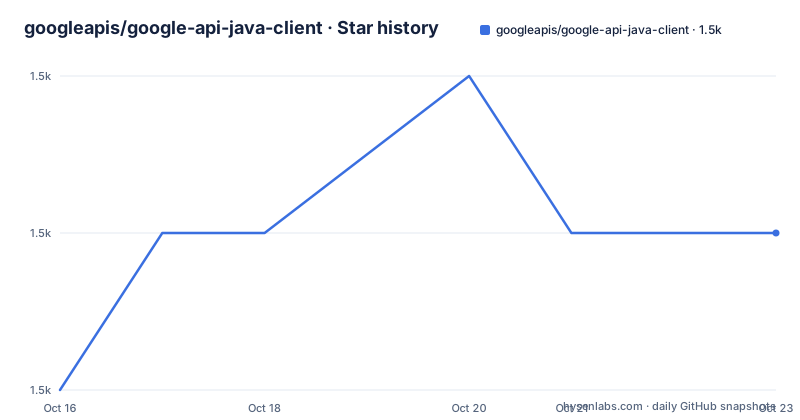
Star history
- googleapis/google-api-java-client1,479 ★ · +1
| Repository | 2026-10-16 | 2026-10-23 |
|---|---|---|
| googleapis/google-api-java-client | 1.5k | 1.5k |
1 Stars in the last 7 days, measured from the daily GitHub snapshot. Compare with other projects
Editorial analysis
A shared Java client for Google and non-Google APIs
Google APIs Client Library for Java addresses the problem of writing low-level HTTP, authentication, and data-handling code separately for every service. The README describes it as a client library for any HTTP-based API on the web, not only Google APIs. That scope makes it relevant to Java developers who need Google service access and to developers who want a common client layer for a separate REST service.
The library offers a consistent OAuth 2.0 interface. It also provides XML and JSON data models that are described as lightweight and schema-independent, plus support for protocol buffers. Generated libraries for Google APIs are maintained in a separate repository, so this repository is the foundation rather than a single package containing every Google service model.
The project also has environment-specific modules. Repository entries include google-api-client-android, google-api-client-appengine, google-api-client-apache-v5, and google-api-client-servlet. Other entries cover Gson, Jackson 2, XML, and protobuf. This layout gives an adopter choices based on the runtime and serialization stack, but it also means the correct dependency is not always the single base artifact shown in the README.
How the OAuth, HTTP, and data layers fit together
The architecture is split across three Google-maintained libraries. According to the README, this library is built on top of Google HTTP Client Library for Java and Google OAuth Client Library for Java. The core project therefore supplies the higher-level API client and data models while relying on separate libraries for HTTP transport and OAuth behavior.
OAuth 2.0 is exposed through a consistent interface rather than being tied only to Google endpoints. XML and JSON model classes are available for arbitrary data schemas, and protocol buffer support covers services or applications that already use generated protobuf types. The generated Google API libraries build on these capabilities, which means request construction, credential handling, and response parsing follow shared client conventions.
The repository structure makes the extension points visible. google-api-client-gson and google-api-client-jackson2 are separate modules, while google-api-client-protobuf provides the protobuf-specific path. There is also an Apache v5 module and modules for Android, App Engine, and Servlet environments. The README does not document every class or request pipeline in detail, so applications requiring unusual transport, serialization, or runtime behavior should consult the linked guide and JavaDoc before choosing a module.
Installing google-api-client with Maven
The README presents Maven as one installation route. Add the base dependency to the application's pom.xml. The documented version is 1.33.0, which differs from the v2 release tags listed for the repository, so version selection should be checked against the project's current artifact publication rather than inferred from those release entries.
<project>
  <dependencies>
    <dependency>
      <groupId>com.google.api-client</groupId>
      <artifactId>google-api-client</artifactId>
      <version>1.33.0</version>
    </dependency>
  </dependencies>
</project>
This block adds the base library. It does not by itself select the generated client for a particular Google API, nor does it show credential setup, request construction, or a JSON parser module. Those concerns belong in the application's build and implementation after the relevant API library and environment modules are identified.
Installing google-api-client with Gradle
Gradle users can configure repositories and add the same base artifact. The README uses the older `compile` dependency configuration, so a current build may need its dependency declaration adjusted according to the Gradle version in use. That adjustment is outside the commands documented in the README, and no replacement configuration can be confirmed from the repository description.
repositories {
    mavenCentral()
    google()
}
dependencies {
    compile 'com.google.api-client:google-api-client:1.33.0'
}
The `mavenCentral()` and `google()` entries provide the repositories listed in the README, while the dependency identifies the base `google-api-client` artifact. The usage section directs readers to the Google API Client Library for Java guide for detailed instructions. It does not provide a complete first-request example, so a real application still needs an API-specific generated library, authentication configuration, and the data model required by its endpoint.
A first API call requires more than the base artifact
The repository includes `samples/`, `samples/snippets/`, `samples/pom.xml`, and `samples/install-without-bom/`, which indicate that sample code is part of the repository layout. The README does not reproduce a complete executable request, credential flow, or response-handling example. It links to the official usage guide instead. For that reason, this project can be reviewed as infrastructure, but the README alone does not support specific client calls or environment variables.
A practical first integration should identify the target API and its generated library, decide whether the application uses XML, JSON, or protocol buffers, and select the matching runtime module. OAuth 2.0 credentials then need to be configured through the library's documented authentication mechanisms. The README does not state whether a particular credential flow, token storage option, or endpoint is required, so those details must come from the linked guide or API-specific documentation.
For build verification, the README documents a one-time local setup procedure involving Maven and a downloaded Google Play services artifact. That procedure is for building locally in the repository's documented setup context. It is not a substitute for application-level authentication or an end-to-end API request.
Version support and upgrade trade-offs
The README lists Java 7 or higher, Android 1.6 or higher, and Google App Engine as supported environments. Those are compatibility claims from the project documentation. They do not mean that every module, generated service, or dependency can be used in every listed environment, so the selected module and its transitive dependencies still require review.
The repository's recent release entries include v2.9.1 dated 2026-09-01, v2.9.0 dated 2026-02-24, and v2.8.1 dated 2025-08-14. The installation examples use `1.33.0`, a different version line. This difference is an explicit documentation and artifact-selection issue. A team should not assume that the README example version, repository release tags, and generated API library version are interchangeable.
The project is not archived, and its last push was on 2026-10-14. The README also warns that deprecated non-beta features are intended for removal eighteen months after the release in which they were first deprecated. That is an explicit upgrade policy in the documentation, although it does not eliminate the risk of breakage. Beta features are marked as subject to change or removal and are specifically discouraged when the application itself is a library.
Where the library is a poor fit
The main limitation is abstraction cost. The base library supplies transport, OAuth, data models, and extension points, while generated Google API libraries supply service-specific code. An application that needs only one narrow HTTP endpoint may carry more dependencies and concepts than necessary. The repository also separates serializers and runtime integrations into multiple modules, which can complicate build configuration when a project has strict dependency constraints.
Another limitation is the depth of the README. It does not explain how to create a client, select an endpoint, authorize a user, parse a particular response, or inspect a request lifecycle. Developers can follow the official guide, but they cannot derive a complete first call from the README alone. The project is also aimed at Java environments and the Google client ecosystem, not at every possible HTTP workflow.
A further constraint concerns API evolution. Beta annotations can change without the stability promised for non-beta features, and deprecated features may fail after the documented eighteen-month period. Applications that expose their own API should treat the README's beta warning seriously because downstream users will inherit those compatibility decisions.
Apache-2.0 and the cost of adopting the client stack
The repository identifies its license as Apache-2.0. That designation applies to the project covered by the repository's LICENSE file. It does not by itself establish the licensing terms of every external service, downloaded artifact, generated API library, or application dependency. Teams should review those terms separately when they add generated service modules or other libraries.
The upgrade cost is primarily integration and dependency management rather than a proprietary runtime fee described in the README. The project contains separate modules for Android, App Engine, Apache v5, Servlet, Gson, Jackson 2, XML, and protobuf. Changing serialization or transport choices can therefore alter the build and require code review. Deprecated APIs add another cost because the README warns that removal can cause arbitrary breakage and may not produce a compilation error.
For a library author, beta features are an additional maintenance risk. The README says they may be modified or removed in any major release, so exposing a beta feature on the application's public classpath transfers that uncertainty to downstream users. The Apache-2.0 label is clear for the repository, but it does not remove the need to inspect version compatibility and transitive licenses.
Editorial conclusion
Adopt google-api-client when a Java application needs OAuth 2.0, generated Google API services, or shared HTTP and data-model infrastructure. Do not select it solely for one small REST endpoint without checking dependency weight and generated API coverage. Verify the selected API module, Java environment, beta features, deprecations, and license implications before integration. The project is not archived, and the last push was on 2026-10-14. Apache-2.0 governs the repository, while compatibility and upgrade behavior must be checked for each dependency and generated service.
Frequently asked questions
What is Google APIs Client Library for Java used for?
It is a Java client library for accessing HTTP-based APIs, including Google APIs and non-Google services. It includes OAuth 2.0 support, XML and JSON models, and protocol buffer support.
How do I install google-api-client with Maven?
Add the documented `com.google.api-client:google-api-client` dependency to `pom.xml`. The README example uses version `1.33.0` and omits additional API-specific or runtime modules.
Which Java environments does the library support?
The README lists Java 7 or higher, Android 1.6 or higher, and Google App Engine. Module-specific compatibility should still be checked for the application.
Can I use @Beta features in a library that downstream users depend on?
The README warns against using beta features when your code is itself a library. Beta features may be changed or removed in any major release.
What should I check when upgrading deprecated APIs?
The README states that deprecated non-beta features are removed eighteen months after the release in which they were first deprecated. It warns that breakage may occur without a guaranteed compilation error.
Official sources
Add this badge to your README
If you maintain this project, the badge below links readers to this analysis and shows its maintenance status from the daily GitHub snapshot. Paste the markdown into your README; add ?metric=license or ?metric=stars to the image URL for a different field.

[](https://hysenlabs.com/projects/googleapis-google-api-java-client)Star history chart for your README
[](https://hysenlabs.com/projects/googleapis-google-api-java-client)Was this useful?