goose3: pulling article text, images and video out of a news page
A Python 3 compatible version of goose http://goose3.readthedocs.io/en/latest/index.html
At a glance
- What is it?
- goose3 is a Python 3 rewrite of the Goose article extractor, aimed at taking a news article or article-type page and returning the main body text, the metadata and the most probable image candidate. It is aimed at teams building search indexes, feed readers or content pipelines in Python.
- Who is it for?
- Adopt goose3 when you need to turn a known set of news or article URLs into structured text, metadata and an image candidate inside a Python pipeline, and you control which sites you feed it. Skip it if you need to render JavaScript-heavy pages, since the extractor works on fetched HTML, or if you need guaranteed structure from a specific publisher, since extraction here is heuristic rather than a per-site rule set.
- Can I use it commercially?
- Yes. Apache-2.0 is a permissive licence: you can use, modify and sell software built on it, as long as you keep its copyright and licence notices.
- Is it still maintained?
- Yes. The repository last received commits 108 days ago.
- What is it written in?
- Mainly HTML, according to GitHub's language statistics.
Answers come from the project's GitHub data, last synced on November 7, 2026, and from our analysis. They are not legal advice.
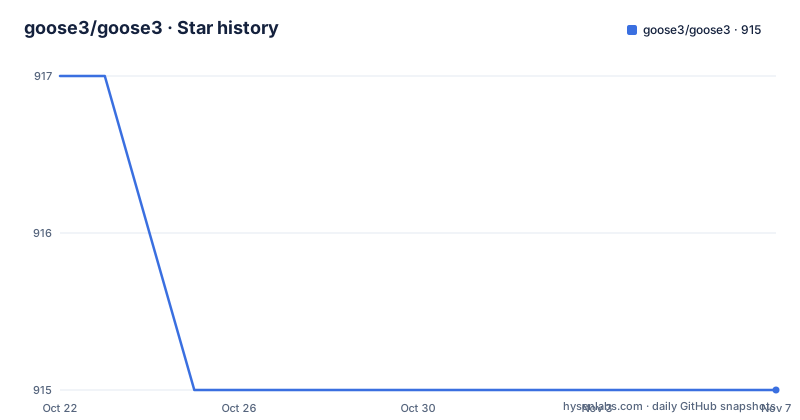
Star history
- goose3/goose3915 ★ · -2
| Repository | 2026-10-22 | 2026-11-07 |
|---|---|---|
| goose3/goose3 | 917 | 915 |
-2 Stars in the last 16 days, measured from the daily GitHub snapshot. Compare with other projects
Editorial analysis
Java, then Scala, then a Python rewrite
goose3 is the Python 3 compatible version of Goose, and the lineage explains a fair amount about the code. The README says Goose was originally an article extractor written in Java that was converted in August 2011 to a Scala project, and that this repository is a complete rewrite in Python.
The Python rewrite was written by Xavier Grangier, and the setup.py header records that it is a port of the original Goose, originally licensed to Gravity.com under one or more contributor license agreements, with a NOTICE file distributed for copyright ownership information. The README states that Goose is licensed by Gravity.com under the Apache 2.0 license.
So the licence lineage is clean and the code lineage explains the shape. A Python port of a Java and Scala extractor inherits an approach to content extraction that was designed before deep learning summarisation and before the current generation of scrapers, and that is not a criticism. Heuristic extraction has the advantage of being fast, dependency-light and predictable, which is what you want when you are processing thousands of pages rather than one.
The stated aim is to take any news article or article-type web page and extract not only the main body of the article but also all meta data and the most probable image candidate.
What the extractor actually returns
The README lists what the extractor tries to pull out: the main text of an article, the main image of the article, any YouTube or Vimeo movies embedded in the article, the meta description, and the meta tags.
The API is a single object with an extract call. The quick tour in the README is short enough to read as the whole interface:
>>> from goose3 import Goose
>>> url = 'http://edition.cnn.com/2012/02/22/world/europe/uk-occupy-london/index.html?hpt=ieu_c2'
>>> g = Goose()
>>> article = g.extract(url=url)
>>> article.title
u'Occupy London loses eviction fight'
>>> article.meta_description
"Occupy London protesters who have been camped outside the landmark St. Paul's Cathedral for the past four months lost their court bid to avoid eviction Wednesday in a decision made by London's Court of Appeal."
>>> article.cleaned_text[:150]
>>> article.top_image.src
Four accessors carry most of the value: `title`, `meta_description`, `cleaned_text` and `top_image.src`. The naming is worth noting because `top_image` is a candidate rather than a guarantee. The README describes it as the most probable image candidate, not the definitive one, which is an honest framing for a heuristic.
Embedded video is exposed separately through `article.movies`, a list of video objects with a `src` and an `embed_code`. The README's example shows a French article yielding one video object whose `src` points at an embedded player URL and whose `embed_code` is the iframe markup.
Installing, with language extras as a deliberate choice
Installation is pip, and the extras exist because language support is where the weight is.
pip install goose3[all]installs the package with all supported languages, which pulls in the additional dependencies for each one. The minimal install is:
pip install goose3and a single language can be installed on its own:
pip install goose3[chinese]
pip install goose3[arabic]
pip install goose3[japanese]
That structure is the clue to how the library is built. Language aware extraction needs a tokenizer and stop word handling per language, so the cost of supporting many languages is a set of dependencies, and the extras let you pay only for the languages your corpus contains. For a pipeline that only handles English, the minimal install avoids several heavyweight packages.
Building from source is documented too:
mkvirtualenv --no-site-packages goose3
git clone https://github.com/goose3/goose3.git
cd goose3
pip install -r ./requirements/python
python setup.py install
The repository layout supports the packaging story: a `setup.py` that delegates to `setup.cfg`, a `pyproject.toml` that declares the setuptools build backend, a `requirements/` directory holding the requirement sets, a `goose3/` package directory, `docs/` for the Read the Docs build, `tests/`, and a `codecov.yml` for coverage reporting.
Configuration is a dict or a Configuration object
There are two ways to pass configuration to Goose, either a `Configuration()` object or a configuration dict. The dict form is what the README uses in every example.
The most immediate setting is the user agent, because extraction starts with an HTTP fetch and some sites serve different markup to different clients:
>>> g = Goose({'browser_user_agent': 'Mozilla'})The parser choice is the next one. Goose can be used with the lxml html parser or the lxml soup parser, and the html parser is used by default. Switching is a single key:
>>> g = Goose({'browser_user_agent': 'Mozilla', 'parser_class':'soup'})Network strictness is the third. By default the library throws network exceptions, and setting the strict configuration setting to false makes it more lenient:
>>> g = Goose({'strict': False})That last setting is the one to think about before running a batch. A pipeline that processes a list of URLs has two failure policies, fail the whole job on one bad URL, or skip and continue, and this flag is the switch between them. Setting it to false means a broken URL yields an empty or partial article rather than an exception, which is usually what you want in a batch and never what you want in a single-request web endpoint.
Image fetching is off unless you ask for it:
>>> g = Goose({'enable_image_fetching': True})That flag controls whether the extractor downloads candidate images to work out which one to keep. Leaving it off is faster and avoids fetching large binaries, at the cost of a less reliable image choice.
Language detection, and the pages that lie about it
Goose is language aware, which means it uses the page's own language signals to decide how to tokenize and to filter out navigation and boilerplate.
The README's example is a Spanish page with correct meta language tags, extracted with the default settings. The failure case is documented too. Some pages do not have correct meta language tags, and the fix is to force the language through configuration:
>>> from goose3 import Goose
>>> url = 'http://www.elmundo.es/elmundo/2012/10/28/espana/1351388909.html'
>>> g = Goose({'use_meta_language': False, 'target_language':'es'})
>>> article = g.extract(url=url)
>>> article.cleaned_text[:150]
Setting `use_meta_language` to false and `target_language` to `es` forcibly selects Spanish, which the README says is what the passing dictionary does.
This is the most operationally important configuration in the library. If a page lies about its language, the stop word filter runs in the wrong language, and the output degrades in a way that is easy to miss because you still get text, just with navigation and boilerplate mixed in. For a batch job, the sane approach is to set the target language per source rather than trusting the page, and to treat `meta_description` and `title` as the signals that would tell you something went wrong.
The same reasoning applies to the extras. Installing `goose3[chinese]` or `goose3[japanese]` only helps if you tell the extractor which language to use.
What this extractor will not do
There are limits, and they follow from what the library is: a fetcher plus heuristics over the HTML it received.
The first is JavaScript. The README does not mention a headless browser, and the extraction pipeline is built on lxml parsers over downloaded markup. A page whose content is assembled client side will produce an article object with very little in it. Nothing in the documentation suggests a rendering option, so if your corpus includes modern single page apps, you need a different tool for those URLs.
The second is per-site accuracy. The extractor is content-type agnostic, which means it works across sites without configuration, and that also means it has no per-publisher rules. The image in particular is a candidate, so a page with several large images may give you a hero graphic rather than the article's lead image.
The third is scope. The extracted fields are the article body, the title, the meta description, the meta tags, a top image and embedded YouTube or Vimeo movies. There is no author extraction, no publication date, no category, no comment count, no structured data parsing. Teams that want those fields end up writing them by hand or adding another tool.
The fourth is network behaviour under batch load. The library fetches pages itself and does not describe rate limiting, robots policy handling or retry behaviour in the README, and the `strict` flag is a blunt instrument by comparison. A crawler built on goose3 needs those behaviours added around it.
Apache-2.0 terms and a steady patch cadence
The licence field on the repository says Apache-2.0, the README says Goose is licensed by Gravity.com under the Apache 2.0 license with details in the LICENSE file, and the setup.py header carries the standard Apache 2.0 notice together with the reference to the NOTICE file for copyright ownership. That chain is consistent, so there is no licence ambiguity to resolve.
Apache-2.0 is a good fit for a library that most users will import rather than modify. It requires the notice to be preserved in redistribution and includes an explicit patent grant.
The release history shows a project that is maintained but not busy. The tagged releases are v3.1.22 on 2026-07-23, v3.1.21 on 2025-11-30 and v3.1.20 on 2025-09-17, with the last push on 2026-07-23, the same day as the current tag. Patch versions every few months is the pace of a library whose job is to keep up with the shape of the web rather than to add features.
The tooling around it is modern enough to be comfortable. pyproject.toml configures pytest with `minversion` 6.0 and `testpaths` of tests, and turns warnings into errors while ignoring DeprecationWarning. Black is configured with a line length of 120 and targets py39 through py313, and isort uses the black profile. There is a `.pylintrc`, a `.readthedocs.yaml` for the documentation build, a CHANGELOG.md, CONTRIBUTING.md and THANKS file.
The documentation lives at goose3.readthedocs.io, and the README points there for more in-depth documentation, which is where the configuration options beyond the four shown here are described.
Editorial conclusion
Adopt goose3 when you need to turn a known set of news or article URLs into structured text, metadata and an image candidate inside a Python pipeline, and you control which sites you feed it. Skip it if you need to render JavaScript-heavy pages, since the extractor works on fetched HTML, or if you need guaranteed structure from a specific publisher, since extraction here is heuristic rather than a per-site rule set. Verify first that the language detection matches your content, because a page with wrong meta language tags needs `use_meta_language` and `target_language` set explicitly, and that `strict` mode is off if you would rather have a partial result than an exception. The licence field on the repository says Apache-2.0, and the last push was on 2026-07-23 with release v3.1.22.
Frequently asked questions
How do I install goose3?
The README gives `pip install goose3[all]` to install with all supported languages and their dependencies, `pip install goose3` for the minimal version, and per-language extras such as `pip install goose3[chinese]`, `pip install goose3[arabic]` and `pip install goose3[japanese]`.
How do I extract an article with goose3?
Create a `Goose()` object and call `extract(url=url)`. The returned article exposes `title`, `meta_description`, `cleaned_text`, `top_image.src` and `movies`. Configuration is passed either as a `Configuration()` object or as a dict such as `Goose({'browser_user_agent': 'Mozilla'})`.
How do I make goose3 handle pages with wrong language tags?
Set `use_meta_language` to false and `target_language` to the language code you want, for example `Goose({'use_meta_language': False, 'target_language':'es'})`. The README states that this forcibly selects Spanish rather than trusting the page's own meta tags.
What is the strict setting in goose3?
Goose throws network exceptions by default. Setting the strict configuration setting to false makes it more lenient, so `Goose({'strict': False})` turns off throwing all network exceptions and lets a batch continue past a failing URL.
Can goose3 extract embedded videos from an article?
Yes. The README lists any YouTube or Vimeo movies embedded in the article among the things it extracts, exposed through `article.movies`, where each video object has a `src` and an `embed_code`.
What licence is goose3 released under and how often is it updated?
The licence field on the repository says Apache-2.0, licensed by Gravity.com, with a LICENSE file and a NOTICE file referenced from setup.py. The releases are v3.1.22 on 2026-07-23, v3.1.21 on 2025-11-30 and v3.1.20 on 2025-09-17.
Official sources
Add this badge to your README
If you maintain this project, the badge below links readers to this analysis and shows its maintenance status from the daily GitHub snapshot. Paste the markdown into your README; add ?metric=license or ?metric=stars to the image URL for a different field.

[](https://hysenlabs.com/projects/goose3-goose3)Star history chart for your README
[](https://hysenlabs.com/projects/goose3-goose3)Was this useful?