Stacks: React Native layout components that own the whitespace
A set of components for building layouts in React Native. Powered by React Native Unistyles.
At a glance
- What is it?
- Stacks is a set of layout components for React Native, powered by React Native Unistyles, built on a single rule: components carry no surrounding white space and layout components own the spacing between elements. It is a small, MIT licensed library with a deliberately narrow dependency floor.
- Who is it for?
- Adopt Stacks if you build React Native interfaces where spacing is inconsistent and you want one place that owns the gap between elements, and if you are already using React Native Unistyles 2 or newer. Do not adopt it as a general component library, because the scope is layout primitives only, and do not adopt it if you need it to run without Unistyles, which is a hard peer dependency rather than an optional one.
- Can I use it commercially?
- Yes. MIT is a permissive licence: you can use, modify and sell software built on it, as long as you keep its copyright and licence notices.
- Is it still maintained?
- Yes. The repository last received commits 68 days ago.
- What is it written in?
- Mainly TypeScript, according to GitHub's language statistics.
Answers come from the project's GitHub data, last synced on November 7, 2026, and from our analysis. They are not legal advice.
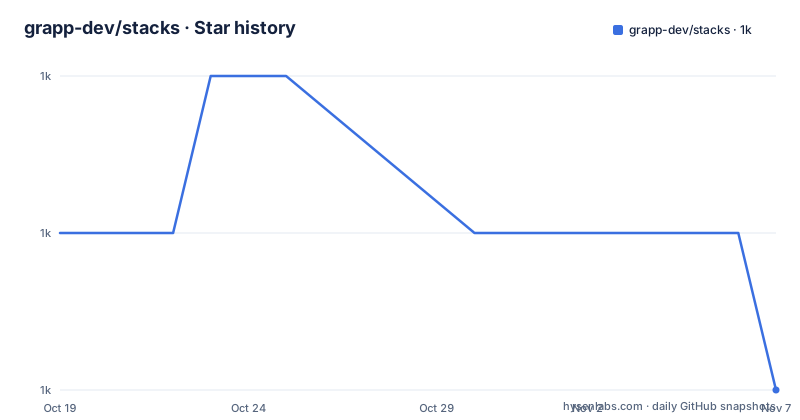
Star history
- grapp-dev/stacks1,027 ★ · -1
| Repository | 2026-10-19 | 2026-11-07 |
|---|---|---|
| grapp-dev/stacks | 1k | 1k |
-1 Stars in the last 19 days, measured from the daily GitHub snapshot. Compare with other projects
Editorial analysis
One rule: components carry no padding
The design principle behind Stacks is stated in a single sentence, and it is the reason to look at the library. It follows a design principle that suggests components should not include any surrounding white space. Instead, layout components should solely own spacing between elements. That sounds like a small decision and it is not. The usual pattern in a React Native codebase is that a card component ships with its own padding, a row ships with its own margin, and a screen ships with its own padding, so the space between a card and the screen edge and the space between two cards come from two different files. Changing the design system then means editing every component. Under the Stacks principle, a component describes what it is, and a layout component describes the gaps, so the spacing is decided in one place per screen rather than being scattered across the component library. The stated aim is to simplify building and maintaining layouts, making it quick and easy, and the whole library exists to serve that.
Unistyles is the engine, not a plugin
Stacks is powered by React Native Unistyles, and the dependency is not optional. The package manifest lists it under peerDependencies, alongside react at >=18.0.0 and react-native at >=0.71.0, with react-native-unistyles at >=2.0. That tells you a lot about the design. A component library that hard-requires a styling engine is making a statement: the layout primitives compute their spacing through that engine rather than through inline styles, so the same style source drives the layout. The practical consequence for an adopter is that you are signing up for a particular styling stack, and the versions of React, React Native and Unistyles have to line up. The development dependencies pin the versions the library is built and tested against, with React 18.2, react-native 0.73.6, react-native-unistyles 2.5.5 and TypeScript 5.4.4, which is a useful reference when you are deciding whether your own versions are compatible. The project also lists react-native-web among its keywords, so the components are intended to work in a web build as well as on a device.
Installing it is a package manager command
The installation section says to use your preferred package manager and then gives four equivalent commands. The npm form is:
npm install @grapp/stacks --saveThe other three are `bun add @grapp/stacks`, `pnpm add @grapp/stacks` and `yarn add @grapp/stacks`. The package is published as @grapp/stacks and is public, with publishConfig access set to public, and the full documentation lives at stacks.grapp.dev. The README is short by design and points you at that site for the API, which is a reasonable arrangement for a library whose selling point is a small, opinionated set of primitives. The community has a Discord server for questions and tips, and the repository is marked as accepting pull requests.
The published package carries its own source
The packaging decisions in package.json are unusual enough to be worth reading. The files array ships src, lib, plugin, the markdown files and package.json, so the TypeScript source travels with the compiled output rather than being thrown away. The react-native and source fields both point at src/index.ts, which tells a bundler such as Metro to consume the TypeScript directly rather than the build output, while main points at lib/index.js and module at lib/index.mjs, so a bundler that prefers the compiled artifacts can still find them. The types field points at lib/index.d.mts. The build itself is a single tsup invocation after clearing the output directory:
"build": "rm -rf ./lib && tsup"and there is a separate type checking script that runs tsc with noEmit, which keeps the type errors out of the build output while still failing a check. A plugin/ directory is shipped alongside src and lib, which is the mechanism a styling engine uses to inject its babel or metro configuration into a consumer project. The repository also carries the usual linting and formatting configuration, with an .eslintrc.js, a .prettierrc.js, a .eslintignore and a tsconfig.json, and the shared configs come from the same organisation as @grapp/eslint-config, @grapp/prettier-config and @grapp/ts-config.
The example app is a working reference, not a demo page
There is an example/ directory at the root with a full mobile project in it, and the file list shows what a consumer actually has to set up. There are android/ and ios/ directories, an app/ directory holding the application code, an assets/ directory, and the configuration files that a React Native project needs: app.json, babel.config.js, metro.config.js, package.json and tsconfig.json. It uses bun, with its own bun.lockb. The presence of a metro.config.js is notable for a Unistyles-based library, because the styling engine usually needs its own babel plugin and metro resolver wiring, and shipping an example with those files in place is the fastest way for a user to see what a correct setup looks like. The example is not a screenshot in the README, it is a project you can run, which makes it the most reliable documentation this repository has, and the docs site is where the rest of the API is described.
Where Stacks is the wrong tool
There are three boundaries to be clear about. The first is scope. This is a set of layout components, not a component library, so it does not give you buttons, inputs, modals, lists or anything else, and the rest of your interface still comes from somewhere else. The second is the Unistyles requirement. Because the peer dependency is declared rather than bundled, a project that has chosen a different styling approach cannot drop Stacks in, and a project using Unistyles below version 2 cannot use it at all. That is a defensible design decision, since the library is powered by that engine, but it does narrow the audience to teams already inside that ecosystem. The third is release cadence. The most recent release listed is v3.1.0 from 2024-04-11, with v3.0.2 and v3.0.3 in the days before it, while the last push to the repository was on 2026-09-01. So the source tree is being touched well after the last published version, and the version in package.json matches the last release rather than the head of the branch. If you are evaluating this, check whether the fixes you need are in the published v3.1.0 or only in the unreleased commits, because nothing in the README describes a nightly or canary channel.
Editorial conclusion
Adopt Stacks if you build React Native interfaces where spacing is inconsistent and you want one place that owns the gap between elements, and if you are already using React Native Unistyles 2 or newer. Do not adopt it as a general component library, because the scope is layout primitives only, and do not adopt it if you need it to run without Unistyles, which is a hard peer dependency rather than an optional one. Before you pin a version, check whether the tag you want matches what is published, since the latest release listed is v3.1.0 from 2024 while the repository has seen commits as recently as 2026-09-01.
Frequently asked questions
What is the Stacks library for React Native?
Stacks is a set of components for building layouts in React Native, powered by React Native Unistyles. It aims to simplify building and maintaining layouts by having layout components own the spacing between elements.
What is Stacks' main design principle?
Components should not include any surrounding white space. Instead, layout components should solely own spacing between elements, so the gap between two things is decided in one place rather than being baked into each component.
What do I need to install Stacks?
The package is @grapp/stacks and it is installed with your package manager, for example `npm install @grapp/stacks --save`, with equivalent bun, pnpm and yarn commands. Its peer dependencies are react >=18.0.0, react-native >=0.71.0 and react-native-unistyles >=2.0.
Does Stacks work on the web?
The package keywords include react-native-web, and the example project in the repository includes metro and babel configuration alongside the android and ios directories, so the components are intended to run in a web build as well as on device.
How often is Stacks released?
The latest listed release is v3.1.0 from 2024-04-11, preceded by v3.0.2 and v3.0.3 in April 2024, while the last push to the repository was on 2026-09-01. The version in package.json matches the last release rather than the branch head.
Official sources
Add this badge to your README
If you maintain this project, the badge below links readers to this analysis and shows its maintenance status from the daily GitHub snapshot. Paste the markdown into your README; add ?metric=license or ?metric=stars to the image URL for a different field.

[](https://hysenlabs.com/projects/grapp-dev-stacks)Star history chart for your README
[](https://hysenlabs.com/projects/grapp-dev-stacks)Was this useful?