git-xargs: One Command to Update Many GitHub Repositories
git-xargs is a command-line tool (CLI) for making updates across multiple Github repositories with a single command.
At a glance
- What is it?
- git-xargs takes a command and a list of repositories, then clones each one, runs the command against it, commits the result and opens a pull request, all in parallel. It is aimed at organisations that need to apply the same change across dozens or hundreds of GitHub repositories and want a report of what happened to each.
- Who is it for?
- git-xargs fits a platform team that owns a fleet of repositories generated from a template, or a company that just renamed a dependency and needs the same pull request in every internal service, since it turns a repetitive manual task into one command and one report.
- Can I use it commercially?
- Yes. Apache-2.0 is a permissive licence: you can use, modify and sell software built on it, as long as you keep its copyright and licence notices.
- Is it still maintained?
- Yes. The repository received new commits within the last day.
- What is it written in?
- Mainly Go, according to GitHub's language statistics.
Answers come from the project's GitHub data, last synced on November 7, 2026, and from our analysis. They are not legal advice.
Star history
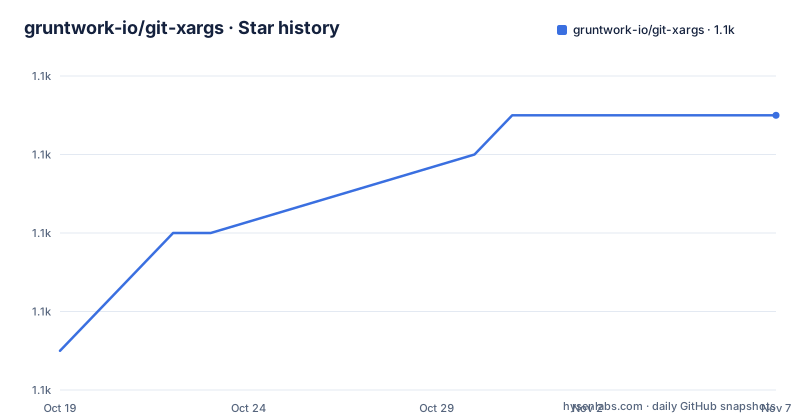
- gruntwork-io/git-xargs1,137 ★ · +6
| Repository | 2026-10-19 | 2026-11-07 |
|---|---|---|
| gruntwork-io/git-xargs | 1.1k | 1.1k |
6 Stars in the last 19 days, measured from the daily GitHub snapshot. Compare with other projects
Editorial analysis
The Problem Is a Change That Has to Happen Everywhere
git-xargs is a command line tool for making updates across multiple GitHub repositories with a single command. You give it two things, a script or a command to run, and a list of repos, and it does the rest.
The README describes the intended cases in a sentence each. Adding a particular file across many repos at once. Running a search and replace to change a company or product name across 150 repos with one command. Upgrading Terraform modules to the latest syntax. Adding a CI/CD configuration file if it does not exist, or modifying it in place if it does, but only on a subset of the repositories you select.
That last case is the interesting one, because it is the difference between a script and a tool. A shell loop over a list of clones can do the first three. Selecting a subset by some property, and reporting per repository what actually happened, is what the tool adds.
The implementation is in Go, distributed under the Apache-2.0 licence, and it uses goroutines to perform the repo-updating work in parallel, which the README notes is why it is fast. The tool is published on Homebrew, and the repository is built on CircleCI.
Clone, Run, Commit, Pull Request, Report
The five steps in the README are the whole contract, and each one implies a decision.
Cloning each repo means the tool works on a local copy, and it clones through the Go git library rather than shelling out to the git binary. Running the specified script or command against it means the command runs with the repository as its working directory, so the command is written the way you would write it for a single checkout. Committing any changes is conditional, because a repo where the command changed nothing has nothing to commit. Opening pull requests is the delivery mechanism, and it is the reason the tool is safe to point at a fleet of production repositories: nothing lands on a default branch without review.
The report is the fifth step and it is not an afterthought, which the next section covers.
The example in the README is the simplest possible case, creating a file in every repository in an organisation:
git-xargs \
  --branch-name test-branch \
  --github-org <your-github-org> \
  --commit-message "Create hello-world.txt" \
  touch hello-world.txt
The branch name matters more than it looks. The command creates a branch rather than working on the default branch, and the tool creates it locally if it does not exist on the remote, so a run never collides with work someone else has in flight on that branch.
The Report Is the Part You Actually Read
The sample output is a structured report with distinct sections, and the structure tells you what the tool tracks. The run summary comes first, with a timestamp and the runtime in seconds. Then the command supplied, so you can see what was run. Then the repos supplied via the --repos file flag, as a table of organisation name and URL.
After that, the report is organised by what happened to each repository, one section per outcome. There is a section for all repos that were targeted for processing after filtering missing and malformed repos. There is a section for repos that were successfully cloned to the local filesystem. There is a section for repos that showed file changes to their working directory following command execution. There is a section for repos supplied by the user that do not exist, that returned a 404 via the GitHub API. There is a section for repos whose specified branches did not exist on the remote and so were first created locally. And the run finishes with the pull requests that were opened, as a table of repo name and PR URL.
That last table is the deliverable in a real workflow. It is a list of review URLs, one per repository where something changed, and everything else in the report explains why a repository is not in that list.
The printer package in the repository tree is where this formatting lives, and the table style in the sample output is not hand written ASCII, it comes from a table rendering library, which is pterm in the dependency list.
Repositories That Do Not Exist and Branches That Do Not Exist
Two failure modes get their own sections in the report, and they are different in kind.
The 404 case is a repository the user named that does not exist. In the sample, terraform-aws-asg and terraform-aws-security were named and are absent, and the tool lists them separately with empty URLs. This happens when a list of repos has drifted, when someone renamed a repository, or when a name in the list is a typo. The point of reporting them separately rather than failing is that one missing repository out of five should not stop the other four, and that a run over a large fleet will surface a name that no longer exists.
The missing branch case is different. If the branch you named, test-branch in the example, does not exist on the remote, the tool creates it locally so the commit has somewhere to go, and it tells you that it did. Since the pull request is opened against that branch, the outcome is still a reviewable change rather than a lost one.
Together these two sections mean the report is exhaustive. Every repository you asked for appears in one of the outcome sections, which is what makes the report usable as the record of a run rather than a log to skim.
Choosing the Target Set and the Credentials
The target set comes from the command line, and the README documents the flags. The --github-org flag selects an organisation and the --repos file flag takes a file containing a list of repositories. The --branch-name flag names the branch to work on, and the --commit-message flag sets the commit message.
The example shows the organisation form, where every repository in the organisation is the target, and the README describes the alternative of selecting a subset of the repositories. That subset selection is the part that turns this from a blunt instrument into something you can run across a fleet, since the common case is a change that applies to some services and not others.
Credentials are handled by the auth/ package in the repository tree, and the dependency list includes golang.org/x/oauth2 along with the GitHub API client, google/go-github. The Go Git library, go-git v5, is what does the cloning, and the urfave/cli library provides the command line parsing. The module targets Go 1.25.0.
One point worth stating plainly: the tool needs write access to every repository it touches, since it pushes a branch and opens a pull request in each. A token scoped more widely than the target set is the natural mistake here.
Installation and the Release Build
There are two documented installation routes. The first is Homebrew, which is a single command:
$ brew install git-xargsThe second is to download a published binary for your platform from the releases page and save it somewhere on your PATH, such as /usr/local/bin, and the README points at the releases page for the correct binary per system.
The release process is visible in the repository, with a.gon_amd64.hcl and a.gon_arm64.hcl configuration file at the root. The two names point at release build configurations for amd64 and arm64, which is the sign that the published artifacts cover both architectures. The CircleCI configuration in.circleci/ is where the build and release run.
The version history is worth noting. The recent tags are v0.1.16 from 2025-03-13, v0.1.15 from 2025-01-31 and v0.1.14 from 2025-01-27, so the project is on a 0.1 line, which is a candid way of saying the interface may still change. The repository is not archived and the last push was on 2026-08-12.
The source layout is conventional for a Go CLI: main.go at the root, with cmd/ for the command definitions, config/ for the configuration, repository/ for the GitHub and git operations, auth/ for credentials, printer/ for the report, stats/ for the run statistics, io/ for the input and output handling, local/ and data/ for the working data, common/ and util/ for shared code, mocks/ for the test doubles and scripts/ for the helper scripts.
Where the Tool Stops
The boundaries are clear enough to state in advance.
It is a GitHub tool. The repositories are GitHub repositories, the API it calls is the GitHub API, and the pull requests it opens are GitHub pull requests. There is no GitLab or Bitbucket support mentioned anywhere in the documentation.
It is a file-level tool. The command runs against a checkout, so anything that needs to understand the code rather than edit it is out of scope. There is no dependency graph, no build and no test run in the pipeline, which means the tool will happily commit a change that does not compile. For a fleet of template-generated repositories that is usually fine, since the change is the same one you have already validated elsewhere, and it is not fine for a fleet where each repository has drifted.
It does not merge. Pull requests are opened and the report gives you the URLs, so the review and the merge stay with your existing process, which is the right default for a tool that touches many repositories at once.
And the permission model is the real constraint. A run touches every repository in the target set, so the token in use has to be able to push a branch and open a pull request in each of them. The way to keep that blast radius small is to keep the target set small, and to read the report before merging anything.
Editorial conclusion
git-xargs fits a platform team that owns a fleet of repositories generated from a template, or a company that just renamed a dependency and needs the same pull request in every internal service, since it turns a repetitive manual task into one command and one report. It is the wrong tool for a single repository, and for a fleet you do not control, because it needs GitHub credentials with write access to every target and it opens pull requests rather than pushing to the default branch. Before running it, read the report structure rather than just the exit code, since the sample output separates repos that were cloned, repos that changed, repos that returned 404 and branches that had to be created locally, and check the token scopes you are about to grant. The project is Apache-2.0 licensed, the newest release is v0.1.16 from 2025-03-13, and the last push was on 2026-08-12.
Frequently asked questions
How do I use git-xargs to add a file to every repository in an organisation?
Run the tool with the branch name, the organisation, a commit message and the command, for example `git-xargs --branch-name test-branch --github-org <your-github-org> --commit-message "Create hello-world.txt" touch hello-world.txt`. The tool clones each repo, runs the command, commits any changes and opens a pull request.
How do I install git-xargs?
With `brew install git-xargs`, or by downloading the correct binary for your platform from the releases page and saving it somewhere on your PATH such as /usr/local/bin. The project publishes release binaries for amd64 and arm64.
What happens to a repository that does not exist?
It is reported in its own section, listing repositories supplied by the user that do not exist because they returned a 404 via the GitHub API. The other repositories in the run continue, and the report lists every repository under the outcome it had.
What happens if the branch I named does not exist?
The tool creates it locally and reports those repositories in a section for branches that did not exist on the remote and were first created locally, so the commit has a branch to go to and the pull request can still be opened.
Does git-xargs push to the default branch?
No. It clones each repository, runs the command, commits the changes on the branch you name with --branch-name, and opens a pull request, leaving review and merge to your existing process.
Official sources
Add this badge to your README
If you maintain this project, the badge below links readers to this analysis and shows its maintenance status from the daily GitHub snapshot. Paste the markdown into your README; add ?metric=license or ?metric=stars to the image URL for a different field.

[](https://hysenlabs.com/projects/gruntwork-io-git-xargs)Star history chart for your README
[](https://hysenlabs.com/projects/gruntwork-io-git-xargs)Was this useful?