SSHM Review: A TUI Manager for SSH Configuration
SSHM is a beautiful command-line tool that transforms how you manage and connect to your SSH hosts. Built with Go and featuring an intuitive TUI interface, it makes SSH connection management effortless and enjoyable.
At a glance
- What is it?
- SSHM gives Linux, macOS, and Windows users a keyboard-driven interface for organizing entries in SSH configuration files and connecting to selected hosts. It is most useful for people who regularly work with many hosts, Include files, tags, forwarding rules, or ProxyJump settings.
- Who is it for?
- SSHM fits developers and operators who want a graphical workflow without leaving the terminal, especially when their host list spans multiple SSH Include files. It is a poorer choice for a user who wants only a minimal `ssh` alias or who cannot accept configuration backups and background connectivity checks.
- Can I use it commercially?
- Yes. MIT is a permissive licence: you can use, modify and sell software built on it, as long as you keep its copyright and licence notices.
- Is it still maintained?
- Yes. The repository last received commits 34 days ago.
- What is it written in?
- Mainly Go, according to GitHub's language statistics.
Answers come from the project's GitHub data, last synced on November 7, 2026, and from our analysis. They are not legal advice.
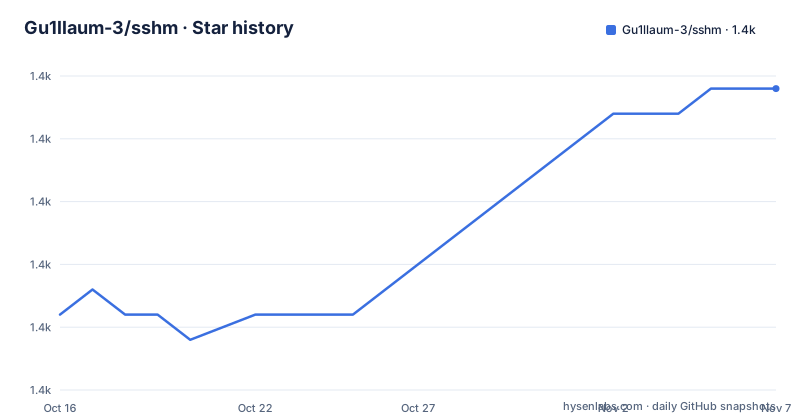
Star history
- Gu1llaum-3/sshm1,422 ★ · +9
| Repository | 2026-10-16 | 2026-11-07 |
|---|---|---|
| Gu1llaum-3/sshm | 1.4k | 1.4k |
9 Stars in the last 22 days, measured from the daily GitHub snapshot. Compare with other projects
Editorial analysis
Why SSHM Exists for Multi-Host SSH Work
SSHM addresses the administrative side of SSH: keeping host entries organized, finding them, connecting to them, and configuring forwarding. The intended user is someone who already uses `~/.ssh/config` but finds repetitive manual edits inconvenient. Instead of replacing the OpenSSH configuration format with a private host database, SSHM works against the existing file. That choice makes it relevant to engineers who keep development servers, database machines, jump hosts, and infrastructure endpoints in SSH configuration.
The tool serves both interactive and command-oriented workflows. Running `sshm` opens a TUI, while `sshm <host>` provides the quick-connect form documented by the README. Search can filter by host name, hostname, or tag. Entries can be added, edited, deleted, sorted by name or last login, and moved to another configuration file when Include directives are present. A special `hidden` tag excludes an entry from the normal host list without making it unreachable by name.
This is a focused answer to configuration friction rather than a replacement for SSH itself. The repository declares dependencies for Cobra, Bubbletea, Bubbles, Lip Gloss, and `golang.org/x/crypto`. That stack matches the visible design: a command parser and SSH configuration logic sit behind an interactive terminal UI. Users who manage one or two stable hosts may find plain OpenSSH commands less complex.
SSHM Configuration and Connection Data Flow
According to the README, SSHM reads and edits `~/.ssh/config` directly. It can also receive another file through the documented `-c` flag, which is useful when a project or operations team already separates SSH settings into a dedicated configuration. The interactive forms collect a hostname or IP address, username, port, identity file, ProxyJump, ProxyCommand, extra SSH options, and comma-separated tags. The default port shown in the form documentation is `22`.
SSH Include support changes how host management should be understood. If configuration is split across files, SSHM presents hosts from those included definitions and can move an entry to another file only when Include directives are available. The README also states that changes trigger automatic configuration backups and that built-in validation is intended to prevent configuration errors. This is an important design point: SSHM is an editor and launcher for configuration that OpenSSH continues to consume.
Connection details do not appear to be confined to SSHM's own menu. Host names, tags, forwarding definitions, and last-login information provide organization around the underlying SSH model. ProxyJump and ProxyCommand are represented in the documented form, while additional settings can be entered in `-o` form. Port forwarding has Local, Remote, and Dynamic modes, corresponding to `-L`, `-R`, and `-D` behavior. The README documents history persistence for forwarding, although it does not identify the exact storage path.
Connectivity checks add a second background path. The TUI checks hosts when it starts and again when the user presses `p`, displaying Online, Connecting, Offline, or Unknown states. Those checks do not replace an actual login, but they can help distinguish an unreachable entry from a reachable SSH endpoint. The precise timeout and check command are not documented in the README.
Installing SSHM and Connecting to the First Host
The README recommends Homebrew for macOS. This command installs the `sshm` formula from the repository's tap. After installation, `sshm` with no arguments starts the interactive TUI, while `sshm <host>` connects directly to a configured host name.
brew install Gu1llaum-3/sshm/sshmThe README also supplies shell and PowerShell installation scripts for Unix-like systems and Windows. These commands download and execute the corresponding installer from the repository.
curl -sSL https://raw.githubusercontent.com/Gu1llaum-3/sshm/main/install/unix.sh | bashirm https://raw.githubusercontent.com/Gu1llaum-3/sshm/main/install/windows.ps1 | iexFor a first interactive use, launch the program and begin typing. Search is focused at startup, so entering part of a name, hostname, or tag reduces the visible entries. Use the arrow keys or `Ctrl+P` and `Ctrl+N` to choose a result and `Enter` to connect.
sshmThe TUI reports connectivity when it starts. `p` requests another status check, while `H` toggles visibility for hosts carrying the special `hidden` tag. If an entry does not appear, the user can either adjust the search or use `H` before assuming that the host has been removed. The README does not document a separate configuration-file creation command.
Host Editing, Include Files, and Forwarding Controls
The host table exposes direct editing shortcuts. `a` starts the add form, `e` edits the selected host, and `d` deletes it. Pressing `m` moves a host to another configuration file, but the README limits this operation to configurations that use SSH Include directives. Because these operations modify OpenSSH input, users should first understand the relationship among the main file and every included file.
The forwarding form supports three distinct network shapes. Local forwarding maps a local port to a destination reached through the SSH host, which fits a remote database exposed locally. Remote forwarding maps a port on the SSH server back to a local endpoint. Dynamic forwarding creates a SOCKS proxy. The documentation also records forwarding history, but it does not state whether that history can be edited or deleted from the TUI.
External access through Remote forwarding has several server-side boundaries. The server may require `GatewayPorts yes` in `/etc/ssh/sshd_config`, followed by an SSH service restart. A firewall rule must permit the port, and the port must be available. Binding to `0.0.0.0` can expose the service beyond the server's loopback interface, while `127.0.0.1` limits access. SSHM can collect the forwarding configuration, but the README does not claim that it edits `sshd_config` or configures host firewalls.
Validation reduces accidental malformed entries, and automatic backups help with recovery. Neither feature removes the need to inspect generated SSH syntax. Users with unusual Match, Include, wildcard, or multi-value directives should confirm that the rewritten files retain the expected interpretation.
SSHM Limits on Platforms and Operational Control
The clearest limitation is SSHM's reliance on an editable SSH configuration rather than a read-only inventory. Automatic backups and validation help, but a bad rewrite can affect OpenSSH commands outside SSHM. The README does not describe a configuration diff, restore command, dry-run mode, or explicit backup naming scheme. It says that backups occur before changes, so the safe first step is to locate and inspect those files after editing an important configuration.
Connectivity indicators also need careful interpretation. The README calls an endpoint Offline when it is unreachable or the SSH connection fails, but it does not define the timeout, authentication behavior, or whether every configured method is attempted. A host can therefore appear unavailable because of network policy, DNS, credentials, or server configuration. The indicator is useful for triage, not a complete diagnosis.
Platform support is stated as Linux, macOS on Intel and Apple Silicon, and Windows. The exact TUI terminal requirements are not documented. This matters because the interface relies on keyboard-driven selection, search focus, and terminal rendering. Remote or minimal environments may also behave differently, although the README does not specify support for such cases.
Automatic version checking is documented, but the notification and upgrade mechanism is not described in detail. The repository's recent releases include v1.12.0 on 2026-10-04, v1.11.0 on 2026-03-18, and v1.10.0 on 2026-01-04. The last push was on 2026-10-04. Upgrade cost appears lower for packaged binary users, while source builders need Go 1.27.1 according to `go.mod` and must account for the pinned dependency versions. SSHM uses the MIT license, so repository use and modification are governed by that license rather than a proprietary end-user agreement.
SSHM Compared with Manual OpenSSH Configuration
Manual OpenSSH configuration remains the direct alternative. For a small, carefully reviewed configuration, that lower layer of tooling may be preferable.
SSHM adds value where the manual approach becomes repetitive. Its forms cover common host fields, Include-based organization, tags, hidden entries, last-login sorting, forwarding, and ProxyJump or ProxyCommand. The README also describes conversion between command-line and configuration formats, although it does not provide the exact conversion syntax. That omission matters for users deciding whether SSHM can replace an existing scripted workflow.
Another alternative is a general-purpose SSH client with a graphical interface. Such a client may be easier for mouse-oriented workflows, but the repository does not document another specific product, so a detailed feature comparison would be unsupported. The relevant distinction is architectural. SSHM is a terminal program that edits OpenSSH configuration. A GUI client may maintain its own abstraction, although this project does not document whether any competing tool does so. SSHM's direct relationship with `~/.ssh/config` is the feature to compare first.
For automation-heavy teams, SSHM's interactive controls may also be less suitable than a checked-in text configuration and scripted validation. Its TUI is designed around human keyboard interaction, not a documented headless management API.
Editorial conclusion
SSHM fits developers and operators who want a graphical workflow without leaving the terminal, especially when their host list spans multiple SSH Include files. It is a poorer choice for a user who wants only a minimal `ssh` alias or who cannot accept configuration backups and background connectivity checks. Before adoption, inspect how SSHM rewrites `~/.ssh/config`, verify the effect of `hidden` tags, and test one noncritical Host entry together with its Include files.
Frequently asked questions
How do I install SSHM on macOS, Linux, or Windows?
macOS users can use the documented Homebrew command. The README also provides a Unix-like shell installer and a Windows PowerShell installer for the other supported platforms.
How do I connect to a host with SSHM?
Run `sshm` to open the TUI and select a host with `Enter`, or run `sshm <host>` for direct access to a configured host name.
Does SSHM change my existing SSH configuration?
The README states that SSHM works directly with `~/.ssh/config`, supports custom files through `-c`, creates backups before changes, and validates configuration edits.
Can SSHM manage hosts stored in multiple SSH Include files?
Yes. The README documents SSH Include support and says that a host can be moved to another configuration file when Include directives are available.
What kinds of port forwarding does SSHM support?
SSHM supports Local forwarding through `-L`, Remote forwarding through `-R`, and Dynamic SOCKS forwarding through `-D`. Remote external access can also require server SSH settings, firewall changes, and an available port.
Official sources
Add this badge to your README
If you maintain this project, the badge below links readers to this analysis and shows its maintenance status from the daily GitHub snapshot. Paste the markdown into your README; add ?metric=license or ?metric=stars to the image URL for a different field.

[](https://hysenlabs.com/projects/gu1llaum-3-sshm)Star history chart for your README
[](https://hysenlabs.com/projects/gu1llaum-3-sshm)Was this useful?