CutClaw: an agentic pipeline for cutting hours of footage to music
Agentic Hours-Long Video Editing via Music Synchronization
At a glance
- What is it?
- CutClaw is a research system from Beijing Jiaotong University, GVC Lab and Tencent ARC Lab that takes hours of raw footage and a music track, deconstructs the footage into structured captions, then has a multi-agent pipeline plan the shots, choose the timestamps and validate the result before rendering. The pipeline stages are named in the readme, which makes it unusually easy to understand what the thing actually does.
- Who is it for?
- CutClaw is worth reading as a reference architecture for long-form video editing with language models, because it separates captioning, shot planning, timestamp selection and validation into named stages, which is the pattern any production system needs.
- Can I use it commercially?
- Not without permission. GitHub finds no licence file in the repository, and without a licence all rights are reserved by default: you may read the code but not reuse it. Check the README, or ask the authors, before using it.
- Is it still maintained?
- Activity is slowing. The repository last received commits 6 months ago.
- What is it written in?
- Mainly Python, according to GitHub's language statistics.
Answers come from the project's GitHub data, last synced on November 7, 2026, and from our analysis. They are not legal advice.
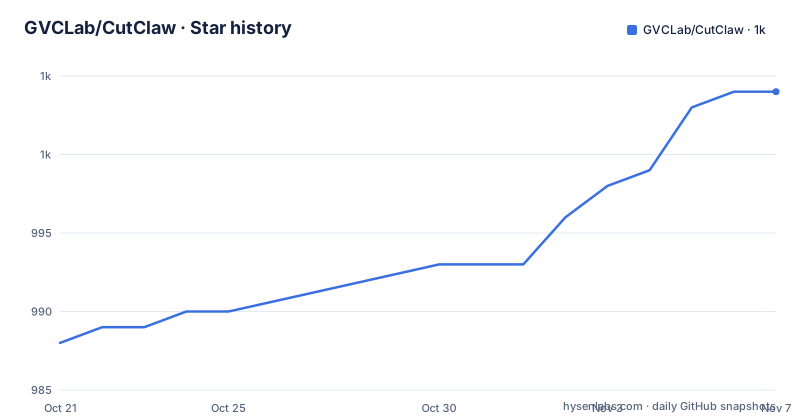
Star history
- GVCLab/CutClaw1,004 ★ · +16
| Repository | 2026-10-21 | 2026-11-07 |
|---|---|---|
| GVCLab/CutClaw | 988 | 1k |
16 Stars in the last 17 days, measured from the daily GitHub snapshot. Compare with other projects
Editorial analysis
The pipeline works on captions, not on frames
The overview is short, and the architecture follows directly from it. CutClaw is an end-to-end editing system for long-form footage plus music. It first deconstructs raw video and audio into structured captions, and then uses a multi-agent pipeline to plan shots, select clip timestamps, and validate final quality before rendering.
That order is the interesting part. The system does not start by watching pixels and deciding what to cut. It starts by turning hours of material into a structured, textual representation, and the language models work on that text. The reason is cost, and it is stated in the readme's own roadmap: the plan to bring in ARC-Chapter is to reduce the cost of long-form footage deconstruction, and a low-cost mode is planned that would proactively read only relevant footage instead of fully processing all source material.
So the architecture is built around a known cost problem. Deconstruction is the expensive stage, because it means running a speech recognition model and a vision model over a large amount of video, and the rest of the pipeline is comparatively cheap because it operates on captions.
The stage names are given in the readme as identifiers, shot_plan and shot_point, and there is a separate validation stage before rendering. A pipeline that names its intermediate artefacts is a pipeline you can inspect, and that is worth more to a reader than a longer feature list.
Planning, selecting and validating are separate agents
The three stages after deconstruction are distinct enough to describe separately, and each maps onto a different failure mode.
Planning the shots is the stage that turns a piece of text into an editorial intent. The features section describes this as instruction control: a single text instruction steers the editing style, and the readme claims the system can produce fast-paced character montages or slow-paced emotional narratives from the same footage. The mechanism is presumably a language model reasoning over the captions and the requested style, and it is the stage where a language model earns its place, because choosing an emotional register is not something a fixed rule set does well.
Selecting the clip timestamps is the stage that turns a plan into concrete cuts. The readme gives the internal name shot_point, and the smart auto-cropping feature belongs here or just after it: content-aware cropping identifies the core subject in a shot and adjusts the aspect ratio to fit various social platforms. That is a genuinely hard problem in long-form material, because the subject of a shot drifts and a fixed centre crop cuts people in half.
Validating final quality before rendering is the stage most pipelines skip. Having a separate check between selection and rendering means the render step is not the first time you discover that the plan did not work.
The system is described as LiteLLM powered, and that is a significant architectural choice. Routing every model call through one interface means the provider is a configuration detail rather than a code dependency, and it also means the cost of a run depends on which model you point the stages at.
Music enters as beats and energy, not as a waveform
The music-aware sync feature is the one that distinguishes this from a generic auto-editor, and the description is specific about the inputs it uses.
It extracts musical beats and energy signals, and uses them to build rhythm-aware cuts that match the music's pacing. That is a two-signal description rather than a beat-detection-only description, and the difference matters. Beat detection gives you the grid, and the grid tells you where a cut is musically clean. Energy tells you where the music is loud or quiet, which tells you where a cut is dramatically appropriate, and which footage should carry a peak.
Combined with the caption-based plan, the two inputs meet in the timestamp selection stage. A shot plan that says this section should feel tense, a music energy curve that says the tension arrives at a specific moment, and a set of candidate clips described in text: the cut is the intersection of the three.
The roadmap also points at a talking-head plus visual mixing goal, where hybrid editing logic coordinates narration-driven clips with supporting visual footage. That is a natural extension of the same idea, because a talking-head video is a case where the speech and the visuals are not interchangeable, and the captions are already the speech.
The gallery in the readme is a set of video comparisons, with a note to turn on the audio. That is the right way to evaluate this project, since the claim is about how the result feels against the music, and a still frame tells you nothing about that.
The dependency list is the honest description of the system
With no installation section in the readme, the requirements file is the best available evidence of what the system actually does, and it is more revealing than a feature list would be.
The core pipeline pulls in numpy, torch at a pinned 2.8.0, decord for video decoding, scenedetect at 0.6.7.1 for shot boundary detection, the PyAV bindings, Pillow, tqdm, litellm, pydantic, sentence-transformers, scikit-learn and opencv-python-headless. The scene detection library in that list is what turns hours of footage into shots, and the sentence embedding and clustering libraries are what turn those shots into searchable, structured captions.
The audio pipeline is separate: soundfile, scipy, audioread, madmom and aubio, with python-dotenv and tenacity for configuration and retries. The ASR backends are pywhispercpp and pyannote.audio, which are the two ways the system can transcribe speech.
Two entries deserve a note. The web and interactive apps section lists streamlit and gradio, so the interactive surfaces are built on those two frameworks. And the file ends with a comment that is the only external system dependency stated anywhere: ffmpeg must be installed and available in PATH.
The practical reading is that this is a heavy install. A pinned torch, a video decoder, a scene detector, two ASR backends, a beat and energy analysis stack and two web frameworks is a research environment, not a library you drop into an application. The requirements also list qwen-omni-utils, which suggests a multimodal model from that family is involved in the captioning stage.
The repository layout suggests two entry points
The top level of the repository is small and gives a hint about how the system is meant to be driven.
There is an app.py, a local_run.py, and directories named src, render, resource and asset, alongside the two readme files, one in English and one in Chinese, and the requirements file. The split between app.py and local_run.py is the interesting part: one is presumably the web application and the other a script for running the pipeline locally, which matches the roadmap item about building a web-based service interface for easier access and deployment.
The render directory is where the output of the pipeline lands, and the resource and asset directories hold the material used by the interface. The src directory holds the pipeline stages, and the requirements file mentions optional helpers under src/utils and src/audio, which tells you that the code is organised by stage rather than by layer.
The project is a research artefact with a paper behind it. The readme links an arXiv paper and lists the authors with their affiliations, Beijing Jiaotong University, GVC Lab at Great Bay University and Tencent ARC Lab, and a developer blog and issue tracker are linked for news and discussion. The reading material is therefore split across the paper, which will have the stage contracts and the evaluation setup, the readme for the feature list and the roadmap, and the source for the implementation details.
The road map lists what does not exist yet
A published road map in a research readme is worth reading as a statement of current limitations, and this one is candid.
The short-term goals are ARC-Chapter integration to reduce the cost of long-form footage deconstruction, a low-cost mode that would proactively read only relevant footage instead of fully processing all source material, and hybrid editing logic for talking-head plus visual mixing. All three are unfinished, and all three are about cost or about handling a case the current design does not cover well.
The long-term goals are a Playwriter upgrade with richer editing patterns and more diverse visual storytelling methods, adaptation to Claude Code MCP workflows, and a web-based service interface. The Playwriter name appears only here, which suggests it is the component that turns the instruction into an editorial pattern, and that the current set of patterns is what limits how different the results can look.
For anyone evaluating this, the practical reading is that the system works but is expensive, that the deconstruction stage is the cost driver, and that the deployment story is unfinished. The fact that the road map asks for contributions through issues is a sign the authors expect the community to shape those items, and a reason to raise the cost question early rather than after a long rendering run.
A research project with no licence and no releases
Two facts about the project as a repository deserve to be stated plainly.
The licence is not stated. The repository listing shows no licence, and the readme does not carry a licence section either. For a system you intend to run on your own footage that is a smaller problem, but for a system you intend to reuse inside a product it is a blocker, since without a licence you have no grant to copy, modify or redistribute the code. The authors are identifiable, and the affiliations are research institutions and a commercial research lab, so the practical route is to ask.
There are also no GitHub releases, so there is no version to pin. The last push was on 2026-04-17, and the repository is not archived, but a project with an arXiv paper behind it and no tagged version is a moving target. If you use it, record the commit you used.
What is missing from the readme is worth listing as well, since it is the practical checklist for anyone trying it. No documented configuration for the model providers, no description of what the ffmpeg invocation looks like, and no statement of what hardware the pipeline needs. A GPU is implied by the pinned torch dependency and the ASR models, but the readme does not say so, and the low-cost mode being on the roadmap tells you the default path is expensive.
The sensible approach is to read the paper first, because that is where the pipeline is specified, then follow the requirements file to build an environment, and then read the source for the stage contracts.
Editorial conclusion
CutClaw is worth reading as a reference architecture for long-form video editing with language models, because it separates captioning, shot planning, timestamp selection and validation into named stages, which is the pattern any production system needs. It is not something to drop into a production pipeline as is, since the licence is not stated, there are no tagged releases, the dependency list includes heavyweight research stacks, and the road map shows that cost control is still an open problem. Before you build on it, read the arXiv paper for the stage contracts, check that the model providers you intend to use work through the LiteLLM layer, and confirm that ffmpeg is available in your environment.
Frequently asked questions
What does CutClaw do with the footage?
It first deconstructs raw video and audio into structured captions, then a multi-agent pipeline plans shots, selects clip timestamps and validates the final quality before rendering. The internal stage names given in the readme are shot_plan for the planning stage and shot_point for the timestamp selection.
How does CutClaw sync cuts to the music?
The music-aware sync feature extracts musical beats and energy signals and uses them to build rhythm-aware cuts that match the pacing of the track. The plan, the music analysis and the candidate clips are then combined when the clip timestamps are selected.
What system dependencies does CutClaw need?
The requirements file lists the Python dependencies, including torch, decord, scenedetect, sentence-transformers, litellm, pywhispercpp, pyannote.audio, streamlit and gradio. The one external system dependency stated in the file is ffmpeg, which must be installed and available in PATH.
Can I use CutClaw in a commercial project?
The repository does not state a licence, and the readme carries no licence section either, so there is no grant to copy, modify or redistribute the code as things stand. The authors are listed with their institutional affiliations, so the practical route to a commercial use is to ask them directly.
Official sources
Add this badge to your README
If you maintain this project, the badge below links readers to this analysis and shows its maintenance status from the daily GitHub snapshot. Paste the markdown into your README; add ?metric=license or ?metric=stars to the image URL for a different field.

[](https://hysenlabs.com/projects/gvclab-cutclaw)Star history chart for your README
[](https://hysenlabs.com/projects/gvclab-cutclaw)Was this useful?