Sniffnet: A Cross-Platform Network Monitor Built on Rust and Iced
GitHub describes it as Comfortably monitor your network traffic 🕵️♂️. The repository metadata lists Rust as its primary language. The metadata lists the Apache-2.0 license. This article stays within the project description and details documented in the GitHub repository README.
At a glance
- What is it?
- Sniffnet is an open-source, cross-platform network traffic monitor that combines packet capture with a graphical interface. It targets users who want to inspect connections, identify programs, and visualize traffic without leaving their desktop.
- Who is it for?
- Adopt Sniffnet if you are a desktop user who wants a visual, interactive way to inspect live network traffic without writing filters or scripts. It is not a replacement for command-line packet analyzers like tcpdump or Wireshark when you need deep protocol dissection or automated capture in headless environments.
- Can I use it commercially?
- Yes. Apache-2.0 is a permissive licence: you can use, modify and sell software built on it, as long as you keep its copyright and licence notices.
- Is it still maintained?
- Yes. The repository last received commits 2 days ago.
- What is it written in?
- Mainly Rust, according to GitHub's language statistics.
Answers come from the project's GitHub data, last synced on November 15, 2026, and from our analysis. They are not legal advice.
Star history
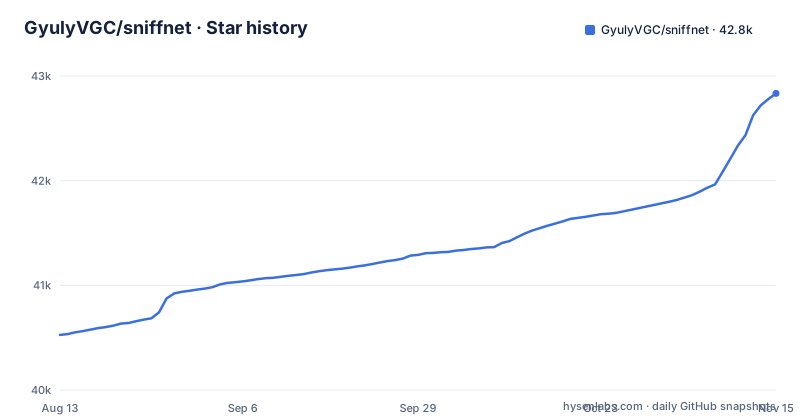
- GyulyVGC/sniffnet42,834 ★ · +2,308
| Repository | 2026-08-13 | 2026-11-15 |
|---|---|---|
| GyulyVGC/sniffnet | 40.5k | 42.8k |
2,308 Stars in the last 94 days, measured from the daily GitHub snapshot. Compare with other projects
Editorial analysis
What Sniffnet Solves and Who It Is For
Sniffnet addresses a common gap: most packet capture tools are either command-line utilities like tcpdump or heavyweight graphical suites like Wireshark that assume prior expertise. Sniffnet is a desktop application that lets you select a network adapter, apply filters, and watch traffic as charts and connection lists. The README lists features such as identifying 6000+ upper layer services, trojans, and worms, finding domain names and ASNs, and seeing which programs generate bandwidth. This makes it suitable for home users who want to know what their computer is sending, or for IT staff who need a quick visual check of a machine's activity without writing capture filters. The project is written in Rust and uses the iced GUI toolkit, which suggests a focus on performance and cross-platform consistency.
How It Works: From Adapter Selection to Connection Inspection
The core mechanism is packet capture from a chosen network adapter. You pick an interface, then optionally apply filters to narrow the traffic. Sniffnet then processes packets to extract metadata: remote host IP addresses, domain names, ASNs, and geographic locations. It also maps traffic to upper layer services, and it can associate connections with specific programs on your system. The interface presents real-time charts of traffic intensity and a searchable list of connections. You can click on a connection to inspect its details. The application also supports importing and exporting PCAP files, which means you can move capture reports in and out as PCAP files. The README mentions that you can keep an eye on the network even when the application is minimized.
Getting It Running: Installation and Dependencies
Installation is straightforward through prebuilt packages. For Windows, you download an MSI for x64, arm64, or x86. For macOS, there are DMG files for Intel and Apple silicon. For Linux, you can choose DEB, RPM, or AppImage packages, each with multiple architectures including amd64, arm64, i386, and armhf. The README includes a note: "Remember to also install the required dependencies for your operating system." Those dependencies are documented in the project wiki, and the troubleshooting section says most errors come from missing dependencies needed to analyze a network adapter. The exact list for each operating system is in the wiki. You do not need to build from source unless you want the latest unreleased version, since the releases page provides the latest stable binaries.
Real-Time Monitoring Features and Customization
Beyond basic capture, Sniffnet offers several features that make it more than a passive sniffer. You can import custom IP blacklists to highlight potentially dangerous connections, which is useful for spotting traffic to known bad hosts. You can set custom notifications for defined network events, so you get alerted when, for example, a new connection to a specific IP appears. The interface supports themes, including custom themes, which helps if you run the app for long periods. You can save favorite hosts, services, and programs, making it easier to filter the view to what matters to you. The README also mentions the ability to identify local network connections, which can reveal devices on your LAN.
Known Limitations and Failure Modes
The documentation points to a few real constraints. First, the required dependencies are a common failure point: if you skip installing libpcap or its equivalent, Sniffnet will not work, and the errors may be cryptic. Second, rendering problems can occur on old architectures or with outdated graphical drivers. The README says the default renderer is wgpu, used by iced, and it may manifest bugs such as interface glitches or unsupported color gradients. This means on older hardware or systems with poor GPU support, the application might be unusable or visually broken. Finally, while Sniffnet can export PCAP files, it is not a full packet analysis tool; you cannot decode protocol fields in depth or reassemble streams the way Wireshark does.
Alternatives and How They Differ
The most direct alternative is Wireshark, which also captures packets and offers a graphical interface. Wireshark provides deep protocol dissection, follow TCP streams, and extensive filtering with display and capture filters. Sniffnet, by contrast, focuses on high-level summaries: connections, services, and program names. It does not aim to replace Wireshark's deep inspection. Another alternative is nethogs, a command-line tool that attributes bandwidth to processes per connection. Nethogs is lighter and works in terminal-only environments, but it lacks the visual charts and geographic mapping that Sniffnet offers. For users who want a simple, visual overview, Sniffnet fills a niche between nethogs and Wireshark. The choice depends on whether you need protocol-level detail or just a clear picture of what your machine is doing.
Maintenance, Licensing, and Upgrade Cost
Sniffnet is licensed under Apache-2.0, which permits commercial use, modification, and distribution with attribution, and it does not impose copyleft requirements. The project has a ROADMAP.md file, indicating an active development plan. Recent releases show a steady cadence: v1.4.2 in November 2025, v1.5.0 in April 2026, and v1.5.1 in July 2026. This suggests regular maintenance and bug fixes. Upgrading is typically a matter of downloading the new installer or package. However, because the application depends on system libraries for packet capture, an upgrade might require updating those dependencies if your OS updates them. Given the Apache-2.0 license, you can fork and adapt the code; the repository has a CONTRIBUTING.md if you plan to submit changes.
Editorial conclusion
Adopt Sniffnet if you are a desktop user who wants a visual, interactive way to inspect live network traffic without writing filters or scripts. It is not a replacement for command-line packet analyzers like tcpdump or Wireshark when you need deep protocol dissection or automated capture in headless environments. Before adopting, verify that your operating system has the required dependencies listed in the Sniffnet wiki, and test the wgpu renderer on your GPU drivers to avoid interface glitches.
Frequently asked questions
What is sniffnet?
Sniffnet is a cross-platform application to comfortably monitor your network traffic, written in Rust. You choose one network adapter to inspect, apply filters to the observed traffic, and view statistics, real-time charts, connections in your local network, and the domain name and ASN of the hosts you exchange traffic with.
how to install sniffnet
The README links prebuilt assets on the GitHub releases page: MSI installers for Windows on x64, arm64 and x86, DMG files for macOS on Intel and Apple silicon, and DEB, RPM and AppImage builds for Linux. It also points to a wiki page for alternative installation methods, and reminds you to install the required dependencies for your operating system.
how to install sniffnet on ubuntu
Linux users choose a DEB, RPM or AppImage build, and the download table lists DEB and AppImage for amd64, arm64, i386 and armhf, with RPM for x86_64 and aarch64. The README points to a required dependencies page, since it says most errors that may arise are likely due to a system missing what is needed to analyze a network adapter.
is sniffnet safe
Sniffnet is a traffic monitor rather than a scanner: you select a network adapter to inspect and a set of filters to apply to the observed traffic. The repository root carries LICENSE-APACHE and LICENSE-MIT, and also SECURITY.md, THREAT_MODEL.md and INCIDENT_RESPONSE.md, and you can import custom IP blacklists to highlight potentially dangerous connections.
sniffnet vs wireshark reddit
Sniffnet identifies more than 6000 upper layer services, protocols, trojans and worms, and it imports and exports capture reports as PCAP files. Wireshark dissects packets field by field, so the practical difference is aggregation against dissection, with the PCAP export being the handoff between them.
Official sources
Add this badge to your README
If you maintain this project, the badge below links readers to this analysis and shows its maintenance status from the daily GitHub snapshot. Paste the markdown into your README; add ?metric=license or ?metric=stars to the image URL for a different field.

[](https://hysenlabs.com/projects/gyulyvgc-sniffnet)Star history chart for your README
[](https://hysenlabs.com/projects/gyulyvgc-sniffnet)Was this useful?