H2 Database: Java's Embeddable SQL Engine, From Maven Dependency to Console
H2 is an embeddable RDBMS written in Java.
At a glance
- What is it?
- H2 is an embeddable RDBMS written in Java, distributed as a roughly 2.5 MB jar. This review covers what it does, how the embedded and server modes differ, and where the documentation leaves you on your own.
- Who is it for?
- H2 fits projects that need a SQL engine inside the JVM: tests, desktop tools, prototypes, and single-process services that want a file or an in-memory database without operating a server. It does not fit multi-user production systems that need replication, a network protocol contract, or strong access control, because the README describes no such features.
- Can I use it commercially?
- Check first. The repository uses a licence we do not classify automatically, so read its LICENSE file before any commercial use.
- Is it still maintained?
- Yes. The repository received new commits within the last day.
- What is it written in?
- Mainly Java, according to GitHub's language statistics.
Answers come from the project's GitHub data, last synced on November 15, 2026, and from our analysis. They are not legal advice.
Star history
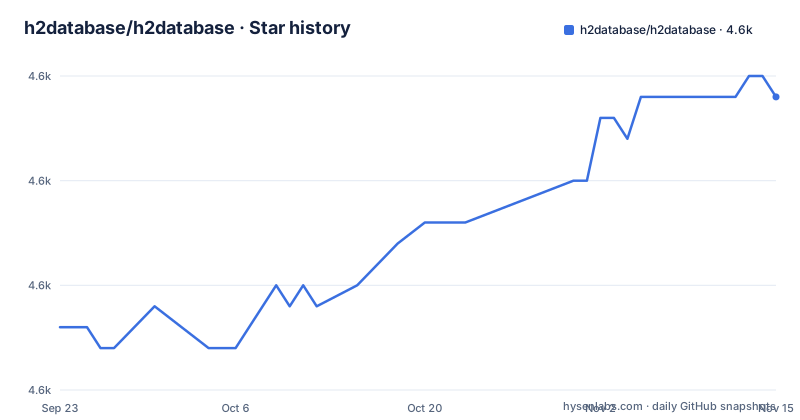
- h2database/h2database4,644 ★ · +11
| Repository | 2026-09-23 | 2026-11-15 |
|---|---|---|
| h2database/h2database | 4.6k | 4.6k |
11 Stars in the last 53 days, measured from the daily GitHub snapshot. Compare with other projects
Editorial analysis
What H2 Is and Which Java Projects Actually Need It
H2 is a relational database management system that runs inside your Java process. The README describes it as embeddable, and the phrase matters: you add one jar, you call JDBC, and you have tables. There is no separate daemon to install, no port to open, and no connection pool to configure unless you want one. The same jar can also start a server, which is why the project calls out both embedded and server modes.
The audience is narrow and specific. If you are writing a Spring Boot service and want a database that disappears when the test finishes, H2 is the default answer in that ecosystem. If you are building a desktop application that needs to store structured data locally, an embedded engine avoids shipping a database server with your installer. If you are prototyping a schema before committing to PostgreSQL, H2 lets you iterate on SQL without provisioning anything. The README lists the feature set that supports these cases: JDBC API, disk-based or in-memory databases, transaction support, multi-version concurrency, a browser-based console, encrypted databases, fulltext search, and an ODBC driver.
What H2 is not is a shared database for a team of services. Nothing in the README describes replication, clustering, or a wire protocol that non-Java clients speak natively. The ODBC driver exists, which suggests some non-Java access, but the README does not document its scope or limitations. Treat that as a gap to investigate rather than a capability to assume.
Embedded Mode, Server Mode, and Where the Data Lives
The mechanism is straightforward. In embedded mode, your application opens a JDBC connection with a URL that points at either a file path or the keyword mem, and the engine runs in the same JVM. Disk-based databases persist to files on the filesystem; in-memory databases exist only for the life of the process. The README states both are supported, and the distinction drives most deployment decisions.
In server mode, the same jar runs a process that accepts connections over a network, and clients connect with a URL that names a host and port. The README lists the console as a main feature, but it does not spell out the URL grammar in the README itself; that detail lives in the tutorial and the SQL command reference.
Transaction support and multi-version concurrency are listed as features. Multi-version concurrency is the mechanism that lets readers proceed while a writer holds a transaction, rather than blocking on a lock. The README does not state the isolation levels H2 implements or how they map to the JDBC constants, so anyone relying on a specific isolation guarantee needs to read the SQL command documentation rather than the README.
The repository layout is a single h2/ directory alongside LICENSE.txt, README.md and SECURITY.md.
Installing H2 and Running Your First Query
There is no installer. The README points to the download page and gives the Maven coordinates, so the practical installation path for a Java project is a dependency entry. The version in the README is 2.5.252, which matches the latest release listed for the project.
Add the dependency to pom.xml:
<dependency>
    <groupId>com.h2database</groupId>
    <artifactId>h2</artifactId>
    <version>2.5.252</version>
</dependency>
After Maven resolves it, the jar is on your classpath.
The README lists a browser-based Console application as a feature and links to a Tutorial page. Because the README does not reproduce the startup command, the exact invocation is something to read from the tutorial before you rely on it.
For a first embedded database, the connection URL is the part worth understanding. A file-based database uses a path, and an in-memory database uses the mem keyword. The README lists both modes but leaves the URL syntax to the documentation.
The Console, Encryption, and Fulltext Search as Separate Features
The README lists four capabilities that are easy to read past: the browser console, encrypted databases, fulltext search, and the ODBC driver. Each one changes what H2 is good for, and each one is documented outside the README.
The console is a web UI that connects to a database and lets you run SQL. For embedded development it is the fastest way to inspect a schema that your application just created, because you point it at the same file. The README does not describe authentication for the console.
Encrypted databases mean the file on disk is not readable without the key. The README states the feature exists but gives no algorithm, no key management guidance, and no statement about what is and is not protected. Anyone treating encryption as a compliance control needs to read the documentation rather than the feature list.
Fulltext search is listed without qualification. Whether it supports stemming, ranking, or language-specific analyzers is not stated in the README. If your search requirements go beyond substring matching, verify against the documentation before designing around it.
The ODBC driver is the least documented item. It implies that non-Java tools can connect, but the README does not say which platforms it targets or whether it is maintained at the same cadence as the JDBC driver. That is a real gap for anyone planning to connect a BI tool or a scripting language.
Where H2 Is the Wrong Choice
A single H2 server process is a single point of failure, but H2 also documents a clustering/high-availability mode that maintains two database copies. Evaluate that mode's setup, failure behavior and operational limits against your requirements rather than assuming ordinary server mode provides high availability.
The second limitation is version compatibility. The release history shows 2.4.240, 2.5.250 and 2.5.252. Opening a database file written by an older version with a new jar is not something the README promises will work. If you have data written by an older H2, plan a migration path before upgrading the dependency, and check the documentation for the supported upgrade route.
The third is the SQL dialect. H2 implements a large subset of SQL with its own extensions, and the README links to separate pages for commands, functions, aggregate functions, window functions, and data types. Code written against H2 that uses those extensions will not move to another database without changes. If portability is a requirement, H2 is a development convenience, not a production target.
Finally, the licence field in the repository metadata is NOASSERTION, and the repository carries a LICENSE.txt at the top level. That combination means the machine-readable licence identifier is not set, so anyone with licence review requirements should read LICENSE.txt directly rather than trusting an SPDX tag.
How H2 Compares With SQLite and With Running PostgreSQL
The obvious comparison is SQLite. Both are embeddable, both store data in a single file, and both avoid a server process. The difference is the host language and the concurrency model. SQLite is a C library with bindings, and H2 is pure Java, which the README highlights along with the roughly 2.5 MB jar size. For a JVM application, H2 needs no native library and no platform-specific artifact, which removes a class of packaging problems. For a Python or Go application, that advantage disappears entirely, and SQLite is the natural pick.
The second comparison is running a real PostgreSQL or MySQL instance. That gives you replication, mature access control, a stable wire protocol, and a large ecosystem of operational tooling. H2 gives you none of those, and in exchange you get zero operational surface: no container, no port, no backup job, no connection pool tuning. The trade is operational simplicity against operational capability, and it is the right trade only when the database is not the thing you are operating.
A third option worth naming is Testcontainers, which runs a real database in a container for tests. That gives you the production engine in CI, at the cost of a container runtime and slower startup. H2 in memory is faster to start and needs nothing installed, but it tests your SQL against H2's dialect rather than your production database's. Teams that have been burned by dialect differences usually move to Testcontainers for integration tests and keep H2 only for unit-level repository tests.
Maintenance, Upgrade Cost, and What the Release Cadence Tells You
The repository is not archived, and the last push was on 2026-11-02. The most recent release is version 2.5.252, dated 2026-09-24, with the previous two at 2026-08-31 and 2025-09-22. The project is maintained.
For adopters, that cadence has a practical consequence. Pinning a version is the normal posture. Budget for reading the release notes and for testing against a copy of your data.
The upgrade cost also depends on how deeply you use H2-specific features. If you use it as a JDBC target with plain SQL, upgrades are cheap. If you use fulltext search, encryption, or the console, you are using surfaces whose documentation the README does not summarize, so each upgrade means re-reading the relevant documentation page.
Editorial conclusion
H2 fits projects that need a SQL engine inside the JVM: tests, desktop tools, prototypes, and single-process services that want a file or an in-memory database without operating a server. It does not fit multi-user production systems that need replication, a network protocol contract, or strong access control, because the README describes no such features. Before adopting it, verify the jar version you pin in pom.xml matches the version whose SQL grammar you tested.
Frequently asked questions
What is meant by H2 database?
H2 is an embeddable relational database management system written in Java. The README describes it as providing a JDBC API, embedded and server modes, disk-based or in-memory databases, and a browser-based console.
How do I install H2 database?
There is no installer. The README points to the download page and gives Maven coordinates: groupId com.h2database, artifactId h2, version 2.5.252. Adding that dependency puts the jar on your classpath.
Can I use H2 database in Spring Boot?
The README does not document Spring Boot integration. It lists the h2 tag on Stack Overflow as the place for questions about Hibernate with H2, which suggests that ecosystem questions are handled there rather than in the project's own documentation.
How do I open an H2 database file?
The README lists disk-based databases and a browser-based console application as features, and links to a tutorial page for usage. The console is the tool the project provides for opening a database and running SQL against it.
What is com.h2database h2?
It is the Maven coordinate for the H2 jar. The README shows com.h2database as the groupId and h2 as the artifactId, with 2.5.252 as the version in its example dependency block.
How do I use H2 database in Java?
Add the com.h2database:h2 dependency and connect through the JDBC API, which the README lists as a main feature. The README does not include a connection example, so the URL syntax and driver class come from the linked tutorial and SQL command documentation.
Official sources
Add this badge to your README
If you maintain this project, the badge below links readers to this analysis and shows its maintenance status from the daily GitHub snapshot. Paste the markdown into your README; add ?metric=license or ?metric=stars to the image URL for a different field.

[](https://hysenlabs.com/projects/h2database-h2database)Star history chart for your README
[](https://hysenlabs.com/projects/h2database-h2database)Was this useful?