LuckPerms ships one common module and a separate plugin for each Minecraft server platform
A permissions plugin for Minecraft servers.
At a glance
- What is it?
- A Java permissions plugin for Minecraft servers built around groups and permission nodes. The repository is organised by platform, so the build output and the API both depend on which server software you run.
- Who is it for?
- Use LuckPerms if you run a Minecraft server on Bukkit, BungeeCord, Fabric, Forge, Nukkit, Sponge or Velocity and want permissions managed through groups, with commands, config files or a web editor. Skip building from source unless you need a patched jar, since downloads are linked from luckperms.net.
- Can I use it commercially?
- Yes. MIT is a permissive licence: you can use, modify and sell software built on it, as long as you keep its copyright and licence notices.
- Is it still maintained?
- Yes. The repository received new commits within the last day.
- What is it written in?
- Mainly Java, according to GitHub's language statistics.
Answers come from the project's GitHub data, last synced on November 25, 2026, and from our analysis. They are not legal advice.
Star history
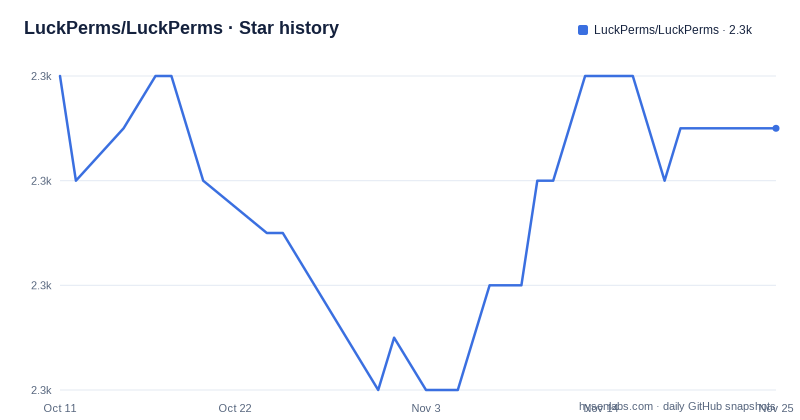
- LuckPerms/LuckPerms2,329 ★ · -1
| Repository | 2026-10-11 | 2026-11-25 |
|---|---|---|
| LuckPerms/LuckPerms | 2.3k | 2.3k |
-1 Stars in the last 45 days, measured from the daily GitHub snapshot. Compare with other projects
Editorial analysis
Groups carry permissions, and players inherit what their groups allow
LuckPerms lets server admins control which features players can use by creating groups and assigning permissions to them. That is the whole premise in the README, and it answers what the plugin does in Minecraft: it decides who may run which command or use which plugin feature on your server.
There are three ways to set permissions up. You can use commands in game, edit the config files directly, or use the web editor. The README also says the plugin supports a variety of data storage options and works on many server types, but it does not list the storage backends. For those, go to the wiki on luckperms.net.
It is free. The README says it is available at no cost and permissively licensed, so it can remain free forever, and the repository carries the MIT license in LICENSE.txt.
Seven platform modules sit on top of a shared common module
The repository is split into modules. The API module is the public, semantically versioned interface that other plugins use to integrate with LuckPerms and read its data. For the most part it contains no implementation, because the plugin provides it at runtime.
The common module holds most of the code that implements the plugins, which is how the project avoids duplicating logic across platforms. On top of it, one module per platform adapts the common code: Bukkit, BungeeCord, Fabric, Forge, Nukkit, Sponge and Velocity. The top-level directory listing shows more than that, including bukkit-legacy, neoforge, hytale and standalone, none of which the README explains.
The consequence for you is that an install is platform specific. A jar built for Velocity will not run on Fabric, so the first decision is which module matches your server software, and the second is that a proxy network may need LuckPerms on both the proxy and the backend servers. The README does not say how those installs coordinate.
Building from source needs Java 21 and Gradle through the wrapper
Compiling needs a Java 21 JDK or newer, and Git. The project uses Gradle to handle dependencies and building, and the wrapper script gradlew is in the repository, so you do not install Gradle yourself.
The build commands are three lines:
git clone https://github.com/LuckPerms/LuckPerms.git
cd LuckPerms/
./gradlew build
The output jars land in loader/build/libs or build/libs. Because the repository holds many platform modules, expect several jars and pick the one for your server. Most admins will skip this and take the latest downloads from the project homepage at luckperms.net, which is where the README sends them. The repository has no GitHub releases, so there is no release page to download from.
Unit tests run in common, integration tests run in standalone
A set of automated tests run during each build. Unit tests are defined in common/src/test, and integration tests are defined in standalone/src/test. That layout matches the module split: the shared logic is tested directly, and the standalone module exercises the plugin as a whole without a Minecraft server.
A CI badge in the README links to ci.lucko.me, where the project's builds run. The README does not state coverage figures or which platforms the integration tests cover. A change to the Fabric or Forge module therefore may not be covered by the same tests as a change in common, and the README leaves that for you to find out from the test directories.
The performance and reliability claims in the README have no numbers
The README describes LuckPerms as fast, reliable, easy to use, flexible, extensive and free. The performance claim says it was written with performance and scalability in mind. The reliability claim says it is trusted by thousands of server admins and by the largest server networks.
None of these come with a measurement, a named network or a benchmark. They are the maintainers' description of intent. If scale matters to you, for example a network with many concurrent players, run a test with your own data store and player count before committing, and read the wiki article Why LuckPerms? that the README points to for the longer argument.
The extensive claim refers to a plethora of customization options and settings. The README names none of them, so the config file shipped with the plugin is the real list.
Semantic versioning covers the API, and the plugin builds loosely follow Google style
Only the API module is described as semantically versioned. Plugins that integrate with LuckPerms should depend on that API, and a Maven Central badge and a Javadoc badge in the README point to the net.luckperms api artifact. The README does not say what versioning promise applies to the rest of the code, so do not depend on common or the platform modules directly.
For contributors, the project loosely follows the Google Java Style Guide, and the advice is to copy the style of the class you are editing. Pull requests are welcome, especially bug fixes, and CONTRIBUTING.md holds the detail. The project also has a Discord server linked from a badge.
Last push on 20 October 2026, with no GitHub releases to track
The repository is not archived, and its last push was on 20 October 2026. There are no GitHub releases, so you cannot follow versions from the releases page or its feed. Updates have to be tracked from luckperms.net or from the CI server.
That matters for operations. A server admin who wants to know when a security fix lands has no release notes in the repository to subscribe to. The README does not describe an update channel inside the plugin either. Decide how you will learn about new builds before you put LuckPerms in charge of who can run commands on a public server.
Editorial conclusion
Use LuckPerms if you run a Minecraft server on Bukkit, BungeeCord, Fabric, Forge, Nukkit, Sponge or Velocity and want permissions managed through groups, with commands, config files or a web editor. Skip building from source unless you need a patched jar, since downloads are linked from luckperms.net. Before choosing, check that your server software has a module in the repository, and read the wiki page Why LuckPerms? because the README's claims about speed and reliability carry no figures.
Frequently asked questions
What does LuckPerms do in Minecraft?
It is a permissions plugin for Minecraft servers. Admins control what features players can use by creating groups and assigning permissions.
Is LuckPerms free?
Yes. The README says it is available for download and usage at no cost, and it is licensed under the permissive MIT license.
How do I configure LuckPerms?
Permissions can be set up using commands, directly in config files, or with the web editor. The wiki on luckperms.net has the detail.
Official sources
Add this badge to your README
If you maintain this project, the badge below links readers to this analysis and shows its maintenance status from the daily GitHub snapshot. Paste the markdown into your README; add ?metric=license or ?metric=stars to the image URL for a different field.

[](https://hysenlabs.com/projects/luckperms-luckperms)Star history chart for your README
[](https://hysenlabs.com/projects/luckperms-luckperms)Was this useful?