SIMPLE 4.0: A Fortran-Based Cryo-EM Pipeline for Methods Development
SIMPLE 4.0: Computational Environment for Electron Microscopy Methods Development
At a glance
- What is it?
- SIMPLE is a high-performance cryo-EM processing platform written in Fortran, aimed at researchers who need end-to-end reconstruction and the freedom to modify the code. This review covers its build process, architecture, and the trade-offs of adopting a GPL-licensed scientific tool.
- Who is it for?
- Adopt SIMPLE if you are a cryo-EM method developer who needs a modifiable, HPC-oriented pipeline and is comfortable with Fortran and a GPL-3.0 license. Do not adopt it if you prefer a turnkey GUI or lack the compiler toolchain (gfortran ≥ 14.2, FFTW, ARPACK).
- Can I use it commercially?
- Yes, with conditions. GPL-3.0 is a copyleft licence: if you distribute software that includes it, you must release that software's source code under the same licence. Running it internally without distributing it does not trigger that obligation.
- Is it still maintained?
- Yes. The repository received new commits within the last day.
- What is it written in?
- Mainly Fortran, according to GitHub's language statistics.
Answers come from the project's GitHub data, last synced on October 22, 2026, and from our analysis. They are not legal advice.
Star history
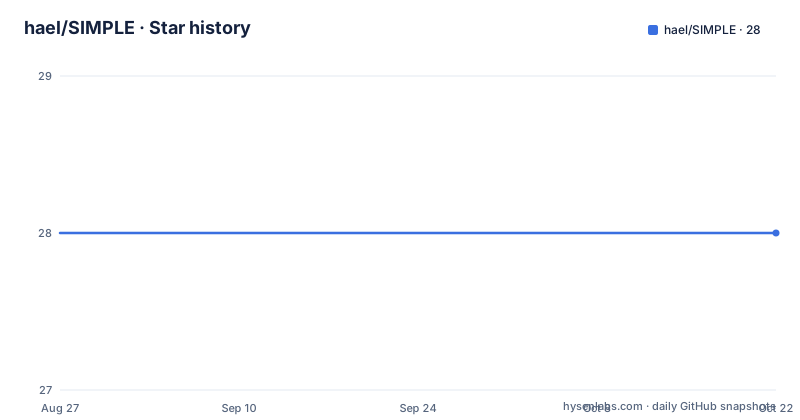
- hael/SIMPLE28 ★ · +0
| Repository | 2026-08-27 | 2026-10-22 |
|---|---|---|
| hael/SIMPLE | 28 | 28 |
0 Stars in the last 56 days, measured from the daily GitHub snapshot. Compare with other projects
Editorial analysis
What SIMPLE Solves and Who It Serves
SIMPLE targets a specific niche: cryo-electron microscopy (cryo-EM) researchers who need to turn raw movies, micrographs, and particle images into 2D class averages, 3D reconstructions, symmetry analysis, and atomic-level models. The README describes it as a high-performance, end-to-end platform. The intended user is not a casual microscopist but someone who wants to develop new methods, given the project's name and its emphasis on a modular architecture. The Fortran base suggests a focus on numerical performance over ease of scripting. If you are a structural biologist who only wants a black-box tool, SIMPLE may be overkill. But if you are writing new reconstruction algorithms and need a foundation that you can modify, this project offers a full pipeline rather than isolated components.
The Mechanism: From Raw Data to Atomic Models
SIMPLE's workflow is end-to-end, meaning it handles every stage from raw movies to the final structural model. The README lists the outputs: 2D class averages, high-resolution 3D reconstructions, symmetry analysis, and atomic-level structural models. The architecture is modular, which allows different stages to be swapped or extended. The project also supports streaming data processing, which is a key differentiator: instead of waiting for all micrographs to be collected, SIMPLE can process data as it arrives. This is critical for real-time cryo-EM where datasets can be enormous. The underlying numerical work is done in Fortran, using BLAS/LAPACK for linear algebra, ARPACK for eigenvalue problems, and FFTW for Fourier transforms. These are standard, battle-tested libraries, so the performance ceiling is high. The README does not detail the exact data flow, but the dependency list implies a pipeline that reads TIFF images, uses libcurl for network access (likely for streaming or remote data), and leverages Python for scripting or orchestration.
Getting It Running: Build and Configuration
The build process is CMake-based, which is familiar to most HPC users. The README gives a straightforward sequence: download the source, run cmake, then make. For a stable release, you can grab the tarball or clone the repo. The minimal build requires a recent compiler stack: GNU gcc and gfortran ≥ 14.2, which is a significant requirement because many systems still ship older versions. You also need BLAS, LAPACK, ARPACK or ARPACK-NG, FFTW (with double, single, and threaded builds), libcurl, and libTIFF. The environment setup involves appending the build directories to your PATH and setting SIMPLE_PATH. There is also a GUI build option called NICE, which you enable with -D NICE=on and then launch with nice_local. The updating procedure is simple: git stash, pull, and rebuild. This is a standard workflow, but the need to rebuild after every pull could be tedious if you track the development branch.
Streaming and HPC: Where SIMPLE Stands Out
The README highlights two features that set SIMPLE apart from many academic cryo-EM packages: streaming data processing and HPC scalability. Streaming means you can process movies as they are collected, which is essential for large datasets that cannot fit in memory or for live monitoring of data quality. The HPC scalability suggests that SIMPLE can run on distributed clusters, likely using MPI or similar, though the README does not specify the parallelization method. The modular architecture supports this: you can run different stages on different nodes. This is a genuine advantage for groups that operate their own cryo-EM facilities and need to process terabytes of data quickly. However, the README does not provide benchmarks or performance numbers, so the actual speedup over other tools is unverified. If you are on a single workstation, the streaming feature may still help, but the HPC angle is aimed at larger facilities.
Limitations and When It Is the Wrong Tool
The most obvious limitation is the compiler requirement: gfortran ≥ 14.2. This is a very recent version, and many Linux distributions (especially older LTS releases) do not ship it by default. You may need to build GCC from source or use a package manager like conda, which adds setup time. The README also lists jbigkit as optional, but libTIFF and libcurl are mandatory, so you cannot skip them. Another limitation is the lack of a detailed user manual in the README; the documentation is hosted externally, but it is not linked in the cleaned README, so you must go to the GitHub pages. For a beginner, the learning curve is steep: you need to understand cryo-EM concepts, Fortran conventions, and the command-line interface. If you are a biologist who just wants a reconstruction, tools like RELION or cryoSPARC might be more accessible. Also, the project is under GPL-3.0, which means any derivative work must also be GPL-licensed. This could be a problem for commercial users who want to integrate SIMPLE into a proprietary pipeline.
Alternatives and How They Differ
The main alternative in the cryo-EM field is RELION, which is also open-source but written in C++ and uses a different approach: it is more focused on Bayesian refinement and has a GUI. RELION is widely used and has a larger user community, which means more tutorials and support. SIMPLE, in contrast, is Fortran-based and emphasizes modularity for methods development. The difference is in the target audience: RELION is for users who want a reliable, well-documented pipeline, while SIMPLE is for developers who want to experiment with new algorithms. Another alternative is cryoSPARC, which is commercial and offers a polished GUI, but it is not open-source. If you need to modify the code, SIMPLE is the only one of these that gives you full control, but you pay for that freedom with a steeper learning curve and a smaller ecosystem.
Maintenance and License Implications
The repository shows recent activity: the last push was June 2025, and there is a v3.1-beta release from the same date. This suggests the project is actively maintained, which is a good sign for a scientific tool. The stable release is v3.0.0 from 2020, so the beta has been in development for several years. This could mean the beta is unstable or that the developers are careful about releasing. The license is GPL-3.0 or later, which has implications: if you distribute a modified version, you must release the source code under the same license. This is fine for academic use, but if you plan to use SIMPLE in a commercial product, you need to consider whether GPL compatibility is acceptable. The README also states that the software is provided without warranty, which is standard but worth noting for a scientific tool where errors could lead to incorrect results.
Editorial conclusion
Adopt SIMPLE if you are a cryo-EM method developer who needs a modifiable, HPC-oriented pipeline and is comfortable with Fortran and a GPL-3.0 license. Do not adopt it if you prefer a turnkey GUI or lack the compiler toolchain (gfortran ≥ 14.2, FFTW, ARPACK). Before committing, verify that the v3.1-beta branch is stable enough for your data volume, and confirm that the streaming features work with your microscope's output format. The project's last push was June 2025, so check the issue tracker for recent fixes.
Frequently asked questions
How much does it cost to use Simple?
SIMPLE is distributed under the GNU General Public License version 3 or later, and the project states it is provided without warranty, including without implied warranty of merchantability or fitness for a particular purpose. There is no paid tier described anywhere in the repository.
What does it mean to be simple, in the SIMPLE project?
The name refers to a computational environment for electron microscopy methods development, a Fortran platform that turns raw cryo-EM movies, micrographs and particle images into 2D class averages, 3D reconstructions, symmetry analysis and atomic-level structural models. The readme frames the design as numerical kernels plus domain abstractions plus workflow orchestration.
how to install simple ui koreader
Nothing here relates to a reading interface. To build SIMPLE you clone the repository or unpack the release tarball, create a build directory, configure with CMake, run the install target, then append the prepared shell fragment or set the two build subdirectories on PATH and define the project path variable yourself.
Official sources
Add this badge to your README
If you maintain this project, the badge below links readers to this analysis and shows its maintenance status from the daily GitHub snapshot. Paste the markdown into your README; add ?metric=license or ?metric=stars to the image URL for a different field.

[](https://hysenlabs.com/projects/hael-simple)Star history chart for your README
[](https://hysenlabs.com/projects/hael-simple)