Metro is the bundler you get for free, so the interesting parts are the repo and the docs
🚇 The JavaScript bundler for React Native
At a glance
- What is it?
- Metro is the JavaScript bundler React Native ships, and its README is 200 words long because the real content sits at metrobundler.dev and in a Yarn, Flow and Jest monorepo. Worth reading before you file an issue or try to build it from source.
- Who is it for?
- Use Metro if you build React Native, because it is the bundler already wired into your project and into its release train. Do not expect a standalone install path or a self explanatory README, and skip the source tree unless you intend to work on Metro itself.
- Can I use it commercially?
- Yes. MIT is a permissive licence: you can use, modify and sell software built on it, as long as you keep its copyright and licence notices.
- Is it still maintained?
- Yes. The repository last received commits 1 day ago.
- What is it written in?
- Mainly JavaScript, according to GitHub's language statistics.
Answers come from the project's GitHub data, last synced on November 15, 2026, and from our analysis. They are not legal advice.
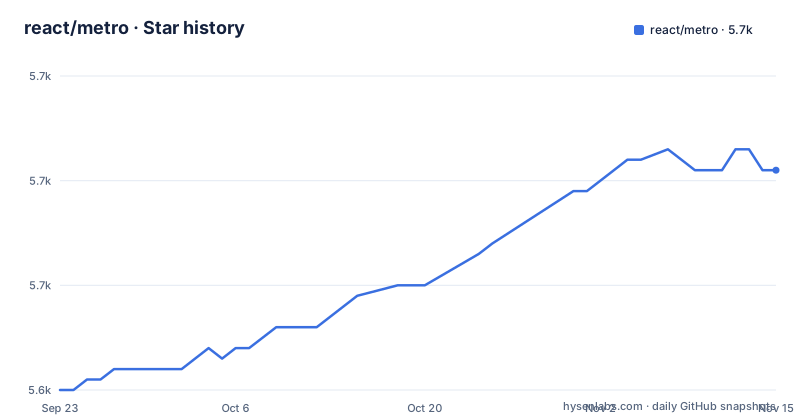
Star history
- react/metro5,661 ★ · +21
| Repository | 2026-09-23 | 2026-11-15 |
|---|---|---|
| react/metro | 5.6k | 5.7k |
21 Stars in the last 53 days, measured from the daily GitHub snapshot. Compare with other projects
Editorial analysis
There is no metro install command, by design
The Installation section is three lines and no shell. Metro is included with React Native, and the getting started path is the React Native documentation at reactnative.dev/docs/getting-started. For an existing project, the pointer is the Getting Started guide on the Metro site.
That is the whole story, and it is deliberate. Metro is not something you add to a React Native app the way you would add a lint rule. It is the bundler the framework ships, which is why the npm page and the license badge lead the README instead of a `npm install` line.
The consequence for a reader is that the project's identity information lives in the badge row: the npm package, the LICENSE file, a nightly test workflow and a coverage report. The repository itself is MIT licensed with its homepage at metrobundler.dev, on the `main` branch, with the last push on 2026-11-01 and tags v0.87.2 from 2026-10-26, v0.87.1 from 2026-09-13 and v0.84.6 from 2026-09-02.
The three headline claims are aims, not measurements
The feature list is three bullets. Fast, described as aiming for sub-second reload cycles, fast startup and quick bundling speeds. Scalable, described as working with thousands of modules in a single application. Integrated, described as supporting every React Native project out of the box.
Read closely, the first one is a target rather than a result: the word used is aim, and the only figure is the sub second reload target. No bundle size, no benchmark table, no hardware description appears anywhere in the README, so there is nothing here to compare a build against. The second claim is about module count rather than machine class, and the third is a compatibility statement that the docs site, not this page, would have to define.
That is a small README by choice, not by neglect, and it points twice: once for configuration at metrobundler.dev/docs/configuration and once for the React Native setup. It names no alternative bundler at all, so any comparison has to start from the documentation site.
Configuration lives at metrobundler.dev and its sources live in docs/
Every question about how Metro behaves is routed to the website. Configuring Metro has its own page, the general documentation sits behind metrobundler.dev/docs/getting-started, and the sources for that documentation are kept in this repository under `docs/`.
The root also carries a `website/` directory, so the site and its content are developed next to the bundler rather than somewhere else. That arrangement is the practical answer to the thin README: if you want to know what a resolver or a transformer option does, you are reading the website, and if you want to fix or extend that page, you edit `docs/` in a pull request against this repository.
Configuration is therefore the one area this README refuses to summarize. There is no sample config file, no option name and no default value in the text you are reading now. Anyone evaluating Metro has to keep the documentation site open next to the editor, which is a fine arrangement for a project with its own site and a poor one for a quick decision.
A private Yarn workspace carrying Flow, Jest and TypeScript side by side
The root `package.json` is `@metro/monorepo`, private, with version `0.0.0`, and `yarn.lock` at the root confirms Yarn rather than npm as the workspace manager. Published code lives under `packages/`, with `private/` and `scripts/` alongside it for things that do not ship.
Type checking runs on two systems at once, which is the most surprising thing in the dependency list. Flow is everywhere: `.flowconfig`, `flow-typed/`, `flow-parser`, `flow-eslint` and `flow-api-translator` at 0.336.0 and `flow-bin` at ^0.338.0. TypeScript tooling sits alongside it: `@microsoft/api-extractor` and a dedicated `tsconfig.api-extractor.json`. Babel does the transform work, with `babel-plugin-transform-flow-enums` among the plugins.
Tests run on Jest 29, with `jest-environment-jsdom`, `jest-watch-typeahead`, `jest-junit` and `babel-jest` in the tree, configured through `jest.config.js` next to `babel.config.js`. For a contributor, the cost of that stack is real: Flow annotations in the source, generated TypeScript definitions at the package boundary, and a lint configuration that understands both.
build wipes every package output before regenerating it
The tree also keeps `metro.code-workspace` for editor setup and `.watchmanconfig` at the root.
ESLint 8 with the fb-strict preset, Prettier pinned exactly
The lint setup is Meta's. `eslint` is declared as ^8.57.0 with `eslint-config-fb-strict` at ^27.0.0, configured through `.eslintrc.js` and filtered by `.eslintignore`. Prettier has its own `.prettierrc.js`, with `eslint-config-prettier` keeping the two from fighting.
The plugin list explains the shape of the code: `eslint-plugin-ft-flow` for Flow annotations, `eslint-plugin-babel` for the transform layer, `eslint-plugin-react`, `eslint-plugin-relay`, `eslint-plugin-import`, `eslint-plugin-jest` for the test suite and `eslint-plugin-jsx-a11y` for accessibility in components. `jsonc-eslint-parser` handles JSON with comments, which matters for config files, and `@typescript-eslint` is present for the definition files.
None of this affects anyone using Metro as a bundler, and all of it shapes anyone sending a pull request. A strict internal preset is a fair trade for consistent output, but it is a culture an outside contributor inherits wholesale, and `.editorconfig` at the root makes the whitespace rules non negotiable too.
Issues moved out of react-native so Metro work could move faster
The repository's own history is the reason it exists. Metro was previously part of the `react-native` repository, and the split was made so the team working on Metro could respond to issues and pull requests without queueing behind the framework itself. The original announcement is react-native issue 13976.
The consequences are still visible in where you are supposed to talk. Bug reports and pull requests go to this repository. Larger discussions and proposals about React Native and Metro go to `@react-native-community/discussions-and-proposals`, a separate home for anything bigger than a patch. `CONTRIBUTING.md` holds the development process, how to propose a fix and how to build and test a change, and a Meta code of conduct is linked as the behaviour expected in the repository.
Maintenance signal is straightforward. MIT licensed, not archived, last push on 2026-11-01, with `CHANGELOG.md` at the root and coverage reported through `codecov.yml`, `istanbul-lib-coverage`, `istanbul-lib-report` and `istanbul-reports` alongside the nightly test workflow in `.github/`. The one thing missing is a stated support policy for anything but React Native, since the integrated claim covers React Native projects and nothing else.
Editorial conclusion
Use Metro if you build React Native, because it is the bundler already wired into your project and into its release train. Do not expect a standalone install path or a self explanatory README, and skip the source tree unless you intend to work on Metro itself. Before anything else, read the configuration page at metrobundler.dev/docs/configuration, since the README itself points you there instead of documenting a single option.
Frequently asked questions
Do I need to install metro separately in a React Native project?
No install command exists, because Metro is included with React Native. The README sends you to the React Native getting started docs, and to the Getting Started guide on metrobundler.dev if you want to add Metro to an existing project.
How do I configure metro?
The README holds no option names or defaults and points to the configuring Metro page at metrobundler.dev/docs/configuration instead. The sources for that documentation live in this repository under docs/, next to a website/ directory.
What does building metro from source involve?
The root package is a private Yarn workspace named @metro/monorepo, and CONTRIBUTING.md explains how to build and test your changes to Metro.
Why was metro moved out of the react-native repository?
So the team working on Metro could respond to issues and pull requests without sharing a queue with the framework, as stated in the README with the announcement in react-native issue 13976. Larger proposals now go to the react-native-community discussions-and-proposals space.
What license does metro use?
Metro is MIT licensed, as found in the LICENSE file at the root of the repository.
Official sources
Add this badge to your README
If you maintain this project, the badge below links readers to this analysis and shows its maintenance status from the daily GitHub snapshot. Paste the markdown into your README; add ?metric=license or ?metric=stars to the image URL for a different field.

[](https://hysenlabs.com/projects/react-metro)Star history chart for your README
[](https://hysenlabs.com/projects/react-metro)Was this useful?