nohang: a userspace OOM daemon that sends SIGTERM before SIGKILL
A sophisticated low memory handler for Linux
At a glance
- What is it?
- nohang is a configurable Linux daemon that watches memory pressure and terminates a chosen victim gracefully, sending SIGTERM first and only escalating to SIGKILL if the process ignores it. It also ships three diagnostic tools, oom-sort, psi2log and psi-top, and it is the most feature-dense of a family of userspace OOM killers that includes earlyoom, oomd and systemd-oomd.
- Who is it for?
- nohang suits an operator who has already hit a real low memory freeze and wants fine-grained control over which process dies and how, since victim selection by name, cgroup, exe path, environment, cmdline and euid is something the simpler alternatives do not offer.
- Can I use it commercially?
- Yes. MIT is a permissive licence: you can use, modify and sell software built on it, as long as you keep its copyright and licence notices.
- Is it still maintained?
- Yes. The repository last received commits 95 days ago.
- What is it written in?
- Mainly Python, according to GitHub's language statistics.
Answers come from the project's GitHub data, last synced on November 7, 2026, and from our analysis. They are not legal advice.
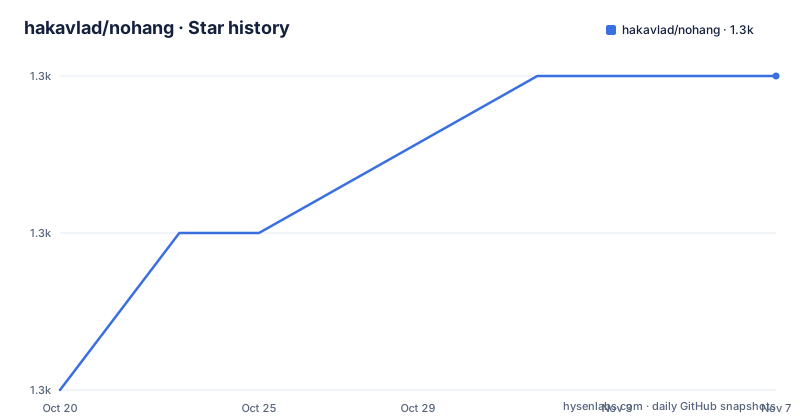
Star history
- hakavlad/nohang1,318 ★ · +2
| Repository | 2026-10-20 | 2026-11-07 |
|---|---|---|
| hakavlad/nohang | 1.3k | 1.3k |
2 Stars in the last 18 days, measured from the daily GitHub snapshot. Compare with other projects
Editorial analysis
The freeze the kernel OOM killer does not prevent
The problem nohang is built around is described more precisely than the usual complaint about the OOM killer.
OOM conditions may cause freezes, livelocks, dropped caches, and processes to be killed via SIGKILL instead of being terminated correctly via SIGTERM or otherwise corrected. Some applications may crash if it is impossible to allocate memory.
The quoted user reports in the README establish the shape of the problem. A program consumes a lot of memory, the machine becomes unresponsive, and the user cannot even kill the offender because the shell itself is not responding. A second report notes that with or without swap the system still freezes before the OOM killer runs automatically, and that common suggestions such as disabling or enabling swap, buying more RAM, running fewer processes, or setting limits do not address the underlying problem.
The engineering.fb.com quote is the sharpest of the three: the traditional Linux OOM killer works fine in some cases, but in others it kicks in too late, resulting in the system entering a livelock for an indeterminate period.
The mechanism behind that is timing. The kernel OOM killer is a last resort that runs when allocation has already failed, by which point the system is already thrashing. A userspace daemon that watches pressure information and acts earlier can terminate the offender while the machine is still responsive enough to do so.
The audience is operators of Linux systems where memory exhaustion is a recurring operational event: a desktop that users push to the limit, a small server with a workload that occasionally spikes, a build machine.
SIGTERM first, SIGKILL only if the victim refuses
The first item in the features list is the one that matters most, and it is a default rather than an option.
Sending the SIGTERM signal is the default corrective action. If the victim does not respond to SIGTERM, with a further drop in the level of memory it gets SIGKILL.
That is the fundamental difference from the kernel OOM killer, which sends SIGKILL, an uncatchable signal, to a process that gets no chance to close files, flush buffers, or release resources. A daemon that sends SIGTERM first gives the application a chance to shut down cleanly, and only escalates when the memory situation continues to worsen.
The two-stage escalation also has a second effect. Because the escalation is conditional on a further drop in memory level, a process that is merely slow to exit is not killed immediately. That gives the graceful path room to work before the hard path, which is a meaningful difference when the victim is a database or a message broker rather than a stray script.
The topic list confirms the mechanism set: cgroups, oom, oom-killer, out-of-memory, psi, sigterm and zram. PSI is the pressure stall information the daemon reads, cgroups are how the process tree is identified, and zram is the compressed swap alternative that the README also recommends as a general remedy for responsiveness during heavy swapping.
Victim selection by regex across six process attributes
The second feature is the one that distinguishes nohang from earlyoom, and it is unusually specific.
Customizing victim selection works by matching the impact on the badness of processes against specified regular expressions, applied to their names, cgroups, exe realpaths, environs, cmdlines and euids. Six attributes, each matchable by regex.
That is a lot of control, and it is the reason to choose nohang over a simpler daemon. The typical policy is that the biggest memory hog gets killed, but the useful policy is often contextual: never kill the process running as a particular user, always kill something in a particular cgroup, kill the process whose executable lives under a particular path, kill only processes whose command line matches a pattern that identifies a runaway job.
The envir attribute deserves a specific note, because matching on the environment is unusual. A process's environment often contains the identifiers of the job it belongs to, so a regex on the environment can match a workload by its configuration rather than by its name.
The trade-off is complexity. Regexes across six attributes, combined with a badness score, is a policy surface that has to be tested against real workloads, and a misconfigured pattern that matches too broadly can kill the wrong process on a machine that was merely under pressure. The configuration is a template file, conf/nohang/nohang.conf.in, and the shipped default is the right starting point to read rather than to replace.
The alternative daemons, and where nohang claims the gap
The README does an unusual thing for a project README: it spends most of its length on the alternatives, including itself, and the taxonomy is genuinely useful.
The recommendation structure is by use case. earlyoom is described as a simple, stable and tiny OOM prevention daemon written in C, the best choice for embedded and old servers, with minimal dependencies and able to work with the oldest kernels. It is enabled by default on Fedora 32 Workstation and F33 KDE. oomd is the userspace OOM killer for Linux systems written in C++ and developed by Facebook, described as the best choice for use in large data centers, and it needs Linux 4.20 or newer. systemd-oomd is provided by systemd as systemd-oomd.service and uses cgroups v2 and pressure stall information to monitor and take action before an OOM occurs in kernel space, and it is used by default on the desktop versions of Fedora 34. There is also low-memory-monitor from the freedesktop project and psi-monitor, which is used by default on Endless OS.
nohang's own position in that list is stated as: nohang is earlyoom on steroids and has many useful features, see below. Maybe this is a good choice for modern desktops and servers if you need fine-tuning. Previously it was used by default on Garuda Linux.
So the choice is: earlyoom if you want something tiny and stable, oomd if you run a data centre, systemd-oomd if you already have cgroups v2 and systemd, and nohang if you need fine-tuning on a desktop or a server. The README is honest that the other three are better supported in their respective niches, which is more than most projects say about their competitors.
There is a second family in the README for improving responsiveness during heavy swapping, including the MGLRU patchset merged in Linux 6.1 with min_ttl_ms greater than 50, the le9-patch kernel patchset, prelockd, memavaild and uresourced. These are complements to an OOM daemon, not substitutes.
Three diagnostic tools that make the problem legible
The package includes additional diagnostic tools named oom-sort, psi2log and psi-top, and they are installed as separate binaries by the Makefile.
install -p -m0755 src/oom-sort $(DESTDIR)$(BINDIR)/oom-sort
install -p -m0755 src/psi-top $(DESTDIR)$(BINDIR)/psi-top
install -p -m0755 src/psi2log $(DESTDIR)$(BINDIR)/psi2log
The names describe the split. oom-sort is about victim selection, and it is the tool for understanding why a particular process was chosen, which matters when you have written a custom victim policy and it is behaving differently from what you expected. psi-top and psi2log are about pressure stall information, the kernel's own accounting of how much time tasks spent waiting on memory, and reading PSI is how you tell the difference between a system that is busy and one that is thrashing.
The Makefile also shows the packaging shape. The daemon itself is installed into SBINDIR, which defaults to the same path as BINDIR but is separated so a distribution can put the privileged daemon on a different path from the user-facing tools. Configuration templates are processed with sed, replacing the :TARGET_DATADIR: placeholder in conf/nohang/nohang.conf.in and conf/nohang/nohang-desktop.conf.in, and the generated files are installed both to the system config directory and to the data directory. The version string is produced by git describe --tags --long --dirty and installed as a file, so a packaged install reports the exact commit it came from.
Man pages are generated from Markdown sources with pandoc, from docs/nohang.manpage.md and the equivalents for the three tools, and the Makefile skips generation with a message if pandoc is not installed rather than failing.
The build also has a deb/ directory for Debian packaging, an openrc/ directory for OpenRC init scripts alongside the systemd/ directory, and a repology packaging status badge, so the distribution story is handled rather than left to the user.
Version 0.3.0 after a five year gap
The release history has a shape that matters for anyone adopting this today.
The versions are v0.3.0 from 2025-12-20, v0.2.0 from 2020-12-31, and v0.1 from 2019-04-30. The last push was on 2026-08-05, so the tree is being worked on, and the project carries a CodeQL workflow badge, which means the code is scanned for security issues in continuous integration.
The five year gap between 0.2.0 and 0.3.0 is the detail to keep in mind. A large part of the guidance available online for nohang, and a lot of the community discussion, dates from that era. Configuration files and examples written for 0.1 may not apply cleanly to 0.3.0.
The CHANGELOG.md at the repository root is where the answer is, and that is the first file to read before deploying it. The 0.x version number also carries the usual meaning that the interface is not yet frozen.
The licence is MIT, with the LICENSE file at the root. For a daemon that runs with privileges to kill other processes and read other processes' environments, that permissive licence is convenient for an organisation that wants to run it on its own hardware without a separate grant.
The maintenance picture in one sentence: not archived, last push on 2026-08-05, a version 0.3.0 that is recent but follows a long quiet period, and a project whose author is also the author of the related tools listed in the README, prelockd, memavaild and the le9-patch kernel patchset.
Editorial conclusion
nohang suits an operator who has already hit a real low memory freeze and wants fine-grained control over which process dies and how, since victim selection by name, cgroup, exe path, environment, cmdline and euid is something the simpler alternatives do not offer. It is the wrong tool for a large data centre where a maintained daemon with a large operational surface fits better, since the README itself points at oomd for that case, and it is the wrong choice for a system with cgroups v2 and systemd-oomd already in place, since running two OOM daemons means two processes racing to kill things. Before you deploy it, read conf/nohang/nohang.conf.in to see what the shipped configuration actually matches, and check the v0.3.0 release notes in the CHANGELOG.md because the project shipped a 0.2.0 in 2020 and a 0.3.0 in December 2025, which suggests the configuration surface has changed since most online write-ups of it.
Frequently asked questions
What problem does nohang solve?
It prevents out-of-memory conditions from causing freezes and livelocks, and it kills processes with SIGTERM so they can shut down correctly instead of receiving an uncatchable SIGKILL from the kernel OOM killer.
How does nohang decide which process to kill?
Victim selection can be customised by matching the badness of processes against regular expressions applied to their names, cgroups, exe realpaths, environs, cmdlines and euids.
How does nohang compare to earlyoom and oomd?
The README describes earlyoom as the simple, tiny choice for embedded and old servers, oomd as the best choice for large data centres, systemd-oomd as the cgroups v2 and PSI based daemon, and nohang itself as earlyoom on steroids, a choice for modern desktops and servers when you need fine-tuning.
What extra tools does the nohang package install?
Three diagnostic tools: oom-sort, psi2log and psi-top. They are installed as separate binaries alongside the nohang daemon, and each has its own man page generated from a Markdown source with pandoc.
How do I install nohang from source?
The Makefile supports make install, make install-openrc and make uninstall, with paths controlled by PREFIX, SYSCONFDIR, SYSTEMDUNITDIR and DESTDIR. Man pages are regenerated with make update-manpages if pandoc is available.
Official sources
Add this badge to your README
If you maintain this project, the badge below links readers to this analysis and shows its maintenance status from the daily GitHub snapshot. Paste the markdown into your README; add ?metric=license or ?metric=stars to the image URL for a different field.

[](https://hysenlabs.com/projects/hakavlad-nohang)Star history chart for your README
[](https://hysenlabs.com/projects/hakavlad-nohang)Was this useful?