spotDL v4: YouTube is the source, Deno is strongly recommended, and 128 kbps is the ceiling
Download your Spotify playlists and songs along with album art and metadata (from YouTube if a match is found).
At a glance
- What is it?
- spotDL reads your Spotify playlists, finds each track on YouTube, and downloads it with art, lyrics and tags. It is not a lightweight install: it wants FFmpeg, it strongly wants Deno, and the audio bitrate it can reach is bounded by YouTube rather than by your Spotify plan.
- Who is it for?
- spotDL suits someone who wants a mirrored folder of a playlist they can keep in sync, and who is comfortable with a Python tool that pulls a web stack whether or not you use the web interface. It does not suit you if you need lossless or 320 kbps files, since the ceiling is YouTube's 128 or 256 kbps, and it is not a way to get audio straight from Spotify.
- Can I use it commercially?
- Yes. MIT is a permissive licence: you can use, modify and sell software built on it, as long as you keep its copyright and licence notices.
- Is it still maintained?
- Yes. The repository received new commits within the last day.
- What is it written in?
- Mainly Python, according to GitHub's language statistics.
Answers come from the project's GitHub data, last synced on November 13, 2026, and from our analysis. They are not legal advice.
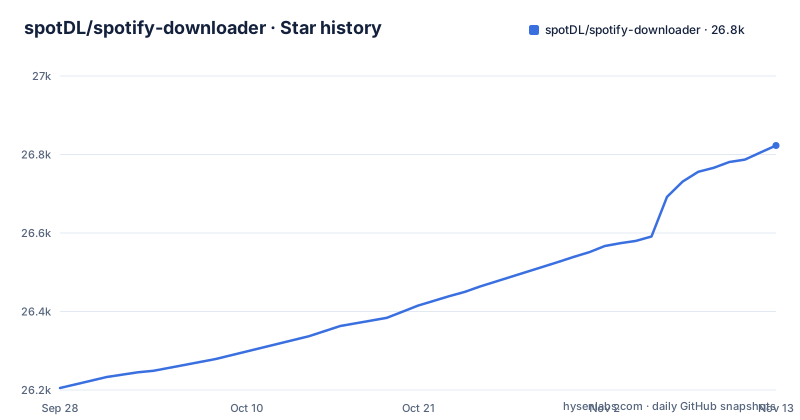
Star history
- spotDL/spotify-downloader26,823 ★ · +618
| Repository | 2026-09-28 | 2026-11-13 |
|---|---|---|
| spotDL/spotify-downloader | 26.2k | 26.8k |
618 Stars in the last 46 days, measured from the daily GitHub snapshot. Compare with other projects
Editorial analysis
Deno is the dependency that quietly fails your first playlist
Deno is officially a strong recommendation rather than a requirement, but it is not an extra to skip. spotDL uses yt-dlp for the YouTube side, and the documentation says plainly that some videos require Deno to download successfully, and that without it spotDL may fail on some songs, including videos marked as "made for kids." That is a real subset of tracks failing, not a hypothetical.
What makes it awkward is the shape of the failure. Without Deno, the documented symptom is that some songs fail to download. Both runtimes have the same convenience pattern, each installing to the spotDL directory rather than system-wide:
spotdl --download-ffmpegspotdl --download-denoTreat FFmpeg and Deno as part of installation. If you want FFmpeg system-wide instead, the docs point at the platform package managers, with `brew install ffmpeg` on macOS and `sudo apt install ffmpeg` on Linux among the options.
128 and 256 kbps is the ceiling, and YouTube sets it, not Spotify
Since spotDL pulls audio from YouTube rather than from Spotify, the quality you can reach is bounded by what YouTube serves for that video, not by what your Spotify subscription includes. The documentation states that spotDL is designed to always download the highest possible bitrate, which is 128 kbps for regular users and 256 kbps for YouTube Music premium users.
So the premium tier is a YouTube Music subscription, not a Spotify one. A Spotify Premium subscriber who has no YouTube Music gets 128 kbps files. That is the single most important fact for anyone building a local library out of this, because it determines whether the files are archival or just convenient.
The practical consequence is that these files are not bit-equivalent to a lossless rip of the same recording, even when the tags match. If you are trying to match a downloaded file against a lossless library and the hashes differ, that is the format ceiling rather than a bad download. Format and quality details live on a dedicated audio formats page in the docs.
sync is a two-file state machine, not a live mirror
`sync` is the operation that turns spotDL from a one-shot downloader into something you can run on a schedule, and it works by carrying state in a file you create once. The first run takes the playlist and writes that state:
spotdl sync [query] --save-file {filename}.spotdlAfterwards, to bring the directory up to date, you pass the file back rather than the URL:
spotdl sync {filename}.spotdlThe delete semantics are what make this safe to point at a directory you care about. The documentation is specific: newly added songs will be downloaded and removed songs will be deleted, and no other songs will be downloaded and no other files will be deleted. That last clause is the important one. Files you added by hand, or anything else sitting in the folder, are left alone, and only the delta against the playlist is touched.
The cost is that the `.spotdl` state file becomes load-bearing. Delete it and the next sync has no record of what it previously downloaded. Keep it with the music, not in a temp directory, and treat the pair as a unit.
The web interface is deliberately hobbled to single songs
spotDL does have a web mode, and it is worth being clear about how limited it is, because the presence of a browser interface invites the assumption that it mirrors the CLI. It does not. The documentation says `spotdl web` starts a web interface instead of using the command line, and that it has limited features and only supports downloading individual songs.
Every operation that matters for a library, syncing a playlist, saving metadata, resolving URLs, retagging files, is a command line operation. If you are scripting a mirror or a recurring job, you are on the CLI and the web mode is not an alternative path to it.
That constraint is also visible in the dependency list, which carries a full web stack regardless of whether you ever open the interface: fastapi and uvicorn for the server, jinja2 for templating, python-multipart for uploads, and websockets. A CLI-only user still installs all of it, which is the trade for having a browser front end at all. For grabbing a single track without leaving the desktop, the web mode does the job it is sized for.
It sources from YouTube on purpose and disclaims the rest
spotDL does not pull audio from Spotify. It reads the playlist from Spotify, locates a matching video on YouTube, and downloads that. The stated reason for the design is to avoid issues related to downloading music from Spotify. That single architectural choice explains the bitrate ceiling, the Deno dependency, and the legal posture below.
On the legal side, the project attaches a clear note: users are responsible for their actions and potential legal consequences, it does not support unauthorized downloading of copyrighted material, and it takes no responsibility for user actions. The code itself is MIT licensed.
Those two facts sit side by side, and the distinction is worth keeping straight. The MIT licence covers the software, not the rights in any particular recording. Whether you may download and keep a given track is a question about the rights in that music and your jurisdiction, not about the licence of the tool doing the downloading. A permissive licence on a downloader does not create permission to download. Check what you are actually allowed to do with the output in your own context before you rely on this for anything ongoing.
pip install pulls a web stack whether you use it or not
The recommended install is a single command, and on some systems you may need pip3 instead of pip:
pip install spotdlBut spotDL is not a lightweight CLI in dependency terms. Alongside the expected pieces, spotipy for Spotify, ytmusicapi for YouTube Music search, yt-dlp for downloading, mutagen for tags, and rich for terminal output, the package pulls a serving stack: fastapi, uvicorn, jinja2, python-multipart, websockets, and datastar-py. Every one of those is installed whether or not you ever run `spotdl web`, which is a meaningful part of the install for a command line tool.
Python support is declared as 3.11 and up but below 3.16, with classifiers spanning 3.11 through 3.15. If your interpreter sits outside that window the install will not resolve cleanly. When pip is not the route you want, the alternatives are a prebuilt executable from the Releases tab, an Arch User Repository package, a Termux one-liner, or Docker, which is covered next.
The container runs as a non-root user and bakes Deno in at build time
The Dockerfile is deliberate about privilege. It accepts UID and GID build arguments defaulting to 1000, creates a spotdl group and user with those IDs, chowns the application directory, and switches to that user before the entrypoint runs. It also pre-creates the output directory and chowns it specifically so that a freshly mounted named volume inherits writable ownership, which is the fix for the common permission-denied-on-empty-volume problem.
Two other build-time choices matter. FFmpeg and aria2 are installed as system packages during the build, and Deno is fetched by running the downloader itself as a build step, so Deno is already present inside the image before any music is requested. The entrypoint then invokes the tool through uv with a frozen lockfile.
The compose file passes the identity through from the host with a UID defaulting to 1000 and a GID defaulting to 1000, mounts a named volume for the music, and sets the timezone. The ownership of files you get back therefore follows those two build arguments, so set them to match the user on your host rather than leaving the defaults, or the files will be owned by a different numeric user than you expect.
Editorial conclusion
spotDL suits someone who wants a mirrored folder of a playlist they can keep in sync, and who is comfortable with a Python tool that pulls a web stack whether or not you use the web interface. It does not suit you if you need lossless or 320 kbps files, since the ceiling is YouTube's 128 or 256 kbps, and it is not a way to get audio straight from Spotify. Before you build a library on it, verify two things: that Deno is actually installed, because without it some songs may fail to download, and that your intended use of the downloaded audio is one you are permitted to do, since the MIT licence covers the tool and not the recording.
Frequently asked questions
how to install spotify downloader
The recommended method is `pip install spotdl`, and you can update with `pip install --upgrade spotdl`; on some systems pip must be pip3. Two runtimes are also needed: FFmpeg, which is required and which you can install into the spotDL directory with `spotdl --download-ffmpeg`, and Deno, which is strongly recommended because spotDL uses yt-dlp and some videos need Deno to download, installable with `spotdl --download-deno`. Prebuilt executables, an Arch AUR package, a Termux script, and Docker are the alternatives.
Does spotDL download audio directly from Spotify?
No. spotDL uses YouTube as the source for music downloads, and the documentation gives the reason as avoiding any issues related to downloading music from Spotify. It reads your playlist from Spotify, finds a matching video on YouTube, and downloads that, which is also why the highest bitrate it can reach is YouTube's, 128 kbps for regular users or 256 kbps for YouTube Music premium users.
How do I keep a folder in sync with a Spotify playlist?
Use the sync operation in two steps. First run `spotdl sync [query] --save-file {filename}.spotdl` to write a state file from the playlist. After that, run `spotdl sync {filename}.spotdl` to update the directory. Sync downloads newly added songs and deletes songs removed from the playlist, while leaving any other files in the directory untouched, so keep the state file with your music so it is not lost.
Official sources
Add this badge to your README
If you maintain this project, the badge below links readers to this analysis and shows its maintenance status from the daily GitHub snapshot. Paste the markdown into your README; add ?metric=license or ?metric=stars to the image URL for a different field.

[](https://hysenlabs.com/projects/spotdl-spotify-downloader)Star history chart for your README
[](https://hysenlabs.com/projects/spotdl-spotify-downloader)Was this useful?