hdmi: sending real HDMI 1.4b from an FPGA without licensing an IP core
Send video/audio over HDMI on an FPGA
At a glance
- What is it?
- hdmi is a SystemVerilog implementation of HDMI 1.4b video and audio output for FPGAs, covering data islands, ECC, audio clock regeneration and L-PCM audio, with a dual-licensed MIT and Apache 2.0 core. It is a take-it-into-your-own-project library rather than a turnkey design, and its release history stops in 2021.
- Who is it for?
- Adopt hdmi if you are building an FPGA design that must output real HDMI rather than DVI, and you want the protocol layers implemented for you without licensing a vendor IP core. Do not adopt it expecting a finished reference design, a maintained project, or support for 4K at 60Hz, since 3840x2160 at 60Hz is marked not ready in the pixel clock table.
- Can I use it commercially?
- Check first. The repository uses a licence we do not classify automatically, so read its LICENSE file before any commercial use.
- Is it still maintained?
- Yes. The repository last received commits 117 days ago.
- What is it written in?
- Mainly SystemVerilog, according to GitHub's language statistics.
Answers come from the project's GitHub data, last synced on November 6, 2026, and from our analysis. They are not legal advice.
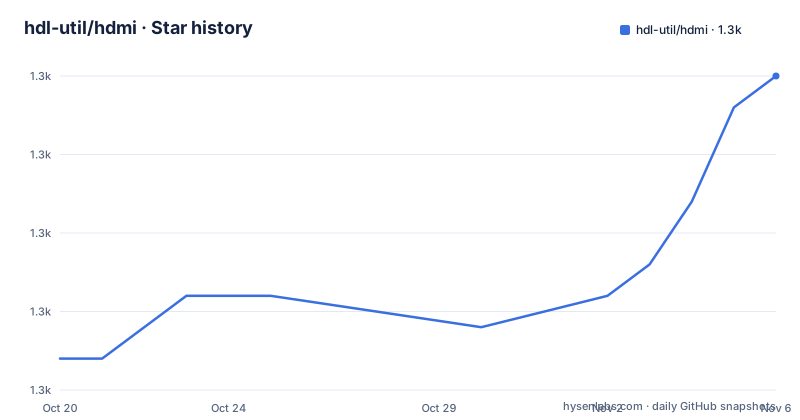
Star history
- hdl-util/hdmi1,315 ★ · +9
| Repository | 2026-10-20 | 2026-11-06 |
|---|---|---|
| hdl-util/hdmi | 1.3k | 1.3k |
9 Stars in the last 17 days, measured from the daily GitHub snapshot. Compare with other projects
Editorial analysis
Why DVI is not enough
hdmi is SystemVerilog code for HDMI 1.4b video and audio output on an FPGA, and the README opens with the reason it exists. Most free and open source HDMI source implementations, meaning computer and gaming console sources, actually output a DVI signal, which HDMI sinks, meaning TVs and monitors, are backwards compatible with. To support audio and other HDMI-only functionality, a true HDMI signal must be sent. The code lets you do that without licensing an HDMI IP block from anyone.
That is the whole problem statement, and it is a good one. DVI over an HDMI connector is a subset: video, and no audio, no InfoFrames beyond the basics, and none of the HDMI-specific features. If you want a monitor to show a boot splash and play a beep, or you want a device to identify itself properly in the sink's input list, you need the real thing, and the real thing is a licensed core in the commercial world. This repository implements it in SystemVerilog, and the primary language of the repository is SystemVerilog.
The demo in the README is deliberately modest: VGA-compatible text mode, 720x480p, on a Dell Ultrasharp 1080p monitor. That is the same 720x480p mode used by the DVI-compatible implementations, which is a useful detail, because it means the demo proves the data island and audio path work rather than the video path.
The licence situation is stated clearly, and it is one of the more permissive arrangements in FPGA work. The project is dual-licensed under MIT and Apache 2.0, with the SPDX-License-Identifier: MIT OR Apache-2.0 identifier, and the repository carries both LICENSE-MIT and LICENSE-APACHE files. The repository's own metadata records the licence as a custom one that GitHub cannot classify, but the README and the two licence files are unambiguous. For a company with an open source review process, MIT OR Apache-2.0 is one of the easiest outcomes to approve, and it means the code can go into a proprietary product with attribution.
The homepage is a blog post announcing the release, on purisa.me.
How you actually use it: files you copy into your own project
The usage section is short and the shape of it matters. You take files from src/ and add them to your own project. If you use hdlmake, you can add this repository itself as a remote module. Other helpful modules for displaying text and generating sound are also available in the same GitHub organization. You consult the simple usage example in top/top.sv, look at the hdmi-demo repository for code that runs the demo as seen in the GIF, read through the parameters in hdmi.sv and tailor any instantiations to your situation. And if you hit a problem, you file an issue, having consulted the troubleshooting section first.
So this is a source library in the sense that you vendor it. It is not a package you install, a core you instantiate and configure with a wizard, or a board support package. The unit of adoption is a directory of SystemVerilog files that you copy in and then wire up yourself, with hdmi.sv as the module whose parameters you set.
The two build paths are worth separating. hdlmake is the build tool this project uses, with the repository carrying a Manifest.py and a requirements.txt pinning hdlmake==3.3 and six==1.14.0, and hdlmake is what lets you pull the repository in as a remote module. If you do not use hdlmake, you copy the files, which means you own the vendoring and the updates.
The repository layout backs this up. There is src/ with the implementation, top/ with the example, test/ for the testbench, sim/ for simulation, a Manifest.py for the hdlmake build, and requirements.txt for the Python side of the build tooling. The two licence files sit at the root alongside the README and its French translation.
The platform support list in the README is the practical guide to what you are signing up for. Altera is checked, tested on the MKR Vidor 4000. Xilinx is checked, tested on the Spartan Edge Accelerator Board. Lattice is unchecked and marked unknown. Gowin is marked WIP, with active testing on Tang Nano 9K. Two platforms are tested, one is unknown, one is work in progress.
What the implementation covers: data islands, ECC and audio
The to-do list in the README is effectively the feature matrix, and reading it tells you what you get and what you do not.
On the video side, 24-bit colour is done, as are the video formats 1, 2, 3, 4, 16, 17, 18 and 19, and a VGA-compatible text mode with the IBM 8x16 font. Alternate fonts are not done. Other colour formats such as YCbCr and deep colour are not done, nor are other video ID codes, interlaced video or pixel repetition.
On the HDMI-specific side, which is the point of the project, data island packets are implemented, including the null packet, ECC with BCH systematic encoding over GF(2^8), audio clock regeneration, and L-PCM audio in 2-channel. The InfoFrame set includes the Audio InfoFrame, the Auxiliary Video Information InfoFrame and the Source Product Descriptor InfoFrame. The MPEG Source InfoFrame is explicitly not implemented, and the README carries a note explaining why: problems with the MPEG Source InfoFrame were identified that could not be fixed in time for CEA-861-D, so implementation is strongly discouraged until a future revision fixes them. Gamut Metadata and 1-bit audio are also not done, and L-PCM beyond 2 channels, from 3 to 8, is not done.
That MPEG note is a good example of the project being candid about a specification problem rather than a coding problem, and it is the kind of detail that tells you the author worked against real sinks.
The audio configuration is a parameter of the HDMI module, and bitrate can be any value from 16 through 24. The README gives a mapping from sampling frequency to the AUDIO_RATE value, 32 kHz to 32000, 44.1 kHz to 44100, 88.2 kHz to 88200, 176.4 kHz to 176400, 48 kHz to 48000, 96 kHz to 96000 and 192 kHz to 192000. There is also a warning in capitals about the audio being REALLY LOUD if you use the full dynamic range with hand-generated waveforms, and the suggestion of using less dynamic range, with the example of audio_sample >> 8, so you are not deafened.
The clocking requirement, which is where most designs go wrong
You need a PLL for the two HDMI clocks, and the README is specific about the second one. The pixel clock for each supported format is given in a table, and the second clock is a clock 5 times as fast as the pixel clock. Even if your FPGA only has a single PLL, the Altera MegaWizard, or the Xilinx equivalent, should still be able to produce both, and the hdmi-demo repository has example PLLs.
That 5x relationship is the kind of detail that decides whether a design fits. The table covers 640x480 at 25.2MHz and 25.175MHz, 720x480 at 27.027MHz and 27MHz, 720x576 at 27MHz, 1280x720 at 74.25MHz, 74.176MHz and again 74.25MHz for the 50Hz entry, 1920x1080 at 148.5MHz and 148.352MHz for 60Hz and 59.94Hz, 1920x1080 at 74.25MHz and 74.176MHz for 30Hz and 29.97Hz, and 3840x2160 at 297MHz at 30Hz. The 3840x2160 at 60Hz row with 594MHz is marked not ready.
That last entry is the important one for planning. A 594MHz pixel clock plus a 5x clock at nearly 3GHz is beyond the I/O capability of most FPGAs, and the README says as much in the troubleshooting section: some FPGAs do not support I/O at speeds high enough to achieve 720p or 1080p. The suggested workaround for Altera users is to specify speed grade C6 and see if it works, though yours may be C7 or C8, and the README warns that this might introduce some system instability. Trading stability for I/O speed on a timing-critical video link is the sort of decision that belongs at the start of a project rather than the end.
The same section also covers the other two classic hardware problems. Poor wiring, if you are using a breakout board or long lengths of untwisted wire, might give a few jittering pixels from interference, and the advice is to make sure all the necessary pins are connected including the ground pins, and to try a different HDMI cable, since some cheap cables have poor shielding. And a separate one: all the modules are unaware of hotplug, which the README says should not affect anything in the long term, with the only stateful value being hdmi.tmds_channel[2:0].acc.
The TMDS problem, and the LVDS workaround
The second hardware constraint is the one that catches people out, and the README gives a worked answer to it.
Many FPGAs without a dedicated HDMI output do not support TMDS, which is the signalling standard HDMI uses. The README says you should be able to directly use LVDS at 3.3v instead, tested up to 720x480, and that this might not work if your video has a high number of transitions or you plan to use higher resolutions.
The solution given is to AC-couple the 3.3v LVDS wires by adding 100nF capacitors in series, as close to the transmitter as possible. The reasoning is in the README and it is worth repeating because it is the kind of thing people try to work around by guessing. TMDS is current mode logic, and driving a CML receiver with LVDS is detailed in Figure 9 of the document on interfacing LVDS with other differential I/O types. Resistors are not needed since the Vcc is 3.3v for both the transmitter and receiver. And there is a worked example: J13 on the Arduino MKR Vivado 4000 schematic, where LVDS IO standard pins on a Cyclone 10 FPGA have 100nF series capacitors.
That specific reference to a real board schematic is what makes the advice actionable rather than theoretical.
The Source Device Information Code is the other configuration item worth understanding. This code is sent in the Source Product Descriptor InfoFrame via SOURCE_DEVICE_INFORMATION to give HDMI sinks an idea of what capabilities an HDMI source might have, and the README notes it may be used for displaying a relevant icon in an input list, for example a DVD logo for a DVD player. The table runs from 0x00 for Unknown, through 0x01 Digital Set-top Box, 0x02 DVD Player, 0x03 Digital VHS, 0x04 HDD Videorecorder, 0x05 Digital Video Camera, 0x06 Digital Still Camera, 0x07 Video CD, 0x08 Game, 0x09 PC General, 0x0a Blu-Ray Disc, 0x0b Super Audio CD, 0x0c HD DVD and 0x0d Portable Media Player.
That last value matters for a device built with this code. If you set 0x08 for a game console, the sink's input list will show a game console icon next to your device, and any user who has a real console attached will be mildly confused about which input to select.
Maintenance, and the state of the release history
The maintenance picture needs to be stated precisely, because the repository is not archived but the releases are old.
The three most recent releases are v1.2.1 on 2021-03-08, v1.2 on 2021-02-28, and v1.1.1 on 2021-02-27, the last of which is described as DDR for Xilinx Platform. The last push was on 2026-07-13, so the repository is not archived and there has been activity on the branch, but there has been no tagged release since March 2021.
That gap has a practical consequence. The version you are most likely to copy is the version in the repository today, which is not a tagged release, and the release notes for it are not something the README summarises. The CHANGELOG is not in the top-level listing either, so the history of unreleased changes is not documented in the way the tags are.
There is a positive side. The project is not abandoned in the sense of being frozen, and the to-do list in the README is still being worked through: Gowin support is marked WIP with active testing on Tang Nano 9K, and there are unchecked items such as the 3 to 8 channel L-PCM audio, alternate fonts, other colour formats and interlaced video, which suggests the to-do list is live rather than a historical document.
The licence is the strong part of the risk picture, and it is not a close call. MIT OR Apache-2.0 lets you use the code in a commercial product, with attribution and, for Apache 2.0, the patent grant and the NOTICE requirements. The dual licence also lets you choose which of the two terms suits your organisation, which is a genuine convenience in a legal review.
For a project at version 1.2 with a five-year gap between the last release and the last push, the reasonable expectation is that you are forking a working implementation and taking responsibility for it, not waiting for upstream to add a feature. That is a perfectly good arrangement for FPGA work, where designs are long-lived and the code is copied rather than depended upon, and it is the reason the licensing is so permissive in the first place.
Editorial conclusion
Adopt hdmi if you are building an FPGA design that must output real HDMI rather than DVI, and you want the protocol layers implemented for you without licensing a vendor IP core. Do not adopt it expecting a finished reference design, a maintained project, or support for 4K at 60Hz, since 3840x2160 at 60Hz is marked not ready in the pixel clock table. Verify first that your FPGA part has the I/O speed and the TMDS-capable output the README describes, that the platform you use is on the tested list rather than the unknown one, and that the source device information code you send matches what your sink expects.
Frequently asked questions
What is the difference between this HDMI implementation and a DVI output?
The README explains that most open source HDMI source implementations actually output DVI, which HDMI sinks accept for video but which carries no audio. This code sends a true HDMI 1.4b signal with data islands, ECC, audio clock regeneration and L-PCM audio, without licensing a vendor HDMI IP block.
How do I use the hdmi code in my own FPGA project?
The README says to take the files from src/ and add them to your own project, or to add the repository as a remote module if you use hdlmake. You then look at the example in top/top.sv and tailor the parameters in hdmi.sv. The hdmi-demo repository contains code that runs the demo shown in the README.
Which FPGA platforms are supported?
The README's platform list marks Altera as supported and tested on the MKR Vidor 4000, and Xilinx as supported and tested on the Spartan Edge Accelerator Board. Lattice is listed as unknown and Gowin is work in progress with active testing on the Tang Nano 9K.
Can I drive the HDMI output from an FPGA without TMDS support?
The README says you should be able to use LVDS at 3.3v directly, tested up to 720x480, by AC-coupling the wires with 100nF capacitors in series as close to the transmitter as possible, because TMDS is current mode logic. It points to pin J13 on the Arduino MKR Vivado 4000 schematic as a worked example.
What licence does the hdmi code use?
The README states the project is dual-licensed under MIT and Apache 2.0, with the SPDX-License-Identifier: MIT OR Apache-2.0 identifier, and the repository carries both LICENSE-MIT and LICENSE-APACHE files at the root.
Official sources
Add this badge to your README
If you maintain this project, the badge below links readers to this analysis and shows its maintenance status from the daily GitHub snapshot. Paste the markdown into your README; add ?metric=license or ?metric=stars to the image URL for a different field.

[](https://hysenlabs.com/projects/hdl-util-hdmi)Star history chart for your README
[](https://hysenlabs.com/projects/hdl-util-hdmi)Was this useful?