HelloCSV: a drop in CSV importer with a four step upload wizard
https://hellocsv.github.io/HelloCSV/
At a glance
- What is it?
- HelloCSV is a frontend only JavaScript library that puts a CSV import wizard into an application, covering upload, column mapping, preview and confirmation, with custom columns, validations and transformations. It builds for React, Preact and a bundled vanilla target, and at version 0.6.0 it is still a young package with a young release history.
- Who is it for?
- Adopt HelloCSV if your product needs users to upload CSV data and you want a mapping and preview step instead of a raw file input, and if you are on React, Preact or plain JavaScript. Do not adopt it expecting server side guarantees, since the whole package is frontend only and the README does not document file size limits or encoding handling.
- Can I use it commercially?
- Yes. MIT is a permissive licence: you can use, modify and sell software built on it, as long as you keep its copyright and licence notices.
- Is it still maintained?
- Yes. The repository last received commits 19 days ago.
- What is it written in?
- Mainly TypeScript, according to GitHub's language statistics.
Answers come from the project's GitHub data, last synced on November 7, 2026, and from our analysis. They are not legal advice.
Star history
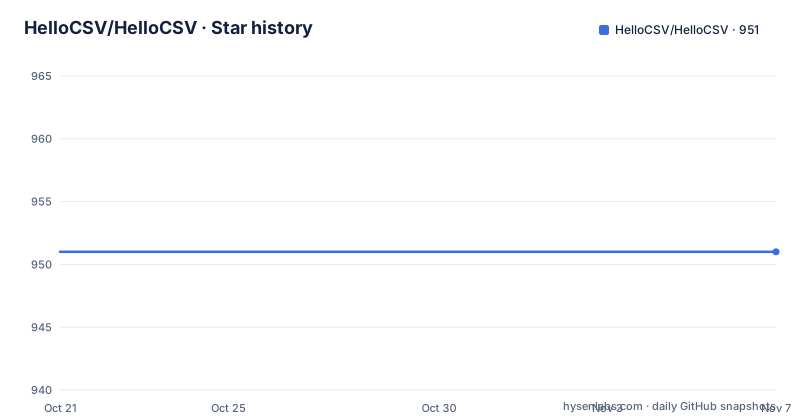
- HelloCSV/HelloCSV951 ★ · +0
| Repository | 2026-10-21 | 2026-11-07 |
|---|---|---|
| HelloCSV/HelloCSV | 951 | 951 |
0 Stars in the last 17 days, measured from the daily GitHub snapshot. Compare with other projects
Editorial analysis
The import problem every product runs into
The README opens by naming a problem that most projects hit eventually: importing user uploaded data from CSV files in a way that does not cause a ton of issues. Developers always have to work out four things.
How do you make sure the uploaded data is correct. How do you notify the user that the data is incorrect before they upload it, and give them a chance to fix it. How to deal with incorrect or duplicate data that has already been uploaded, which the README calls super annoying to try to fix after the fact. And how to run automatic formatters, for example phone number formatting, while providing a way for the user to see what the formatter did before the upload as a sanity check.
That last one is the sharpest problem, and it is the reason a preview step exists at all. A formatting rule that silently rewrites a column is harmless when you are formatting a display value and damaging when it happens between the user's file and your database.
HelloCSV is described as a Javascript library that drops a CSV importer into your project. The three headline properties are that it has a small JS footprint, that it does not assume your frontend stack, and that it ships a UI rather than a set of hooks you wire together yourself. The documentation lives at hellocsv.mintlify.app, and there is a demo at hellocsv.github.io/HelloCSV.
The primary language is TypeScript, and the package on npm is named hello-csv at version 0.6.0.
Upload, map columns, preview, confirm
The wizard structure is stated in one line and it is worth unpacking, because each step answers one of the four questions above.
The flow is upload, then map columns, then preview data, then upload confirmation. Uploading is the file pick. Mapping is where the user says which CSV column is which field, which is also where a default mapping can be pre-filled for the common case. Preview is where the parsed rows are shown, and it is the point at which validations and transformations become visible to the user. Confirmation closes the loop and performs the upload.
The mapping step is the part that most often gets skipped in home grown importers, and it is the part that determines whether the parsed data is usable. A CSV has no schema, so the header row is the only evidence of what the columns mean, and a user whose file has the columns in a different order produces garbage if the importer guesses by position.
Preview and confirmation together are what turn the importer from a file input into a review tool. The user sees the parsed result, including any formatting that was applied, before anything reaches the server. That is the difference between a validation error the user can fix in ten seconds and a support ticket about rows that failed to import.
Custom columns, validations and transformations
The feature list is short and each item is a hook into the pipeline.
Custom columns are supported, which means the columns the user sees in the mapping and preview steps are yours rather than whatever the CSV happened to contain. With custom columns come custom validations and custom transformations, and the README gives the phone number formatting case as the example of a transformation that runs automatically and should be visible to the user before upload.
The division between the two is the useful distinction. A validation decides whether a value is acceptable and produces an error message when it is not. A transformation rewrites a value into the form you want to store, and the design intent of this library is that both are visible in the preview, so the user can see what your rules did rather than discovering it after the fact.
That combination is what makes the library more than a file reader. A plain CSV parse gives you strings. What most applications actually need is a typed, validated and normalised set of rows, with a UI where the user can confirm the result, and HelloCSV is aimed at exactly that gap.
The package keywords list csv, importer, import, convert, json, react, upload, preview, parse, parser, csv-parse and typescript, which describes the intended integration surface: your application hands it a file, it hands you back data.
Three build targets instead of one framework assumption
The claim that it does not assume your frontend stack is backed by the build configuration rather than only by prose.
The package scripts define three parallel builds: build:react, build:preact and build:bundled, each running the TypeScript compiler and then Vite in the matching mode, with the full build running all three in parallel through npm-run-all. The exports map publishes separate entry points, ./react with its own ES and CJS builds and type definitions, and a matching ./react/index.css for the stylesheet, and the same pattern for ./preact. The bundled target exists for projects that want a single file with no framework.
The repository layout matches. There are example-next-js/, example-preact/, example-react/ and example-vanilla/ directories, so each supported integration has a working example, and the deploy script publishes the Preact example to gh-pages, which is how the demo page is produced.
Two more details show the project treats itself as a library rather than an application. The package is marked as an ES module with a source entry at src/index.ts and type declarations at dist/types/index.d.ts, and a prepare script emits declaration files, so consumers get types without the TypeScript sources.
The tooling is TypeScript with a tsconfig.json and a separate tsconfig.react.json, Vite for bundling, Vitest for tests, ESLint run with --max-warnings=0 over the source, and Prettier for formatting, with the standard JavaScript style guide badge in the README.
Installing from npm or pulling it from a CDN
The npm route is one command:
npm install hello-csvFor a quick prototype or a project without a bundler, the CDN route loads the ES module build and the stylesheet directly:
<script src="https://cdn.jsdelivr.net/npm/[email protected]/dist/bundled/index.es.js"></script>
<link rel="stylesheet" href="https://cdn.jsdelivr.net/npm/[email protected]/dist/bundled/hello-csv.css">
Both CDN URLs pin the version at 0.6.0, which is worth keeping in mind. A pinned URL gives you a reproducible page, but it also means you have to bump the URL by hand to pick up a fix, and the stylesheet is loaded separately, so a page that adds the script without the stylesheet gets a working importer with an unstyled one.
The bundled path is the one to use if you have no build step at all. If you do have a bundler, import from the react or preact entry point instead, which gives you the framework specific build and the matching type definitions.
Since the whole library is frontend only, there is no server component to install, no database migration to run and no service to keep alive. What you configure is the columns, the validations and the transformations, and where the confirmed rows should go.
Frontend only is both the design and the limit
The description calls it a frontend only CSV importer workflow, and that word does most of the work in understanding both the appeal and the constraint.
The appeal is that there is no infrastructure. The user opens your application, uploads a file, and the parsing, mapping, validation and preview all happen in the browser. Your backend receives data that has already been through a schema the user has seen and approved. For many products that is the entire requirement, and a server side importer would be a service to deploy, secure and maintain for a workflow that could have run client side.
The constraint is that everything the library does is advisory. Validation that runs in the browser tells the user about a problem before they upload; it does not make the data valid once it arrives at your API. If the importer is the only thing standing between a file and your database, you are trusting client side code with your own integrity rules, and any user can bypass the wizard and post whatever they like. The README does not describe a server side counterpart, a signed payload or any verification of the uploaded data.
The README also does not document the practical edges. There is no statement about maximum file size, about whether parsing happens on the main thread or in a worker, about delimiter detection, about character encoding beyond UTF-8, or about how a malformed row is reported to the user. For a library aimed at user facing uploads, those are the questions to answer before you ship, and they are questions the documentation leaves open rather than questions the code has refused.
A young package with an active release line
The release history is short but moving. v0.4.4 was released on 2026-07-10, v0.5.0 on 2026-09-20 and v0.6.0 on 2026-10-04, and the last push was on 2026-10-19. The repository is not archived, the default branch is main, and the package is published under the MIT licence with the licence badge in the README pointing at the standard licence text.
A pre-1.0 version number is the honest signal here. It says the public API may still change between minor versions, which for a library that exports several entry points and a set of component props means your upgrade notes will occasionally be more than a version bump. Pinning the version in your lockfile and reviewing the release notes before upgrading is the sensible discipline at this stage.
The package name on npm is hello-csv while the repository and organisation are HelloCSV, which is a small trap worth noting if you search for one and not the other. The project also advertises issue trackers labelled bug and enhancement, a developer docs site on Mintlify, and a demo page that is deployed from the Preact example.
For a team shipping this to end users, the sensible posture is to adopt it inside your own upload flow with your own column configuration, and to treat the version as something you own rather than something you track.
Editorial conclusion
Adopt HelloCSV if your product needs users to upload CSV data and you want a mapping and preview step instead of a raw file input, and if you are on React, Preact or plain JavaScript. Do not adopt it expecting server side guarantees, since the whole package is frontend only and the README does not document file size limits or encoding handling. Before you ship it, check that your validation rules can live in the browser, verify the bundle you import matches your framework, and note that the licence is MIT with v0.6.0 released on 2026-10-04 and the last push on 2026-10-19.
Frequently asked questions
How do I install HelloCSV?
Install it from npm with npm install hello-csv, or load the bundled ES module and stylesheet from jsdelivr. The package also publishes separate react and preact entry points for projects with a bundler.
What steps does the HelloCSV import wizard present to the user?
Four steps: upload, map columns, preview data, and upload confirmation. The preview step is where validations and transformations become visible before anything is uploaded.
Does HelloCSV run on the server?
No. It is described as a frontend only CSV importer workflow, so parsing, mapping, validation and preview all happen in the browser and there is no server component to deploy.
Can I use HelloCSV with React, Preact or plain JavaScript?
Yes. The build produces react, preact and bundled targets, the exports map publishes react and preact entry points with their own type definitions, and the repository includes example-react, example-preact, example-vanilla and example-next-js directories.
What licence is HelloCSV released under and what is the current version?
The package is MIT licensed and the npm version is 0.6.0, released on 2026-10-04, with the last push on 2026-10-19. It is still a pre-1.0 package, so the API may change between minor versions.
Official sources
Add this badge to your README
If you maintain this project, the badge below links readers to this analysis and shows its maintenance status from the daily GitHub snapshot. Paste the markdown into your README; add ?metric=license or ?metric=stars to the image URL for a different field.

[](https://hysenlabs.com/projects/hellocsv-hellocsv)Star history chart for your README
[](https://hysenlabs.com/projects/hellocsv-hellocsv)Was this useful?