ian-handdrawn-ppt for Codex PNG Slide Generation
中文手绘技术 PPT 整页图像生成 Skill | 21:9 封面 + 16:9 正文配图 | PNG 输出
At a glance
- What is it?
- ian-handdrawn-ppt is a Codex Skill that turns Chinese source material into planned, hand-drawn technical illustrations and PNG outputs. It suits article and course production, but it does not generate editable PPTX files.
- Who is it for?
- Adopt ian-handdrawn-ppt when the deliverable is a cohesive set of Chinese raster illustrations and narrative planning matters more than editability. Do not adopt it for editable PPTX, PDF, Keynote, or interactive output.
- Can I use it commercially?
- Yes. MIT is a permissive licence: you can use, modify and sell software built on it, as long as you keep its copyright and licence notices.
- Is it still maintained?
- Yes. The repository last received commits 12 days ago.
- What is it written in?
- GitHub does not report a main language for this repository.
Answers come from the project's GitHub data, last synced on November 7, 2026, and from our analysis. They are not legal advice.
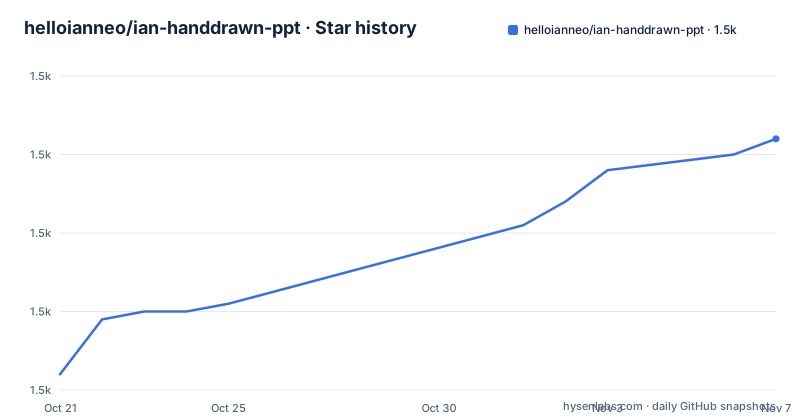
Star history
- helloianneo/ian-handdrawn-ppt1,512 ★ · +30
| Repository | 2026-10-21 | 2026-11-07 |
|---|---|---|
| helloianneo/ian-handdrawn-ppt | 1.5k | 1.5k |
30 Stars in the last 17 days, measured from the daily GitHub snapshot. Compare with other projects
Editorial analysis
Why ian-handdrawn-ppt Produces Raster Pages Instead of PPTX
ian-handdrawn-ppt addresses a specific content production problem: turning an article, lecture outline, transcript, or set of notes into Chinese technical illustrations that feel like deliberate teaching pages rather than a conventional slide template. The intended users include writers of Chinese technical articles, instructors preparing courses or workshops, and Codex users who want the agent to plan a visual narrative before generating images.
The project is not a presentation editor and does not promise editable slide objects. Its normal outputs are one 21:9 cover, 16:9 body illustrations, a contact sheet for reviewing multiple pages, and a short slide blueprint summary. It does not output PPTX, image-based PPTX, PDF, Keynote, HTML, SVG, or canvas versions. This boundary is central to adoption. If a later editing stage requires selectable text, positioned vector shapes, speaker notes, animations, or a conventional presentation package, this Skill is the wrong output format.
A traditional PPTX or slide-template workflow represents content as editable slide objects and delegates final layout to a presentation engine. ian-handdrawn-ppt instead produces complete raster images after planning each page as a semantic illustration. The README does not document conversion from its PNG output into an editable deck, so that bridge must not be assumed.
The repository is not archived, and its last push was on 2026-09-24. That indicates recent repository activity at the recorded point, although it does not establish a release cadence or compatibility guarantee. The repository has no GitHub releases, so installation is based on cloning the default branch rather than selecting a documented release artifact.
How the Codex Skill Maps Content to Visual Pages
The Skill begins with an intake stage that examines the topic, audience, context, objective, central arguments, and whether the source contains enough material. It accepts articles, Markdown, PDF, DOCX, PPTX, course outlines, scripts, or rough ideas as input. The output files can differ from those input formats: PPTX and PDF may be read, but the final deliverable remains PNG pages.
After intake, the workflow chooses a narrative form. The documented options include teaching, persuasion, reporting, product explanation, and knowledge-card structures. Each page is then assigned an archetype such as a cover metaphor, left-right comparison, process, cycle, classification, matrix, or summary. This is a content-directed approach rather than placing text into a fixed set of slide layouts.
The Skill then applies a visual lock covering the paper background, title treatment, page numbering, line style, colors, and graphic scale. Each page receives its own image prompt containing the page role, main message, composition, and `Required text only`. That last field is intended to constrain visible wording, which is important because image models can invent labels or render Chinese characters incorrectly.
Generation and inspection follow the planning stage. The documented checks cover Chinese text, aspect ratio, style consistency, unwanted yellowing, and excessive template appearance. For a multi-page deck, the Skill generates a contact sheet for quick review. The README also recommends producing several versions of each page and selecting the one with the most stable Chinese characters, composition, and semantic relationships.
The Handdrawn Technical Style and Its Constraints
The default style uses a near-white, non-yellow paper background, fine hand-drawn lines, light pencil hatching, restrained titles, and a limited palette of pale blue, sage green, light peach, and light purple. The central illustration is meant to remain relatively small, leaving substantial white space. Visible Chinese text is kept short so it can be inspected, and the style permits only a small reader or engineer character in limited circumstances.
The reference image is stored at `ian-handdrawn-ppt/assets/reference-handdrawn-article-illustration-style.png`. Repository files also include `theme-tokens.json`, while the supporting references include `intake.md`, `narrative-planning.md`, `output-quality.md`, `prompt-patterns.md`, `slide-archetypes.md`, and `visual-dna-v6.md`. Based on that layout, the installable directory is the child directory named `ian-handdrawn-ppt`, not the repository root.
The visual system is suitable for technical explanation pages, but it is not designed for dense reference material. The README explicitly says the project is not meant to put a large amount of body text into one image. Short text improves the chance of legible output, yet it does not guarantee correctness. The documentation warns about incorrect Chinese characters, hallucinated labels, wrong object relationships, and style drift. These are direct limits of using generated raster images for instructional material.
If Chinese rendering fails, the README recommends reducing the amount of text and generating again. When composition is good but the text is still wrong, it suggests retaining the image direction and adding accurate Chinese through deterministic post-processing. That is a useful production strategy, but the README does not document a specific text-overlay command or script, so the implementation remains the user's responsibility.
Installing the Skill and Running the First Prompt
Clone the repository and enter its directory:
git clone https://github.com/helloianneo/ian-handdrawn-ppt.git
cd ian-handdrawn-ppt
Copy the Skill directory into the Codex skills directory:
mkdir -p "${CODEX_HOME:-$HOME/.codex}/skills"
cp -R ./ian-handdrawn-ppt "${CODEX_HOME:-$HOME/.codex}/skills/"
The README says to use the Skill after installation with a request that names the desired cover and body-page count:
Use $ian-handdrawn-ppt 把这篇文章做成 1 张封面图 + 3 张正文配图。For a controlled first run, provide the source article in a second prompt. The example asks for one 21:9 cover and three 16:9 body illustrations, with short Chinese text and one idea per page. The reader should expect the Skill to organize the material before producing final PNG pages. If the environment does not provide ChatGPT Image 2.0, the README says to use the highest-quality available image model and keep the same model and style lock across the set.
Planning-Only Use and the Contact Sheet Review
A planning-only run is useful when the page structure should be reviewed before spending time on image generation. The README provides this request:
Use $ian-handdrawn-ppt 先不要生图。
请把这篇内容规划成一套 10 页左右的中文手绘技术 PPT-style image deck。
每页给出标题、主旨、版式 archetype、可见文字和图像 brief。

<粘贴素材>
This mode is intended to expose the proposed title, message, archetype, visible text, and image brief for each page. It does not create a presentation package. A course example similarly requests an eight-page deck for beginners and asks for a slide-by-slide blueprint before final PNG pages are generated.
For generated multi-page output, the contact sheet is the documented fast inspection surface. It helps identify pages that should be regenerated, but the README does not define automated image quality scoring or a command for batch review. The final selection remains a manual judgment based on text correctness, composition, semantic relationships, and style consistency. This makes the Skill closer to a guided image-production workflow than a batch renderer with a formal pass or fail gate.
Maintenance, MIT Terms, and Upgrade Boundaries
The repository carries the MIT License, with license text in `LICENSE` and additional attribution or notice information in `NOTICE.md`. The repository is not archived, and the last push was on 2026-09-24. There are no GitHub releases, so there is no documented versioned upgrade path or release artifact in the repository information. Upgrading means comparing or replacing the cloned Skill directory after a later repository change, then checking `SKILL.md` and its reference files for changed behavior.
The README recommends ChatGPT Image 2.0 when available. If it is unavailable, the documented fallback is the available highest-quality image model, with the same model retained across the set. This creates an operational dependency on the image-generation capability of the surrounding Codex environment. The repository describes the Skill, but it does not include a standalone image API, model download, local inference command, or documented dependency installation for generating images.
The MIT License permits use and modification under its terms, subject to the license text. This is a repository statement, not legal advice. Anyone redistributing generated images or incorporating the Skill into a larger workflow should review the actual `LICENSE` and `NOTICE.md` files for required notices.
Editorial conclusion
Adopt ian-handdrawn-ppt when the deliverable is a cohesive set of Chinese raster illustrations and narrative planning matters more than editability. Do not adopt it for editable PPTX, PDF, Keynote, or interactive output. Before production, verify image generation in the Codex environment, inspect Chinese glyphs in every page, and confirm that repeated generations can maintain the selected model and visual lock.
Frequently asked questions
Does ian-handdrawn-ppt generate an editable PPTX file?
No. The README identifies PNG page images as the output and explicitly says PPTX, image-based PPTX, PDF, Keynote, HTML, SVG, and canvas versions are not default outputs.
Which directory should be copied into the Codex skills directory?
The repository README says to copy the child directory named `ian-handdrawn-ppt`, not the repository root. The root contains GitHub documentation and examples, while the child directory contains `SKILL.md`, assets, and references.
What should I check before accepting generated Chinese pages?
The README recommends checking Chinese text, aspect ratio, style consistency, unwanted yellowing, and excessive template appearance. It also recommends generating multiple candidates because image models can produce incorrect characters, invented labels, wrong object relationships, or style drift.
Official sources
Add this badge to your README
If you maintain this project, the badge below links readers to this analysis and shows its maintenance status from the daily GitHub snapshot. Paste the markdown into your README; add ?metric=license or ?metric=stars to the image URL for a different field.

[](https://hysenlabs.com/projects/helloianneo-ian-handdrawn-ppt)Star history chart for your README
[](https://hysenlabs.com/projects/helloianneo-ian-handdrawn-ppt)Was this useful?