helm/chart-testing: Helm chart linting and pull request testing
CLI tool for linting and testing Helm charts
At a glance
- What is it?
- Chart Testing is a Go CLI that identifies changed Helm charts and runs lint and installation workflows against them. It suits chart repositories that need repeatable pull request checks, with Docker, Homebrew, and signed release artifacts available.
- Who is it for?
- Adopt chart-testing when a Helm repository needs change detection and repeatable chart checks in CI, especially when pull requests are the main review workflow. Do not treat it as a replacement for Helm, kubectl, or a Kubernetes integration suite.
- Can I use it commercially?
- Yes. Apache-2.0 is a permissive licence: you can use, modify and sell software built on it, as long as you keep its copyright and licence notices.
- Is it still maintained?
- Yes. The repository last received commits 1 day ago.
- What is it written in?
- Mainly Go, according to GitHub's language statistics.
Answers come from the project's GitHub data, last synced on November 6, 2026, and from our analysis. They are not legal advice.
Star history
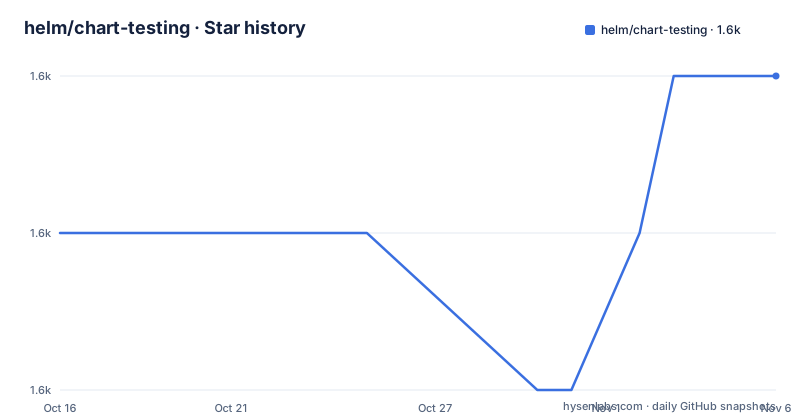
- helm/chart-testing1,646 ★ · +1
| Repository | 2026-10-16 | 2026-11-06 |
|---|---|---|
| helm/chart-testing | 1.6k | 1.6k |
1 Stars in the last 21 days, measured from the daily GitHub snapshot. Compare with other projects
Editorial analysis
Why Chart Testing belongs in Helm chart pull requests
Chart Testing, usually invoked as `ct`, targets the part of Helm chart development that happens before a chart is published: checking whether a proposed change is valid. The README positions it for linting and testing pull requests, and its central behavior is automatic detection of charts changed against a target branch. That makes it more targeted than running every command over an entire chart repository on every change.
The tool is aimed at maintainers and engineering workflows that manage multiple Helm charts. A chart repository may contain stable and incubator charts, while a pull request may modify only one of them. Chart Testing can select the affected charts, apply configured lint rules, and install selected charts for verification. The repository includes documentation for `ct install`, `ct lint`, `ct lint-and-install`, and `ct list-changed`, so the workflow is organized around separate stages rather than one opaque validation command.
The implementation is a Go command-line application. Its command structure is visible under `ct/`, while supporting packages live under `pkg/`. The module path is `github.com/helm/chart-testing/v3`, and it depends directly on Cobra, pflag, Viper, and Helm v3. The practical implication is that Chart Testing operates as an orchestration layer around Helm-related tooling rather than as a new chart renderer or Kubernetes controller.
Chart selection, linting, and installation flow
The documented flow starts with the repository and its remote configuration. `ct` detects charts changed against the target branch, then passes the selected chart information to linting or installation commands. The exact command behavior is delegated to individual command documentation, but the README gives enough configuration to understand the data path.
The `ct install` command accepts a remote repository, chart directories, and a build identifier. For example, the README shows:
ct install --remote upstream --chart-dirs stable,incubator --build-id pr-42This tells Chart Testing which Git remote to compare, which chart directories to consider, and which build identifier to associate with the operation. The build identifier can represent a pull request in a CI system. The same settings can be supplied through environment variables:
export CT_REMOTE=upstream
export CT_CHART_DIRS=stable,incubator
export CT_BUILD_ID

ct install
Configuration can also live in `config.yaml`:
remote: upstream
chart-dirs:
  - stable
  - incubator
build-id: pr-42
The command then becomes:
ct install --config config.yamlConfiguration precedence is explicit. CLI flags take precedence over `CT_` environment variables, and environment variables take precedence over the config file. Viper supplies support for YAML, JSON, TOML, HCL, and Java properties formats. This is useful in CI because the same `ct` invocation can use repository defaults while a job supplies a build-specific override.
Lint and install are distinct concerns. The README identifies separate `ct lint` and `ct install` documentation, plus `ct lint-and-install`. That separation lets a repository decide whether a pipeline should run static checks alone, perform chart installation, or combine both. Installation still depends on Helm and Kubernetes access, so `ct` does not make chart validation independent of the target cluster.
Installing Chart Testing and running a first local check
For a first use, the README recommends the Docker image because it includes the required tools: Helm, Git, Yamllint, Yamale, and Kubectl. The image is published at `quay.io/helmpack/chart-testing`. The documented local repository example runs against the current directory:
ct install --chart-dirs . --charts .That command is intended for a host installation where `ct` is available on `PATH`. The Docker form mounts the current directory and Kubernetes configuration, then runs the same command inside the image:
docker run -it --network host --workdir=/data --volume ~/.kube/config:/root/.kube/config:ro --volume $(pwd):/data quay.io/helmpack/chart-testing:v3.15.0 ct install --chart-dirs . --charts .The README specifically warns that the `workdir` parameter must match the volume mount. Without that alignment, the container's working directory and the host-mounted project can point at different locations. The command also expects `/root/.kube/config` to exist, which means Kubernetes credentials are required for installation testing even though linting may not need the same access.
For a host-based installation, the README offers Homebrew:
brew install chart-testingIt also points to the Releases page for downloading an OS-specific binary. The binary should be unpacked and placed on `PATH`. The container route is more self-contained because it packages the supporting command-line tools, while the binary route leaves the listed prerequisites to the host environment.
Lint configuration and validation dependencies
Chart Testing does not treat lint configuration as optional for the linting workflow. The README states that linting requires configuration files for Yamllint and Yamale. If no paths are specified, it searches the current directory, the `.ct` directory in the current directory, `$HOME/.ct`, and `/etc/ct`, in that order. Sample files are provided in the repository's `etc` folder.
This search order creates an explicit boundary for CI images. The Dockerfile copies `etc/chart_schema.yaml` and `etc/lintconf.yaml` into `/etc/ct`, so the official image has system-level defaults. A host installation does not automatically gain those files merely by installing the binary. It must provide compatible Yamllint and Yamale configuration in one of the documented search locations, or specify paths through the command configuration described in the command documentation.
The two validators have different jobs. Yamllint is the YAML linter named in the README, while Yamale is used as a YAML schema validator. The Dockerfile installs `yamale==6.1.0` and copies the chart schema into the image. This means a lint result can depend not only on the chart but also on the validator versions and schema files present in the environment. Chart Testing can coordinate those checks, but it cannot make two installations with different configuration files produce identical results.
The repository also includes chart examples and an `etc` directory, which makes it possible to inspect the intended defaults. The available documentation should be consulted for command-specific flags before adding extra lint behavior. The README does not document a complete rollback procedure for failed lint or install operations.
Private repositories, OCI registries, and operational limits
Chart Testing supports private chart repositories through the `chart-repos` configuration. The documented configuration distinguishes ordinary repositories from OCI registries:
chart-repos:
  - incubator=https://incubator.io
  - basic-auth=https://private.com
  - ssl-repo=https://self-signed.ca
  - oci-registry=oci://nice-oci-registry.pt
helm-repo-extra-args:
  - ssl-repo=--ca-file ./my-ca.crt
The README states that extra arguments can be passed per repository to `helm repo add`. OCI registries are added with `helm registry login`, and they also support `helm-repo-extra-args` for authentication. For example:
ct install --config config.yaml --helm-repo-extra-args "basic-auth=--username user --password secret"This is a pass-through configuration model. Chart Testing delegates repository operations to Helm, which means credentials, certificates, network access, and Helm's behavior remain part of the operational boundary. A pull request workflow that installs charts therefore needs access to the relevant repository and cluster before it can reach a meaningful chart test.
The tool is also not a general Kubernetes validation system. The repository topics mention Kubernetes, but the documented commands focus on Helm chart linting, chart installation, and changed-chart discovery. A failed installation can reflect cluster permissions, unavailable APIs, missing dependencies, or chart problems. The README does not provide a taxonomy that separates every failure cause.
Compared with invoking Helm and lint tools directly for every chart, Chart Testing reduces repeated command construction and makes target-branch selection part of the workflow. In exchange, teams need to understand its configuration search rules, matching repository expectations, and external tool dependencies. For a repository with one chart and a very small release process, those abstractions may add more setup than they remove.
Release verification, licensing, and maintenance
Release artifacts, including archives, checksums, and SBOMs, are signed with cosign using keyless signing. Each artifact has a `.sigstore.json` bundle beside it. The README gives this verification command for a checksums file:
cosign verify-blob checksums.txt \
    --bundle checksums.txt.sigstore.json \
    --certificate-identity "https://github.com/helm/chart-testing/.github/workflows/release.yaml@refs/heads/main" \
    --certificate-oidc-issuer "https://token.actions.githubusercontent.com"
The Docker image is signed as well:
cosign verify quay.io/helmpack/chart-testing:<version> \
    --certificate-identity "https://github.com/helm/chart-testing/.github/workflows/release.yaml@refs/heads/main" \
    --certificate-oidc-issuer "https://token.actions.githubusercontent.com"
The license is Apache-2.0. The repository contains a `LICENSE` file and the README identifies the project under that license. The documentation does not offer legal guidance, so organizations should review the license text for their own distribution and compliance requirements.
The repository is not archived. Its last push was on 2026-10-15, and recent releases include v3.15.0 on 2026-10-06, v3.14.0 on 2025-10-08, and v3.13.0 on 2025-06-02. That history indicates recent release work, but upgrade planning still requires checking the command documentation and release artifacts because configuration behavior and bundled tool versions can change between releases.
There is a version detail worth resolving before building from source. The README says `ct` is built using Go 1.13 or higher, while `go.mod` declares `go 1.27`. The module file is the more specific repository configuration, so source builders should use a toolchain matching that declaration.
Editorial conclusion
Adopt chart-testing when a Helm repository needs change detection and repeatable chart checks in CI, especially when pull requests are the main review workflow. Do not treat it as a replacement for Helm, kubectl, or a Kubernetes integration suite. Verify first that your chart layout, Helm and kubectl versions, repository configuration, and Kubernetes test environment match the commands your pipeline will execute.
Frequently asked questions
What is helm/chart-testing used for?
Chart Testing is a Go CLI for linting and testing Helm charts, particularly in pull request workflows. It detects charts changed against a target branch and provides separate lint, install, and combined commands.
How do I install helm/chart-testing?
The README offers a release binary, a Docker image at `quay.io/helmpack/chart-testing`, and a Homebrew command. The Docker image is recommended because it includes Helm, Git, Yamllint, Yamale, and Kubectl.
Does helm/chart-testing support private Helm repositories?
Yes. The documented `chart-repos` configuration supports ordinary repositories and OCI registries, with per-repository `helm-repo-extra-args` passed to Helm repository and registry commands.
Official sources
Add this badge to your README
If you maintain this project, the badge below links readers to this analysis and shows its maintenance status from the daily GitHub snapshot. Paste the markdown into your README; add ?metric=license or ?metric=stars to the image URL for a different field.

[](https://hysenlabs.com/projects/helm-chart-testing)Star history chart for your README
[](https://hysenlabs.com/projects/helm-chart-testing)Was this useful?