WiFi_Kit_series is Heltec's fork of the Espressif Arduino ESP32 core
Arduino source codes and toolchain for WiFi_Kit_series made by HelTecAutomation.
At a glance
- What is it?
- This repository is a full clone of the Espressif arduino-esp32 core with the variants folder and boards.txt rewritten so that Heltec boards appear in the Arduino Boards Manager. It carries the core framework only, no LoRa, OLED or sensor drivers, and it lags or leads upstream depending on the release line you install.
- Who is it for?
- Adopt WiFi_Kit_series when you build for Heltec boards and want them listed by name in the Arduino IDE, since the upstream core does not ship those definitions. Do not adopt it as a general ESP32 core, because it excludes the on-board device drivers and its release line moves on its own schedule.
- Can I use it commercially?
- Yes, with conditions. LGPL-2.1 is a weak copyleft licence: you can use it inside commercial and closed-source software, but if you distribute changes to its own files, you must publish those changes under the same licence.
- Is it still maintained?
- Yes. The repository last received commits 5 days ago.
- What is it written in?
- Mainly C++, according to GitHub's language statistics.
Answers come from the project's GitHub data, last synced on November 7, 2026, and from our analysis. They are not legal advice.
Star history
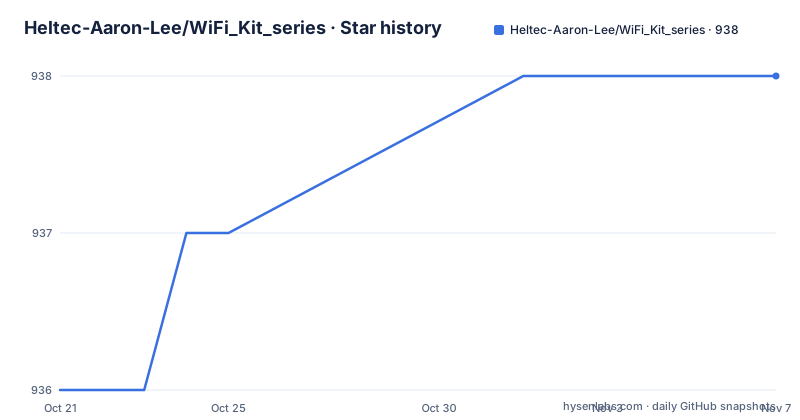
- Heltec-Aaron-Lee/WiFi_Kit_series938 ★ · +2
| Repository | 2026-10-21 | 2026-11-07 |
|---|---|---|
| Heltec-Aaron-Lee/WiFi_Kit_series | 936 | 938 |
2 Stars in the last 17 days, measured from the daily GitHub snapshot. Compare with other projects
Editorial analysis
A clone of arduino-esp32 with two files changed
The README is unusually direct about what this repository is. It says the environment is fully cloned from the Espressif ESP32 projects, and that on that basis the maintainers fixed the variants folder and boards.txt, for the convenience of Arduino plus ESP beginners and for users of the Heltec ESP32 series development boards. The Chinese section of the README says the same thing. Two files, then. boards.txt is the board definition file the Arduino IDE reads to know which boards exist and how to build for them. The variants folder holds the per board pin and configuration definitions. Changing those two files is what makes a Heltec WiFi Kit 32 or Wireless Stick appear in the Boards Manager dropdown instead of forcing you to pick a generic ESP32 target and edit the pins yourself. Everything else is upstream. The package.json in the tree is Espressif's, with the name framework-arduinoespressif32, the keywords framework, arduino, espressif and esp32, and a repository field pointing back to https://github.com/espressif/arduino-esp32. The repository layout confirms it: cores/, libraries/, variants/, tools/, tests/, docs/, package/, boards.txt, platform.txt, programmers.txt, Kconfig.projbuild and CMakeLists.txt. The audience is therefore specific: someone with a Heltec board in hand who wants a familiar IDE workflow and a board entry that already matches the hardware.
No LoRa, no OLED, no sensors in this repository
The README draws a line that many people trip over, and it is worth restating. The development environment includes only the basic framework of the ESP32, ESP32-S2, ESP32-S3 and ESP32-C3 MCU chips. It does not include drivers or example code for on board devices such as LoRa, OLED and sensors. Those live elsewhere, and the README names two libraries for them. The Heltec ESP32 Library contains device drivers for the Heltec ESP32 series board, such as OLED displays, GPS and LoRa chips, a LoRaWAN library compatible with the ESP32 Arduino environment, some external sensor examples and some examples of practical functions. The E-Ink Library covers drivers and examples for multi size E-Ink displays. So the shape of a Heltec project is two installs: this core for the board definition and the Arduino framework, then the Heltec_ESP32 library for the peripherals. A sketch that blinks an onboard LED compiles against this repository alone. A sketch that reads the OLED does not. This split is also a safety net. Because the peripherals live in a separate repository, they can be updated independently of the core, and a core update does not drag your display code along with it.
The board table tells you which chip your board really is
The README includes a table mapping each MCU family to the Heltec boards built on it, and it carries two deprecation warnings that decide what you should buy. Under ESP32-S3 the list is long: WIFI Kit 32 (V3), WIFI LoRa 32 (V3), WIFI LoRa 32 V4, the WiFi LoRa 32 Expansion Kit, Wireless Stick (V3), Wireless Stick Lite (V3), Wireless Paper, Wireless Tracker, Wireless Tracker V2, Wireless Shell (V3), the Multi-Size E-Ink driver HT-DE01, and the Vision Master E213, E290 and T190. Under ESP32-C3 there are the ESP32 C3 Dev-Board and the CT62 LoRa Module. Then two rows carry the note Not recommended for new designs. ESP32-PICO covers Wireless Shell (V3) and Wireless Stick Lite, and ESP32 D0 covers WIFI LoRa 32 (V2) and Wireless Stick. The naming is the tell. V2 and V3 of the same product name sit in different rows with different chips, so a board name alone does not tell you which MCU family you are compiling for. If you are starting a design, the table is the fastest way to avoid picking a board the vendor itself steers away from. The version suffix in the board name and the MCU row have to be read together, which is exactly the friction the variant definitions exist to remove once the board is installed.
Installing the board package: Boards Manager first, git second
The README gives two installation paths and marks the first as preferred. The preferred route is the Arduino IDE Boards Manager, and the README links an install guide on the Heltec wiki for installing ESP32 from the Boards Manager. The reference document for the install steps is the same Heltec ESP32 quick start page. The second route is to work with the development repository through git, and here the README is more useful because it names a separate guide per operating system. There is InstallGuide/windows.md, InstallGuide/mac.md, InstallGuide/debian_ubuntu.md, InstallGuide/fedora.md and InstallGuide/opensuse.md. The top level entries confirm the InstallGuide directory exists, and the guides are the right place to look since the README itself does not print the git commands. Once the package is installed, the board appears in the Boards Manager dropdown under its own name, and you select it as you would any other board. The selected board then determines which variant directory the build uses, which is where the pin mapping and the preconfigured defaults live. The repository also carries the parts that make the core usable rather than merely present: a .pre-commit-config.yaml, a .clang-format file, a .flake8 configuration, a .vale.ini for prose linting, a .readthedocs.yaml for the documentation build, and a .gitlab-ci.yml alongside the .github directory.
The package identity is upstream, and its description mentions a chip the README does not
The package.json identifies the artefact that the Arduino IDE actually installs.
{
  "name": "framework-arduinoespressif32",
  "version": "3.3.8",
  "description": "Arduino Wiring-based Framework for the Espressif ESP32, ESP32-P4, ESP32-S and ESP32-C series of SoCs",
  "keywords": [
    "framework",
    "arduino",
    "espressif",
    "esp32"
  ],
  "license": "LGPL-2.1-or-later",
}
Three things stand out. The version, 3.3.8, is the version string the Boards Manager shows, and it matches the newest release name in the repository, Heltec ESP32 Series develop environment Rev 3.3.8, dated 2026-04-15. The licence is LGPL-2.1-or-later, and the licence field on the repository says LGPL-2.1. The third is a mismatch worth noting. The package description names the ESP32, ESP32-P4, ESP32-S and ESP32-C series, while the README says the environment includes only the basic framework of the ESP32, ESP32-S2, ESP32-S3 and ESP32-C3 chips. The description is inherited upstream text and it advertises a P4 that the README does not list. If you are chasing a board definition for a P4 based product, this README is not the place that will tell you it is there. Because the package keeps the upstream name and version scheme, two installations of an ESP32 core can look identical in the IDE while differing in the board definitions they add. That is worth remembering when a colleague reports that their sketch compiles for you and not for them.
Decoding exceptions when a sketch crashes at boot
When an ESP32 sketch fails, the serial output is usually a stack trace with addresses rather than anything readable. The README gives one remedy: use EspExceptionDecoder to get a meaningful call trace, linking to the me-no-dev/EspExceptionDecoder project. The advice is short but it points at a general property of this core. It is a large framework with a bootloader, an RTOS layer, WiFi and Bluetooth stacks, and the Arduino compatibility layer on top. When something goes wrong at startup, the useful information is in the call trace, and the decoder turns raw addresses into function names. The README also documents a reporting expectation. Before filing an issue, search for an existing one, and read through the issues labelled for reference. The forum at community.heltec.cn is offered as another channel, alongside the website heltec.org and the documentation wiki at wiki.heltec.org. For a fork of this kind, that for reference label is worth more than usual. A large share of the reports against a modified core tend to be questions about upstream behaviour that the fork inherits unchanged, and the answer is usually in the upstream documentation rather than in the Heltec wiki.
A fork with its own release cadence and a clear upstream boundary
Maintenance here has two clocks, and you need to watch both. The fork's own releases are named Heltec ESP32 Series develop environment Rev followed by a version. The list shows 3.3.8 dated 2026-04-15, 3.0.3 dated 2025-10-24 and 3.0.2 dated 2024-07-29. The last push to the repository was on 2026-09-15, so changes are still landing even though the newest tagged release is several months older. The repository is not archived. The gap between 3.0.2 in July 2024 and 3.0.3 in October 2025 shows that a Heltec release does not track every upstream core release, and it does not need to. The fork only has to carry the upstream core plus the board definitions, and it can lag upstream safely as long as the chip support your board needs is present. That lag is the practical upgrade decision. If upstream fixes something in the WiFi stack or in the toolchain, you get it when the next Heltec release picks it up. If you need an upstream fix immediately, the alternative is to install the upstream Espressif core and add the Heltec board definitions yourself, or to use a generic ESP32 target and configure the pins in your sketch. The licence matters here too. LGPL-2.1-or-later governs the code in this tree, and the project sits next to the separate Heltec_ESP32 and E-Ink libraries, each with its own terms. Reading those licence files is your own responsibility before you ship a product built on them.
Editorial conclusion
Adopt WiFi_Kit_series when you build for Heltec boards and want them listed by name in the Arduino IDE, since the upstream core does not ship those definitions. Do not adopt it as a general ESP32 core, because it excludes the on-board device drivers and its release line moves on its own schedule. Before installing, check the Release Rev of the board package against the upstream arduino-esp32 releases, and install the Heltec_ESP32 library separately if your sketch touches the OLED, the LoRa radio or the GPS.
Frequently asked questions
How do I install the Heltec WiFi Kit series boards in the Arduino IDE?
The README lists the Arduino IDE Boards Manager as the preferred route and links an install guide on the Heltec wiki for installing ESP32 from the Boards Manager. A second path using git is documented per operating system in the InstallGuide folder, with separate files for Windows, Mac, Debian/Ubuntu Linux, Fedora and openSUSE.
What is the difference between WiFi_Kit_series and the Espressif arduino-esp32 core?
The environment is fully cloned from the Espressif ESP32 projects, and on that basis the maintainers fixed the variants folder and boards.txt to add Heltec board definitions. The package.json still carries the upstream name framework-arduinoespressif32 and points its repository field at espressif/arduino-esp32.
Does this repository include the LoRa, OLED and sensor drivers?
No. The README states that the environment includes only the basic framework of the ESP32, ESP32-S2, ESP32-S3 and ESP32-C3 chips, and not drivers or example code for on board devices such as LoRa, OLED and sensors. Those are in the Heltec ESP32 Library, with E-Ink displays in the E-Ink Library.
Which Heltec boards are not recommended for new designs?
In the board table, the ESP32-PICO row covering Wireless Shell and Wireless Stick Lite, and the ESP32 D0 row covering WIFI LoRa 32 (V2) and Wireless Stick, are both marked Not recommended for new designs.
How do I read a stack trace from a crashing ESP32 sketch?
The README recommends using EspExceptionDecoder to get a meaningful call trace, linking to the me-no-dev/EspExceptionDecoder project.
Official sources
Add this badge to your README
If you maintain this project, the badge below links readers to this analysis and shows its maintenance status from the daily GitHub snapshot. Paste the markdown into your README; add ?metric=license or ?metric=stars to the image URL for a different field.

[](https://hysenlabs.com/projects/heltec-aaron-lee-wifi-kit-series)Star history chart for your README
[](https://hysenlabs.com/projects/heltec-aaron-lee-wifi-kit-series)Was this useful?