Mailflare: a self-hosted inbox for custom domains on Cloudflare
Email for professionals and teams
At a glance
- What is it?
- Mailflare puts an email inbox, mailboxes with delegated access and routing rules inside your own Cloudflare account, with D1 for data and R2 for attachments. It is a Workers-first project with a Docker fallback, and the deployment constraints are as interesting as the feature list.
- Who is it for?
- Adopt Mailflare if you already run domains inside Cloudflare, want mail stored in your own D1 and R2, and accept the Worker-name and CF_TOKEN constraints before the first deploy. Skip it if you need a mail server you can move between hosting providers, or if you cannot grant DNS and Email Routing edit scopes to an API token.
- Can I use it commercially?
- Yes, with strict conditions. AGPL-3.0 is a network copyleft licence: if people use a modified version over a network, for example as a hosted service, you must offer them its source code under the same licence.
- Is it still maintained?
- Yes. The repository last received commits 2 days ago.
- What is it written in?
- Mainly TypeScript, according to GitHub's language statistics.
Answers come from the project's GitHub data, last synced on November 15, 2026, and from our analysis. They are not legal advice.
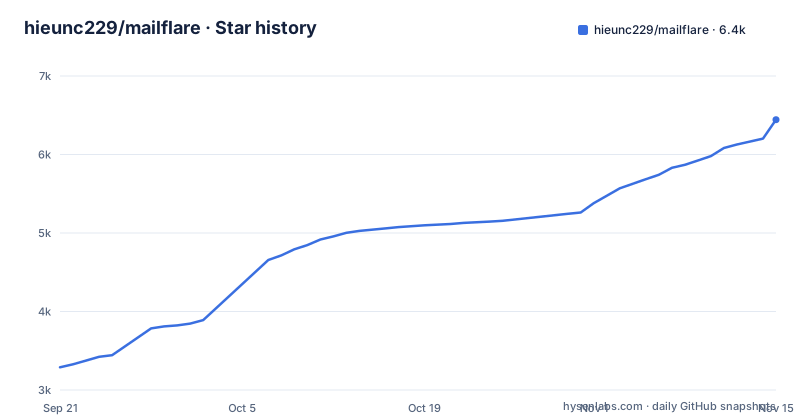
Star history
- hieunc229/mailflare6,443 ★ · +3,154
| Repository | 2026-09-21 | 2026-11-15 |
|---|---|---|
| hieunc229/mailflare | 3.3k | 6.4k |
3,154 Stars in the last 55 days, measured from the daily GitHub snapshot. Compare with other projects
Editorial analysis
The problem Mailflare solves, and who it is aimed at
Running mail for a custom domain usually means choosing between a hosted mailbox you do not control and a full mail server you have to operate. Mailflare takes a third position: the inbox, the mailboxes, the routing rules and the stored messages all live in your own Cloudflare account. The README describes it as "A self-hosted alternative to Google Workspace", with custom domain email, calendar, drive, booking and AI agents.
The audience is narrow but real. You need at least one domain managed by a Cloudflare account, and you need to be comfortable creating a scoped API token. Teams that want shared mailboxes with delegated access, routing rules that store, forward, reject or categorize incoming messages, and an audit log of account activity are the intended users. A single developer who just wants a personal address on a side project also fits, provided the domain is already on Cloudflare.
What it is not is a general-purpose mail platform. The project is opinionated about where it runs.
How the Cloudflare deployment actually moves mail
The architecture is split between inbound and outbound paths. Mail is sent and received with Cloudflare, Resend or Amazon SES. The database defaults to Cloudflare D1 (PostgreSQL, MySQL, Turso or SQLite also work), and files go to R2, Backblaze B2 or AWS S3.
The onboarding flow leans on the Cloudflare API rather than asking you to click through the dashboard. A runtime token named CF_TOKEN is required. The README lists its permissions: Email Sending:Edit, DNS Settings:Edit and Email Routing Addresses:Edit for all accounts, and DNS Settings:Edit, Email Routing Rules:Edit, Zone Settings:Edit and DNS:Edit for all zones.
That split is worth pausing on. The application can edit DNS and routing rules on your behalf, which is what makes one-click domain connection possible, and also what makes the token scope the most sensitive part of the install.
Deploying Mailflare to Cloudflare in three steps
The README frames the hosted path as three steps. First, deploy the app with the Deploy to Cloudflare button and keep the app name as mailflare, because the README states the app will not work correctly under another Worker name. Second, open the deployed app and follow /setup to check the installation and create your admin account. Third, add a domain managed by the same Cloudflare account, then create your first mailbox.
Before any of that, create the scoped token. The README links to a comment on issue 24 for the exact permission list and warns that CF_TOKEN is required during deployment. If you prefer to deploy by hand rather than through the button, the repository exposes the underlying scripts:
npm run deployThat script runs the build and then `wrangler deploy`. A separate `npm run upload` builds and pushes a version without promoting it, which is the path to use if you want to inspect a build before it takes traffic. The README points at docs/deployment.md for more options, so treat that file as required reading rather than optional.
For local work the sequence is short and the port is fixed at 3000:
cp .dev.vars.example .dev.vars
npm install
npm run db:migrate:local
npm run dev
The README says to add your Cloudflare credentials to .dev.vars and then open http://localhost:3000. Sample data comes from `npm run db:seed`, and the script posts to http://localhost:3000/api/seed, so the development server has to be running.
The Docker path swaps D1 and R2 for SQLite and local files
Mailflare also ships a single-container deployment for servers outside Cloudflare. In that mode, SQLite and local files replace D1 and R2, a built-in SMTP listener handles inbound mail.
The compose file makes the shape clear. Two ports are published: 3000 for the web app and JMAP, and 25 for inbound SMTP, which the comment says is where your domain's MX should point. State lives in a named volume mounted at /data. The Dockerfile builds a Node 22 image with MAILFLARE_RUNTIME=node, sets DATA_DIR=/data, PORT=3000 and SMTP_INBOUND_PORT=25, and prunes the Workers toolchain from production dependencies.
cp .env.docker.example .env.docker
docker compose up -d --build
The README gives exactly those two commands and points to docs/self-hosting.md for the rest. Two things stand out. The image still runs a Next.js build through `npm run build:node`, so the container is not a tiny binary. And the SMTP listener on port 25 means the host has to accept inbound connections on the standard mail port, which many VPS providers block by default. The README does not discuss that constraint.
Where Mailflare is the wrong tool
The Worker-name requirement is the sharpest limitation. The README states plainly that the app will not work correctly under another Worker name, which rules out running two Mailflare instances under different names in one Cloudflare account. If you want separate environments for staging and production, the README does not describe how to do that.
The token scope is the second constraint. Onboarding needs edit rights on DNS settings, Email Routing rules, Email Routing addresses and zone settings. Handing an application that level of access to your DNS is a real decision, and the README's own warning that CF_TOKEN is required during deployment means there is no path that avoids it. If your organization does not allow API tokens with DNS edit scope, the hosted deployment is closed to you.
Cost is a third boundary, stated without hedging. Receiving mail is free through Cloudflare Email Routing. Sending can be free on Resend's free tier (3,000 emails a month) or Amazon SES; only Cloudflare's own sending needs the $5/month Paid Worker plan.
Finally, portability. The Cloudflare path stores mail in D1 and attachments in R2. The README does not document a migration from D1 to SQLite or the reverse, so choosing a deployment mode is closer to a commitment than a preference. The Docker path is the more portable of the two, but it is a different runtime with a different storage layer, not a drop-in replacement.
How Mailflare differs from running a conventional mail server
The obvious alternative is a traditional self-hosted mail stack: a mail transfer agent, an IMAP server and a webmail front end, all on a machine you own. The difference in approach is where the work sits. A conventional stack makes you responsible for deliverability, spam filtering, TLS certificates for SMTP, and keeping an IMAP server patched. Mailflare delegates inbound delivery to Cloudflare Email Routing and outbound to Cloudflare Email, Resend or Amazon SES, so deliverability and the SMTP edge are Cloudflare's problem, and yours is the application layer.
That trade is not free. A conventional stack lets you move the whole thing to another host, keep the same IMAP clients, and connect any mail client you like. Mailflare's README mentions IMAP only as an import source; the Docker compose comment mentions JMAP on port 3000, which is a different protocol and a much smaller client ecosystem. If your workflow depends on Thunderbird or Apple Mail syncing over IMAP, Mailflare is not a drop-in substitute.
The second alternative is simply paying a hosted mailbox provider. That gives you the same client compatibility and none of the operational work, in exchange for your mail living on someone else's infrastructure. Mailflare's answer to that is ownership: your messages in your D1 database, your attachments in your R2 bucket, your routing rules under your control. Whether that is worth the token scope and the Worker-name constraint depends on how much you value holding the data yourself.
Maintenance, licence and upgrade cost
The repository is not archived, and its last push was on 2026-10-31, so the codebase is moving. The repository has no published GitHub releases, which means version 0.5.4 in package.json is the main version marker, and the repository carries a changelog/ directory. Upgrades therefore mean pulling the main branch and running the migration scripts yourself.
Migrations are explicit rather than automatic. `npm run db:migrate:remote` applies D1 migrations to the remote database. In the Docker path the same drizzle directory is copied into the image, so a rebuild picks up new migrations. The Dockerfile prunes the Workers toolchain from production dependencies, which keeps the runtime image smaller but means the container cannot run wrangler commands.
The licence is AGPL-3.0. The practical consequence, without giving legal advice, is that the network-copyleft clause applies: if you modify Mailflare and let users interact with it over a network, the AGPL's source-disclosure obligation is the one to read carefully before you ship a modified version as a service. Running an unmodified copy for your own team is the straightforward case. The README only says to see LICENSE, so the repository file is the authority, not the README.
Editorial conclusion
Adopt Mailflare if you already run domains inside Cloudflare, want mail stored in your own D1 and R2, and accept the Worker-name and CF_TOKEN constraints before the first deploy. Skip it if you need a mail server you can move between hosting providers, or if you cannot grant DNS and Email Routing edit scopes to an API token. Before committing, read docs/deployment.md for the token permission list, confirm the app name stays mailflare, and check docs/self-hosting.md to see whether the SMTP listener fits your MX setup.
Frequently asked questions
Is Cloudflare an email provider?
Cloudflare is not the mailbox in this setup. Mailflare's README says receiving is free through Cloudflare Email Routing and that mail can be sent with Cloudflare, Resend or Amazon SES, with the database in D1 by default and files in R2, Backblaze B2 or AWS S3.
How do I connect to Cloudflare for Mailflare?
Create a scoped Cloudflare API token for CF_TOKEN, which the README says is required. It needs Email Sending:Edit, DNS Settings:Edit and Email Routing Addresses:Edit for all accounts, and DNS Settings:Edit, Email Routing Rules:Edit, Zone Settings:Edit and DNS:Edit for all zones.
Does Gmail use Cloudflare?
Mailflare's README does not cover Gmail's infrastructure; it mentions Gmail only as an import source (Gmail Takeout). Mailflare itself can send and receive with Cloudflare, Resend or Amazon SES, with D1 as the default database.
Official sources
Add this badge to your README
If you maintain this project, the badge below links readers to this analysis and shows its maintenance status from the daily GitHub snapshot. Paste the markdown into your README; add ?metric=license or ?metric=stars to the image URL for a different field.

[](https://hysenlabs.com/projects/hieunc229-mailflare)Star history chart for your README
[](https://hysenlabs.com/projects/hieunc229-mailflare)Was this useful?