hledger: Plain Text Accounting with a CLI, TUI and Web Interface
Robust, fast, intuitive plain text accounting tool with CLI, TUI and web interfaces.
At a glance
- What is it?
- hledger is a double-entry accounting tool that stores your books in plain text files and reports on them from the command line, a terminal UI or a browser. It suits engineers who want version-controlled finances, and it asks you to learn journal syntax first.
- Who is it for?
- Adopt hledger if you want your accounts in a diffable text file and you are comfortable in a terminal; the README's opening-balance example and the hledger bs output show how quickly a journal turns into a balance sheet. Avoid it if you need a guided GUI, built-in bank syncing or an accountant-ready workflow, because those are not what the README describes.
- Can I use it commercially?
- Yes, with conditions. GPL-3.0 is a copyleft licence: if you distribute software that includes it, you must release that software's source code under the same licence. Running it internally without distributing it does not trigger that obligation.
- Is it still maintained?
- Yes. The repository received new commits within the last day.
- What is it written in?
- Mainly Haskell, according to GitHub's language statistics.
Answers come from the project's GitHub data, last synced on November 15, 2026, and from our analysis. They are not legal advice.
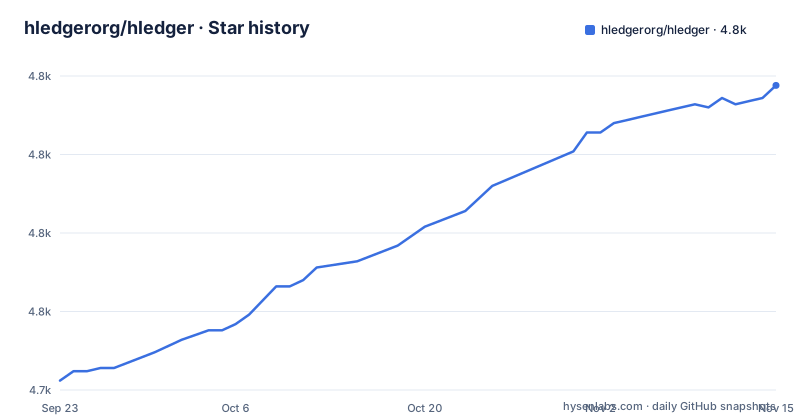
Star history
- hledgerorg/hledger4,822 ★ · +94
| Repository | 2026-09-23 | 2026-11-15 |
|---|---|---|
| hledgerorg/hledger | 4.7k | 4.8k |
94 Stars in the last 53 days, measured from the daily GitHub snapshot. Compare with other projects
Editorial analysis
What hledger solves, and who it is actually for
Most personal and small-business accounting software keeps your books inside its own database. Exporting means a CSV dump, and comparing two months means opening two files. hledger takes the opposite position: the journal is a text file you own, and the program is a reader and reporter for it. The README describes the goal as helping "both computer experts and regular folks gain clarity in their finances and time management", and lists tracking money, investments, cryptocurrencies, invoices, time and inventory.
The audience that benefits most is the one already comfortable with git and a shell. A journal in version control gives you a full history of every edit, and the README calls the format "safe, future-proof" with "full version control and privacy". Someone who wants a bank feed to populate categories automatically will find that work falls on them instead. The README notes CSV import as a strength, not automatic reconciliation.
The README also makes a claim worth reading carefully: hledger is "actively maintained, with regular releases". The release list backs that up, with 1.99.5 on 2026-10-02 and 1.99.6 on 2026-11-01. The README describes two version lines, 1.x for stability and bugfix releases and 2.x in the main branch, which is worth understanding before you pick one.
The journal format and the double-entry engine behind the reports
A journal is a sequence of dated transactions, each with two or more postings. The README's example opens with an equity posting that has no amount:
2022-01-01 opening balances as of this date
    assets:bank:checking                $1000
    assets:bank:savings                 $2000
    assets:cash                          $100
    liabilities:creditcard               $-50
    equity:opening/closing balances
The blank amount on the equity line is the mechanism that makes plain text accounting practical. The engine balances the transaction for you, so you do not have to compute the offsetting figure by hand. Account names are colon-separated hierarchies, which is what lets hledger roll assets:bank:checking up into assets:bank and then assets in a report without any extra configuration.
The engine is multi-currency and, per the README, accurate to 255 decimal places. That precision matters for cost and lot tracking, where a fractional share price multiplies against a fractional quantity. The README lists a general multi-currency accounting engine as a feature and says hledger is "inspired by and partly compatible with Ledger CLI; interconvertible with Beancount". Compatibility here is a format-level claim, not a promise that every Ledger directive behaves identically.
Reports read the journal and emit text, HTML, JSON or SQL. That output layer is what makes hledger scriptable: the README says it is scriptable "by CLI, HTTP or API", so a report can feed a dashboard or a spreadsheet without a separate export step.
Installing hledger and producing your first balance sheet
The README states hledger "installs easily on unix, mac or windows" and points at the home page for getting started. It does not spell out a package command, so the reliable route is the hledger.org install instructions for your platform, or a distribution package. The repository also ships a Dockerfile, which builds with stack and exposes ports 5000 and 5001, mounting a volume at /data with an empty /data/hledger.journal. That is the container path if you would rather not install Haskell tooling.
Once the binary is on your PATH, write a journal and run a report. The README's own example file is the smallest useful starting point:
2022-01-15 market
    expenses:food             $50
    assets:cash              $-50
With the README's full example journal saved, the balance sheet command prints a report:
hledger bsThe README shows the output headed "Balance Sheet 2022-02-15", with assets:bank:checking at $2000, assets:bank:savings at $2000, assets:cash at $50 (assets totalling $4050) and liabilities:creditcard at $50. If totals differ, check the journal files actually loaded, included files, report options and posting amounts.
The income statement takes a period flag. The README's example uses a monthly breakdown:
hledger is --monthlyThat prints an income statement with Jan and Feb columns, starting with Revenues. A report command can optionally be constrained or grouped by period; the journal stays untouched.
Where hledger stops being the right tool
hledger is a reporting engine over a file you maintain. Nothing in the README promises bank connections, receipt scanning, or a guided setup wizard. If your accounting needs are "connect the account and let the software categorise", hledger is the wrong layer and you will spend your time writing import rules instead.
The README is candid about the interface: "Though the UIs are basic, hledger can model any accounting situation." That sentence is the trade-off in one line. The modelling power is real, and the ergonomics are deliberately minimal. A user who needs a polished graphical experience will feel the gap immediately.
The two version lines are a second practical hazard. The README says the master branch was renamed to hledger1 in 2026 and work began on hledger 2.x in main, with 2.x goals including lot tracking, capital gains calculation and "explore ethical use of AI as a dev tool". The 1.x goals include preserving a non-AI-assisted codebase. Those are different products in spirit, and the release list currently shows 1.99.5 and 1.99.6. Anyone installing from a distribution should check which line they are getting, because a 1.x bugfix and a 2.x feature release are not interchangeable.
Finally, the README's performance claim, "analysing 25k transactions per second on a macbook air m1", is a single stated figure without the benchmark conditions attached to it. The repository does contain a bench/ directory, so the numbers are reproducible in principle, but treat the headline as a starting point rather than a guarantee for your journal shape.
hledger against Ledger CLI and Beancount
The closest comparison is Ledger CLI, the tool hledger is explicitly modelled on. The README says hledger is "inspired by and partly compatible with Ledger CLI", which is a precise phrasing: journal syntax overlaps, but the implementations are separate and the feature sets diverge. Ledger CLI is written in C++; hledger is Haskell and, per the README, has regular releases. If you have existing Ledger journals, the compatibility claim is the thing to test on your own files rather than assume.
Beancount is the other serious plain text option, and the README describes hledger as "interconvertible with Beancount". The difference in approach is the data model. Beancount enforces stricter typing and a more opinionated syntax, which catches errors earlier at the cost of flexibility. hledger's journal is looser and its engine handles the balancing. A team that wants the format itself to reject malformed entries will prefer Beancount's constraints; someone who wants to write a quick journal without fighting the parser will prefer hledger.
The third option is not a plain text tool at all. GnuCash and similar packages give you a GUI and a database. Choosing hledger over them is choosing git history and grep over forms and dialogs. That is a genuine preference, not a quality ranking.
Licence, maintenance and the cost of upgrading
hledger is licensed under GNU General Public License v3.0 or later, and the README badge reads GPLv3+. For most users this is a non-issue: you are running the program, not distributing a derivative. It becomes relevant if you embed hledger in a product you ship, because the GPL's copyleft terms attach to distributed derivatives. That is a description of the licence, not legal advice; if you plan to redistribute, read the licence text or consult someone qualified.
The maintenance picture is straightforward from the repository facts. The last push to the default branch was on 2026-11-02, and releases 1.99.5 and 1.99.6 landed on 2026-10-02 and 2026-11-01. The project is not archived. That said, "maintained" here means two parallel lines, and an upgrade path between them is not documented in the README. The README points at hledger.org/relnotes.html for release notes, and at issue 2547 for the 2.x discussion, so those are the places to check before moving.
The upgrade cost that is documented is the format itself. Because the journal is plain text, an upgrade cannot silently migrate your data; your file stays as it is and the engine changes underneath. That is the main advantage of the approach. It also means a behaviour change in a report shows up as a different number, not a failed migration, so keeping the journal in version control alongside the version of hledger you ran is the practical safeguard.
Editorial conclusion
Adopt hledger if you want your accounts in a diffable text file and you are comfortable in a terminal; the README's opening-balance example and the hledger bs output show how quickly a journal turns into a balance sheet. Avoid it if you need a guided GUI, built-in bank syncing or an accountant-ready workflow, because those are not what the README describes. Before committing, install a packaged build, run hledger bs against a copy of your own data, and check the hledger.org relnotes page for which 1.x or 2.x line you are tracking.
Frequently asked questions
What is hledger?
It is lightweight, cross platform, multi-currency, double-entry accounting software that reads plain text journal files and produces reports. The README describes it as having CLI, terminal, web and mobile interfaces and as being part of the Plain Text Accounting ecosystem.
How do I install hledger?
The README states it installs easily on unix, mac or windows and directs readers to hledger.org for getting started, without listing a package command. The repository also includes a Dockerfile that builds with stack and exposes ports 5000 and 5001.
How do I use hledger?
You write dated transactions with two or more postings in a journal file, then run report commands against it. The README's example runs hledger bs for a balance sheet and hledger is --monthly for a monthly income statement.
Is hledger open source?
Yes. The README states it is free software licensed under GNU General Public License v3.0 or later, and the repository carries a GPLv3+ licence badge.
How does hledger compare with Ledger CLI?
The README says hledger is inspired by and partly compatible with Ledger CLI, and that journals are interconvertible with Beancount. It does not claim full behavioural parity with Ledger, so overlapping syntax should be checked against your own files.
Official sources
Add this badge to your README
If you maintain this project, the badge below links readers to this analysis and shows its maintenance status from the daily GitHub snapshot. Paste the markdown into your README; add ?metric=license or ?metric=stars to the image URL for a different field.

[](https://hysenlabs.com/projects/hledgerorg-hledger)Star history chart for your README
[](https://hysenlabs.com/projects/hledgerorg-hledger)Was this useful?