Bizcity Twin AI: A WordPress Plugin That Wants to Be Your Business Brain
Make WordPress as an AI operating system, every plugin becomes an agentic tool The "online Claude" vision — natural language → classify → plan → multi-step execution across plugins, zero config
At a glance
- What is it?
- Bizcity Twin AI is a PHP plugin that turns a WordPress site into an AI operating system, with a knowledge graph and Graph RAG at its core. The project is ambitious and early-stage, with a clear architecture but little evidence of production readiness.
- Who is it for?
- Adopt Bizcity Twin AI if you are a small or medium business already on WordPress, want to own your data, and are willing to experiment with a project that is clearly pre-1.0. Do not adopt it for mission-critical operations until you have verified the actual state of the code, the license, and the security of the demo credentials.
- Can I use it commercially?
- Check first. The repository uses a licence we do not classify automatically, so read its LICENSE file before any commercial use.
- Is it still maintained?
- Yes. The repository last received commits 20 days ago.
- What is it written in?
- Mainly PHP, according to GitHub's language statistics.
Answers come from the project's GitHub data, last synced on October 22, 2026, and from our analysis. They are not legal advice.
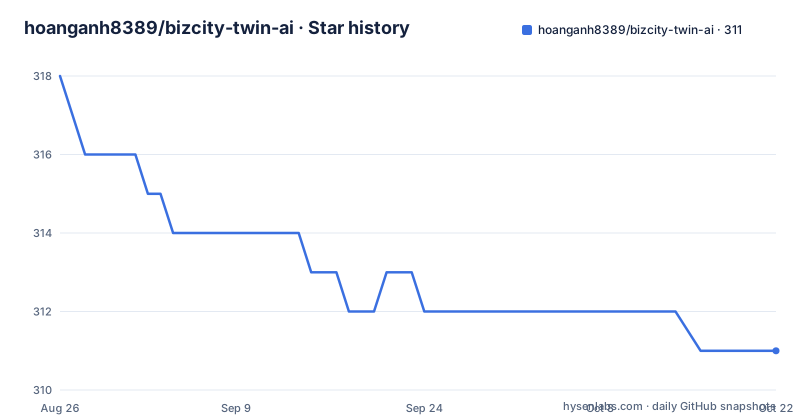
Star history
- hoanganh8389/bizcity-twin-ai311 ★ · -7
| Repository | 2026-08-26 | 2026-10-22 |
|---|---|---|
| hoanganh8389/bizcity-twin-ai | 318 | 311 |
-7 Stars in the last 57 days, measured from the daily GitHub snapshot. Compare with other projects
Editorial analysis
What Bizcity Twin AI Actually Is
Bizcity Twin AI is a WordPress plugin written in PHP. It is not a chatbot. It is not a CRM. It is an attempt to turn WordPress into a platform that runs an entire business's AI operations. The README calls it a Second Brain. The idea is that a business feeds its internal documents, customer data, and workflows into WordPress, and the plugin organizes that knowledge into a graph that an AI can reason over. The plugin then exposes that brain through channels like chat, CRM, and page building. The target user is a small or medium business that already uses WordPress and wants to control its AI stack instead of paying per-seat for external tools. The project is open source with a free core, though the license is listed as NOASSERTION, which means you should not assume you can use it freely without checking.
The Three Architectural Pillars
The README is explicit about the architecture. There are three axes that cannot change. The horizontal axis is the Channel Gateway, which connects external systems like CRM, POS, inventory, and communication tools into a single normalized stream. The vertical axis is the Vertical Brain Mode, where plugins and extensions integrate through a defined contract and share the same brain spine. The knowledge layer is the KG Graph, where internal documents are built into a knowledge graph and used for Graph RAG. The README says extensions like Chatbot, GPT, Profile, Landing Page, and Automation must enrich this shared brain, not create parallel brains or bypass the identity, tenant, and permission contracts. That is a strong architectural stance. It means every plugin must go through the brain, not around it.
How the Brain Works: Graph RAG and Evidence
The core mechanism is Graph RAG. The README states that internal documentation is built into a Knowledge Graph, and that graph serves as the evidence layer for reasoning. The idea is that when a user asks a question in natural language, the system classifies it, plans a multi-step execution across plugins, and then retrieves relevant evidence from the graph. This is different from a simple vector search. A graph preserves relationships between entities, so the AI can answer questions that require connecting facts from different documents. The README also mentions MCP, or Model Context Protocol, as a way to attach external AI tools. But those tools must go through the same contract, identity, tenant, and evidence checks. Nothing bypasses the brain. This is a serious design, but the README does not explain how the graph is built, what embedding model is used, or how the retrieval is scored.
Getting It Running: Demo and Setup
The README points to a live demo at libedemo.bizcity.vn/gpt, with a backend at /wp-admin and a direct backend at /twin. The demo credentials are username demo and password 123456@. That is a weak password, and it is public, so you should treat the demo as a sandbox, not a real environment. The README does not provide installation commands or configuration keys. It does not say how to install the plugin, whether it requires a specific PHP version, or what database tables it creates. For a WordPress plugin, that is a notable gap. You would have to clone the repository, place it in wp-content/plugins, and activate it, but the README does not confirm that. The only setup information is the demo link and the credentials.
Limitations and Failure Modes
The biggest limitation is that the project is early-stage. The license is NOASSERTION, which is a red flag for production use. The README is written in a mix of Vietnamese and English, and it reads like a product vision document more than a technical manual. There are no release notes, no version numbers, and no changelog. The last push date is unknown, and the repository is not archived, but there are no recent releases retrieved. That means you cannot rely on stability. Another failure mode is the weak demo credentials. If you deploy this as-is, you are exposing a WordPress admin with a known password. The README also says extensions must not create parallel brains, but it does not explain how to enforce that in code. A developer could easily violate that contract without knowing it.
Alternatives: How They Differ
The closest alternative is a dedicated AI chatbot platform like Botpress or Rasa. Botpress is a conversational AI platform that also supports knowledge bases and integrations, but it is not WordPress-native. You would run it as a separate service and connect it to WordPress via API. Rasa is an open source conversational AI framework that gives you full control, but it requires significant development effort. The difference is architectural. Bizcity Twin AI wants to embed the brain inside WordPress, so the data and the execution live in the same place as your content. Botpress and Rasa treat the brain as an external service, which means you have to manage data synchronization and identity across systems. If you already live in WordPress, the Twin approach could reduce integration overhead. If you want a proven, standalone platform, Botpress or Rasa are safer bets.
Maintenance and Upgrade Cost
The README does not discuss maintenance or upgrades. There is no mention of a roadmap, a support channel, or a contribution guide. The license being NOASSERTION means you cannot assume you have the right to modify or redistribute the code. That is a serious legal and practical concern. If you adopt this, you need to contact the author to clarify the license before you build anything on top of it. The code is PHP, which is a mature language, but the plugin's architecture is complex, with a brain spine, contracts, and a knowledge graph. That complexity will make upgrades difficult if the core changes. The README says the vision is fixed, but the implementation is not. You should expect breaking changes between versions, and you should have a staging environment to test them.
Editorial conclusion
Adopt Bizcity Twin AI if you are a small or medium business already on WordPress, want to own your data, and are willing to experiment with a project that is clearly pre-1.0. Do not adopt it for mission-critical operations until you have verified the actual state of the code, the license, and the security of the demo credentials. The project's vision of a unified brain is compelling, but the README is heavy on direction and light on implementation details. Check the repository for recent commits, open issues, and a real license before you commit.
Frequently asked questions
Is twin AI free?
The project states that it runs on WordPress with PHP 7.4 or newer under GPL-2.0-or-later with core free and self-hosted, and the license text is in the `LICENSE` file. Repository metadata separately reports the license as NOASSERTION, so read the file rather than the metadata field.
What must a new bizcity-twin-ai plugin declare before storing data?
It must declare `[email protected]` before adding any table, file, option, usermeta entry, custom post type, or knowledge graph artifact. A directive dated 2026-09-13 requires this of new plugins and of plugins that migrate data, and the contract lives in `docs/contracts/` with fixtures.
What is bizcity_context_bank used for in bizcity-twin-ai?
It is only a pointer, correlation, and provenance ledger, not a payload store. Brain Chat reads `[email protected]` through the Context Bank or the TwinBrain owner, and plugins may not scan files, query the knowledge graph directly, or build their own retrieval layer.
How does bizcity-twin-ai keep customer messages apart from admin commands?
The Channel Gateway splits them into two zones. Customer care from Facebook, Zalo, WebChat, and email uses `guest_channel` identity from channel, account, and external user with no automatic WordPress account attachment, while Zalo Bot and Telegram Bot route to TwinBrain and automation instead of the inbox.
What does bizcity-twin-ai require to run?
WordPress with PHP 7.4 or newer, since self-hosting on an existing site is the stated deployment model. The repository ships Composer manifest and lock files, a PHPUnit configuration, a coding standards configuration, and a reference plugin under `examples/`.
Official sources
Add this badge to your README
If you maintain this project, the badge below links readers to this analysis and shows its maintenance status from the daily GitHub snapshot. Paste the markdown into your README; add ?metric=license or ?metric=stars to the image URL for a different field.

[](https://hysenlabs.com/projects/hoanganh8389-bizcity-twin-ai)Star history chart for your README
[](https://hysenlabs.com/projects/hoanganh8389-bizcity-twin-ai)