cargo-sweep: trimming target/ without a full cargo clean
A cargo subcommand for cleaning up unused build files generated by Cargo
At a glance
- What is it?
- cargo-sweep is a Cargo subcommand that deletes build artifacts from target/ by age, by toolchain, or until a size limit is met, so a large build directory can be trimmed without clearing everything. The project itself carries an unmaintained warning, which is the first thing to weigh before adding it to a pipeline.
- Who is it for?
- cargo-sweep suits a Rust developer or CI owner who wants to trim a multi-gigabyte target/ directory by age, toolchain or size instead of wiping it, and the dry-run mode makes a first pass cheap. It does not suit a team that needs a maintained dependency with review capacity, because the project states it is unmaintained and points at cargo-clean-all as the alternative, and it does not suit workspaces where artifact ownership is unclear.
- Can I use it commercially?
- Yes. MIT is a permissive licence: you can use, modify and sell software built on it, as long as you keep its copyright and licence notices.
- Is it still maintained?
- Yes. The repository last received commits 166 days ago.
- What is it written in?
- Mainly Rust, according to GitHub's language statistics.
Answers come from the project's GitHub data, last synced on November 7, 2026, and from our analysis. They are not legal advice.
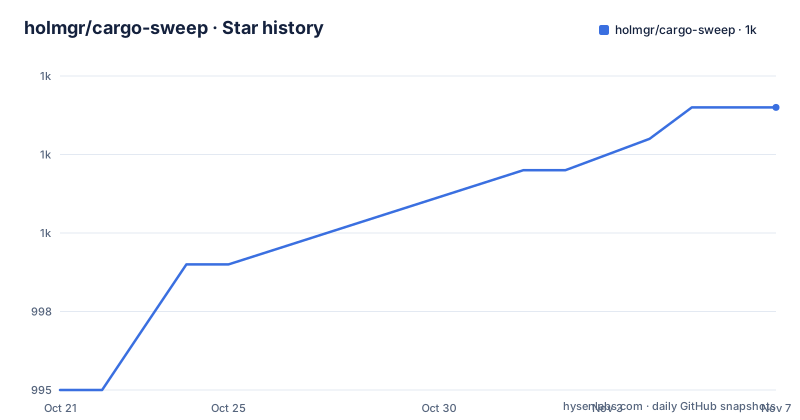
Star history
- holmgr/cargo-sweep1,004 ★ · +9
| Repository | 2026-10-21 | 2026-11-07 |
|---|---|---|
| holmgr/cargo-sweep | 995 | 1k |
9 Stars in the last 17 days, measured from the daily GitHub snapshot. Compare with other projects
Editorial analysis
Deleting some build artifacts instead of all of them
Cargo's built-in clean removes everything, and in a workspace with several toolchains and long lived branches that is a heavy hammer. cargo-sweep exists to do the partial version: deleting old or unused build artifacts out of target/ while keeping what is still in use. The situations the project names are shrinking large target/ directories, avoiding bloated CI caches, and cleaning many Rust projects at once. The distinction is the point. A full clean costs you a full rebuild of everything, and on a CI runner with a warm cache that rebuild is the slowest part of the job. A selective sweep keeps recently built artifacts and throws away what has not been touched in weeks, so the cache stays useful without growing without bound. The tool is a Cargo subcommand, so it runs as cargo sweep from inside a project directory and reads the project layout the same way Cargo does.
cargo install cargo-sweep, then start with a dry run
Installation is a single Cargo command, which builds the binary from the published crate and puts it on your path:
cargo install cargo-sweepAfter that it behaves as a subcommand of Cargo, so cargo sweep --help lists the available options, and the standalone binary can also be called directly as cargo-sweep --help. The first real use should be a preview rather than a deletion, because the dry-run flag prints what would go without removing it:
cargo sweep --dry-run --time 30When the listing matches your expectations, the same selection without the flag removes the artifacts older than 30 days:
cargo sweep --time 30The age filter is expressed in days, and the same shape works for the other criteria.
Age, toolchain, size and everything are four different rules
The selection rules are where the real options sit. Beyond age there is a rule for toolchains, one for total size, and one for unconditional removal. Artifacts that were not built by a currently installed toolchain can be dropped, which is the tidy way to drop build output from a toolchain you have since uninstalled:
cargo sweep --installedThe inverse keeps only the toolchains you name, for example stable and nightly, and sweeps everything else:
cargo sweep --toolchains stable,nightlyA size limit works the other way round, trimming until the target directory falls under a threshold rather than removing by age:
cargo sweep --maxsize 10GiBThe units are written into the value, and the cap is what makes this usable in CI, where a cache size cap is easier to express than a retention policy. For a single project where nothing should be kept, the all flag removes the contents of a specific project directory:
cargo sweep --all path/to/projectThe stamp and file pair keeps only what you just built
There is a second workflow for the case where age is the wrong signal, such as a project where you want to keep the artifacts produced by the current session and drop everything older. The stamp command writes a timestamp marker, you run your builds, tests and benchmarks, and the file command removes everything older than that marker:
cargo sweep --stamp

# run builds, tests, benches, etc.

cargo sweep --file
The sequence matters, and it has an operational side. The stamp is taken before the work, so artifacts written during the session are newer than the marker and survive, while anything from a previous session is older and goes. If the marker is left in place and a later sweep runs without a fresh stamp, you are sweeping against a stale reference point, so the marker is a piece of state you have to manage rather than a flag you can forget. It also gives you a way to reproduce a cache in CI: stamp, build, and the result is exactly the set of artifacts the run produced.
Toolchain detection leans on rustup, with a rustc fallback
Deciding which toolchain built an artifact requires knowing what the artifact was compiled with, and the dependency list names the piece that does it: Cargo.toml includes rustc-stable-hash, along with cargo_metadata for reading the project and walkdir for walking directories. The behaviour the project documents is that in a rustup environment cargo-sweep can identify artifacts from installed toolchains, and when rustup is not available it falls back to invoking rustc directly. That fallback is what keeps the tool usable on a machine where Rust was installed by a package manager or a tarball rather than by rustup, and it also means the tool has to run rustc to answer the question. The two toolchain rules, installed and toolchains, are only as good as that detection. A detection miss shows up as an artifact being kept when you expected it to go, which is why the dry-run listing matters more for the toolchain rules than for the age rule.
Recursive sweeps work over a workspace root, and need care
Cleaning many projects at once is a supported mode rather than a side effect. The recursive flag walks a directory tree and sweeps every Cargo project it finds:
cargo sweep --recursive --time 30 path/to/workspace-rootThis is the flag that makes the tool attractive for a machine with a dozen checkouts and painful target/ directories, and it is also the flag that deserves the most thought before you run it. A recursive sweep deletes build output, not source, but it decides which directories are Cargo projects by walking them, and the age rule applies inside each one it finds. Running it at a high level in a home directory means the scope is whatever happens to be underneath. The README's own example passes a workspace root, which is the safe shape of the command, and the dry-run flag works with it as well, so the sensible first pass is the recursive dry run over the same root, then the real sweep once the list looks right.
The project says it is unmaintained and points elsewhere
The first thing in the README is a warning, and it deserves to be quoted rather than paraphrased: 'cargo-sweep is currently unmaintained'. The stated reason is that the project has issues and lacks a dedicated maintainer to contribute or review contributions from others. The repository also names two previous maintainers, @jyn514 and @marcospb19, and invites a handover discussion. Practically, that changes how you should read the rest of the file. The dates line up: the last push to the repository was on 2026-05-26, and the latest release, v0.8.0, was published on 2025-10-11, with v0.7.0 dating from 2023-10-05. The crate itself is version 0.8.0 on edition 2021, and the licence is MIT, so nothing about the code carries a copyleft obligation or a fee. What you are accepting is a dependency that nobody is currently reviewing, which for a tool that deletes files is the more important consideration than the licence.
cargo clean, cargo-sweep and cargo-clean-all do different things
Two alternatives are named by the project, and they fail differently. The built-in cargo clean removes everything, which is a total operation with a known cost: a full rebuild afterwards. cargo-sweep takes the same target/ directory and applies a rule instead of a blanket, so age, toolchain and size are the levers, and a mistake in a rule is bounded by the rule rather than by the directory. The third option, cargo-clean-all, is what the project points readers to when they want an alternative, and the README deliberately does not describe how its selection rules differ, so that comparison has to be made against that project's own documentation. The honest reason to prefer cargo-sweep over cargo clean is selective retention, not extra features. The honest reason to look elsewhere is the unmaintained warning, since a tool whose job is deleting files is a poor thing to depend on without review.
Editorial conclusion
cargo-sweep suits a Rust developer or CI owner who wants to trim a multi-gigabyte target/ directory by age, toolchain or size instead of wiping it, and the dry-run mode makes a first pass cheap. It does not suit a team that needs a maintained dependency with review capacity, because the project states it is unmaintained and points at cargo-clean-all as the alternative, and it does not suit workspaces where artifact ownership is unclear. Check the first run with cargo sweep --dry-run --time 30 before deleting anything, and note that the last push to the repository was on 2026-05-26 while the latest release, v0.8.0, dates from 2025-10-11.
Frequently asked questions
How do I install cargo-sweep?
The project documents cargo install cargo-sweep, which builds the binary and puts it on your path. After that it runs as a Cargo subcommand, so cargo sweep --help lists the options.
How can I preview what cargo sweep would delete before running it?
Use the dry-run flag with any selection rule, for example cargo sweep --dry-run --time 30. The same command without the flag performs the deletion.
How do I keep only artifacts built by stable and nightly?
The toolchains flag takes a comma separated list, so cargo sweep --toolchains stable,nightly keeps those two and sweeps the rest. The installed flag is the inverse, removing artifacts not built by currently installed toolchains.
Is cargo-sweep still maintained?
The project states in its README that it is currently unmaintained and points to cargo-clean-all as an alternative, with two previous maintainers named for a possible handover. The last push to the repository was on 2026-05-26 and the latest release, v0.8.0, is dated 2025-10-11.
Official sources
Add this badge to your README
If you maintain this project, the badge below links readers to this analysis and shows its maintenance status from the daily GitHub snapshot. Paste the markdown into your README; add ?metric=license or ?metric=stars to the image URL for a different field.

[](https://hysenlabs.com/projects/holmgr-cargo-sweep)Star history chart for your README
[](https://hysenlabs.com/projects/holmgr-cargo-sweep)Was this useful?