Homebrew Core: The Default Formula Repository That Defines macOS Package Management
Default formulae for the missing package manager for macOS (or Linux).
At a glance
- What is it?
- Homebrew Core is the default tap of formulae for the Homebrew package manager on macOS and Linux. It is the workhorse repository that makes `brew install` work out of the box, but its size and scope come with real constraints.
- Who is it for?
- Adopt Homebrew Core if you are a macOS or Linux user who wants a community-maintained, default package source with a simple `brew install` workflow. Do not use it if you need strict supply chain control, offline packages, or a curated set of formulae for a specific enterprise environment.
- Can I use it commercially?
- Yes. BSD-2-Clause is a permissive licence: you can use, modify and sell software built on it, as long as you keep its copyright and licence notices.
- Is it still maintained?
- Yes. The repository received new commits within the last day.
- What is it written in?
- Mainly Ruby, according to GitHub's language statistics.
Answers come from the project's GitHub data, last synced on November 13, 2026, and from our analysis. They are not legal advice.
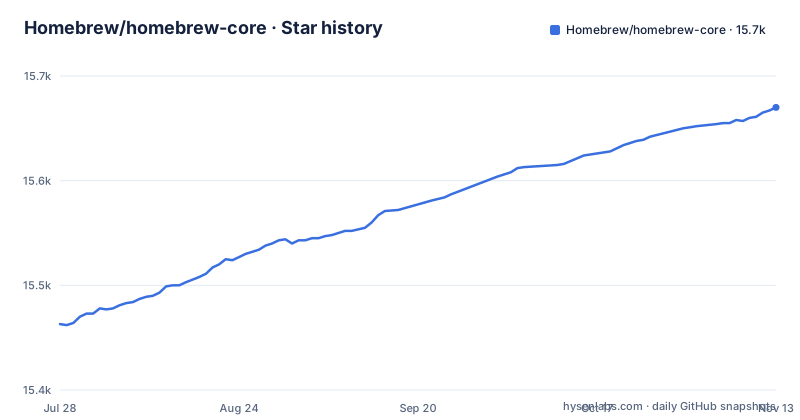
Star history
- Homebrew/homebrew-core15,670 ★ · +207
| Repository | 2026-07-28 | 2026-11-13 |
|---|---|---|
| Homebrew/homebrew-core | 15.5k | 15.7k |
207 Stars in the last 108 days, measured from the daily GitHub snapshot. Compare with other projects
Editorial analysis
The Problem Homebrew Core Solves: Default Package Discovery
The problem is not just discovery; it is also consistency. Homebrew Core provides a single, curated namespace for formulae. When you run `brew install <formula>`, the package manager knows exactly where to look. This is a stark contrast to the early days of package management, where users manually downloaded tarballs or compiled from source. Homebrew Core standardizes the experience. It is the reason the command `brew install` works on a fresh installation without any additional configuration. The repository is the backbone of the ecosystem, even though most users will never look at its contents directly.
How Homebrew Core Works: The Default Tap Mechanism
The dependency on Homebrew/brew is total. Homebrew Core does nothing on its own. It is a data source. The README points to Homebrew/brew's README for more documentation, troubleshooting, and security policies. That separation is deliberate. The core formulae repository is a large, community-maintained collection, while the package manager is a separate project. This split allows the formula collection to grow independently of the manager's code. It also means that changes to Homebrew Core, such as adding a new formula or updating an existing one, do not require a new release of the package manager. The repository's license is BSD-2-Clause, which applies to the formula metadata, not to the software that the formulae install. That is a subtle but important point for users who assume the license covers everything.
Getting Started: Installing Formulae from Homebrew Core
The repository description also mentions that Homebrew works on Linux, so the same `brew install` command applies there. The installation of Homebrew itself is not covered in this README, but it is a prerequisite. The README's brevity suggests that the authors assume the user already knows how to install Homebrew. For a new user, the first step is to install Homebrew, then run `brew install`. The lack of detailed instructions in this README is a deliberate choice; the Homebrew/brew README is the place for that. This repository is a component, not a standalone product. The command `brew install <formula>` is the only command you need to interact with Homebrew Core directly. Everything else is handled by the package manager.
Limitations and Failure Modes: When Homebrew Core Is the Wrong Tool
A more serious failure mode is the trust model. Homebrew Core is a community-maintained repository. The README points to security policies in Homebrew/brew, but it does not detail them here. If a formula is compromised, the impact could be widespread, because Core is installed by default. This is not a hypothetical risk; it is a known concern with any large package repository. The BSD-2-Clause license on the repository gives you rights to the formula code, but it does not guarantee the security of the software installed. For users who need a higher level of trust, such as enterprises, relying on a community repository may be unacceptable. In those cases, a private tap or a different package manager with a stricter review process is a better fit. Homebrew Core is the wrong tool if you need offline installation, because it requires network access to fetch formulae and bottles. The README does not mention offline support, and the design implies a network dependency.
Alternative Approaches: Third-Party Taps and System Package Managers
The key difference between Homebrew Core and a third-party tap is the default trust. Core is installed by default, so you are implicitly trusting the Homebrew maintainers. A tap requires an explicit action, so you are making a deliberate trust decision. For a project that needs a specific version of a library, a tap is often the only way to get it, because Core may not have that version. The documentation for taps is not in this README, but it is a standard Homebrew feature. System package managers, on the other hand, are more conservative. They are designed for stability, not freshness. Homebrew Core sits in the middle: it is more current than system packages but less controlled than a private tap. For most users, the default is the right choice, but it is worth knowing that alternatives exist.
Maintenance and Upgrade Cost: The Hidden Burden of a Default Tap
The upgrade path is straightforward: `brew update` and then `brew upgrade`. But the cost is in the unpredictability. A formula update can change dependencies, and you might have to rebuild packages that depend on it. Homebrew Core does not provide long-term support for specific versions. Once a formula is updated, the old version is often removed. This is a rolling release model, and it is a trade-off. You get the latest software, but you accept the risk of breakage. For a production environment, this is a serious concern. The README does not offer a solution, but it points to the Homebrew/brew documentation for troubleshooting. The maintenance cost is real, and it is a reason why some users prefer system package managers, which offer a more stable, albeit older, set of packages. The BSD-2-Clause license gives you the freedom to fork and freeze, but that is a significant undertaking.
Who Should Adopt Homebrew Core: A Direct Assessment
The decision to use Homebrew Core is often not a decision at all, because it is the default. But you can choose to avoid it by not installing Homebrew or by using a different package manager. For most users, the default is fine. The repository's simplicity is its strength. If you are a developer who wants to contribute, the README points to the forum and the contributing sections in Homebrew/brew. The license is permissive, so you can fork it. But forking is a serious commitment. The maintenance cost is high. Homebrew Core is a good default, but it is not a solution for every problem. It is a package source, not a package manager, and it should be evaluated as such.
Editorial conclusion
Adopt Homebrew Core if you are a macOS or Linux user who wants a community-maintained, default package source with a simple `brew install` workflow. Do not use it if you need strict supply chain control, offline packages, or a curated set of formulae for a specific enterprise environment. Before adopting, verify that the formulae you need are present and maintained, understand that the BSD-2-Clause license applies to the repository itself, not to the software installed, and check the Homebrew/brew README for security and contribution policies. The repository is the default for a reason, but it is not a universal answer; it is a massive, fast-moving collection that works best when you accept its defaults.
Frequently asked questions
what is homebrew core
Homebrew Core is the default tap for the Homebrew package manager, holding the core formulae as files under the Formula/ directory alongside Abstract/, Aliases/ and Patches/ directories and four JSON files for renames, migrations and version syncing. It is installed by default, so you use it with brew install rather than by adding a tap.
Does Homebrew still exist?
Yes. Homebrew Core is not archived and its default branch last took a push on 2026-11-01, with the project site at brew.sh and discussion through the Homebrew GitHub discussions forum. It has no GitHub releases, which is expected for a tap of definitions rather than a released program.
Is it safe to install Homebrew on my Mac?
The licence for Homebrew Core is BSD-2-Clause, which is a permissive grant. On mechanics rather than judgement: this repository holds only package definitions, you install from it with brew install <formula>, and everything it contains is consumed by the Homebrew client rather than executed directly by you.
Is installing Homebrew illegal?
No, and the licence is the reason. Homebrew Core is published under the BSD-2-Clause licence, with a LICENSE.txt at the root of the repository, which permits use, modification and redistribution. The project also points at a discussion forum and a documentation site at brew.sh.
Official sources
Where developers are discussing it
Posts on Hacker News, dev.to and Lobsters that link to this repository, found by our scan of those communities. 1 in the last 30 days; newest first.
- Homebrew Git updated away from macOS's system cURLHacker News · Oct 28, 2026 · 2 points · 1 comments
Add this badge to your README
If you maintain this project, the badge below links readers to this analysis and shows its maintenance status from the daily GitHub snapshot. Paste the markdown into your README; add ?metric=license or ?metric=stars to the image URL for a different field.

[](https://hysenlabs.com/projects/homebrew-homebrew-core)Star history chart for your README
[](https://hysenlabs.com/projects/homebrew-homebrew-core)Was this useful?