DevToys 2.0: A Local Toolbox That Keeps Developer Utilities Off the Browser
Project brief: A Swiss Army knife for developers. No need to use many untrustworthy websites to simply decode a text or compress an image.
At a glance
- What is it?
- DevToys is an open-source, MIT-licensed desktop app that bundles 30 small developer tools into one interface, with Smart Detection to guess the right tool from your clipboard. It targets developers who want to avoid untrustworthy websites for quick encoding, formatting, or compression tasks.
- Who is it for?
- Adopt DevToys if you are a developer who regularly performs small, repetitive text or image transformations and prefers a local tool over a web page. Do not adopt it if you need deep, specialized functionality that goes beyond the bundled 30 tools, or if you require a command-line interface, which the README does not mention.
- Can I use it commercially?
- Yes. MIT is a permissive licence: you can use, modify and sell software built on it, as long as you keep its copyright and licence notices.
- Is it still maintained?
- Yes. The repository last received commits 46 days ago.
- What is it written in?
- Mainly C#, according to GitHub's language statistics.
Answers come from the project's GitHub data, last synced on November 13, 2026, and from our analysis. They are not legal advice.
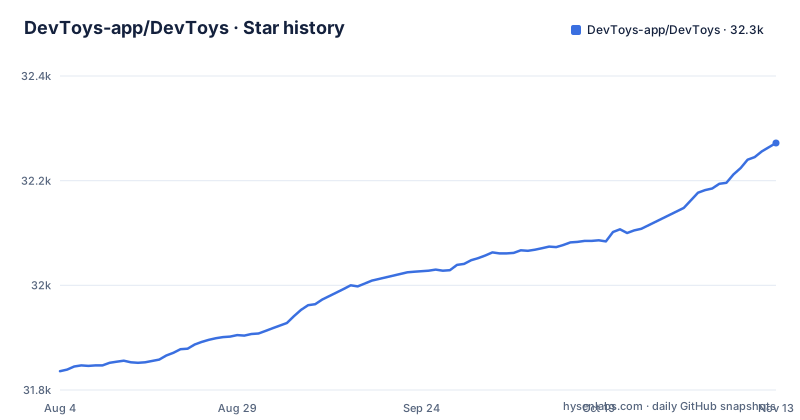
Star history
- DevToys-app/DevToys32,272 ★ · +436
| Repository | 2026-08-04 | 2026-11-13 |
|---|---|---|
| DevToys-app/DevToys | 31.8k | 32.3k |
436 Stars in the last 101 days, measured from the daily GitHub snapshot. Compare with other projects
Editorial analysis
The Problem: Untrustworthy Websites for Simple Tasks
Developers often need to decode a Base64 string, format a JSON blob, or compress a PNG. The common habit is to open a random website that promises to do the job. Those sites may be full of ads, trackers, or worse, they may send your data to a server you do not control. DevToys directly addresses this by offering a local desktop application that performs these tasks on your machine. The README states its purpose plainly: no need to use many untrustworthy websites to simply decode a text or compress an image. This is a privacy-minded approach for a category of tools that are often treated as throwaway browser bookmarks. The audience is any developer who has ever hesitated before pasting a JWT or a proprietary SQL snippet into a web form. DevToys gives those users a reason to keep that data on their own disk.
The Mechanism: Smart Detection and a Bundle of 30 Tools
DevToys 2.0 ships with 30 default tools, organized into seven categories: Converters, Encoders/Decoders, Formatters, Generators, Graphics Tools, Testers, and Text Utilities. The core mechanism is Smart Detection. When you copy something to the clipboard, the app tries to guess which tool fits the data. For example, copying a JSON string might automatically open the JSON formatter. The README says the app intuitively selects the best tool for the data on your clipboard. This is a convenience feature that reduces the friction of choosing from a long list of tools. The tools themselves are not new inventions; they are standard utilities like JSON to YAML, HTML encoder, Base64 decoder, JWT decoder, QR code generator, hash and checksum generator, and a PNG/JPEG compressor. What DevToys adds is a unified interface and a local runtime. The project is written in C#, and the README credits a developer for DevToysMac.
Getting It Running: Installation and Extension Points
The README does not include explicit installation commands, but it links to the homepage at devtoys.app. The project is also listed on the Microsoft Store, as the README mentions a rating there. For developers who want to build from source, the repository is on GitHub with a default branch of main and recent releases like v2.0.9.0 from January 2026. The README points to a documentation site at devtoys.app/doc for developing your own extensions. This is a key part of the project: the 30 default tools are not the end of the story. Extensions allow the community to add more tools. The extension mechanism is not detailed in the README, so you would need to consult the documentation to learn the exact API or packaging format. But the existence of an extension system means the toolset can grow beyond the defaults.
Licence and Dependencies: MIT with Third-Party Notices
DevToys is released under the MIT license, which is permissive for both personal and commercial use. The repository includes a LICENSE.md file and a THIRD-PARTY-NOTICES.md file. The latter lists the third-party software DevToys uses. The README also links to a PRIVACY-POLICY.md, which is a good sign for a tool that handles sensitive clipboard data. The MIT license means you can modify and redistribute the code, but you must retain the copyright notice. The third-party notices are a legal requirement for some dependencies, and you should read them if you plan to redistribute a modified version. This is a low-license-friction project, but the extension ecosystem may have its own licensing terms, so check those separately.
Limitations: Not a Power Tool, and No CLI in Sight
DevToys is a Swiss Army knife, which means it is broad but not deep. Each tool is designed to be quick and specific, not to replace a full-featured application. The README does not mention a command-line interface. The Smart Detection feature is also a double-edged sword: it may guess wrong, and you will have to manually select the correct tool. The README does not describe how to disable Smart Detection or configure its behavior.. These are not fatal flaws, but they define the boundary of what DevToys is good for.
Alternatives: Browser Extensions and Dedicated CLI Tools
The most direct alternative to DevToys is a browser extension like JSON Viewer or a bookmarklet for encoding. These run in the browser, which is convenient, but they still depend on the browser's security model and may not work offline. Another alternative is a set of dedicated command-line tools, such as jq for JSON, base64 for encoding, and pngquant for image compression. These are scriptable and precise, but they require learning multiple tools and managing their installation. The difference in approach is clear: DevToys offers a single graphical interface with Smart Detection, while CLI tools offer precision and automation at the cost of a steeper learning curve. For a developer who wants a quick, visual tool without leaving the desktop, DevToys is a reasonable middle ground. For a developer who wants to automate a pipeline, the CLI tools are the better choice. The README does not compare itself to these options, but the trade-off is evident from the feature set.
Maintenance and Upgrade Cost: Active Releases, but Verify Your Tools
The repository shows regular releases, with v2.0.9.0 pushed on January 8, 2026, and earlier versions in late 2024. This indicates active maintenance, which is a positive signal for a tool that handles many file formats. The upgrade cost is low for end users: you download a new version and install it, likely via the Microsoft Store or the website. For developers who build from source, the cost is higher because you need to track changes in the codebase. The extension API is a potential maintenance burden: if the API changes between versions, your custom extensions may break. The README does not provide a changelog or migration guide, so you should check the release notes on GitHub before upgrading. The MIT license means you can fork the project if the upstream direction does not suit you, but that is a significant long-term commitment. For most users, the maintenance cost is simply keeping the app updated, which is minimal.
Editorial conclusion
Adopt DevToys if you are a developer who regularly performs small, repetitive text or image transformations and prefers a local tool over a web page. Do not adopt it if you need deep, specialized functionality that goes beyond the bundled 30 tools, or if you require a command-line interface, which the README does not mention. Before adopting, verify that the specific tools you need are in the default set or available via an extension, and check the privacy policy and third-party notices to understand what data, if any, leaves your machine. The project is actively maintained, with a release in January 2026, so the toolset is likely to evolve, but you should still confirm that your critical workflow is covered before switching from your current setup.
Frequently asked questions
What is DevToys?
DevToys is described as a Swiss Army knife for developers: a bundle of small tools for quick, specific tasks, so you do not have to use a string of websites to decode text or compress an image. Version 2.0 ships 30 default tools, and Smart Detection selects the tool that matches the data on your clipboard.
How do you install DevToys?
The README documents no install command at all. It links the devtoys.app website and a Microsoft Store listing, and the repository tree contains a chocolatey folder, but no package manager invocation, installer name, or version is given anywhere in the documentation.
Is DevToys safe to use with sensitive data?
The project's stated argument is that the tools are bundled so you avoid using many untrustworthy websites to decode a text or compress an image. The repository carries PRIVACY-POLICY.md and SECURITY.md, but the README does not state what either file covers.
Is DevToys free?
The project is published under the MIT license, with LICENSE.md at the repository root. The README does not mention a paid tier, a subscription, or a pro build, and it links a Microsoft Store listing alongside the devtoys.app website.
How does DevToys compare with Microsoft PowerToys?
PowerToys is a Windows utility suite aimed at operating system chores, while DevToys is aimed at text, data, and image chores such as encoding, formatting, hashing, and compression. The README does not name PowerToys or compare the two.
Official sources
Add this badge to your README
If you maintain this project, the badge below links readers to this analysis and shows its maintenance status from the daily GitHub snapshot. Paste the markdown into your README; add ?metric=license or ?metric=stars to the image URL for a different field.

[](https://hysenlabs.com/projects/devtoys-app-devtoys)Star history chart for your README
[](https://hysenlabs.com/projects/devtoys-app-devtoys)Was this useful?