Hono: A Web Standards Framework for Runtimes You Do Not Control
Web framework built on Web Standards
At a glance
- What is it?
- Hono is a zero-dependency TypeScript framework whose single codebase targets Cloudflare Workers, Deno, Bun, AWS Lambda, Lambda@Edge, Fastly Compute, Vercel and Node.js. The interesting part is not the speed claim, it is how far the Web Standards surface stretches before it breaks.
- Who is it for?
- Adopt Hono if you are deploying the same TypeScript router to more than one of the runtimes the README names, or if you are moving an existing service onto Cloudflare Workers and want a Request/Response surface you already understand. Do not adopt it if your application depends on Node-specific libraries that expect http.IncomingMessage or on a framework's plugin ecosystem for auth, ORM and admin scaffolding; Hono gives you middleware, not an application platform.
- Can I use it commercially?
- Yes. MIT is a permissive licence: you can use, modify and sell software built on it, as long as you keep its copyright and licence notices.
- Is it still maintained?
- Yes. The repository last received commits 4 days ago.
- What is it written in?
- Mainly TypeScript, according to GitHub's language statistics.
Answers come from the project's GitHub data, last synced on November 12, 2026, and from our analysis. They are not legal advice.
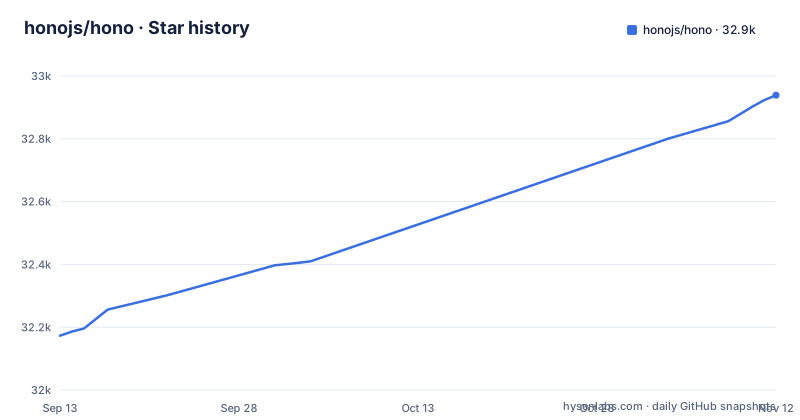
Star history
- honojs/hono32,939 ★ · +766
| Repository | 2026-09-13 | 2026-11-12 |
|---|---|---|
| honojs/hono | 32.2k | 32.9k |
766 Stars in the last 60 days, measured from the daily GitHub snapshot. Compare with other projects
Editorial analysis
The problem Hono solves is deployment portability, not request speed
Most JavaScript web frameworks are written against a runtime's native request object. Express and its descendants assume Node's http module. Workers-oriented frameworks assume the Fetch API. Once you pick one, moving the same handler code to a different execution environment means rewriting the adapter layer, and often the middleware stack with it. Hono's README describes the project as a web framework built on Web Standards that works on Cloudflare Workers, Fastly Compute, Deno, Bun, Vercel, AWS Lambda, Lambda@Edge and Node.js, with the same code running on all platforms. That sentence is the product. The framework is a thin routing and middleware layer over Request, Response and the rest of the platform APIs that these runtimes have converged on. The intended user is someone shipping TypeScript to an edge or serverless target who does not want the routing layer to be the reason a migration is expensive. It is also a reasonable fit for a Node.js service where you want the handler signature to look like the one you would write for Workers, so that a later move is a deployment change rather than a rewrite.
RegExpRouter and the four-router design
The README states that the router RegExpRouter is fast and that it does not use linear loops. The authors section credits Taku Amano with RegExpRouter, SmartRouter, LinearRouter and PatternRouter, so there are four router implementations rather than one. The README names the four routers but does not describe how they differ, so treat the choice between them as something to confirm in the hono.dev documentation before you tune anything. What is verifiable from the README is narrower and still useful: routing is not a linear scan, the package has zero dependencies, and the hono/tiny preset is stated to be under 12kB. Those three facts together are the reason the framework is viable on Workers, where bundle size and cold-start behaviour are constraints rather than preferences.
Middleware is the actual application surface
Hono's README lists batteries included as a feature and distinguishes built-in middleware, custom middleware and third-party middleware. That three-way split tells you where the project draws its boundary. The core is routing plus a context object; anything that touches authentication, validation, logging or CORS lives in middleware that wraps the handler chain. This is a deliberate trade-off and it cuts both ways. You get a small dependency graph, which matters when every kilobyte is parsed on a cold start. You also get a framework that does not decide anything for you. There is no opinion about how a project directory is laid out, no bundled ORM, no session store. If your team is used to a framework that ships an admin generator and a migration tool, Hono will feel like half a framework, because by design it is. The README invites contributors to build middleware and libraries to grow the ecosystem, and points to docs/CONTRIBUTING.md for details. Whether the middleware you need already exists is a question the README cannot answer, and it is the first thing to check against your requirements list.
Getting a project running: the two commands in the README
The README gives a single quick start command, npm create hono@latest, and a minimal application example. The example imports Hono from the hono package, constructs an app with new Hono(), registers a GET route on the root path with app.get('/', (c) => c.text('Hono!')), and exports the app as the default export. The context parameter c is the object that carries the request and produces the response; c.text() is one of its response helpers. That is the whole setup surface documented in the README. Configuration keys, environment bindings and per-runtime entry points are not covered in the README, so the honest statement is that the README shows the shape of an application and points at hono.dev for everything else. If you need to know how bindings are typed on Workers or how the Lambda handler is exported, that is documentation work you have to do before you can estimate the port.
Where the Web Standards abstraction leaks
The claim that the same code runs on all platforms is true at the routing and response layer and progressively less true as you move outward. Request and Response are standardised. Bindings are not. A Cloudflare Worker reaches KV, D1 or R2 through an environment object. A Lambda function reaches its equivalents through a different event shape. A Deno process reaches neither. Hono can give you a uniform way to write a handler, but it cannot give you a uniform way to talk to a platform's storage, queues or scheduled triggers, because those are not part of the standard it builds on. The second leak is the Node.js target. Node's HTTP layer predates the Fetch API, and the adapter that bridges the two is where behaviour differences will surface. The README asserts Node.js support without qualification, and that assertion is plausible given the runtime list, but it does not describe the adapter, so the specific edge cases are unverified. Anyone whose application leans on streaming responses or unusual header handling should treat Node as the target to test first, not last.
Hono versus Express, and what the difference actually is
The obvious comparison is Express, and the difference is architectural rather than stylistic. Express was written for Node's http module and its middleware signature reflects that: handlers receive req and res objects with Node-specific methods, and the ecosystem of Express middleware is built on those objects. Hono's handlers receive a context built on the Fetch API, which is why the same handler can run on Workers. The practical consequence is that the Express middleware ecosystem is not available to you. Body parsers, session stores, passport strategies and template engines that assume req and res will not drop in. You either find a Hono equivalent, write the middleware yourself, or run Hono behind a Node adapter and accept that the portability benefit has been spent. The reverse comparison is to a framework tightly coupled to one edge platform. That buys you deeper integration with that platform's primitives at the cost of the portability that is Hono's entire reason for existing. Hono sits between the two: more portable than a platform-native framework, less batteries-included than Express.
Maintenance, releases and the MIT licence
The repository is active and not archived, with a last push on 2026-10-04 and releases v4.13.14 on 2026-10-25 and v4.13.15 and v4.13.16 on 2026-11-01. That release cadence is worth reading carefully. Three patch releases in about a week suggests either rapid bug fixing or a maintainer who ships small increments; the README does not say which, and the version numbers alone are not evidence of stability. The migration guide lives at docs/MIGRATION.md, which is where you should look before moving between major versions, since a framework whose selling point is portability across runtimes will accumulate breaking changes as those runtimes evolve. Hono is distributed under the MIT License, which is permissive and imposes no copyleft obligation on your application. This is not legal advice; if your organisation has licence review requirements, the LICENSE file in the repository is the authoritative text. The dependency cost of adoption is close to zero, which is unusual and is a genuine argument in the framework's favour when you are auditing a supply chain.
Editorial conclusion
Adopt Hono if you are deploying the same TypeScript router to more than one of the runtimes the README names, or if you are moving an existing service onto Cloudflare Workers and want a Request/Response surface you already understand. Do not adopt it if your application depends on Node-specific libraries that expect http.IncomingMessage or on a framework's plugin ecosystem for auth, ORM and admin scaffolding; Hono gives you middleware, not an application platform. Before committing, verify two things against the version you install: that your target runtime is listed in the README's runtime set, and that the middleware you need is either built in or available as third-party middleware. Then run npm create hono@latest to scaffold a project.
Frequently asked questions
What is Hono used for?
Hono is a small web framework built on Web Standards that runs on any JavaScript runtime, including Cloudflare Workers, Fastly Compute, Deno, Bun, Vercel, AWS Lambda, Lambda@Edge and Node.js. A route handler is a callback receiving a context and returning a response, and you can scaffold a project with `npm create hono@latest`.
What does Node.js actually do in relation to Hono?
Node.js is one of the runtimes Hono targets, alongside Cloudflare Workers, Fastly Compute, Deno and Bun. Hono is built on Web Standard APIs rather than on Node APIs, so the same code runs across all of them, and the package publishes both an ESM entry at dist/index.js and a CommonJS entry at dist/cjs/index.js.
Who is behind Hono's router?
Hono's author is Yusuke Wada, and the four router implementations, RegExpRouter, SmartRouter, LinearRouter and PatternRouter, were created by Taku Amano. The README's Ultrafast feature entry credits RegExpRouter, and it also calls Hono an ultrafast web framework.
Does Hono have any dependencies?
Hono has zero dependencies and uses only the Web Standard API. The `hono/tiny` preset is under 12kB. Note that this applies to the framework itself: third-party middleware you install afterwards is a separate dependency surface.
How do I test Hono across runtimes?
The package scripts run the suite per runtime, with test:deno and test:bun using those runtimes' own test runners, test:fastly, test:node and test:workerd each running vp test against a named project, and test:all chaining the main run with the Deno and Bun ones. The repository also carries runtime-tests directories for Deno and Bun.
Official sources
Where developers are discussing it
Posts on Hacker News, dev.to and Lobsters that link to this repository, found by our scan of those communities. 1 in the last 30 days; newest first.
- I Tried Hono v5 RC: What Changed from v4, and What Breaks?dev.to · Oct 20, 2026 · 5 points · 3 comments
Add this badge to your README
If you maintain this project, the badge below links readers to this analysis and shows its maintenance status from the daily GitHub snapshot. Paste the markdown into your README; add ?metric=license or ?metric=stars to the image URL for a different field.

[](https://hysenlabs.com/projects/honojs-hono)Star history chart for your README
[](https://hysenlabs.com/projects/honojs-hono)Was this useful?