YourTV Android TV player for IPTV and web video sources
安卓电视直播APK:IPTV/網頁視頻支持X5,可自定義源(支持webview://格式),IPTV支持畫中畫和熄屏播放。 Android TV Live APK: IPTV/web video supports X5, customizable sources (support webview:// format), IPTV supports picture-in-picture and off-screen playback.
At a glance
- What is it?
- YourTV is an Android TV and mobile video player built in Kotlin for IPTV and web video sources, including webview:// sources and Tencent X5 support. Its custom source workflow is flexible, but source syncing, release binaries, and source code require careful review before adoption.
- Who is it for?
- YourTV fits users who already have trusted IPTV or web video sources and want a configurable Android TV or mobile player. It is a poor fit for users who expect the repository, downloadable APK, and encryption service to share an identical implementation.
- Can I use it commercially?
- Yes. MIT is a permissive licence: you can use, modify and sell software built on it, as long as you keep its copyright and licence notices.
- Is it still maintained?
- Yes. The repository last received commits 75 days ago.
- What is it written in?
- Mainly Kotlin, according to GitHub's language statistics.
Answers come from the project's GitHub data, last synced on November 7, 2026, and from our analysis. They are not legal advice.
Star history
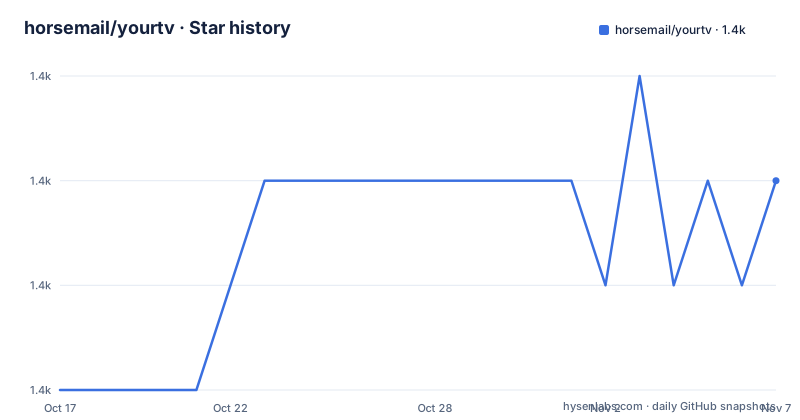
- horsemail/yourtv1,358 ★ · +2
| Repository | 2026-10-17 | 2026-11-07 |
|---|---|---|
| horsemail/yourtv | 1.4k | 1.4k |
2 Stars in the last 21 days, measured from the daily GitHub snapshot. Compare with other projects
Editorial analysis
YourTV's target devices and source formats
YourTV addresses a specific gap between a plain web browser and a fixed television playlist player. It runs on Android 6.0, API level 23, and later, and targets both Android TV systems and phones. That makes it relevant to television boxes, smart TVs based on Android, and mobile users who want the same application for IPTV and web video content.
The application supports two broad source classes. IPTV sources provide television or video entries, while web video sources can use the documented `webview://` format. It also supports Tencent WebView X5, an option that matters for users whose preferred web content depends on a particular embedded browser engine. The README does not specify how the application selects X5 or provide a switch for choosing between browser engines, so compatibility should be confirmed with the intended sites rather than inferred from support for both kinds of content.
Picture-in-picture is documented for mobile use, and IPTV playback is documented as continuing with the phone screen off. These features make the app more relevant than a basic full-screen web player, particularly for users who start video on a phone and then want background playback. The documentation does not state which Android TV models permit screen-off playback, whether audio controls remain available, or how battery optimization interacts with this behavior.
YourTV is for users who manage their own video sources. It is not presented as a curated channel package, and the repository does not claim that it supplies television content by itself. A prospective user still needs compatible source definitions and should assess those sources separately.
Source configuration and remote-update behavior
The central customization feature is user-defined source configuration, including sources expressed with `webview://`. The README also mentions remote configuration through a video source address and an application setting named “应用启动后更新视频源.” Its troubleshooting note states that when that setting is enabled and a source address exists, YourTV can update the sources at application startup and overwrite previously saved source text.
That behavior deserves attention. It makes remote configuration convenient when the address is controlled and intended to be authoritative. It can also surprise someone who edits source text locally, closes the application, and later finds the saved configuration replaced. Users who maintain different configurations on a television box and a phone should therefore understand whether startup synchronization is enabled before editing entries by hand.
The README refers to specific resource files, including `cloudflare.txt`, `github_private.txt`, and `sources.txt`. It instructs builders to confirm each resource and use the associated encryption and decryption tool website before storage. This indicates that private or remote source data is not intended to be treated as ordinary visible text during customization. However, the documentation does not publish the source syntax, a complete configuration schema, credential-handling rules, or the encryption algorithm. Those omissions limit independent validation from the README alone.
For ordinary installation rather than private customization, a user can download an APK from the repository's Releases page and add source definitions through the application. For maintainers who build custom releases, the distinction between application behavior and private resource preparation is more significant because the README warns that the encryption and decryption logic used for uploaded APKs differs from the logic in the source repository.
Installing an APK and launching the first playback
The README directs users to the GitHub Releases page for downloads. It recommends ADB installation for devices where direct APK installation is inconvenient. The documented command uses the name assigned to the downloaded file, so `YourTV.apk` must match the file present on the computer or device receiving the command.
After placing the APK at the expected local path, use:
adb install YourTV.apkThe command should complete with an ADB success message when the package is accepted. The README does not document an unknown-sources setting, Xiaomi-specific permission steps, or an update option for ADB, so those details should not be added as though they were project instructions. It separately says that Xiaomi televisions can use Xiaomi TV Assistant for installation.
On first launch, the application needs a usable source before it can demonstrate IPTV or web video playback. Add or import a source using the interfaces exposed by the downloaded build, then open an entry. The documentation establishes support for custom sources and `webview://`, but the cleaned instructions do not provide a sample source URL or complete first-run steps. Consequently, a real first playback cannot be reproduced from the repository documentation without user-provided source data.
Before beginning, check that the device meets the Android 6.0 minimum and that the source is appropriate for the embedded web or IPTV playback path. Mobile users can also check the documented picture-in-picture and screen-off options after basic playback succeeds. Those capabilities do not remove the need for a source that the application can parse.
Kotlin project layout and version metadata
Based on the repository layout, YourTV is an Android application whose primary language is Kotlin. The project contains an `app/` module, Gradle Kotlin build files, `gradlew`, and `gradlew.bat`. This is a conventional Android build structure rather than a small script-only utility. It also includes a Makefile dedicated to version metadata generation.
The Makefile contains a `gen-version` target that reads the current Git description and converts a tag-shaped version into a numeric value. The repository also contains `version.json`, but the README does not explain how that file is consumed by the application or by a release workflow. It does not document which Gradle task assembles a release APK, which signing configuration is required, or which Android SDK version must be installed.
That makes the repository more useful for source inspection than for reproducing a binary release without additional investigation. The README warns that uploaded APK files and source code may not be synchronized. Source updates can lag by several days according to the README, while a newer uploaded APK may contain private encryption and decryption logic that differs from the repository implementation.
This creates a real provenance consideration. A source checkout is useful for inspecting and modifying Android application code, but it does not necessarily reproduce the latest distributed binary. Maintainers should compare release dates, build configuration, resource files, and signing information before treating a local build as equivalent to a downloaded release.
Maintenance status and upgrade boundaries
The repository is not archived. Its last push was on 2026-08-25, and the listed releases include `v2.4.3` on 2026-07-03, `v2.4.2` on 2026-06-02, and `v2.4.1` on 2026-03-30. Those facts indicate recent project activity, but they do not establish that every device model, television vendor, or source format is supported.
Upgrade cost is higher for customized deployments than for ordinary APK installs. A user who only replaces the APK may need to repeat that replacement whenever a new release is chosen. A builder who edits resource files, encrypts source data, or changes application behavior also has to repeat those private resource steps and verify that the custom content still works. The README does not describe a migration procedure for settings or saved sources across versions.
The troubleshooting section suggests several recovery actions when problems occur: restart the application, restore defaults, clear data, or reinstall. Clearing data can remove locally saved configuration, and restoring defaults can interact with the startup-update setting described earlier. These are documented recovery choices, not a formal rollback plan. The README does not document downgrade behavior or whether older APKs can safely read configuration created by a newer release.
YourTV uses the MIT license. That is a permissive license, but application adoption still involves separate questions about source URLs, private resources, media rights, device permissions, and the terms of external services. The repository license should not be treated as permission to distribute every channel or video source supplied through configuration.
YourTV versus a standard browser or fixed-source TV player
A standard Android browser is the clearest alternative when the required video is simply a web page and picture-in-picture behavior is already provided by the browser. YourTV adds value when the same installation needs IPTV-oriented presentation, custom source definitions, `webview://` handling, and documented screen-off IPTV playback. A browser does not define those source concepts in the same way.
A fixed-source television player follows a different approach. It usually expects a known playlist format and does not need a separate web-oriented source path. YourTV instead supports both IPTV and web video sources, while also offering remote source configuration and Tencent X5 support. That flexibility increases the number of formats and device settings that can affect playback.
Another alternative is building only against the open source codebase. That route suits a developer who needs to inspect or change the Kotlin application and can manage Android builds, signing, private resources, and custom encryption. It is less suitable for someone who wants the exact behavior of the newest uploaded APK, because the README explicitly warns that the distributed binary may be newer and may use different encryption logic.
YourTV is therefore the wrong choice when the requirement is a single-purpose, fixed playlist player with a narrowly documented setup. It is also wrong for a user who cannot obtain a trustworthy, valid source definition. For an existing source collection and an Android television or phone device, its multi-source player design is the relevant reason to consider it.
Editorial conclusion
YourTV fits users who already have trusted IPTV or web video sources and want a configurable Android TV or mobile player. It is a poor fit for users who expect the repository, downloadable APK, and encryption service to share an identical implementation. Before adopting it, verify that a release APK accepts your intended source format, confirm how startup updates affect local source text, and inspect `cloudflare.txt`, `github_private.txt`, and `sources.txt` if you plan to build a customized app.
Frequently asked questions
Which Android versions does YourTV support?
YourTV supports Android 6.0, API level 23, and later. The project is intended for both Android TV systems and phones.
Does YourTV support webview:// sources and mobile playback modes?
The README states that custom sources can use the `webview://` format. It also documents mobile picture-in-picture and screen-off playback for IPTV.
Why do my saved video sources revert after reopening YourTV?
If “应用启动后更新视频源” is enabled and a video source address exists, startup synchronization can overwrite the saved source text. Reviewing that setting and the configured source address is directly relevant to this behavior.
Official sources
Add this badge to your README
If you maintain this project, the badge below links readers to this analysis and shows its maintenance status from the daily GitHub snapshot. Paste the markdown into your README; add ?metric=license or ?metric=stars to the image URL for a different field.

[](https://hysenlabs.com/projects/horsemail-yourtv)Star history chart for your README
[](https://hysenlabs.com/projects/horsemail-yourtv)Was this useful?