The MIT licence covers the sample code and not the binaries
Sonicloud Recorder is a smart recording-hardware integration solution for developers and industry clients, centered on a recorder card. It offers a BLE protocol SDK with Android, iOS, HarmonyOS and Flutter sample code, plus Windows/macOS desktop demos, supporting device connection, recording control, real-time audio, file transfer, OTA upgrades and speech transcription, helping developers quickly integrate the hardware into their own apps, desktop software or industry systems.
At a glance
- What is it?
- sonicloud_opensdk is the Chinese-language open sample set for a BLE voice recorder card: a Python desktop demo with a REPL and a web console, plus Android, iOS, HarmonyOS and Flutter integration examples. The page is unusually clear that the MIT licence applies to the example code only, and that the AAR, static library, HAR, firmware and the private protocol are not open.
- Who is it for?
- Read this repository as a reference implementation, not as the SDK. It tells you the GATT identifiers, the frame layout, the Opus parameters and the integration order, and it gives you a Python demo you can run against real hardware in five minutes, but the libraries you actually link against are binaries under separate terms and the protocol itself is declared off limits for unauthorised hardware.
- Can I use it commercially?
- Yes. MIT is a permissive licence: you can use, modify and sell software built on it, as long as you keep its copyright and licence notices.
- Is it still maintained?
- Yes. The repository last received commits 1 day ago.
- What is it written in?
- Mainly HTML, according to GitHub's language statistics.
Answers come from the project's GitHub data, last synced on November 23, 2026, and from our analysis. They are not legal advice.
Star history
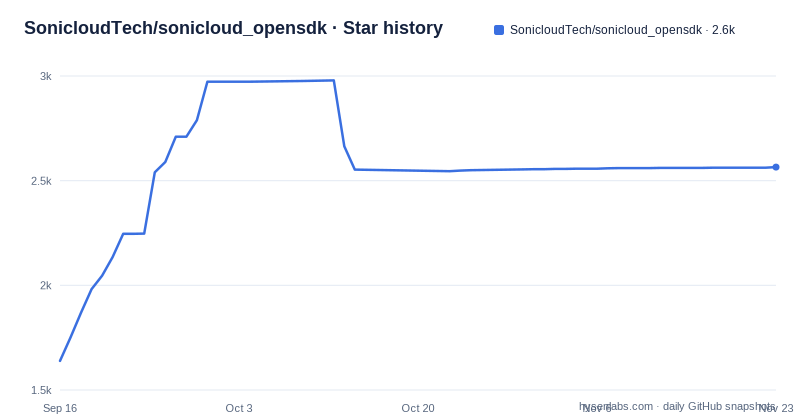
- SonicloudTech/sonicloud_opensdk2,565 ★ · +926
| Repository | 2026-09-16 | 2026-11-23 |
|---|---|---|
| SonicloudTech/sonicloud_opensdk | 1.6k | 2.6k |
926 Stars in the last 68 days, measured from the daily GitHub snapshot. Compare with other projects
Editorial analysis
MIT covers the example code and nothing that ships as a binary
The licence section is the most careful paragraph on the page, and it draws a line through its own project. The example code in the repository is released under the MIT License. The AAR, the static library, the HAR, the firmware, the private device protocol and some of the documents may contain proprietary material belonging to Sonicloud or to the chip vendor, and are not equivalent to everything being open source. Use, redistribution and commercial scope are settled by the package notes and by a commercial agreement rather than by the licence file, and the page closes with a prohibition on using the private protocol with hardware or products that have not been authorised. Two further disclaimers sit alongside it. Interface fields, command numbers and behaviour are declared to be whatever the newest SDK, firmware and protocol versions say, and the SDK is said not to replace Opus decoding, file storage, permission handling or security control on the application side.
The tree diagram has a wrapper folder the repository does not have
The directory navigation is a single fenced block, and it is rooted at a folder that does not appear at the top level of the repository.
recorder/
├── pnote-android-sdk/                  # Android AAR
├── pnote-ios-sdk/                      # iOS 静态库与头文件
├── pnote-harmony-sdk/                  # 鸿蒙 HAR SDK
├── pnote-sdk-flutter-demo-main/        # Flutter 联调 Demo
├── pnote-web-win&Mac-demo/             # BLE 命令行与 Web Demo
│   ├── recorder/                       # 协议、BLE、设备会话、ASR、Web 后端
│   ├── web/                            # 前端页面
│   ├── tests/                          # 协议与设备模拟测试
│   └── docs/协议.md                    # CB08 通讯协议 V1.0
├── img/                                  # 项目图片资源
│   ├── 录音卡片.png
The actual root holds the five pnote directories directly, with no recorder wrapper, alongside an img directory, a demo.mp4, the MIT licence, the readme, a gitignore and a Word document. Two of the entries are also left unexplained by the page. The Flutter demo directory carries the Android and iOS development documents, which the diagram does not mention at all, and the repository contains a uMouse directory that appears in no section of the page, not in the tree, not in the resource table and not in the navigation.
Integration starts with a Word document, and one of them is a patent disclosure
Before you write a line of code the page sends you to a document you cannot read in a code editor. It asks you to read the SDK integration guide as a Word file first, to pick up permissions, dependencies, initialisation, callbacks, audio handling, file resume and the OTA acceptance process, and it separately offers a document for teams that need to understand the cross-vendor standardisation design. Both are .docx files at the root, and the second of them is named as a patent disclosure document for the standard BLE command SDK, so what you are reading for onboarding is material written for a different audience. The page is careful about that too: that document is for technical briefing and scheme discussion, and does not replace a patent agent's prior art search, claim layout or legal opinion. The protocol reference itself is plain text and lives inside the desktop demo at docs/协议.md, describing the CB08 communication protocol version 1.0, and the real captured frames and compatibility strategy are said to be there.
OTA is controlled over BLE and carried over Wi-Fi
The firmware path is split across two radios, and the page is explicit about which part does what. BLE is used to control the device's Wi-Fi hotspot, and the firmware itself is then transferred over Wi-Fi and TCP. Pure BLE does not carry OTA firmware, stated as a flat fact in the capability list. The integration advice adds three preconditions: the Wi-Fi and TCP link must be up, the version must actually need updating, and the battery must be at 20 percent or above. If either link drops mid-upgrade the task should be marked failed, and the guidance says explicitly not to unconditionally resend the whole firmware. The same two-link split shows up in the desktop demo, where file downloads use a 4 byte little-endian offset so a transfer can resume, and the app is told to verify file size and audio decodability after the fact rather than trusting the transfer's own end signal.
One frame line carries the magic byte, the sequence and a CRC
The protocol implementation notes condense the wire format into a single expression, and everything else on the page follows from it. A frame is MAGIC(0x5A), then SEQ, then CRC-16/XMODEM, then LEN, then TYPE, CMD and PARAMS. Notifications are cached by length, checksummed, de-duplicated, reassembled and matched back to their requests, and the page states that notification data supports half frames, multiple frames, noise and cross-packet reassembly. Data notifications and button notifications keep separate parse buffers, and the sending side fragments by MTU while preserving order within a frame. The GATT identifiers are concrete: service 0xAE20, write characteristic AE21, data notification AE22, button notification AE23. The command coverage is listed as device information, battery and capacity, recording status, file list and download, time synchronisation, button response, Wi-Fi state, parameter setting and OTA status, with the instruction that an unknown command should return a recognisable error rather than silence.
The Android AAR carries a build timestamp instead of a version number
The Android integration is three calls, and the file you copy in has a date baked into its name.
PNote.init(context, deviceDataListener);
PNote.startSearch();
PNote.connectDevice(name, address);
The artefact is linked as pnote_20260728171001.aar, which reads as 28 July 2026 at 17:10:01, so the only version marker for the mobile SDK is the filename of the binary. You are told to copy it into the app's libs directory, to add a fileTree dependency, and to add the RxJava, Retrofit and EventBus libraries the SDK needs, which means the SDK imposes its own dependency choices on the host application. The iOS side is a static library and a header, libPNote.a and PNode.h, and you implement a delegate named WindBleDelegate before calling startSearch and connectDeviceAndAddress. The class prefix is PNote on Android and PNode in the header on iOS, which is a small inconsistency to keep in mind when you search for the wrong symbol.
The five minute verification ends in a 900 MB model download
The desktop demo is the one part of this repository you can run without vendor hardware negotiation, and the page gives the whole sequence.
cd pnote-web-win&Mac-demo
python -m venv .venv
source .venv/bin/activate                 # Windows PowerShell: .venv\\Scripts\\Activate.ps1
pip install -r requirements.txt
python main.py --web
Python 3.10 or newer, a usable BLE adapter and a recorder in a connectable state are the stated prerequisites, and the browser then opens at http://127.0.0.1:8000. The command line offers the same thing as a REPL with a record prompt, and the verification list is scan, connect 0, smoke, list, download 0, transcribe 0, so every command takes a device index rather than an id. That last entry is the catch. Offline transcription and the web page are optional, installed from separate requirements files, and the first transcription downloads roughly 900 MB of model from ModelScope before it can run offline, which the page states in the paragraph right after the list.
Keys, authorisation codes and real recordings are called out as uncommittable
Two sections of the page treat data hygiene as an integration requirement rather than advice. The eighth integration suggestion states that cloud ASR keys, device authorisation codes and real recordings must not be hardcoded or committed to the repository, and that logs and packet captures should be desensitised. The feedback section asks an issue reporter to attach the operating system and version, the target platform, the SDK or demo version, the device firmware version, reproduction steps, and the necessary logs or transmitted frame hex, and it asks for serial numbers, addresses, authorisation codes and recording content to be desensitised first. The device information surface is what makes this concrete: the capability list includes battery level, capacity, firmware version, serial number, authorisation code, recording status, duration and gain, so the data an integration naturally logs is exactly the data an issue report could leak. The HarmonyOS section makes the same point about identifiers, warning that the deviceId handed back by a scan callback may be a system privacy random identifier and that address is for display only.
Editorial conclusion
Read this repository as a reference implementation, not as the SDK. It tells you the GATT identifiers, the frame layout, the Opus parameters and the integration order, and it gives you a Python demo you can run against real hardware in five minutes, but the libraries you actually link against are binaries under separate terms and the protocol itself is declared off limits for unauthorised hardware. Before you build on it, confirm two things with the vendor: which hardware revision you will hold, since the adapter layer exists precisely because chip vendors differ, and what your battery floor looks like, since the page's own OTA rule refuses to upgrade below 20 percent. And if you are only evaluating, start with the desktop demo rather than the mobile SDKs.
Frequently asked questions
Is the whole sonicloud_opensdk SDK open source?
No. The page states that the example code in the repository is released under the MIT License, while the AAR, the static library, the HAR, the firmware, the private device protocol and some documents may contain proprietary material from Sonicloud or the chip vendor. Use, redistribution and commercial scope are governed by the package notes and a commercial agreement.
What audio format does the sonicloud recorder card stream?
Opus raw bytes at 16 kHz, mono, 40 bytes per frame, 20 ms, for both the live recording callback and the file callback. The SDK does not decode the audio and does not generate WAV headers; decoding, playback and any speech recognition service are left to the application.
Can firmware be upgraded over BLE alone?
No. BLE is used to control the device's Wi-Fi hotspot, and the firmware is then transferred over Wi-Fi and TCP, with the page stating that pure BLE does not carry OTA firmware. The guidance adds that an upgrade should only run when the link is up, the version needs updating and the battery is at 20 percent or more, and that a dropped link should be marked failed rather than resent unconditionally.
Which BLE service and characteristics does the recorder card use?
Service 0xAE20, write characteristic AE21, data notification AE22 and button notification AE23. The general frame is MAGIC(0x5A), SEQ, CRC-16/XMODEM, LEN and then TYPE, CMD and PARAMS, cached by length, checksummed, de-duplicated and reassembled across packets.
What do I need to run the sonicloud desktop demo?
Python 3.10 or newer, a usable BLE adapter and a recorder card in a connectable state. You change into pnote-web-win&Mac-demo, create and activate a virtual environment, run pip install -r requirements.txt, then python main.py --web, which serves http://127.0.0.1:8000. Offline transcription is optional and pulls about 900 MB of model from ModelScope on first use.
Official sources
Add this badge to your README
If you maintain this project, the badge below links readers to this analysis and shows its maintenance status from the daily GitHub snapshot. Paste the markdown into your README; add ?metric=license or ?metric=stars to the image URL for a different field.

[](https://hysenlabs.com/projects/sonicloudtech-sonicloud-opensdk)Star history chart for your README
[](https://hysenlabs.com/projects/sonicloudtech-sonicloud-opensdk)Was this useful?