ChronoFrame: a self-hosted photo gallery where the EXIF pass needs Perl and exiftool
Self-hosted personal gallery application with online photo management and albums, supporting Live/Motion Photos, EXIF parsing, geolocation recognition, and an explore map.
At a glance
- What is it?
- ChronoFrame is a Nuxt 4 gallery and management application with albums, an explore map, reverse geocoding, Live and Motion Photo support and a WebGL image viewer, running on SQLite with Drizzle. Its container ships into a scratch image by copying perl and exiftool out of Alpine, which tells you the metadata path is not pure JavaScript.
- Who is it for?
- Adopt ChronoFrame if you want a private photo site with a map, albums and automatic metadata, and you are willing to run it as a container with real API tokens for the map features. Do not adopt it expecting a stable 1.0: the published version is v1.0.0-rc.4 from 2026-08-06, so pin the tag rather than latest.
- Can I use it commercially?
- Yes, with strict conditions. AGPL-3.0 is a network copyleft licence: if people use a modified version over a network, for example as a hosted service, you must offer them its source code under the same licence.
- Is it still maintained?
- Yes. The repository received new commits within the last day.
- What is it written in?
- Mainly Vue, according to GitHub's language statistics.
Answers come from the project's GitHub data, last synced on October 23, 2026, and from our analysis. They are not legal advice.
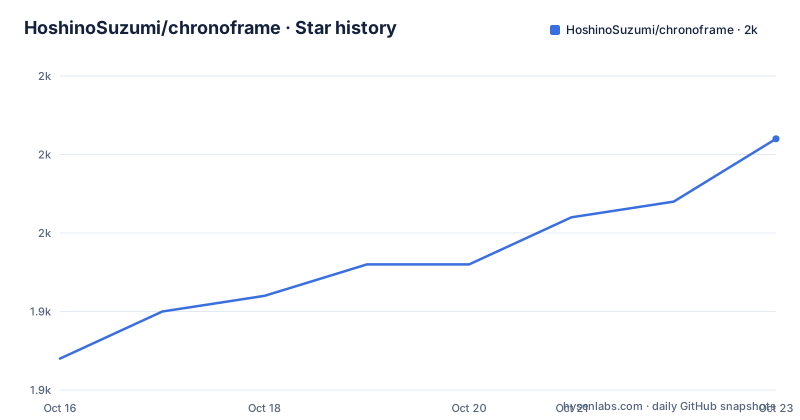
Star history
- HoshinoSuzumi/chronoframe1,956 ★ · +14
| Repository | 2026-10-16 | 2026-10-23 |
|---|---|---|
| HoshinoSuzumi/chronoframe | 1.9k | 2k |
14 Stars in the last 7 days, measured from the daily GitHub snapshot. Compare with other projects
Editorial analysis
The scratch image explains the architecture
The Dockerfile is the fastest way to understand this project. The final stage is FROM scratch, so there is no shell, no package manager and no distribution underneath the application.
What gets copied in is a short list: the node binary, then perl, env and exiftool, each installed into a separate runtime directory in an Alpine stage with install -D so it lands at a fixed path, then copied to /usr/bin. After that come /usr/lib, /usr/share, /lib, /etc/ssl and a temporary directory.
Two of those deserve attention. exiftool and perl are there because photo metadata is extracted by an external binary, not by a JavaScript parser. That is a real constraint when you think about deployment: the image is not just a Node bundle, it is a Node bundle plus a Perl program and the shared libraries both need. The comment on the temporary directory is explicit that scratch has none and that uploads and image processing need one, so it is copied with mode 1777.
The build stages are more conventional. Dependencies install with pnpm using a frozen lockfile and a cache mount on the pnpm store, the workspace package at packages/webgl-image is built first, then the Nuxt build runs with an 8 GB old space limit, and finally every .map file is deleted from .output before it is copied into the runtime stage.
A default admin account that is published in the README
The configuration is a .env file, and the README gives a minimal example plus a pointer to a configuration guide for the full set.
Only one variable is marked required, CFRAME_ADMIN_EMAIL. The others in the minimal block have defaults, and two of those defaults matter more than they look.
If CFRAME_ADMIN_EMAIL and CFRAME_ADMIN_PASSWORD are not set, the README states the default admin account is [email protected] with password CF1234@!. Those are the same values shown as the defaults for CFRAME_ADMIN_NAME (Chronoframe) and CFRAME_ADMIN_PASSWORD in the .env example.
That is a convenience for a first run and a hole in a deployment. Anyone who has read this repository can log into a gallery that has been started without those two variables set. Set them before the container is reachable.
The other required value is NUXT_SESSION_PASSWORD, documented as a 32 character random string, which signs session cookies. NUXT_OG_IMAGE_SECRET is a separate key for stable signing of Open Graph images, and the .env file gives the way to generate it, npx nuxt-og-image generate-secret.
Three storage providers and why the choice is not cosmetic
NUXT_STORAGE_PROVIDER selects between local, s3 and openlist, and the choice changes what you can serve and from where.
The local provider stores under NUXT_PROVIDER_LOCAL_PATH, which the Docker run mounts to /app/data, and is served through a built-in route at NUXT_PROVIDER_LOCAL_BASE_URL, defaulting to /storage. That is why the container volume mount matters: without a volume the photos live inside the container and disappear when it is replaced.
The S3 provider is configured with an endpoint, bucket, region (defaulting to auto), access key and secret, a prefix that defaults to photos/, a CDN URL and a path style flag. Any S3-compatible endpoint works, so this covers more than one vendor. The CDN URL is the piece worth understanding: with it set, photo delivery goes through your CDN rather than the storage endpoint, which is what makes a large gallery usable from outside.
The OpenList provider takes a base URL and a root path, which is aimed at users in mainland China who need a specific route into their storage.
The docker-compose file ships with a commented-out Postgres block using postgres:15-alpine, alongside the SQLite default, so the compose file shows both shapes even though the default runtime uses better-sqlite3.
Map features need three different tokens
The explore map and reverse geocoding rest on a provider choice, NUXT_PUBLIC_MAP_PROVIDER, defaulting to maplibre.
For MapLibre the token goes in NUXT_PUBLIC_MAP_MAPLIBRE_TOKEN as a MapTiler access token, and the style URL is NUXT_PUBLIC_MAP_MAPLIBRE_STYLE. For Mapbox, NUXT_PUBLIC_MAPBOX_ACCESS_TOKEN is the client side public token and NUXT_PUBLIC_MAP_MAPBOX_STYLE is the style URL.
Reverse geocoding is separate. It uses NUXT_MAPBOX_ACCESS_TOKEN without the PUBLIC prefix, because it is called server side against the Mapbox Search API. That is the token to protect and to rotate carefully, and the naming difference between the two Mapbox variables is the only clue in the file.
There is also NUXT_NOMINATIM_BASE_URL, documented for pointing at a custom Nominatim instance when the official API is blocked. So the geocoding path can be Mapbox, or a Nominatim server of your choosing, or a proxy.
Set the provider and its token before uploading anything. Reverse geocoding runs as part of the upload pipeline, so a photo uploaded with no working geocoder stores coordinates without a place name and there is no documented backfill in the README.
Running it and getting photos in
The image is published on GitHub Container Registry and Docker Hub, so pick whichever is reachable:
docker pull ghcr.io/hoshinosuzumi/chronoframe:latestRunning it directly with your environment file:
docker run -d --name chronoframe -p 3000:3000 -v $(pwd)/data:/app/data --env-file .env ghcr.io/hoshinosuzumi/chronoframe:latestThe compose equivalent mounts ./data to /app/data, maps 3000, uses restart unless-stopped and reads the same .env:
services:
  chronoframe:
    image: ghcr.io/hoshinosuzumi/chronoframe:latest
    container_name: chronoframe
    restart: unless-stopped
    ports:
      - '3000:3000'
    volumes:
      - ./data:/app/data
    env_file:
      - .env
Uploading goes through the dashboard at /dashboard, on the Photos page, with batch selection and drag and drop. The pipeline then parses EXIF, generates thumbnails and performs reverse geocoding without any further step from you. Login is by clicking the avatar, either through GitHub OAuth or with email and password.
Thumbnails use ThumbHash, which is why they render instantly on the grid regardless of the size of the original, and the dependency list shows the WebGL viewer as a workspace package, @chronoframe/webgl-image, built separately before the main build.
Development setup and what the scripts actually do
Requirements are Node.js 18 or newer and pnpm 9.0 or newer, with npm and yarn accepted for installing dependencies. Configuration starts from the example file:
cp .env.example .envThe database is Drizzle ORM over SQLite through better-sqlite3, and the drizzle scripts are all drizzle-kit wrappers: db:push applies the schema directly, db:generate creates migration files, db:migrate runs them, db:pull introspects an existing database, db:check validates and db:studio opens a studio on port 3010.
Two build details worth knowing. The dev script is not simply nuxt dev: it runs the workspace WebGL package in watch mode and waits on packages/webgl-image/dist before starting Nuxt, because the viewer has to be built before the app can use it. And the production build sets NODE_OPTIONS to an 8 GB old space limit, which is a signal that the build is memory hungry.
Lint and format use oxlint and oxfmt rather than eslint and prettier, configured through .oxlintrc.json and .oxfmtrc.json. Documentation builds with VitePress, and the docs directory is the same one linked as the configuration guide.
What is still release candidate, and the alternatives
The version in package.json is 1.0.0-rc.4, matching the v1.0.0-rc.4 release on 2026-08-06, after rc.2 and rc.3 in April 2026. The last push was on 2026-10-15, so work continues, but the published tags are all release candidates and the latest tag is over two months older than the source.
That combination is why the README recommends the prebuilt image but the image tag is latest. If you pin latest you are running whatever was built last, which is not necessarily rc.4.
The comparison is with the hosted galleries. A commercial photo service gives you clients for iOS and Android, automatic backup and sync with your phone library, and sharing features that work across accounts. ChronoFrame gives you your own storage, your own domain and photos you can serve from your own CDN, and it does not enumerate any mobile app in the dependency list.
The other comparison is with a plain static gallery generator. A generator gives you a build with no server, no database and no admin user, which is a much smaller thing to run. ChronoFrame is for the case where you want to add photos over time from a browser, with the map and the metadata handled for you.
The licence is MIT, and the runtime dependencies are ordinary open source: the AWS SDK for S3, maplibre bindings, Tailwind, Pinia and Nuxt UI.
Editorial conclusion
Adopt ChronoFrame if you want a private photo site with a map, albums and automatic metadata, and you are willing to run it as a container with real API tokens for the map features. Do not adopt it expecting a stable 1.0: the published version is v1.0.0-rc.4 from 2026-08-06, so pin the tag rather than latest. Before the first run, set CFRAME_ADMIN_EMAIL and NUXT_SESSION_PASSWORD, because the defaults leave a known admin account at [email protected] with password CF1234@! that anyone can log in with.
Frequently asked questions
What are the default ChronoFrame admin credentials?
If CFRAME_ADMIN_EMAIL and CFRAME_ADMIN_PASSWORD are not set, the default account is [email protected] with the password CF1234@!. Set both variables before exposing the container to a network.
How do I run ChronoFrame with Docker?
Pull ghcr.io/hoshinosuzumi/chronoframe:latest and run it with port 3000 mapped, a volume mounted at /app/data and an --env-file pointing at your .env. A docker-compose.yml with the same image, port, volume and env_file is included.
Which storage backends does ChronoFrame support?
NUXT_STORAGE_PROVIDER selects local, s3 or openlist. The local provider writes to NUXT_PROVIDER_LOCAL_PATH and is served from NUXT_PROVIDER_LOCAL_BASE_URL, the S3 provider takes endpoint, bucket, region, keys, prefix and an optional CDN URL, and OpenList takes a base URL and root path.
Does reverse geocoding in ChronoFrame need an API key?
Yes, if you use Mapbox. The client side public token goes in NUXT_PUBLIC_MAPBOX_ACCESS_TOKEN, while reverse geocoding uses the server side NUXT_MAPBOX_ACCESS_TOKEN against the Mapbox Search API. There is also NUXT_NOMINATIM_BASE_URL for a custom Nominatim instance.
What does ChronoFrame need for EXIF parsing?
The container image copies perl and exiftool into the final scratch image alongside node, so metadata extraction depends on those binaries rather than on a JavaScript-only parser. The image also copies a temporary directory, because scratch has none and uploads need one.
Official sources
Add this badge to your README
If you maintain this project, the badge below links readers to this analysis and shows its maintenance status from the daily GitHub snapshot. Paste the markdown into your README; add ?metric=license or ?metric=stars to the image URL for a different field.

[](https://hysenlabs.com/projects/hoshinosuzumi-chronoframe)Star history chart for your README
[](https://hysenlabs.com/projects/hoshinosuzumi-chronoframe)Was this useful?