js-emoji: Portable Emoji Conversion for JavaScript
A JS Emoji conversion library
At a glance
- What is it?
- js-emoji converts native emoji and colon sequences into platform-specific Unicode, images, CSS sprites, or text. It is aimed at browser and Node.js applications that must render emoji across devices with different support levels.
- Who is it for?
- Adopt js-emoji when an application needs one conversion layer across browsers and devices with inconsistent emoji support, especially when it can store colon sequences and serve matching emoji images. Do not adopt it for a native-only interface that gains nothing from image fallbacks or platform-specific conversion.
- Can I use it commercially?
- Yes. MIT is a permissive licence: you can use, modify and sell software built on it, as long as you keep its copyright and licence notices.
- Is it still maintained?
- Yes. The repository last received commits 18 days ago.
- What is it written in?
- Mainly JavaScript, according to GitHub's language statistics.
Answers come from the project's GitHub data, last synced on November 7, 2026, and from our analysis. They are not legal advice.
Star history
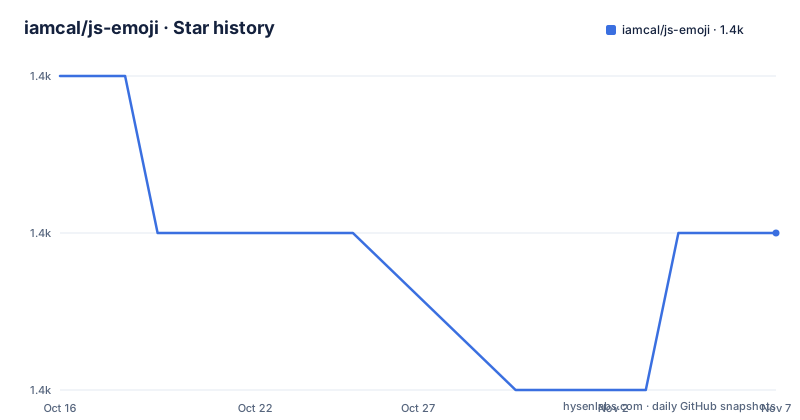
- iamcal/js-emoji1,436 ★ · -1
| Repository | 2026-10-16 | 2026-11-07 |
|---|---|---|
| iamcal/js-emoji | 1.4k | 1.4k |
-1 Stars in the last 22 days, measured from the daily GitHub snapshot. Compare with other projects
Editorial analysis
Why js-emoji Exists Across Uneven Browser Support
js-emoji addresses the gap between text that contains emoji and clients that cannot display those emoji consistently. The target use is an application that accepts modern emoji, stores messages or comments, and later renders them on older phones, desktops, and browsers with different emoji capabilities. It is also relevant when stored text uses portable colon sequences such as `:smile:` rather than native Unicode characters.
The project supports two primary input paths. `replace_unified` handles native emoji code points, while `replace_colons` handles colon sequences. The replacement may be a native code point, a legacy code point for an older platform, a text name such as `smile`, or HTML containing an image or styled `<span>` element. That range makes the library a compatibility layer rather than simply a modern Unicode normalizer.
The README states that native code-point replacement is significantly slower than colon-sequence replacement. Its recommended application lifecycle is therefore to translate native input into colon form, store that form when desired, and convert it only when rendering. This distinction matters for databases and APIs: an application can avoid preserving a presentation detail tied to the device that entered the text.
js-emoji is not the right choice when every supported client reliably renders native emoji and the product has no requirement for legacy devices, selectable image sets, or CSS image fallback. Adding it in that situation would introduce an extra conversion layer without a documented compatibility benefit.
How Replacement Mode Controls js-emoji Output
js-emoji exposes an `EmojiConvertor` instance and performs environment-based selection when no forced mode is set. The detected value can be inspected through `emoji.replace_mode`. Supported modes cover `unified` Unicode output, legacy `softbank` and `google` code points, `css` output based on `<span>` elements, and `img` output based on `<img>` elements.
Two overrides take priority over the automatic choice. Setting `emoji.text_mode = true` forces a plain short name such as `smile`, while `emoji.colons_mode = true` restores colon syntax such as `:smile:`. A developer can also assign another documented value directly to `emoji.replace_mode`, which is useful when the browser or deployment target is known in advance.
Runtime options narrow what the library can emit. `allow_native` permits native code points and otherwise falls back to `css` or `img`. `use_sheet` selects spritesheets instead of individual images in CSS mode. `use_css_imgs` emits per-emoji CSS classes rather than inline positioning, but requires `emoji.css` to be loaded. The default `avoid_ms_emoji` setting prevents native output in Windows browsers because the README describes that platform's native appearance as undesirable.
Markup behavior is also configurable. `wrap_native` adds a wrapper around native output, `include_title` places the colon short name in an HTML `title` attribute, and `include_text` inserts the short name inside CSS-mode `<span>` elements. These switches expose presentation decisions directly to the caller. They also mean that an application using several modes must test each relevant branch rather than assuming one HTML shape covers every output type.
Installing emoji-js and Running the First Node.js Conversion
The README offers two acquisition paths: cloning the Git repository or installing the published npm package. For the Node.js tutorial, install `emoji-js` with the documented command. This creates the package required by the CommonJS example.
npm install emoji-jsInstantiate `EmojiConvertor`, pass a colon-containing string to `replace_colons`, and inspect the returned value. For the documented input, the converter produces output that contains the rendered representation of `:smile:`. In automatic mode, the exact form depends on the detected environment and enabled options.
var EmojiConvertor = require('emoji-js');

var emoji = new EmojiConvertor();

console.log(emoji.replace_colons("Hello :smile:"));
The package entry is `lib/emoji.js`, and the declared package version is `3.9.0`. Its runtime dependencies include `emoji-datasource` at `16.0.0` and `tar-fs` under `^2.1.4`. Applications using ES modules would need a compatibility design based on their module system, but the README only documents `require`, so that should not be inferred automatically.
Version 3 changed the initialization model. Releases before 3.0 exposed a global `emoji` object, while the current interface requires manual construction. Existing global-context code can add the constructor assignment documented in the README:
var emoji = new EmojiConvertor();This is a source-level migration step, not merely a package update. Removing old global initialization without adding the instance can leave calls such as `replace_colons` without the required converter.
Loading Browser Assets for CSS or Image Fallbacks
Browser usage requires more than loading JavaScript when CSS output may be selected. The README includes `emoji.css` as a stylesheet and `emoji.js` as a script, followed by creation of an `EmojiConvertor`. The CSS matters for `use_css_imgs` and for the library's styled-span output paths.
<link href="emoji.css" rel="stylesheet" type="text/css" />
<script src="emoji.js" type="text/javascript"></script>
<script type="text/javascript">
var emoji = new EmojiConvertor();
</script>
The default asset path is `/emoji-data/`, which means image-mode output expects that the required images are reachable there unless the configuration is changed. Image sets include `apple`, `google`, `twitter`, and `facebook`, with `apple` as the default. Both individual image paths and spritesheet URLs can be redirected, but the individual-image `.path` must retain a trailing slash.
emoji.img_sets.apple.path = 'http://my-cdn.com/emoji-apple-64/';
emoji.img_sets.apple.sheet = 'http://my-cdn.com/emoji-apple-sheet-64.png';
Asset version compatibility is a real failure boundary. The README warns that the image set must match the version used to build the library because mismatched spritesheet coordinates can produce incorrect or missing images. The declared `emoji-datasource` dependency is `16.0.0`, while the README points image consumers to the separate emoji-data repository. It does not document an automated compatibility check, so a deployer must control those versions explicitly.
For cache busting, `emoji.img_suffix` appends the assigned string to generated URLs. The default is an empty string, while the documented example uses `?foo`. This changes generated URLs without changing the selected image set.
Aliases, Case Sensitivity, and Application Data Choices
js-emoji recognizes lowercase colon names by default. Setting `emoji.allow_caps = true` makes names such as `:SMILE:` behave like `:smile:`. This is a narrow behavior switch, not a general normalization system for arbitrary user text. Case-insensitive matching may be appropriate for user-generated input, but an application that treats emoji names as canonical identifiers should preserve the default strictness.
Applications can add aliases or replace built-in mappings with `addAliases`. The README uses hexadecimal emoji identifiers as values:
emoji.addAliases({
  'doge' : '1f415',
  'cat'  : '1f346'
});
This permits product-specific short names and can override a built-in association. `removeAliases` accepts an array of alias names and also resets those built-in mappings to their original state. The application should therefore treat its alias configuration as mutable runtime state rather than assuming every mapping is immutable package data.
The main storage decision comes from the documented lifecycle. Storing colon sequences supports the documented rendering modes and lets the converter choose at display time. Storing native emoji can reduce server-side normalization ambiguity, but the README explicitly warns that replacing native code points is slower than replacing colon sequences. Neither storage model is universally mandatory, so the choice depends on whether cross-platform rendering outweighs server conversion work.
No sanitization model or escaping policy is documented for arbitrary text surrounding colon tokens. The README focuses on replacement behavior and does not state how malformed aliases, duplicate names, or hostile input should be handled beyond the available alias methods. Applications should not treat this omission as evidence that `replace_colons` is a complete HTML sanitizer.
Limitations, Maintenance, and the emoji-datasource Alternative
The strongest limitation is tied to browser assets rather than conversion syntax. Selecting `css` or `img` does not make images available by itself. A deployment must load `emoji.css` when relevant, host the correct image set, and keep image coordinates synchronized with the library data.
There are no GitHub releases for this repository, which gives users fewer formal package-release records to consult there. The last push was on 2026-09-03. The package metadata declares version `3.9.0` and pins `emoji-datasource` to `16.0.0`, while development dependencies and the `tar-fs` range can change when `package-lock.json` is updated. Upgrade planning should therefore account for both the JavaScript package and external emoji assets.
The repository is licensed under MIT. That permits use and modification under the license terms, but this review does not interpret the legal obligations or provide legal advice. The published file list includes `LICENSE`, `README.md`, `CHANGES.md`, and `lib`, so npm consumers receive the library documentation, changes, license, and implementation directory.
`emoji-datasource` is declared as a runtime dependency. Separately, the README points image consumers to the emoji-data repository for the images. js-emoji adds runtime input conversion, browser capability modes, legacy mappings, CSS or image markup, and alias handling. A project that only ships an emoji picker or resolves metadata may need the data dependency without js-emoji. A project that must turn user text into renderable output should prefer js-emoji's conversion layer.
Editorial conclusion
Adopt js-emoji when an application needs one conversion layer across browsers and devices with inconsistent emoji support, especially when it can store colon sequences and serve matching emoji images. Do not adopt it for a native-only interface that gains nothing from image fallbacks or platform-specific conversion. Before integration, verify the selected replacement mode, asset delivery path, and compatibility between the installed emoji-datasource version and the image set.
Frequently asked questions
How do I install and use js-emoji in Node.js?
Run `npm install emoji-js`, require the package, and create an `EmojiConvertor`. Pass text containing a colon sequence to `replace_colons`.
Which js-emoji replacement modes are available?
The documented modes are `unified`, `softbank`, `google`, `css`, and `img`. Automatic selection depends on detected environment capabilities and can be inspected through `emoji.replace_mode`.
Why might js-emoji display the wrong or missing image?
The README says the image set must match the version used to build the library. Mismatched spritesheets can lead to incorrect or missing images.
How do I upgrade code from js-emoji 1.x or 2.x?
Version 3.0 and later require manual creation of an `EmojiConvertor` instance instead of relying on the old global object. In global code, add `var emoji = new EmojiConvertor();` after exposing the constructor.
Can js-emoji add custom colon aliases?
Yes. Call `emoji.addAliases()` with a mapping of names to hexadecimal emoji identifiers, and use `emoji.removeAliases()` to remove custom aliases and restore affected built-in mappings.
Official sources
Add this badge to your README
If you maintain this project, the badge below links readers to this analysis and shows its maintenance status from the daily GitHub snapshot. Paste the markdown into your README; add ?metric=license or ?metric=stars to the image URL for a different field.

[](https://hysenlabs.com/projects/iamcal-js-emoji)Star history chart for your README
[](https://hysenlabs.com/projects/iamcal-js-emoji)Was this useful?