a-dove-is-dumb: Adobe telemetry blocking for hosts and Pi-hole
Easily block Adobe telemetry checking domains. Continuously Updated. Useful for HostsMan / SwitchHosts / Pi-hole users ✨
At a glance
- What is it?
- a-dove-is-dumb is a maintained domain blocklist for suppressing Adobe telemetry checks without blocking network-dependent Adobe features. It offers static and automatically refreshed endpoints for hosts-file managers, Pi-hole, Clash-based software, and manual Windows configuration.
- Who is it for?
- Adopt a-dove-is-dumb if you want a focused Adobe telemetry blocklist and already use Pi-hole or a compatible hosts-file manager. Do not treat it as a general Adobe network blocker or as a substitute for investigating failed application connections.
- Can I use it commercially?
- Yes. BSD-2-Clause is a permissive licence: you can use, modify and sell software built on it, as long as you keep its copyright and licence notices.
- Is it still maintained?
- Yes. The repository last received commits 3 days ago.
- What is it written in?
- GitHub does not report a main language for this repository.
Answers come from the project's GitHub data, last synced on October 23, 2026, and from our analysis. They are not legal advice.
Star history
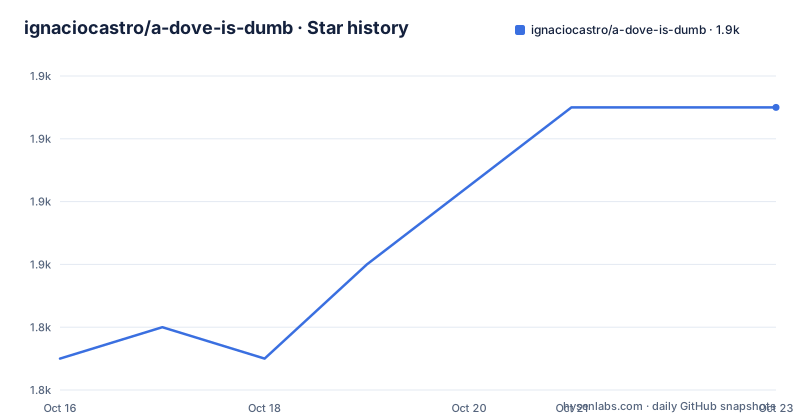
- ignaciocastro/a-dove-is-dumb1,855 ★ · +8
| Repository | 2026-10-16 | 2026-10-23 |
|---|---|---|
| ignaciocastro/a-dove-is-dumb | 1.8k | 1.9k |
8 Stars in the last 7 days, measured from the daily GitHub snapshot. Compare with other projects
Editorial analysis
Adobe telemetry blocking with a domain-only list
a-dove-is-dumb addresses one narrow problem: preventing Adobe applications from reaching domains used for telemetry checking. The repository describes itself as a way to block Adobe telemetry servers without blocking other network-required features. That distinction matters. The list is intended to reject known telemetry hosts, not every Adobe endpoint, so it should not be treated as an offline mode or a general network firewall.
The intended audience is explicit. The README targets Pi-hole users and people who manage hosts files through tools such as HostsMan, SwitchHosts, and hostsmgr. It also publishes a Clash-formatted repository file. The supported Adobe products suggested by the repository topics include Illustrator, Photoshop, and Premiere Pro, although the README does not promise compatibility with every Adobe product or operating system.
The project is not an application with a package to compile. Its deployable artifact is a set of text lists. Each format targets a particular consumption path: ordinary hosts syntax, blocking with `127.0.0.1`, Pi-hole gravity, Microsoft Windows formatting, IPv6 blocking, or Clash configuration. The short `/127` endpoint changes the destination used to block requests, while `/pihole` omits an IP before each domain.
Maintenance is supported by recent repository activity and the README's dated update notice. The last push was on 2026-10-16, and the repository is not archived. There are no GitHub releases, so adoption does not involve choosing a tagged package version. Users normally consume a remote endpoint or copy the current list from the default branch.
List formats and how the blocking request is rejected
The core mechanism is DNS or hosts-file redirection. The default `list.txt` maps Adobe telemetry domains to a blocking destination. A separate `127.txt` uses `127.0.0.1` instead of the default destination shown by the project's landing page. For an IPv6 environment, `ipv6.txt` supplies an IPv6-formatted variant. These files do not inspect Adobe application traffic directly; they act earlier in name resolution.
Pi-hole uses a different representation. The `pihole.txt` endpoint is prepared for Pi-hole's gravity adlist processing and has no IP before each domain. That makes it different from copying a conventional hosts block directly into Pi-hole. Hosts managers usually want remote URLs and periodic refreshes, while the `/winhosts` variant follows the default Microsoft Windows hosts-file format. The repository also contains `clash.yaml` for Clash-based programs, although the README does not provide a separate configuration tutorial for that file.
Delivery is redundant by design. The project site exposes human-friendly routes such as `/127`, `/cdn`, `/fastly`, `/pihole`, `/winhosts`, `/ipv6`, and `/clash`. The troubleshooting section adds direct `.txt` URLs for clients that reject 301 redirects. jsDelivr and Fastly endpoints host repository content, while alternative Gcore, Quantil, and Ghproxy addresses are listed for users who cannot reach the default services. This gives clients several delivery paths, but it does not turn the repository into a server-side filtering service with its own control plane.
The list can become stale between Adobe domain changes. The README says Adobe tends to update its telemetry checking subdomain about every two weeks and asks users who find a missing domain to update the list first, capture traffic with Fiddler or Charles Proxy, search for `/integritychecker/machineevents/v1`, and submit the requested URL as text.
Adding the Pi-hole list and running the first refresh
Pi-hole has the clearest documented setup. This is a subscription configuration rather than a software installation. Open the Pi-hole dashboard, go to `Adlists`, add the `/pihole` address under `Address`, and add the supplied comment under `Comment`. The documented address is:
https://a.dove.isdumb.one/piholeThe README then directs the user to click `Add` and either run the following command locally or update gravity through the Pi-hole interface:
pihole -gAfter gravity updates, the Pi-hole dashboard's adlist and gravity status should reflect the added list. The README does not provide a diagnostic command for confirming an individual Adobe request, so acceptance should first be checked in Pi-hole's own query or logs screens. If the dashboard rejects the friendly URL, the troubleshooting section supplies a direct Pi-hole endpoint:
https://a.dove.isdumb.one/pihole.txtThis direct form is also documented for Fastly, Gcore, and Quantil. A user should choose one delivery endpoint rather than adding the same blocklist repeatedly under different URLs, although the README does not explicitly state the consequences of duplicate gravity sources. The important distinction is between the friendly `/pihole` route and the direct `.txt` resource for clients with redirect limitations.
Manual Windows setup versus automatic hosts updates
Manual Windows use is the simplest deployment and also the least automated. The README locates the hosts file at `C:/Windows/System32/drivers/etc/hosts`. A user can copy the default list contents into that file, or use the Windows-formatted endpoint if the existing file follows Microsoft's default layout. There is no installer, service, or documented command in the repository that performs this edit automatically.
The real alternative is an external hosts manager that periodically downloads a remote list. HostsMan can register either the main project URL or its `/127` variant, then check automatically for and download updates. SwitchHosts can create a `Remote` hosts entry and refresh it every hour. hostsmgr accepts a preferred URL in `hosts_sources.dat` and then runs an update. These approaches differ from manual editing in one concrete way: the client owns refresh scheduling, so the user does not need to replace the hosts content after every repository update.
For example, the README identifies the following full URLs for HostsMan:
https://a.dove.isdumb.one
https://a.dove.isdumb.one/127
HostsMan users cannot use the CDN or Pi-hole URLs because of its request-header requirements. That restriction demonstrates why the format-specific endpoints matter. A list that looks valid in a browser may not be accepted by a particular manager. The project solves this by publishing direct variants rather than relying on every client to normalize redirects, comments, or address formatting.
Failure modes when Adobe changes its telemetry domains
The main failure mode is loss of coverage after Adobe changes or adds a telemetry subdomain. The project describes these changes as occurring roughly every two weeks, while also explaining that a quiet update period does not prove abandonment. A red application banner can mean either that the existing list no longer matches Adobe's current request or that a different network condition is involved. The repository does not document every Adobe failure state.
When a new domain is suspected, the README asks users to first update the blocklist. If that does not resolve the banner, the documented investigation uses Fiddler or Charles Proxy while opening the Adobe application. The relevant requests are sorted by `/integritychecker/machineevents/v1`, and the subdomain is submitted through an issue. The requester must paste the URL as text rather than only attaching a screenshot.
Blocking also carries an application-compatibility risk. The README claims that the list avoids other network-required Adobe features, but it does not provide a product-by-product compatibility matrix or document all telemetry paths. Users should therefore check the applications they rely on after enabling the list. Someone who needs a strict guarantee about every Adobe endpoint should not infer that guarantee from this repository's description.
Redirect support is another practical boundary. Some managers refuse source URLs that return a 301 redirect. In that case, the direct `.txt` URLs are the relevant workaround. This is a client compatibility issue, not evidence that the underlying list has stopped being maintained.
Distribution access, licensing, and maintenance cost
The project depends on several external delivery paths. Its own site provides the formatted resources, while jsDelivr and Fastly distribute repository files. For users in locations where GitHub or Cloudflare is slow or blocked, the README lists Gcore, Quantil, and Ghproxy alternatives. If none of the documented options can be reached, it directs the user to open an issue. This distribution model reduces the need to install software, but it does not guarantee availability in every network.
The repository is licensed under `BSD-2-Clause`. That license permits use and modification under its stated terms, but this review does not provide legal advice. Users distributing a modified list should read the repository's `LICENSE` file rather than infer obligations from the list format or from the homepage.
The maintenance cost is mostly operational. Users of Pi-hole must update gravity, while HostsMan, SwitchHosts, and hostsmgr require their configured updater to remain active. The last push was on 2026-10-16 and there are no GitHub releases, so consumers should expect the moving `main` content or remote endpoints rather than version-pinned releases. For organizations, the main change-management concern is monitoring whether Adobe adds domains quickly enough and whether an enabled list causes an application workflow failure.
Editorial conclusion
Adopt a-dove-is-dumb if you want a focused Adobe telemetry blocklist and already use Pi-hole or a compatible hosts-file manager. Do not treat it as a general Adobe network blocker or as a substitute for investigating failed application connections. Verify first that your chosen client accepts the documented list format, that automatic updates work, and that the application remains usable before retaining the blocklist.
Frequently asked questions
How do I install a-dove-is-dumb in Pi-hole?
Add `https://a.dove.isdumb.one/pihole` under `Adlists` in the Pi-hole dashboard, click `Add`, and run `pihole -g` or update gravity online.
Which URL should Windows hosts users use?
The README offers `https://a.dove.isdumb.one/winhosts.txt` for the Microsoft Windows hosts format. For manual editing, the hosts file is located at `C:/Windows/System32/drivers/etc/hosts`.
What should I do if an Adobe red banner remains after updating the list?
The README recommends opening an issue if updating does not help. It asks for the telemetry subdomain as text, captured with Fiddler or Charles Proxy by searching for `/integritychecker/machineevents/v1`.
Does a-dove-is-dumb block every Adobe feature?
No. The project says its list targets Adobe telemetry checking servers without blocking other network-required features, but it does not provide a complete Adobe product compatibility matrix.
Official sources
Add this badge to your README
If you maintain this project, the badge below links readers to this analysis and shows its maintenance status from the daily GitHub snapshot. Paste the markdown into your README; add ?metric=license or ?metric=stars to the image URL for a different field.

[](https://hysenlabs.com/projects/ignaciocastro-a-dove-is-dumb)Star history chart for your README
[](https://hysenlabs.com/projects/ignaciocastro-a-dove-is-dumb)Was this useful?