Command-T's description says Vim, the rewrite says Neovim only
⌨️ Fast file navigation for Neovim and Vim
At a glance
- What is it?
- Command-T is a fuzzy file finder for Neovim, written in Lua with a C matching core, and this repository is the second implementation of the name. The description still advertises Neovim and Vim while the current code requires Neovim and points Vim users at a separate Ruby branch. Everything else worth knowing is in the Makefile, where the default target is a prerelease gate rather than a build.
- Who is it for?
- Command-T suits someone who lives in Neovim and wants file, buffer and tag jumping with positional ranking rather than substring matching, and who is willing to build a small C library to get it. Two things to check first.
- Can I use it commercially?
- Yes. BSD-2-Clause is a permissive licence: you can use, modify and sell software built on it, as long as you keep its copyright and licence notices.
- Is it still maintained?
- Yes. The repository last received commits 25 days ago.
- What is it written in?
- Mainly Lua, according to GitHub's language statistics.
Answers come from the project's GitHub data, last synced on November 15, 2026, and from our analysis. They are not legal advice.
Star history
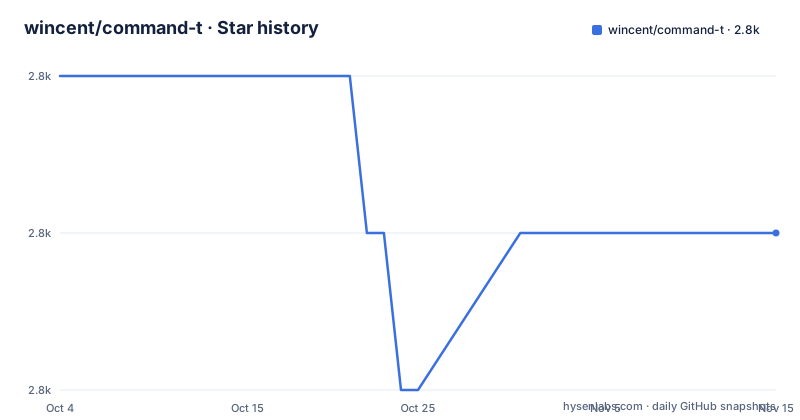
- wincent/command-t2,782 ★ · -1
| Repository | 2026-10-04 | 2026-11-15 |
|---|---|---|
| wincent/command-t | 2.8k | 2.8k |
-1 Stars in the last 42 days, measured from the daily GitHub snapshot. Compare with other projects
Editorial analysis
The one line description still advertises Vim
The repository description reads Fast file navigation for Neovim and Vim, and the current code supports only the first of those. The notice at the top of the file says this is the Lua-powered rewrite of Command-T and that it requires Neovim, then points anyone who wants the older version at the `7-x-release` branch, described as Ruby-powered and also supporting Vim.
So the two-word editor list in the description covers a capability that no longer exists on the default branch. A Vim user arriving from a search result, a package manager listing or an old configuration will find a plugin that refuses to load rather than a fallback.
The project structure is where the split is visible rather than stated. The Lua namespace is `wincent.commandt`, without the hyphen the repository and the project name both carry, and the tree holds a `plugin/` directory alongside `lua/`, `ftplugin/` and `data/`. The C core that the file credits for its speed sits in its own directory with its own Makefile.
Two implementations, one name, and the tags tell them apart
The release list carries three entries and they straddle the rewrite. 7.0.2 is dated 2025-11-05 and belongs to the Ruby line that still supported Vim. 8.1 follows on 2026-03-19 and 8.2 on 2026-07-13, both from the Lua rewrite on the main branch.
The last push to main is dated 2026-09-23, more than two months after the 8.2 tag, and the repository is not archived. So the current branch is moving past its newest release without a new tag to show for it, which is a normal pattern for a plugin that ships on a package manager cadence rather than on release days.
The version boundary matters more than the dates. A configuration file, a lockfile entry or a plugin manager manifest written against 7.x names a plugin that this branch no longer serves, and the file's own advice is to use the 7-x-release branch rather than to downgrade.
Ranking is positional, so the same letters score differently
Selection works by typing characters that appear in the paths, and the interesting part is not the matching but the ordering. Files are ranked by an algorithm that knows certain positions matter more, with the example given being a character immediately after a path separator.
That single rule explains most of the behaviour users notice. A hit on a filename segment outranks the same letters scattered through a directory path, and a match that starts a segment beats one that ends it. It also means the ordering is not the ordering a substring matcher would produce, which is why swapping in a different fuzzy finder changes results even when the typed text is identical.
The rest of the interaction surface is conventional: files can be opened in the current window, or in splits, or in tabs, and the file says many configuration options are provided without reproducing them. They live in the help file at doc/command-t.txt.
The default target is a release gate, and it runs three bin scripts
The Makefile has six targets and the interesting one is `check`, which is what the help text describes as the prerelease check:
check:
	$(MAKE) clean build test
	bin/check-format
	bin/check-spdx
	bin/check-tag
A clean build, the test run, and then three scripts in `bin/`. The first checks formatting, the second checks SPDX headers, and the third checks the tag, which only makes sense immediately before cutting a release rather than during ordinary development.
The help text describes this as clean, build, run tests, check style, check tag, and that is almost accurate. The third step is a format check rather than a style check, and the fourth is an SPDX header check that the one line summary does not mention at all. The Makefile carries its own SPDX header naming the copyright holder and the BSD-2-Clause identifier, which is the convention the bin script then enforces across the tree.
Six formatter and tooling configs share the root directory
The tree root is mostly configuration. A `.clang-format` covers the C core, `.stylua.toml` and `.styluaignore` cover Lua formatting, `.dprint.jsonc` and `.prettierignore` cover the remaining text and data files, `.luarc.jsonc` configures the Lua language server, and `.gitattributes` handles line endings.
Three of those have a direct counterpart in the feature list. `.watchmanconfig` exists because the file credits integration with Watchman as one of the optimizations behind the search speed, and `.ctags` sits beside it because tag jumping is one of the things the plugin does. `compile_flags.txt` is there for clang tooling over the same C sources.
One directory is not about the plugin at all: `appstream/`, which holds AppStream metadata used by software catalogues rather than by Neovim. `ARCHITECTURE.md` sits at the root next to `CONTRIBUTING.md`, `CODE_OF_CONDUCT.md` and `LICENSE.md`, so the design discussion is in the repository rather than on a separate site.
The build recurses into one directory and everything else is a wrapper
Only one target does real work, and it does it somewhere else. `build` calls `$(MAKE) -C $(LUA_DIR)`, with `LUA_DIR` set to `lua/wincent/commandt/lib`, and `clean` recurses into the same place. The compile step for the C library therefore lives in a Makefile under the Lua tree rather than at the root.
That layout is why the root Makefile is so short. Six targets, four of which are echoes or delegations: `build` and `clean` recurse, `test` runs `bin/test`, `check` composes them, and `help` prints four lines describing the other four.
There is no install target and no test target written in the Makefile itself. Installation is left to whatever plugin manager the user already has, which is consistent with a plugin that documents its options in a help file rather than in a package manifest.
The README opens with an empty block and claims a superlative
The file begins with a centered block that contains nothing, and then goes straight to the title. Whatever image or badge belonged there is not in the file, so the first thing a reader sees on a rendered page is an empty div.
The performance claim is the other thing to treat carefully. The file states that the hand-crafted matching algorithm, implemented in low-level C and combined with parallelized search, input debouncing, integration with Watchman and many other optimizations, mean that Command-T is the fastest fuzzy file finder bar none.
Each ingredient in that list is checkable in the repository, since the C sources, the Watchman config file and the build system are all present. The conclusion is not, because no benchmark appears anywhere in the tree. The file does at least say what speed is optimising for: speed as the primary design goal, alongside high quality, intuitive match ordering.
Editorial conclusion
Command-T suits someone who lives in Neovim and wants file, buffer and tag jumping with positional ranking rather than substring matching, and who is willing to build a small C library to get it. Two things to check first. Confirm your editor, because this line requires Neovim and the Vim support lives on a different branch in a different language. And read the version numbers against the branch you are on, since the 7.x releases belong to the Ruby implementation and the 8.x releases to this one, with 8.2 published on 2026-07-13 and the last push to main dated 2026-09-23.
Frequently asked questions
What is the command T?
The phrase usually refers to something else entirely. In this repository Command-T is a Neovim plug-in providing a fast fuzzy mechanism for opening files and buffers, jumping to tags and help, and running commands or previous searches, ranked by giving characters in certain path positions more weight.
Does Command-T work in Vim?
Not on this branch. The current code is the Lua-powered rewrite and requires Neovim. Vim users are pointed at the 7-x-release branch, which holds the older Ruby-powered version that also supports Vim, corresponding to the 7.0.2 release from 2025-11-05.
How does Command-T rank the files it shows?
By position as much as by content. Characters that appear in certain locations, immediately after a path separator for instance, are given more weight, so a match on a filename segment outranks the same letters spread through a directory path.
How do I build Command-T from source?
Run `make build`, which recurses into `lua/wincent/commandt/lib` and compiles there. The root Makefile has no install target; `make check` runs a clean, a build, the tests in bin/test, and the bin/check-format, bin/check-spdx and bin/check-tag scripts.
Where are Command-T's options documented?
In the help file at doc/command-t.txt, which is where the README sends readers for more information. The README itself says many configuration options are provided and does not reproduce them, and notes that files can be opened in the current window, in splits or in tabs.
Official sources
Add this badge to your README
If you maintain this project, the badge below links readers to this analysis and shows its maintenance status from the daily GitHub snapshot. Paste the markdown into your README; add ?metric=license or ?metric=stars to the image URL for a different field.

[](https://hysenlabs.com/projects/wincent-command-t)Star history chart for your README
[](https://hysenlabs.com/projects/wincent-command-t)Was this useful?