IMBoy: A Self-Hostable Erlang Chat Server with a Two-Pass Installer
An open-source instant messaging solution with an Erlang + PostgreSQL backend and a Flutter frontend (the backend runs on the high-performance Erlang/OTP web framework Cowboy; load-tested on an 8-core/16GB host at 1M PPS, sustaining 1M+ stable TCP connections for over 90 minutes). Supports WebRTC-based one-to-one video calls.
At a glance
- What is it?
- IMBoy is a privately deployable instant messaging platform with an Erlang/OTP and Cowboy backend, PostgreSQL persistence, and a Flutter client. It targets teams that want full control over their chat infrastructure, but its community edition has some rough edges you should verify before adopting it.
- Who is it for?
- Adopt IMBoy if you need a self-hosted chat platform with a clear separation of concerns, a documented HTTP/WebSocket API, and a Docker Compose path that handles TLS and secrets automatically. Skip it if you require a battle-tested Kubernetes deployment, a mature mobile client in the same repository, or a permissive license without the MulanPSL-2.0 constraints.
- Can I use it commercially?
- Check first. The repository uses a licence we do not classify automatically, so read its LICENSE file before any commercial use.
- Is it still maintained?
- Yes. The repository received new commits within the last day.
- What is it written in?
- Mainly Erlang, according to GitHub's language statistics.
Answers come from the project's GitHub data, last synced on October 23, 2026, and from our analysis. They are not legal advice.
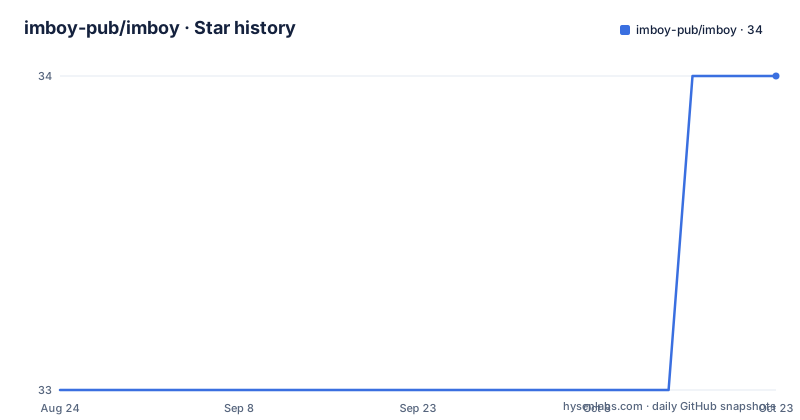
Star history
- imboy-pub/imboy34 ★ · +1
| Repository | 2026-08-24 | 2026-10-23 |
|---|---|---|
| imboy-pub/imboy | 33 | 34 |
1 Stars in the last 60 days, measured from the daily GitHub snapshot. Compare with other projects
Editorial analysis
What IMBoy Solves and Who It Is For
IMBoy is a self-hosted instant messaging platform. The repository contains the Erlang/OTP backend, database migrations, production deployment configuration, and documentation. The Flutter client and React admin panel live in separate repositories. This split matters: you are not getting a single codebase to run out of the box. The target user is a team or organization that wants to own its chat infrastructure, avoid third-party SaaS dependencies, and have the ability to modify the server-side logic. The README lists single chat, group chat, channels, a friend circle, and message push as core features. It also supports HTTP API and WebSocket long connections, optional end-to-end encryption, and PostgreSQL persistence with Garage S3 for attachments. This is not a toy project; the architecture description shows a deliberate layering of handler, logic, data service, and repository components.
The Architecture: Cowboy, PostgreSQL, and a Clear Call Chain
The backend runs on Erlang/OTP with the Cowboy web framework. The README includes a Mermaid diagram showing the data flow: the Flutter app and React admin connect over HTTPS or WSS to Nginx, which reverse-proxies to the IMBoy backend. The backend then talks to PostgreSQL and Garage S3. Prometheus scrapes /metrics, and Grafana visualizes it. The internal structure follows a strict pattern: Handler to Logic to DS to Repo. This is a conventional layered design. The Handler layer deals with HTTP and WebSocket parameters, the Logic layer contains business rules, the DS layer handles data services and caching, and the Repo layer accesses PostgreSQL. The README explicitly says new endpoints usually require changes to Handler, routes, Logic, and tests, and warns against modifying the vendored erlang.mk. This is a concrete constraint: the project expects contributors to respect its layering. The separation is clean, but it also means adding a feature touches multiple files, which raises the barrier for casual contributors.
Getting It Running Locally and in Production
For local development, the prerequisites are Erlang/OTP 28 or newer, GNU Make, and Docker. The setup script, scripts/dev_setup.sh, starts PostgreSQL 18 and creates .env and config/sys.local.config. You then run make compile and IMBOYENV=local make run. The service listens on port 9800, and you can check readiness by visiting http://127.0.0.1:9800/api/v1/init. If you need a phone to connect to the backend, you must change 127.0.0.1 to your computer's LAN IP. For production, the README describes a two-pass installer. First, run bash install.sh --edition community, which generates .env and all random secrets, then stops for you to fill in three required variables: API_DOMAIN, ADMIN_DOMAIN, and CERTBOT_EMAIL. Running the same command a second time completes the installation: preflight checks, service startup, TLS certificate issuance, health checks, and a post-deploy self-check. There is also a fully scripted path using flags like --admin-phone and --admin-password. This two-pass approach is practical because it separates machine-generated secrets from human-provided domains, and it avoids the common failure of an installer that tries to guess everything.
The Demo Mode and the Release Identity Triple
If you want a quick evaluation, the README offers a one-command demo: cd deploy and docker compose -f docker-compose.demo.yml up -d. This brings up a minimal two-service environment (PostgreSQL and the backend) with zero configuration, and after about 30 seconds you can access the init endpoint. That is useful for a product demo or a first look. For production, the installer prints a Release Identity triple: IMBOY_VERSION, IMBOY_GIT_SHA, and IMBOY_IMAGE_DIGEST. The README says that after an official release, the GitHub Release notes will include the same triple, so you can compare them to confirm you are running the exact image that passed the release gate. This is a good reproducibility practice, and it gives you a concrete way to verify the artifact you are running. However, the README does not mention how often releases are published or whether the triple is actually present in existing releases, so you should check that before relying on it.
Limitations and Failure Modes
The most obvious limitation is that the community edition does not include the production Docker Compose file. The README says docker-compose.prod.yml and a sales-policy overlay are not distributed with the open source repository. You get them only through a business channel, by contacting a specific email address. That means the community edition's production path is the community compose file, which is simpler and may lack features you need. The README also notes that Helm and Kubernetes are experimental and have not been verified in a production cluster. If your organization runs on Kubernetes, IMBoy is not ready for you without significant work. Another limitation is the license: the repository uses MulanPSL-2.0, which is a Chinese open-source license. It is OSI-approved, but it is less familiar to many Western teams, and you should review its terms carefully. Finally, the README mentions that the performance claim of 1 million concurrent TCP connections was based on a specific test with an 8-core 16GB machine, but it does not provide the test methodology or the exact version tested. Treat that number as an anecdote, not a benchmark you can reproduce.
Alternatives and How They Differ
The most direct comparison is with Matrix (Synapse) or Rocket.Chat. Matrix uses a federated architecture with a Python-based Synapse server, whereas IMBoy is a single-node Erlang backend with optional federation not mentioned in the README. Matrix has a mature client ecosystem and a well-known E2EE protocol, while IMBoy's E2EE is documented in a spec in the repository but the client is separate and its maturity is unknown. Rocket.Chat is a Node.js and MongoDB-based platform with a large feature set and a strong admin UI, but it is heavier and not Erlang-based. The key difference is the language and runtime: Erlang/OTP is designed for high concurrency and fault tolerance, which is why IMBoy claims to handle a million connections. If you need a battle-tested, widely deployed chat server with a large community, Matrix or Rocket.Chat are safer bets. If you want a lightweight, Erlang-native backend that you can customize deeply, IMBoy is more interesting, but you must be willing to navigate a smaller ecosystem.
Maintenance, Upgrade, and License Considerations
Upgrading IMBoy is presented as a one-liner: change IMBOY_VERSION in deploy/.env, then run pull and up -d, with migrations applied automatically. The README points to RELEASES.md for version history and rollback instructions, but that file is not included in the README excerpt. The maintenance cost is tied to Erlang/OTP 28+, which is a recent version; you need to keep your build environment aligned. The project uses erlang.mk as a build tool, and the README explicitly says not to modify the vendored copy, which means you must work within its constraints. The license is MulanPSL-2.0, a permissive license similar to Apache 2.0 but with its own wording. It allows commercial use, modification, and distribution, but you should read the full text because it includes a clause about patent rights and a requirement to retain copyright notices. The README does not mention any contributor license agreement or trademark policy, so those are open questions. Before adopting IMBoy, verify the release cadence and whether the business edition is a hard requirement for your use case.
Editorial conclusion
Adopt IMBoy if you need a self-hosted chat platform with a clear separation of concerns, a documented HTTP/WebSocket API, and a Docker Compose path that handles TLS and secrets automatically. Skip it if you require a battle-tested Kubernetes deployment, a mature mobile client in the same repository, or a permissive license without the MulanPSL-2.0 constraints. Before committing, verify the current state of the Flutter client, the E2EE implementation against the protocol spec, and the release identity triplets for the specific version you plan to run.
Frequently asked questions
How do I install the IMBoy backend?
Clone the repository, change into imboy/deploy and run bash install.sh --edition community. The first run writes .env, generates the random keys and the RSA login key pair, then stops so you can set API_DOMAIN, ADMIN_DOMAIN and CERTBOT_EMAIL. Run the same command again to start the services, issue TLS certificates and print the release identity.
Which licence applies to IMBoy?
The backend and the React admin frontend use the Business Source License 1.1, under which the source is public but competitive commercial use is restricted, and which converts to MPL 2.0 four years after release. The Flutter mobile client uses MulanPSL 2.0. Versions published before 14 September 2026 remain under MulanPSL 2.0.
Can I enable payments in the community edition of IMBoy?
No. The community edition ships with the payment gateway fixed off, and the orchestration file for the business edition, docker-compose.prod.yml plus a sales-policy overlay, is not distributed with the repository. Those files are obtained through the commercial delivery channel and installed with bash install.sh --edition business.
Official sources
Add this badge to your README
If you maintain this project, the badge below links readers to this analysis and shows its maintenance status from the daily GitHub snapshot. Paste the markdown into your README; add ?metric=license or ?metric=stars to the image URL for a different field.

[](https://hysenlabs.com/projects/imboy-pub-imboy)Star history chart for your README
[](https://hysenlabs.com/projects/imboy-pub-imboy)Was this useful?