The main branch of ActionRoguelike is a playground, and many of its experimental systems are off by default
Co-op Action Roguelike in Unreal Engine C++
At a glance
- What is it?
- Project Orion is a co-op action roguelike sample built in Unreal Engine 5 and C++. It is a course project that keeps growing, and the main branch deliberately carries unstable experiments that are disabled with #define directives.
- Who is it for?
- Use ActionRoguelike if you are learning Unreal Engine C++ and want a complete, readable game to read rather than a tutorial snippet, especially if you already work in Enhanced Input and GameplayTags. Do not clone the main branch expecting a stable multiplayer build, because the projectiles system there is explicitly experimental and not always multiplayer-ready.
- Can I use it commercially?
- Not without permission. GitHub finds no licence file in the repository, and without a licence all rights are reserved by default: you may read the code but not reuse it. Check the README, or ask the authors, before using it.
- Is it still maintained?
- Yes. The repository last received commits 3 days ago.
- What is it written in?
- Mainly C++, according to GitHub's language statistics.
Answers come from the project's GitHub data, last synced on November 15, 2026, and from our analysis. They are not legal advice.
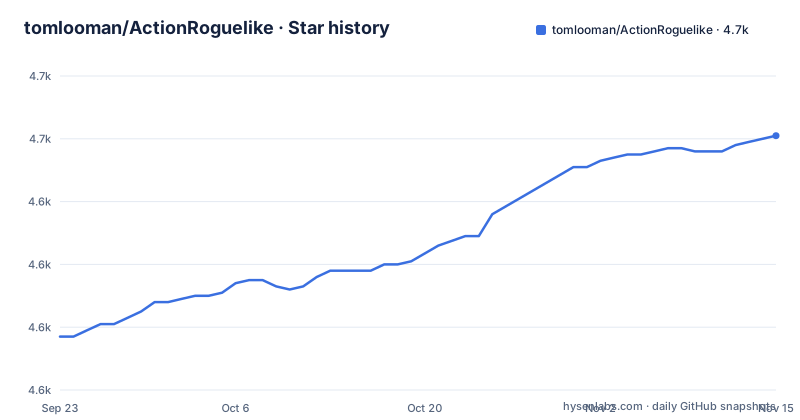
Star history
- tomlooman/ActionRoguelike4,661 ★ · +64
| Repository | 2026-09-23 | 2026-11-15 |
|---|---|---|
| tomlooman/ActionRoguelike | 4.6k | 4.7k |
64 Stars in the last 53 days, measured from the daily GitHub snapshot. Compare with other projects
Editorial analysis
The main branch tracks UE 5.6 and carries experiments that may not be multiplayer safe
The README states the main branch engine version is 5.8, and immediately qualifies what that branch is for. It is described as a playground for experimentation of new systems that may eventually become a blog post or a course, rather than a stable release.
The named example is projectiles. They have both an Object Pooling mechanism and an experimental Data Oriented Design approach that uses no Actors at all. The README says this may affect stability and is not always supporting multiplayer yet, until the systems stabilize.
The mitigation is a convention rather than a build system: many experimental features are disabled by default using `#define` directives so they can be toggled during compilation. That means the behaviour you get depends on which macros are set in your build configuration, not on which tag you checked out. Anyone reading the repository to understand how the game works has to establish which of those defines are active before drawing conclusions about the projectile code.
So there are two different artifacts here under one repository name. The course code lives on the course branches. The main branch is where new systems are tried.
The action system is a hand-rolled ability framework, not the Gameplay Ability System
The feature list leads with third-person action character movement and Enhanced Input, then an Action System described as similar to the Gameplay Ability System in design. Similar, not the same thing.
What the Action System contains is worth listing because it shows the shape of the pattern. There is a Dash Ability that teleports by way of projectile, a Blackhole Ability, a Magic Projectile Attack, a Thorns buff that reflects damage, and a Burning damage-over-time effect.
Two supporting systems make that work. An AttributeComponent holds health and similar values. GameplayTags mark up Actors, buffs and actions.
Underneath, the logic is event-based rather than polled, which is what drives the UI and the gameplay reactions. That combination, a data-driven action list, tags for identity, and events for propagation, is the architecture a reader is meant to take away.
Multiplayer support is claimed for all of the features, with GameMode logic handling the match structure. The README qualifies it for main, where the experimental projectile approaches are not always supporting multiplayer yet.
GameMode owns an economy, and enemy configuration lives in DataAssets and DataTables
The GameMode section is where this stops being a combat demo and becomes a game loop.
There is EQS, the Environment Query System, used for binding bot and powerup spawn locations. There is a bot spawning system where bots cost points to spawn and the GameMode gains points over time to spend. That is a resource loop, and it is what gives the co-op mode a reason to run longer than a single encounter.
Enemy configuration is split across two mechanisms. A DataTable holds bot information, which suits tabular data with a stable schema. DataAssets hold enemy configurations, which suit per enemy variations that benefit from designer-authored defaults and inheritance.
The AI underneath uses Behavior Trees for minion behaviour, with five named states: Roam, See, Chase, Attack, and a combined Flee or Heal state. Alongside the trees there are C++ custom Behavior Tree nodes, which is the part that matters if you are learning, because writing your own node shows you the interface a tree expects rather than only the set shipped by the engine.
EQS appears a second time here, this time for attack and cover locations chosen by the AI. So the query system is used both at spawn time and at decision time, which is a pattern worth copying.
Two branches exist for course students, and they are pinned to different engine versions
If you are following the course rather than reading the code, the README routes you elsewhere.
For the original UE4 version of the course, there is a branch the README labels UE4-Lecture29-FinishedProject (its link points to `Lecture29-FinishedProject`) with the finished course code and no additions, going back as far as UE 4.25. For the new UE 5.6 version of the course, there is a `UE5.6-CourseProject` branch that has a commit URL with each lesson, so you can check out the exact state of the project at the point a given lesson was taught.
That per-lesson commit URL is the feature that makes this branch different from the original. In the UE4 branch you get the finished project and navigate backwards yourself; in the UE 5.6 branch you get a series of discrete points matching the lesson sequence.
The reason there are two is stated plainly: the main branch game has been updated over the years to keep up with the latest Unreal Engine release, and new features are often added in connection with new articles or tutorials. So main and the course project have diverged, and following a lesson against main would not line up.
For anyone reading the project rather than studying it, the reverse applies: main has the newer systems, the course branches have the documented progression.
Asset loading is asynchronous through the Asset Manager, and PSOs are precached for Windows DX12
Two pieces of engine plumbing are worth calling out because they are the ones that cause hitches when done badly.
The Asset Manager handles async loading of data assets, and UI icons load asynchronously as well. In a project where enemies, powerups and abilities are all data-driven, loading those synchronously at level start produces a visible stall, and the Asset Manager is the mechanism that avoids it.
The other is PSO precaching, with bundled PSOs set up for Windows DX12. There is a `CollectedPSOs/` directory at the repository root, which is where the collected shader pipeline objects live. Pipeline state objects have to be compiled by the driver before a shader can be used, and doing that mid-frame is one of the more recognisable causes of stutter on DirectX 12. Precaching them during load removes that.
The Windows DX12 qualifier matters because that is the platform this was set up for. The same technique has equivalents elsewhere, but the collected files in this repository are specific to that API and that configuration.
Also present is an async line tracing example, which is a small demonstration of doing trace queries off the game thread rather than a system in its own right.
The Paragon assets carry their own licence terms and separate code from art
The credits and licence note are the part of this repository most likely to matter to you if you build on it.
Two contributors are credited for asset work. tharlevfx converted the Paragon Cascade effects to Niagara, and Sander van Zanten did an audio overhaul. Both credited with links to their own courses and site.
The licence statement is specific and restrictive in scope. The game assets are licensed for use with Unreal Engine only. Without a custom licence you cannot use them to create sequels, remasters, or otherwise emulate the original game, and you cannot use the original game's trademarks, character names or other IP to advertise or name your game. The Unreal Engine EULA applies.
The note then draws the line that actually matters for a learner, and it is a narrower restriction than it first appears. This applies to the game assets that refer to Epic's Paragon. You can still use the project code and content to build your own Unreal Engine game.
So the C++, the Blueprints, the architecture and the course structure are usable. What you cannot do without a custom licence is use the Paragon game assets to create sequels or remasters or otherwise emulate the original game, or use the original game's trademarks, character names or other IP to advertise or name your game. There is also no separate licence file named in the repository, and the project's licence is reported as unknown, so read this note rather than assuming a standard open source grant applies to everything in the tree.
This is a teaching repository, and the surrounding site is part of the deliverable
The README is short, and that is because the documentation lives off the repository.
Detailed information about the project and its features is on a documentation page hosted on the author's site, and the README points there rather than duplicating it. It also references tutorials and articles written about the project, with the Save Game System called out as an example you can implement in your own game.
The framing throughout is instructional. The project is described as an expansion on the game built during a Professional Game Development in C++ and Unreal Engine 5 course, and as a continued effort at building the most advanced sample game for the engine while remaining easy to understand, learn from and adapt to.
That last clause is the design constraint that shapes the code. Multiplayer support across all features, a mix of C++ and Blueprint with attention to how to combine them, and a GameplayTags based marking system are all there to be read and copied. The Action System is deliberately not the engine's built-in framework, which is what makes it readable as an example of the pattern.
There are no GitHub releases, so there is no version to pin and nothing to compare against. The last push to the repository was 2026-11-02, and the default branch is `master`. The repository root is a standard Unreal project: `ActionRoguelike.uproject` alongside `Config/`, `Content/`, `Source/`, `Binaries/` and `CollectedPSOs/`.
Editorial conclusion
Use ActionRoguelike if you are learning Unreal Engine C++ and want a complete, readable game to read rather than a tutorial snippet, especially if you already work in Enhanced Input and GameplayTags. Do not clone the main branch expecting a stable multiplayer build, because the projectiles system there is explicitly experimental and not always multiplayer-ready. If you are following a course, use the UE5.6-CourseProject or Lecture29-FinishedProject branch instead of main, and read the licence note on the Paragon-derived game assets before you ship anything built on this code.
Frequently asked questions
What is an action roguelike?
An action roguelike combines real-time combat with the roguelike structure of permadeath and procedural regeneration. The ActionRoguelike project is described as a co-op action roguelike sample game, built in Unreal Engine 5 and C++, with third-person action character movement and multiplayer support across its features.
What is a roguelike vs. a roguelite?
The README does not define either term, since it documents a game rather than the genre vocabulary. What it does describe is a bot spawning system in which bots cost points to spawn and the gamemode gains points over time to spend.
What Unreal Engine version does ActionRoguelike target?
The main branch engine version is stated as 5.8, and there is a separate UE5.6-CourseProject branch for students of the current course version. An older branch, UE4-Lecture29-FinishedProject, holds the finished course code from the original UE4 version, reaching back to UE 4.25.
Is ActionRoguelike's main branch stable for multiplayer?
Not entirely. The README describes main as a playground for experimentation and says the projectile system on that branch may affect stability and is not always supporting multiplayer yet. Many experimental features are disabled by default using #define directives, and the UE5.6-CourseProject branch is the one intended for course use.
Can I use the ActionRoguelike game assets in my own game?
The game assets are licensed for use with the Unreal Engine only, and that restriction applies to assets referring to Epic's Paragon. Without a custom licence you cannot use them to make sequels or remasters, or the original game's trademarks and character names to advertise or name your game. The project code and content can still be used to build your own Unreal Engine game.
Official sources
Add this badge to your README
If you maintain this project, the badge below links readers to this analysis and shows its maintenance status from the daily GitHub snapshot. Paste the markdown into your README; add ?metric=license or ?metric=stars to the image URL for a different field.

[](https://hysenlabs.com/projects/tomlooman-actionroguelike)Star history chart for your README
[](https://hysenlabs.com/projects/tomlooman-actionroguelike)Was this useful?