CodeRunner: an Apple container sandbox for MCP-connected coding agents
A local sandbox for your AI agents
At a glance
- What is it?
- CodeRunner wraps a Python and Playwright execution environment in an Apple container and exposes it to Claude Code, Claude Desktop, OpenCode, Gemini CLI, Kiro and OpenAI agents over MCP. The design is narrow on purpose, and the Apple Silicon requirement is the first thing to check.
- Who is it for?
- Adopt CodeRunner if you run coding agents on an Apple Silicon Mac and want their code execution to land in a container you can stop with container stop coderunner and resume with container start coderunner rather than on your working tree.
- Can I use it commercially?
- Yes. Apache-2.0 is a permissive licence: you can use, modify and sell software built on it, as long as you keep its copyright and licence notices.
- Is it still maintained?
- Yes. The repository received new commits within the last day.
- What is it written in?
- Mainly Python, according to GitHub's language statistics.
Answers come from the project's GitHub data, last synced on November 22, 2026, and from our analysis. They are not legal advice.
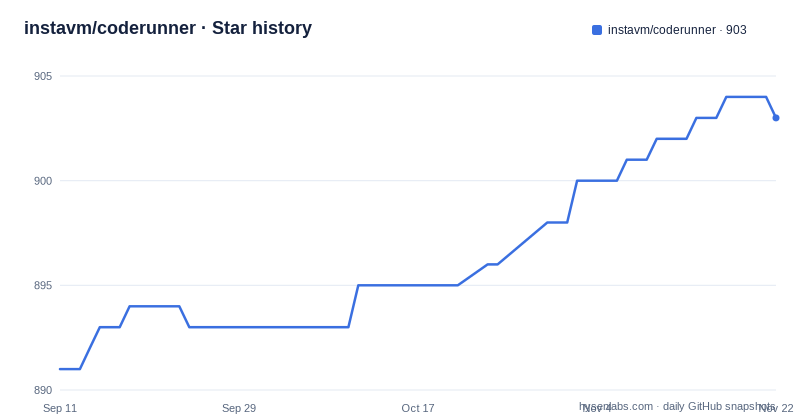
Star history
- instavm/coderunner903 ★ · +12
| Repository | 2026-09-11 | 2026-11-22 |
|---|---|---|
| instavm/coderunner | 891 | 903 |
12 Stars in the last 72 days, measured from the daily GitHub snapshot. Compare with other projects
Editorial analysis
The problem CodeRunner addresses: agent code execution on your own machine
An agent that can run Python is an agent that can delete files, read credentials and post data somewhere you did not intend. The README states the key use case directly: running multiple Claude Code or AI agents in the sandbox without fear of data loss and exfiltration. That framing tells you the intended user is someone who already gives an agent shell or code access and wants that access fenced off from the host filesystem. It is not a general container tool and it is not a code interpreter for a web app. It is a local execution backend for MCP-capable clients, and the list of integrations in the README (Claude Desktop, Claude Code CLI, OpenCode, OpenAI's Python agents library, Gemini CLI, Kiro) is the real scope statement. If your agent client cannot speak MCP, CodeRunner has nothing to offer you beyond a container you could build yourself. The vendor also sells a hosted version, InstaVM, described in the README as cloud managed VMs for agents, so the open source repository is positioned as the local counterpart to a paid service rather than as a standalone product.
What the installer actually builds and how the MCP server is reached
The install path is a shell script, not a package. You clone the repository, make install.sh executable and run it. The README's quick start uses ./install.sh, while the Claude Code CLI section shows sudo ./install.sh, which suggests the script may need elevated permissions in some setups, and that is worth resolving before you run it. The script creates ~/.coderunner/venv, a virtualenv used by the Claude Desktop proxy, and it creates a container named coderunner. The MCP endpoint is published at http://coderunner.local:8222/mcp for clients that resolve that hostname, and at http://127.0.0.1:8222/mcp when the sandbox is created with CODERUNNER_NETWORK=none. The installer is also the lifecycle manager: it refuses to resume a container whose network mode differs from the one you are asking for, which means the network decision is made once, at creation time, and changing your mind means deleting the container. The README gives that recovery path explicitly: container delete coderunner followed by running the installer again, which also wipes uploads, kernels and installed packages.
The session model: persistent kernels, named sessions and a five-session ceiling
CodeRunner is not a stateless execute-and-return service. The tool list in the README includes execute_python_code, which runs code in a persistent Jupyter kernel, plus start_python_session, list_python_sessions and stop_python_session for reserving an isolated kernel per named session. The README instructs you to pass the returned session_id to execute_python_code so that state stays isolated between agents, and states that up to five named sessions can run concurrently. Persistence is the point: variables, imports and downloaded files survive between calls, which is what makes multi-step data work practical. It is also the main operational hazard. A kernel that keeps state can accumulate memory, hold file handles and retain secrets in variables long after the task that needed them finished. stop_python_session is described as discarding kernel state, so it is the cleanup primitive, and the five-session cap means an orchestration that fans out to six agents will have to queue or reuse sessions. Alongside Python, the tool list includes navigate_and_get_all_visible_text for Playwright-based scraping and a skill layer (list_skills, get_skill_info, get_skill_file) covering docx, xlsx, pptx, pdf and image processing. Those skills are documentation and files the agent reads, not a separate runtime, so the practical ceiling on what an agent can do is still set by what is installed in the container.
Wiring CodeRunner into a client: three configuration shapes
The integrations split into two patterns. Claude Desktop uses a local proxy process: you copy examples/claude_desktop/claude_desktop_config.example.json to claude_desktop_config.json and replace the placeholder paths so that command points at $HOME/.coderunner/venv/bin/python and args points at your cloned examples/claude_desktop/mcpproxy.py. That is a stdio MCP server launched by the desktop app. OpenCode, Gemini CLI and Kiro use the remote HTTP endpoint instead: OpenCode takes a ~/.config/opencode/opencode.json entry with type set to remote and url set to http://coderunner.local:8222/mcp; Gemini CLI takes an mcpServers block in ~/.gemini/settings.json with httpUrl set to the same address; Kiro uses ~/.kiro/settings/mcp.json. Claude Code CLI goes through a plugin marketplace instead of a config file, with claude plugin marketplace add followed by claude plugin install instavm-coderunner and a /mcp reconnect. The OpenAI agents example is a Python client you run yourself after exporting OPENAI_API_KEY and installing examples/requirements.txt into your own virtualenv, not the installer's. Note that the README does not state whether the HTTP endpoint has any authentication, and the hostname coderunner.local implies mDNS resolution on your local network. Treat that as unverified and check it yourself before exposing the port.
Where CodeRunner is the wrong tool
The prerequisites are the hard boundary: a Mac with macOS and Apple Silicon (M1/M2/M3/M4) and Python 3.10 or newer. The lifecycle commands are container stop, container start and container delete, which are Apple's container CLI, so this does not run on Linux servers or on Intel Macs. If your agents run in CI or on a shared Linux box, CodeRunner is not a candidate. The second boundary is network egress. By default, the README states, code in the sandbox has unrestricted network access; CODERUNNER_NETWORK=none switches to a host-only network with no internet access. That is a binary choice fixed at container creation, and it cuts both ways. A host-only sandbox cannot pip install a package, call an external API or fetch a URL during a run, so any agent task that depends on the network will fail in the mode that offers the strongest isolation. There is no documented middle ground such as an allowlist. The third limitation is durability: the README's own clean-slate instruction is container delete coderunner && ./install.sh, and the resume path is described as preserving uploads, kernels and installed packages.
How this differs from running the agent in a full dev container or a hosted sandbox
The obvious alternative is a general container setup: a Dockerfile or devcontainer that installs Python, Playwright and whatever else, then pointing the agent's MCP configuration at a process inside it. The difference is in what is exposed. A general container gives the agent a shell and a filesystem and leaves the tool surface to the client; CodeRunner instead exposes a fixed set of MCP tools (execute_python_code, the session tools, the Playwright navigation tool and the skill readers) over a single endpoint, so the integration work is a config entry rather than a server you write. The trade-off is that you inherit someone else's tool surface and its limits, including the five-session cap and the skill set the installer ships. The other alternative is the vendor's own hosted option, InstaVM, which the README describes as cloud managed VMs for agents. That removes the Apple Silicon requirement and the local container lifecycle, at the cost of running agent code on someone else's infrastructure. Choosing between them is mostly a question of whether your agent's data is allowed to leave the machine; if it is not, the local container is the only one of the two that fits.
Maintenance, licensing and what to verify before standardising on it
CodeRunner is Apache-2.0, which permits commercial use and modification, and the repository is not archived. The material retrieved includes no releases, so there is no versioned artifact to pin and no changelog to read; installation is a git clone plus a shell script, which means your upgrade path is pulling the repository and re-running install.sh. That matters because the installer owns the container and refuses to resume one whose network mode differs, so a re-run is not guaranteed to be a no-op on an existing sandbox. Budget for the possibility that upgrading means deleting the container and losing installed packages and kernel state. The Python dependency surface is split between the installer's ~/.coderunner/venv for the Claude Desktop proxy and examples/requirements.txt for the example clients, so environment drift between the two is a real possibility. The Kiro integration should be treated as unconfirmed until you read the full file. This is not legal advice; if you redistribute the installer or bundle it into a product, read the Apache-2.0 terms and the LICENSE file in the repository yourself.
Editorial conclusion
Adopt CodeRunner if you run coding agents on an Apple Silicon Mac and want their code execution to land in a container you can stop with container stop coderunner and resume with container start coderunner rather than on your working tree. Do not adopt it if you are on Linux or Intel macOS, since the prerequisites state a Mac with Apple Silicon and the workflow is built on the container command; and do not adopt it if your agents need package installs or API calls that require outbound network, because CODERUNNER_NETWORK=none removes internet access and the installer will not resume a container created with a different network mode. Before trusting it, run the installer once with CODERUNNER_NETWORK=none, confirm http://127.0.0.1:8222/mcp answers, and check that the five-session limit and the persistent kernel behaviour match how many agents you actually run in parallel.
Frequently asked questions
What is CodeRunner?
A local sandbox for AI agents. Code runs in an isolated container with VM-level isolation using Apple's container project, and an MCP server on port 8222 lets an assistant execute Python in a persistent Jupyter kernel, scrape pages with Playwright and read skill files.
Does the CodeRunner sandbox have internet access?
By default it does: the README states that code running in the sandbox has unrestricted network access. Installing with `CODERUNNER_NETWORK=none ./install.sh` puts it on a host-only network with no internet, and in that mode the MCP endpoint is `http://127.0.0.1:8222/mcp`. The mode is fixed when the container is created.
What are the system requirements for CodeRunner?
A Mac running macOS on Apple silicon, listed as M1, M2, M3 or M4, with Python 3.10 or newer on the host. The container image itself is Debian based and built on Python 3.13.3, so the Linux side is the guest rather than the host.
Which AI assistants can connect to CodeRunner?
Six documented configurations: Claude Desktop, the Claude Code CLI through a plugin installed from a separate repository, OpenCode, a Python OpenAI agents example, Gemini CLI and Amazon's Kiro. A seventh, Coderunner-UI, is named and linked with no configuration shown.
Can CodeRunner keep state between sessions?
Yes. Starting the container again preserves uploads, kernels and installed packages, so a session is resumable rather than disposable. Inside the sandbox, code runs in a persistent Jupyter kernel, and named sessions give each agent its own kernel, with up to five running concurrently.
How do I reset a CodeRunner sandbox or change its network mode?
Delete the container and rerun the installer with `container delete coderunner && ./install.sh`. Because the network mode is fixed at creation and the installer refuses to resume a container created with a different mode, changing it means a full reinstall rather than a configuration edit.
Official sources
Add this badge to your README
If you maintain this project, the badge below links readers to this analysis and shows its maintenance status from the daily GitHub snapshot. Paste the markdown into your README; add ?metric=license or ?metric=stars to the image URL for a different field.

[](https://hysenlabs.com/projects/instavm-coderunner)Star history chart for your README
[](https://hysenlabs.com/projects/instavm-coderunner)Was this useful?