rLLM keeps one agent file and swaps the training backend behind it
Democratizing Reinforcement Learning for LLMs
At a glance
- What is it?
- rLLM is a Python framework for reinforcement learning on language agents: a model gateway captures token IDs and logprobs so the same rollout function serves both evaluation and training. The backend switch is a pip extra, and the interesting risk is in the files that disagree with each other.
- Who is it for?
- rLLM suits a team that already has an agent loop and a scorer and wants to put a policy update behind them without rewriting either. It does not suit a team looking for a ready-made agent, a ready-made reward, or a laptop-only path to distributed training.
- Can I use it commercially?
- Yes. Apache-2.0 is a permissive licence: you can use, modify and sell software built on it, as long as you keep its copyright and licence notices.
- Is it still maintained?
- Yes. The repository last received commits 30 days ago.
- What is it written in?
- Mainly Python, according to GitHub's language statistics.
Answers come from the project's GitHub data, last synced on November 13, 2026, and from our analysis. They are not legal advice.
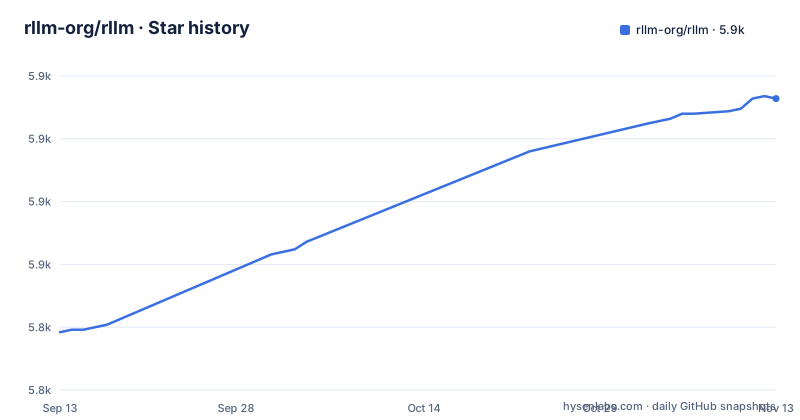
Star history
- rllm-org/rllm5,916 ★ · +93
| Repository | 2026-09-13 | 2026-11-13 |
|---|---|---|
| rllm-org/rllm | 5.8k | 5.9k |
93 Stars in the last 61 days, measured from the daily GitHub snapshot. Compare with other projects
Editorial analysis
One rollout function, two jobs: eval and the policy update
The central claim is that a single agent implementation serves both evaluation and training, and the mechanism is a model gateway. While training runs, `config.base_url` is pointed at a gateway that transparently captures token IDs and logprobs, and your agent code is left exactly as written. The agent never learns which endpoint it is calling, so the same function that answers a benchmark question during eval becomes the function that produces rollouts for a policy update. Underneath sit four steps (run your agent, collect traces, compute rewards, update the model) and four components. A Workflow Engine runs N parallel agent instances to gather rollouts, the Model Gateway routes requests and captures token IDs plus logprobs, a Transform Pipeline groups trajectories for advantage computation, and the Training Backend does the policy update. The reward side is never inferred for you.
Captured calls become Episodes, Trajectories and Steps
Traces are not left as raw request logs. The gateway structures them into a three level record: an Episode is one task, a Trajectory is one agent run inside it, and a Step is a single LLM call, which is where the token IDs and logprobs needed for advantage computation are kept. Sessions are routed by URL, and that is what lets one agent definition be replayed against a benchmark and against a training run without branching the code. The same structure is the contract your reward function reads. In the documented evaluator, the reward is pulled out of `episode.artifacts`, compared against `task["ground_truth"]`, and returned as an EvalOutput carrying a reward value, a correctness flag and named signals. Artifacts are therefore the seam between whatever your agent keeps internally and whatever your scoring logic can see.
Backends are pip extras, not separate frameworks
The choice of engine is packaging plus one flag. Three backends sit behind the same API: `verl` for distributed multi-GPU work on vLLM or SGLang, `tinker` for single-machine runs against the Tinker API, and `fireworks` for the Fireworks platform. A plain install already pulls the dependencies for the `rllm` CLI running on the tinker backend, so the extras are the real difference between a laptop and a GPU cluster. The verl extra also carries the heavy pins: torch>=2.10.0, torchvision>=0.23.0, vllm==0.22.1, flash-attn==2.8.3, verl==0.8.0 and ray, plus transformers>=5.5.3 and qwen-vl-utils. Smaller groups exist for rewards (sympy, pylatexenc, antlr4-python3-runtime==4.9.3), for MCP tooling, for a UI served over HTTP with httpx and python-multipart, and for development with pytest, ruff and mypy. The two extra installs look like this, and the extras in brackets are the entire switch:
# Distributed multi-GPU training (verl + vLLM/SGLang)
uv pip install "rllm[verl] @ git+https://github.com/rllm-org/rllm.git"

# Fireworks training platform
uv pip install "rllm[fireworks] @ git+https://github.com/rllm-org/rllm.git"
Drop the bracket and you are back on tinker, which is what the CLI assumes before you change anything.
Harnesses and sandboxes are picked per run
The harness and the execution environment are the two axes you choose at run time. Ten or more command line harnesses are wired in, among them Claude Code, Codex, Terminus-2, mini-swe-agent and opencode, and Harbor-compatible task directories are supported alongside them. Anything else is wrapped instead: a LangGraph graph, an OpenAI Agents SDK setup or a plain `openai.OpenAI` client becomes a rollout by decorating the function with `@rllm.rollout`. On the environment side, Docker, Daytona, Modal and local execution all work, with snapshot and warm-pool acceleration described as the way to keep rollouts affordable at training scale. The price of that reach shows in the layout, because `rllm-model-gateway/` is a separate top-level package next to `rllm/`, and the examples directory keeps one folder per shape of problem: agentcore_math, countdown, harbor_swe, verifiers_env, math_distill, fully_async and an archive.
Benchmarks are addressed by name, not by loader code
Evaluation is addressed by name rather than by data plumbing. Sixty or more benchmarks are integrated, spanning math, code, multiple choice, question answering, search, vision-language, translation and agentic tasks, with Terminal-Bench 2.0, SWE-bench, SkillsBench, AIME, MATH-500 and GPQA named among them. One command pulls the task set and runs it, and the same name works for training, which is the symmetry that makes a loop cheap to iterate on: `rllm eval gsm8k` measures what `rllm train gsm8k` then optimises. Provider credentials come first through a setup step rather than an environment variable in the docs. Around the framework, community projects include Alibaba's DeepResearch, terminal-bench-rl, PettingLLMs for multi-agent training, SETA, LLM-in-Sandbox, Vision-DeepResearch and OpenSearch-VL, plus cookbooks for a single-turn VLM solver and a multi-agent solver-judge. The whole first session is three commands:
# 1. Configure your model provider
rllm model setup

# 2. Evaluate on a benchmark
rllm eval gsm8k

# 3. Train with RL
rllm train gsm8k
Setup comes first in the README quickstart.
The version floor, the licence and the container all disagree
Three files contradict each other in ways worth settling before you install. The README states Python 3.11 or newer, while pyproject declares requires-python >=3.10, so a 3.10 interpreter satisfies the packaging metadata and still misses the documented floor; the tinker dependencies are separately marked for python_version >= '3.11'. Licence is the second gap: the repository is published as Apache-2.0 while the packaging classifier inside pyproject reads MIT, with the real text loaded from a LICENSE file. Pinned versions are the third. The verl extra asks for verl==0.8.0, but the Dockerfile in the repository root starts from verlai/verl:vllm011.latest, checks out verl v0.6.1, installs rllm with pip install -e ., and adds playwright with chromium. A container built from that file is not the environment the extras describe, and the last push on main is 2026-10-16 while the newest tag is v0.3.0-pre.
It will not write the agent, the scorer or the cluster
Three things rLLM does not do are worth saying plainly. It does not supply the agent: the rollout function is yours, whether that is a handful of lines against an OpenAI-compatible client or a full harness. It does not supply the reward: the evaluator decorator wraps a function you write, comparing whatever you placed in artifacts against whatever ground truth the task carries, and no built-in scorer stands in for that judgement. It does not remove the infrastructure either. A distributed run wants a GPU cluster, and the container recipe asks for the nvidia runtime with all GPUs, host networking, a shared memory size and an added SYS_ADMIN capability. The extras are also only partly optional: the fireworks path pins fireworks-ai[training]==1.2.20, and torch, vllm, flash-attn, torchvision and qwen-vl-utils all arrive with the verl extra.
Editorial conclusion
rLLM suits a team that already has an agent loop and a scorer and wants to put a policy update behind them without rewriting either. It does not suit a team looking for a ready-made agent, a ready-made reward, or a laptop-only path to distributed training. Before installing, decide whether you need the verl extra at all, read the Dockerfile against pyproject because they pin different verl versions, and confirm which Python floor and licence the project actually intends.
Frequently asked questions
Do I need a GPU cluster to try rLLM?
Not for the documented starting path. The plain install pulls the dependencies for the rllm CLI on the tinker backend, which runs on a single machine. The verl extra is the distributed multi-GPU route, and it is what brings in torch, vllm, flash-attn and ray.
How do I plug in an agent that rLLM does not list?
Decorate your function with `@rllm.rollout` and return an Episode holding trajectories, steps and artifacts. The documented example calls an OpenAI-compatible client through config.base_url, and the built-in harness list already covers Claude Code, Codex, Terminus-2, mini-swe-agent and opencode.
Which training methods and backends can rLLM use?
The feature list names GRPO, REINFORCE, RLOO, SFT and on-policy distillation. Backends are verl for distributed multi-GPU, tinker for single-machine, and fireworks for the Fireworks platform, and the choice is passed to the trainer as a backend argument.
Official sources
Add this badge to your README
If you maintain this project, the badge below links readers to this analysis and shows its maintenance status from the daily GitHub snapshot. Paste the markdown into your README; add ?metric=license or ?metric=stars to the image URL for a different field.

[](https://hysenlabs.com/projects/rllm-org-rllm)Star history chart for your README
[](https://hysenlabs.com/projects/rllm-org-rllm)Was this useful?