II-Researcher: a self-hostable deep search agent with pluggable search and scraping providers
II-Researcher: a new open-source framework designed to aid building search / research agents
At a glance
- What is it?
- II-Researcher is an Apache-2.0 Python framework that runs a think-act-reflect loop over web search and page visits, then writes a referenced report. It is model-agnostic through LiteLLM and ships a CLI, a FastAPI backend, a Next.js UI and an MCP server, but the README leaves several operational details unstated.
- Who is it for?
- Adopt II-Researcher if you need a self-hosted research agent whose search and scraping providers can be swapped without rewriting the loop, and you are willing to run your own API keys and a LiteLLM endpoint. Do not adopt it if you want a general-purpose agent toolkit or a managed service, because the project is a single-purpose pipeline with two releases and no published dependency or upgrade policy.
- Can I use it commercially?
- Yes. Apache-2.0 is a permissive licence: you can use, modify and sell software built on it, as long as you keep its copyright and licence notices.
- Is it still maintained?
- Yes. The repository last received commits 136 days ago.
- What is it written in?
- Mainly Python, according to GitHub's language statistics.
Answers come from the project's GitHub data, last synced on November 15, 2026, and from our analysis. They are not legal advice.
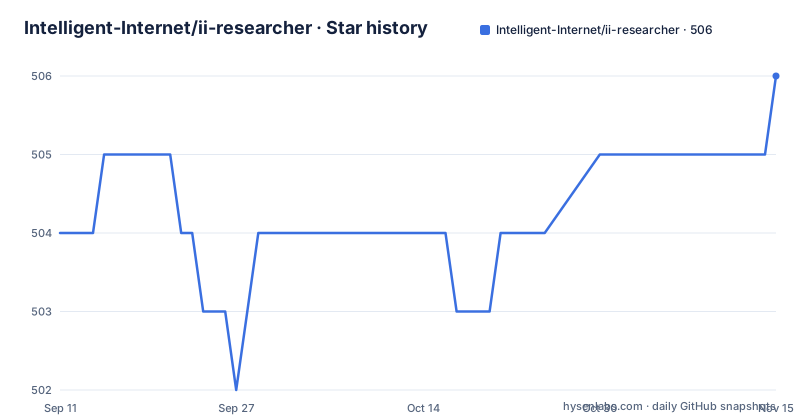
Star history
- Intelligent-Internet/ii-researcher506 ★ · +2
| Repository | 2026-09-11 | 2026-11-15 |
|---|---|---|
| Intelligent-Internet/ii-researcher | 504 | 506 |
2 Stars in the last 65 days, measured from the daily GitHub snapshot. Compare with other projects
Editorial analysis
The problem: a research loop that has to survive contact with real web pages
Most agent frameworks give you primitives and leave the research pipeline to you. II-Researcher takes the opposite position: it ships the pipeline as the product. The README describes it as a deep search agent that, given a question, autonomously searches the web, visits and reads pages, reflects on intermediate findings, and synthesizes a final answer with references. The intended user is an engineer who needs that behaviour as a component, not as a chat interface. You get a Python library and CLI, a streaming FastAPI backend, a Next.js web UI, and an MCP server that plugs into Claude and other MCP-compatible clients. That spread matters, because it means the same agent core is reachable from a shell script, a browser, or a desktop assistant without reimplementing the loop three times. The scope is deliberately narrow. There is no claim of general tool use, no plugin registry beyond search and scrape providers, and no multi-agent orchestration. If your problem is answering a hard question with citations, the project addresses it directly. If your problem is something else, the abstraction will not stretch.
Inside the think-act-reflect loop and where retrieved text gets cut down
The architecture diagram in the README shows a reasoning agent that streams its reasoning tokens while cycling through think, act and reflect. At each step it can call two tool families: web search (SerpAPI, Tavily or Jina) and page visit (Firecrawl, a headless browser, BeautifulSoup, Tavily Extract or Jina), with dedicated handling for PDFs and YouTube. Search results feed back into the agent; scraped pages pass through a compression stage before they do. That compression stage is the part worth pausing on. The README lists embedding-based and LLM-based compressors, and the diagram labels the embedding path as similarity filtering, with the LLM compressor as optional. The stated purpose is keeping long pages within the model's context window. This is a real design decision rather than a detail: an embedding filter is cheap and deterministic, while an LLM compressor costs another model call per page and introduces its own summarization errors. The README does not say which is the default, nor how the two interact when both are enabled, so treat that as something to confirm in the source before you rely on either. Model calls route through a LiteLLM proxy, which is what makes the framework model-agnostic across OpenAI, DeepSeek, Gemini, OpenRouter and any OpenAI-compatible endpoint, including self-hosted models. Report generation is handled by a separate builder that produces basic or advanced reports with references and multilingual output, with structured outputs powered by BAML.
Getting it running: install, environment variables and provider switches
The README gives two install paths. From PyPI: pip install ii-researcher. From source: git clone https://github.com/Intelligent-Internet/ii-researcher.git, then cd ii-researcher, then pip install -e. Python 3.10 or newer is required for local development, and Docker with Docker Compose is listed for containerized deployment, Node.js and npm for local frontend work. Configuration is entirely environment variables, and the README shows the shape of them. OPENAI_API_KEY holds your model key. OPENAI_BASE_URL points at the LiteLLM endpoint, shown as http://localhost:4000 in the example. SEARCH_PROVIDER selects the search backend and accepts serpapi, tavily or jina. SCRAPER_PROVIDER selects the scraping backend, and the README's example sets it to firecrawl. The provider keys are conditional rather than universal: TAVILY_API_KEY is described as required when SEARCH_PROVIDER=tavily, SERPAPI_API_KEY when SEARCH_PROVIDER=serpapi, and FIRECRAWL_API_KEY when SCRAPER_PROVIDER=firecrawl. That conditional wording is useful because it tells you the dependency graph without you having to read the settings module. The feature list names Firecrawl, Browser, BeautifulSoup, Tavily Extract and Jina, but the exact SCRAPER_PROVIDER string values are worth confirming. Usage is documented across four surfaces: a CLI, a web interface, an MCP server for Claude Desktop, and Docker.
The Frames benchmark claim and what it does not tell you
The README reports 84.12% accuracy on Google's Frames benchmark using DeepSeek-R1-0528, and the news section dates that result to June 2025. This is the project's own reported figure, run by its maintainers, and the README does not publish the harness, the number of runs, or the token budget per question. It also does not say whether the default context compression settings were used or whether the configuration was tuned for the benchmark. That is not an accusation; it is simply the information a reader needs before treating the number as a baseline for their own workload. A single accuracy figure on a single dataset with a single model tells you the pipeline can work well under favourable conditions. It does not tell you how the agent behaves on questions where the answer requires reading a paywalled page, or where search returns nothing useful, or where the model is a smaller self-hosted one rather than DeepSeek-R1-0528. The project's own framing is honest about this: it presents the number as a benchmark result, not as a general capability claim. Treat 84.12% as a ceiling observed under one configuration, and measure your own queries before you commit.
Where the design will frustrate you
The provider model is the main source of friction. Search and scraping are each swappable, but they are not equivalent. A page visit through BeautifulSoup returns raw HTML that you then have to clean, while Firecrawl returns extracted content and costs an API call. The README lists both under the same heading, which flattens an important difference in output quality and cost. The same applies to search: SerpAPI, Tavily and Jina return different result shapes, and the README does not describe a normalisation layer, so behaviour may vary by provider in ways the documentation does not enumerate. The second constraint is operational. Every stage routes through a LiteLLM proxy, so you are running a proxy in front of your model provider whether you want one or not. That is what buys model-agnosticism, but it is another process to deploy, monitor and keep in sync with LiteLLM's own release cadence. Third, the release history is thin. The README's news section is more current (August 2025 entry) than the release list, which shows v0.1.5 from May 2025 and v0.1.4 from April 2025. A pre-1.0 version number means the configuration keys and Python API can change between minor releases, and the README does not document a deprecation policy. If you pin to a version, pin hard.
How it differs from a general agent toolkit
The closest comparison is a general-purpose agent framework such as LangChain or a graph-based orchestrator, where you assemble search, retrieval and generation yourself. The difference is where the opinion lives. In a general toolkit, the think-act-reflect loop is something you write; in II-Researcher it is the shipped artifact, and the extension points are narrowed to search providers, scrapers, compressors and models. That trade buys consistency: every user of the framework gets the same reflection behaviour and the same referenced report format, which makes results comparable across deployments. It costs flexibility: if your research task needs a custom step between scraping and compression, you are modifying the loop rather than composing around it. A second contrast is the MCP server. Rather than asking you to build an integration, the project ships one so Claude Desktop and other MCP clients can call the agent directly. Frameworks that treat MCP as an afterthought leave that as an exercise. The third contrast is the report builder with its basic and advanced modes and multilingual output. Many agent toolkits stop at returning text; II-Researcher treats the final referenced document as a first-class output type. If citations are not part of your requirement, that machinery is overhead you are carrying for nothing.
Licence, maintenance and what an upgrade actually costs
II-Researcher is Apache-2.0, which permits commercial use, modification and redistribution provided you retain the licence and notices, and it includes a patent grant. That is a permissive arrangement, and it is one of the more straightforward parts of adopting the project. The maintenance picture is harder to read. The repository is not archived, the last push is dated 2026-07-02, and the two most recent releases listed are v0.1.5 (2025-05-09) and v0.1.4 (2025-04-14). The README news section mentions an August 2025 demo of II-Search-CIR-4B under examples/ii_search_4b and a June 2025 benchmark result, so activity continued after the last listed release even though no newer version appears in the release list. The practical cost of upgrading is the configuration surface. Because providers are selected by environment variables and model calls route through LiteLLM, a version bump can change accepted provider strings, required keys, or the LiteLLM version range without a major version number to warn you. The repository includes a test and lint workflow, referenced by the badge in the README, which is the place to check whether your provider combination is covered. Before upgrading, diff the environment variable names against your deployment and run the CLI against a fixed question to compare report output. This is not legal advice; read the LICENSE file and the notices of any provider SDKs you enable, since your obligations to SerpAPI, Tavily, Firecrawl or Jina are separate from the Apache-2.0 grant.
Editorial conclusion
Adopt II-Researcher if you need a self-hosted research agent whose search and scraping providers can be swapped without rewriting the loop, and you are willing to run your own API keys and a LiteLLM endpoint. Do not adopt it if you want a general-purpose agent toolkit or a managed service, because the project is a single-purpose pipeline with two releases and no published dependency or upgrade policy. Verify first that your chosen SEARCH_PROVIDER and SCRAPER_PROVIDER combination is actually exercised in the repository's tests, and check whether the Frames number at 84.12% was produced with the default settings or a tuned run, since the README does not say.
Frequently asked questions
What is ii-researcher?
It is a self-hostable deep search agent from Intelligent Internet. Given a question it searches the web, reads pages, reflects on what it found and writes a referenced answer, shipping as a Python library and CLI, a streaming API backend, a web interface and an MCP server.
What benchmark score does ii-researcher report?
It reports 84.12 percent accuracy on Google's Frames benchmark using the DeepSeek-R1-0528 model, stated identically in the news section and the benchmark section. No baseline, comparison, cost figure, timing or question count appears alongside it in the repository.
Which search and scraping providers does ii-researcher support?
Search is pluggable across three named services. Scraping is pluggable too, but the provider variable accepts four values while the feature list and the architecture diagram both name five, with one of them available only as a search provider.
How many services does the ii-researcher Docker setup run?
Three: the web interface, the API backend, and a model proxy that every model call passes through. The proxy and the API service both bind-mount the host project directory into the container, and the MCP server is a fourth surface that appears in no compose file.
How is ii-researcher configured to use different models?
There are five separate model roles, set independently. The example configuration uses a DeepSeek reasoner for the main loop at a temperature of 0.2, a separate OpenAI model to write the report, and a small Gemini model for context compression, all routed through a local proxy.
How current is the published ii-researcher package?
The newest release tag is v0.1.5 dated 2025-05-09, the package metadata declares 0.1.6, and the last push to the repository is dated 2026-07-02. The README's own news entries date from June and August 2025, so they postdate the newest release.
Official sources
Add this badge to your README
If you maintain this project, the badge below links readers to this analysis and shows its maintenance status from the daily GitHub snapshot. Paste the markdown into your README; add ?metric=license or ?metric=stars to the image URL for a different field.

[](https://hysenlabs.com/projects/intelligent-internet-ii-researcher)Star history chart for your README
[](https://hysenlabs.com/projects/intelligent-internet-ii-researcher)Was this useful?