InternAgent-1.5 Setup and Scientific Discovery
InternAgent-1.5: A Unified Agentic Framework for Long-Horizon Autonomous Scientific Discovery
At a glance
- What is it?
- InternAgent-1.5 coordinates literature research, idea generation, code execution, and paper reproduction through several Python entry points. It fits research teams willing to configure model providers and task-specific environments, but it does not replace experimental infrastructure.
- Who is it for?
- Researchers who want InternAgent-1.5 to coordinate QA, discovery experiments, and paper reproduction should first verify that `AutoDebug` completes with their selected backend and that each task's datasets and dependencies fit their environment. The custom `LICENSE` also needs direct review before redistribution or commercial integration.
- Can I use it commercially?
- Check first. The repository uses a licence we do not classify automatically, so read its LICENSE file before any commercial use.
- Is it still maintained?
- Yes. The repository last received commits 103 days ago.
- What is it written in?
- Mainly Python, according to GitHub's language statistics.
Answers come from the project's GitHub data, last synced on November 8, 2026, and from our analysis. They are not legal advice.
Star history
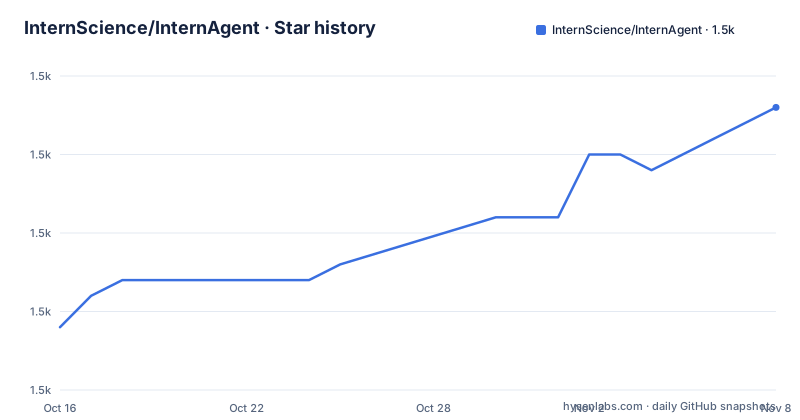
- InternScience/InternAgent1,468 ★ · +14
| Repository | 2026-10-16 | 2026-11-08 |
|---|---|---|
| InternScience/InternAgent | 1.5k | 1.5k |
14 Stars in the last 23 days, measured from the daily GitHub snapshot. Compare with other projects
Editorial analysis
InternAgent-1.5 Research Scope and Audience
InternAgent-1.5 addresses the orchestration problem in long-horizon scientific research. A research request may require literature search, question decomposition, hypothesis generation, code writing, experiment execution, outcome recording, and synthesis. The framework organizes those activities as agent-based workflows rather than treating the task as a single prompt. Its repository topics identify coding agents, hypothesis generation, multi-agent systems, paper surveys, and autonomous scientific discovery.
The intended users are researchers and developers who need repeatable entry points for scientific tasks. InternAgent is not limited to answering questions. Its QA mode performs deep research, while discovery mode can generate ideas and proceed into experiments. Algorithm discovery tasks are stored under `tasks/`, and paper reproduction work has a separate area under `sci_tasks/tasks/`.
That range does not make every included task self-contained. Algorithm tasks have their own prompts, baseline code, and launch scripts, but datasets and environment preparation vary. Paper reproduction also depends on a supplied paper and its data. The framework provides the coordinating software, not a universal laboratory environment. This boundary matters when deciding whether InternAgent fits a project involving proprietary data, external services, or domain-specific computational tools.
Discovery, Deep Research, and Memory Data Flows
InternAgent exposes several execution paths. `launch_discovery.py` starts a discovery experiment, `launch_qa.py` handles a research question, and `launch.py` provides a unified interface for both modes. This separation makes it possible to begin with literature synthesis or move into a multi-stage discovery workflow.
In QA mode, the Deep Research module decomposes a question into subtasks, gathers information from academic databases and the web in parallel, and synthesizes the material into either a direct answer or a structured report. The README explicitly says that this mode does not run an experiment loop. It is therefore closer to a coordinated research and reporting pipeline than an autonomous laboratory process.
Discovery mode follows a different path. It can generate ideas, run experiments, and record outcomes. Users may skip idea generation and supply an existing file through `--idea_path`. This is useful when ideas have already been generated or reviewed, although the README does not document the full schema or validation rules for that file.
The memory module adds cross-session state by recording experiment outcomes. According to the README, later sessions can use this record to avoid previously failed directions and build on successful ones. The README points to `docs/memory_module.md` for configuration, but it does not specify storage retention, deletion, concurrency behaviour, or recovery procedures. Those details should be checked before memory becomes part of a long-running research record.
Python 3.11 Installation and Environment Setup
The README documents a Conda installation using Python 3.11 and the versions listed in `requirements.txt`. Run these commands from the repository checkout. After installation, copy `.env.example` to `.env`, then add credentials for the providers selected by the configuration.
conda create -n InternAgent python=3.11
conda activate InternAgent
pip install -r requirements.txt
The next command creates the local environment file. No values should be added on the command line because that could expose credentials in shell history.
mv .env.example .envThe environment file distinguishes credentials used by different components. `OPENAI_API_KEY` and `OPENAI_API_BASE_URL` support an OpenAI-compatible endpoint. `OPENROUTER_API_KEY` is used with the OpenRouter provider, while `ANTHROPIC_API_KEY` is required when the experiment backend is `claudecode`. The example file also identifies `OPENAI_BASE_URL` as an alias used by the `sci_task` scorer and says it should match `OPENAI_API_BASE_URL`.
This distinction is an easy setup trap. A successful core LLM configuration may still leave the paper reproduction scorer without its expected endpoint alias. Provider-specific documentation, including `docs/openrouter.md`, should be read before selecting that gateway. InternAgent supports several optional providers, but the README does not state that every workflow or task works identically with every provider.
The dependency list is substantial. It includes packages for language-model APIs, document conversion, data processing, scientific software, web access, retrieval, and application services. A successful environment creation therefore does not guarantee that a domain task will start. Tasks can require extra datasets, services, or environment preparation that is not covered by the initial commands.
First QA Query and AutoDebug Verification
The QA launcher provides the shortest documented research query. It sends a question through the Deep Research pipeline and writes the answer to `answer.md`. This operation does not execute the discovery experiment loop, but it still needs a valid core LLM configuration.
python launch_qa.py -q "What are recent advances in memory-augmented LLMs?" -o answer.mdAfter the environment file has been configured, the recommended first discovery run is `AutoDebug`. The README describes it as self-contained and says it needs no dataset or model download. The command selects `config/default_config.yaml`, the `AutoDebug` task, and the `claudecode` backend.
python launch_discovery.py \
    --config ./config/default_config.yaml \
    --task AutoDebug \
    --exp_backend claudecode
Readers should expect configuration warnings or missing-file errors until every path is resolved from the repository root. The README states that results are stored under `results/` and logs under `logs/`. It does not document a concise success signature for `AutoDebug`, so completion and usable output should be checked through those directories.
For an organization already operating from an existing idea file, the launcher supports `--skip_idea_generation` and `--idea_path`. That shortcut changes the start of the workflow but does not remove the need for a valid experiment backend and task configuration. Ready-made shell scripts under `scripts/` cover full discovery, skipped idea generation, scientific reproduction, and QA.
Scientific Task Boundaries and Failure Modes
InternAgent's broad task catalogue is also its main adoption risk. The `tasks/` directories are not merely prompts for the same generic experiment. Each algorithm discovery task includes its own task description, baseline code, and `launcher.sh`, while external datasets and setup vary. A successful installation of InternAgent cannot establish that every task is reproducible on the current machine.
Scientific paper reproduction introduces separate requirements. This mode receives a published paper and its data, then attempts to reproduce key findings. The README links to `docs/sci_tasks.md` and ResearchClawBench, but it does not promise exact recovery of every experimental result. Model-generated code may also depend on external packages or services that are absent from the task definition.
External model access is another failure boundary. Credentials, endpoint compatibility, quotas, and provider behaviour affect both planning and execution. The environment template permits custom base URLs, which can help with proxies or self-hosted endpoints, but the framework cannot eliminate connectivity or service-availability failures. Retry behaviour and the point at which a partial experiment is abandoned are not documented in the README.
Code execution is an explicit concern for any coding-agent framework, yet the README does not specify its container policy, filesystem permissions, network permissions, or secret-isolation mechanism. InternAgent should therefore not be treated as a ready security boundary. A deployment that accepts untrusted task input needs an isolation design outside the documented quick start.
Manual Research Pipelines as the Practical Alternative
A manual research pipeline is the clearest alternative. A researcher can search literature, maintain notes, generate hypotheses, write experiment code, run tasks, and record results in separate tools. Unlike InternAgent's coordinated agents, every transition remains under direct human control and can be reviewed at a specific point.
The difference is architectural rather than cosmetic. InternAgent packages idea generation, experiment execution, Deep Research, scientific reproduction, and memory into shared Python launchers and configuration. A manual pipeline may use specialized tools that are easier to inspect individually, but the researcher must implement the coordination and state transfer between them. Persistent outcome memory also has to be added separately.
InternAgent is the more relevant choice when repeatable task scaffolding, multiple entry points, and cross-session experiment memory justify the provider and dependency setup. The manual route is preferable when each action needs explicit approval, experimental outputs must follow an existing laboratory process, or the framework's undocumented execution boundaries cannot be accepted. Neither route can turn a missing dataset or incompatible environment into a runnable experiment by itself.
Maintenance Signals, Upgrade Cost, and Licence Review
The repository is not archived, and the last push was on 2026-07-29. The README records an open-source announcement for InternAgent-1.5 and says that InternAgent 1.0 was fully open-sourced. These facts support recent repository activity, but the project has no GitHub releases, so that channel does not provide a conventional release history.
Upgrade cost is likely to involve more than changing application code. The root `requirements.txt` contains many exact versions. Provider SDKs and task dependencies may change independently, and the repository includes separate documentation for memory, Deep Research, OpenRouter, and scientific tasks. Users who rely on saved experiment configs should compare those files after updating rather than assuming that the main launcher and optional modules move together.
The licence requires separate attention. GitHub classifies it as custom, and the project directs readers to the `LICENSE` file. The README does not state the permissions, restrictions, attribution requirements, or redistribution conditions. Commercial deployment, modification, and inclusion in an internal platform should be evaluated directly from that file. The repository's open-source announcement is not enough to infer a standard software licence grant.
Editorial conclusion
Researchers who want InternAgent-1.5 to coordinate QA, discovery experiments, and paper reproduction should first verify that `AutoDebug` completes with their selected backend and that each task's datasets and dependencies fit their environment. The custom `LICENSE` also needs direct review before redistribution or commercial integration. Teams that require controlled sandboxes, a documented rollback process, or predictable behaviour without external model providers should not assume those requirements are covered.
Frequently asked questions
How do I install InternAgent-1.5?
Create a Conda environment with Python 3.11, activate it, and run `pip install -r requirements.txt`. Copy `.env.example` to `.env`, then configure the provider credentials required by the workflow.
What is the recommended first InternAgent-1.5 task?
The README recommends `AutoDebug` as the first discovery task because it is self-contained and requires no dataset or model download. It requires a configured experiment backend, including `ANTHROPIC_API_KEY` for `claudecode`.
Does InternAgent-1.5 support paper reproduction and Deep Research?
Yes. Scientific paper reproduction uses a separate `sci_tasks` mode, while Deep Research decomposes questions, gathers academic and web information, and synthesizes a direct answer or structured report.
Official sources
Add this badge to your README
If you maintain this project, the badge below links readers to this analysis and shows its maintenance status from the daily GitHub snapshot. Paste the markdown into your README; add ?metric=license or ?metric=stars to the image URL for a different field.

[](https://hysenlabs.com/projects/internscience-internagent)Star history chart for your README
[](https://hysenlabs.com/projects/internscience-internagent)Was this useful?