The iptv-org database is a folder of CSV files anyone can edit
User editable database for TV channels.
At a glance
- What is it?
- The iptv-org/database repository holds the channel list for the iptv-org project as plain CSV files in a data folder, editable in a spreadsheet, and it is the same data the project serves through its API. The repository is private to npm and unlicensed for redistribution, and the automation around it is a set of small TypeScript commands.
- Who is it for?
- Adopt the iptv-org database if you need a structured, community-maintained list of TV channels that you can read as CSV, edit in a spreadsheet, or consume through the iptv-org API, and if you are willing to contribute corrections through pull requests.
- Can I use it commercially?
- Yes. Unlicense is a permissive licence: you can use, modify and sell software built on it, as long as you keep its copyright and licence notices.
- Is it still maintained?
- Yes. The repository received new commits within the last day.
- What is it written in?
- Mainly JavaScript, according to GitHub's language statistics.
Answers come from the project's GitHub data, last synced on October 23, 2026, and from our analysis. They are not legal advice.
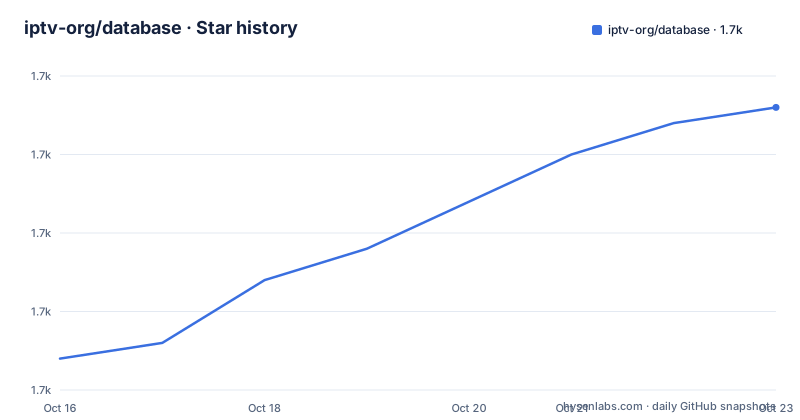
Star history
- iptv-org/database1,728 ★ · +16
| Repository | 2026-10-16 | 2026-10-23 |
|---|---|---|
| iptv-org/database | 1.7k | 1.7k |
16 Stars in the last 7 days, measured from the daily GitHub snapshot. Compare with other projects
Editorial analysis
A data project with no code of its own
The iptv-org/database repository describes itself in two words: a user editable database for TV channels. That is the entire product.
The structure of the repository follows from that. There is a data/ directory, and all the data is stored there as CSV files that can be edited with any spreadsheet editor, the README naming Google Sheets and LibreOffice as examples. Around the data sit the tools: a scripts/ directory with the commands that validate, export and update the database, a tests/ directory, and a package.json whose scripts are the working interface to the project.
The audience is two groups, and they use the repository differently. Consumers, mostly people building IPTV applications, read the CSV files or call the API and never touch the repository except to pull the latest data. Contributors, who are the wider community, edit a CSV file or a spreadsheet, correct a stream URL or a channel name, and send a pull request.
What makes this design work is that the storage format is deliberately boring. CSV is the one format that a spreadsheet can open, a diff can show, a reviewer can read in a pull request, and a script can parse. The trade-off is inherent to that choice, since a CSV has no schema, no types and no relations, and a channel database with many attributes per row is exactly the kind of data that a relational model handles better. The project has chosen editability over structure, and the tooling in scripts/ exists to compensate for what CSV cannot express.
The data folder is the interface everyone actually touches
The README is short, and that is because the data is the documentation. There is a preview image of channels.csv in the .readme/ directory, and the file names follow the same naming pattern the rest of the project uses.
What the CSV approach buys is specific. A contributor can open the data in Google Sheets or LibreOffice, find the row for a channel, fix a field and export it back. There is no schema migration to run, no ORM to configure, and no API key to obtain. The review happens in the pull request, on a diff that a human can read line by line.
The cost is that the data has to be kept honest by convention rather than by the type system. A channel name, a country code, a category and a stream URL all live in columns, and the only thing preventing a typo is the validation tooling and the reviewers who read the diff. That is why the db:validate command exists and why it is wired into the workflow.
The repository listing also shows the supporting infrastructure for the data itself. There is a .prettierrc.js, which means the CSV files are formatted by a formatter, and an eslint.config.mjs with a .husky/ directory for git hooks, so the formatting of a contributed file is checked before it lands. The .readme/ directory holds the assets for the README, including the preview image, and the .github/ directory holds the workflows that the package scripts refer to.
Three commands do the work: validate, export and update
The package scripts describe the daily mechanics of the project better than any prose would.
    "db:validate": "tsx scripts/commands/db/validate.ts",
    "db:export": "tsx scripts/commands/db/export.ts",
    "db:update": "tsx scripts/commands/db/update.ts",
Validation checks the data against whatever the project considers correct, export produces the derived output, and update refreshes the data. The commands are run with tsx, so they execute TypeScript directly without a separate build step, and the file layout in scripts/commands/db/ mirrors the command names.
The dependency list explains what those commands do. The json2csv packages handle the export direction, and csvtojson handles the import direction, with the @json2csv/transforms and formatters packages for shaping the output. The @joi/date package and dayjs deal with dates. The @octokit/core with its paginate and rest-endpoint-methods plugins is the GitHub API client, which is what an update command needs in order to read upstream data, and the @iptv-org/sdk is the project's own SDK. @freearhey/core and @freearhey/storage-js are the author's own utility packages, and the presence of @swc/core suggests a fast transform path in the toolchain.
The package itself is marked private and the name is scoped, @iptv-org/database. Nothing here is published for consumption as a library, so the CSV files and the API are the only ways to get the data out.
Local workflow rehearsal with act, against the real workflows
The most interesting part of the script list is the act prefix. act is a tool that runs GitHub Actions workflows locally, and this repository exposes each workflow as a script so that a contributor can rehearse the automation before opening a pull request.
"act:check": "act pull_request -W .github/workflows/check.yml",The other entries follow the same pattern. act:update runs the update workflow with a workflow_dispatch trigger, act:deploy runs the deploy workflow on a push event, and the two issue scripts, act:validate_issue and act:validate_label, run the issue validation workflows through the GitHub CLI extension.
That set of scripts maps one to one onto the workflows in the .github/ directory, and the README carries an update workflow badge. In practice it means the check that will run on your pull request can be run on your own machine first, which turns a red CI run into a local command. For a repository where the contribution itself is a data edit, that is a real convenience, because the most common failure is a malformed row rather than a subtle logic error.
The issue scripts are worth a second look. The validate_issue and validate_label workflows run against the issue tracker rather than the data, which suggests the project automates the triage of incoming issues, not just the validation of the CSV files.
Tests, linting and hooks that run before a contribution lands
The remaining scripts cover the usual hygiene, and the configuration choices here are worth a look because they are not the defaults most projects use.
    "lint": "npx eslint \"{scripts,tests}/**/*.{ts,js}\"",
    "test": "npx vitest run --no-file-parallelism",
Lint runs eslint over the scripts and tests directories. The test command uses vitest, and the --no-file-parallelism flag is a deliberate choice to run the test files one at a time, which usually means the tests are not independent of each other and that order matters. There is also a jest configuration block in the manifest, with a testMatch pattern pointing at tests/commands, which reflects a mixed or migrating test setup rather than a single runner.
The prepare script runs husky, so the git hooks are installed when dependencies are installed. Combined with the .husky/ directory, the .prettierrc.js file and the eslint configuration, the project enforces a consistent style on the code that maintains the database, even though the contribution itself is usually a data change.
The dependency list is wide, and most of it is tooling rather than runtime. eslint, the eslint plugins for stylistic rules and typescript, @eslint/js and @eslint/eslintrc are there to lint, while commander, chalk, async-es, cross-env and tsx exist to make the command line scripts pleasant to write and to run. The point of mentioning them is scale: this is a data repository with a real, well equipped toolchain around it, not a folder of spreadsheets.
Contributions are reviewed, and the README's issue links point at the wrong repository
The Contribution section asks contributors to read the Contributing Guide, CONTRIBUTING.md, before sending an issue or a pull request. The guide is in the repository root, alongside the other contribution documentation.
There is a small oddity in the links, and it is the kind of thing that costs a contributor a detour. The issue link and the pull request link in the README both point at the iptv-org/epg repository rather than at iptv-org/database, even though the text describes contributing to this database. If you follow the link expecting to open an issue about a channel entry, you land in a different project. Worth knowing before you assume your pull request went missing.
Elsewhere the project is organised around a shared organisation rather than a single repository. Questions and ideas go to the Discussions tab of the organisation, the API documentation lives in the iptv-org/api repository, and links to other IPTV related resources are collected in the iptv-org/awesome-iptv repository. The database is one component of a wider set, and the tools here assume that structure, which is why the update command depends on the project SDK and the GitHub API client.
The project is also funded and credited in the usual way for a community data project, with an OpenCollective backer badge and a contributors badge, so there is a route for sponsoring the work and for tracking who has contributed.
Two different licence statements, and no tagged releases
The licence is where the metadata disagrees with itself, and it is worth resolving before you build anything on this data.
The repository licence field records the Unlicense, and the package manifest says the package is private with the license set to UNLICENSED. The README, however, displays a CC0 badge linking to the LICENSE file, and CC0 is a public domain dedication rather than the Unlicense, even though the two are close in spirit in that both aim to remove restrictions on use. For a consumer this difference is minor. For anyone redistributing the data inside a product, the mismatch is worth raising with the project rather than resolving on your own.
The repository is not archived and the last push was on 2026-10-21, so the data is being maintained continuously. There are no GitHub releases, which is the correct shape for this project. A tagged release of a database snapshot would be the wrong abstraction, since the whole point is that consumers track the current state of the data folder, and the automation in.github/workflows keeps the derived data and the API in step with the CSV files.
The homepage is iptv-org.github.io, and the API repository holds the documentation for the programmatic view of the same data. So there are two consumption paths, the raw CSV for a spreadsheet or a script, and the API for an application, and the difference between them is worth checking in practice rather than assuming the API returns exactly the columns the CSV contains.
Editorial conclusion
Adopt the iptv-org database if you need a structured, community-maintained list of TV channels that you can read as CSV, edit in a spreadsheet, or consume through the iptv-org API, and if you are willing to contribute corrections through pull requests. Do not adopt it as a source you can vendor into a closed product without reading the licence situation, because the package manifest marks the package private and unlicensed while the README points at a CC0 licence file, and those two statements need reconciling before you redistribute. Before you build on it, read CONTRIBUTING.md, run db:validate on the data you plan to use, and confirm with the project whether your intended use of the channel list fits its terms.
Frequently asked questions
How is the iptv-org channel data stored and edited?
All the data is stored in the data folder as CSV files, and the README says they can be edited with any spreadsheet editor such as Google Sheets or LibreOffice. The format is chosen so that corrections can be made without a database or an API key.
How do I get the iptv-org channel data for my application?
You can read the CSV files from the data folder directly, or use the API, whose documentation is in the iptv-org/api repository. The same data is behind both.
What do the db:validate, db:export and db:update commands do?
They are the package scripts that run the TypeScript commands in scripts/commands/db, one per file, using tsx. Validation checks the data, export produces the derived output, and update refreshes the database, with the GitHub API and the project SDK among the dependencies.
How do I contribute a correction to the iptv-org database?
The README asks you to read CONTRIBUTING.md before sending an issue or a pull request, and it points to the Discussions tab of the organisation for questions. Note that the issue and pull request links in the README point at the iptv-org/epg repository rather than at this one.
What licence applies to the iptv-org database?
The repository licence field records the Unlicense and the package manifest marks the package private with the license set to UNLICENSED, while the README shows a CC0 badge pointing at the LICENSE file. The project states are not identical, so check with the maintainers before redistributing the data.
Official sources
Add this badge to your README
If you maintain this project, the badge below links readers to this analysis and shows its maintenance status from the daily GitHub snapshot. Paste the markdown into your README; add ?metric=license or ?metric=stars to the image URL for a different field.

[](https://hysenlabs.com/projects/iptv-org-database)Star history chart for your README
[](https://hysenlabs.com/projects/iptv-org-database)Was this useful?