React-Landing-Page-Template: A Data-Driven One-Page Site
A simple react one page landing page templates for startups/companies
At a glance
- What is it?
- React-Landing-Page-Template is a React 17 template for startup and service landing pages, with most visual content centralized in data.json. It suits developers seeking a one-page starting point, but its older dependency stack, manual EmailJS setup, and lack of releases require scrutiny before adoption.
- Who is it for?
- Adopt this repository when a small team needs an editable React one-page design and is prepared to maintain the dependency set. Do not choose it as a low-maintenance foundation for a long-lived product site.
- Can I use it commercially?
- Yes. MIT is a permissive licence: you can use, modify and sell software built on it, as long as you keep its copyright and licence notices.
- Is it still maintained?
- Yes. The repository last received commits 110 days ago.
- What is it written in?
- Mainly JavaScript, according to GitHub's language statistics.
Answers come from the project's GitHub data, last synced on November 7, 2026, and from our analysis. They are not legal advice.
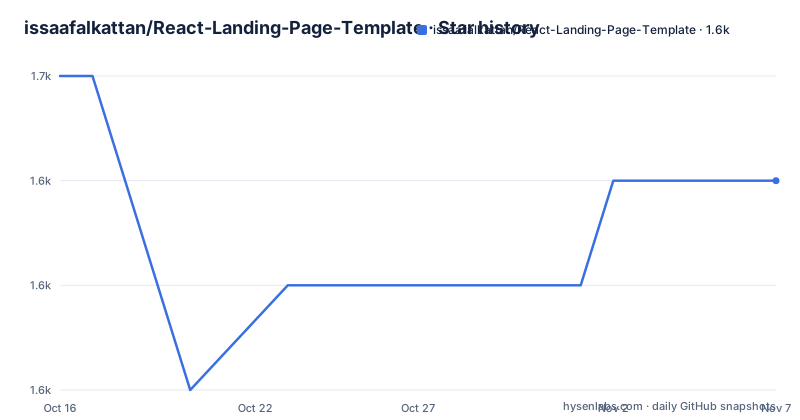
Star history
- issaafalkattan/React-Landing-Page-Template1,649 ★ · -1
| Repository | 2026-10-16 | 2026-11-07 |
|---|---|---|
| issaafalkattan/React-Landing-Page-Template | 1.7k | 1.6k |
-1 Stars in the last 22 days, measured from the daily GitHub snapshot. Compare with other projects
Editorial analysis
What React-Landing-Page-Template Handles
React-Landing-Page-Template addresses a narrow front-end problem: creating a startup or company landing page that fits into one scrolling page. It is aimed at developers who want an existing React structure without building every landing-page section from scratch. The README describes it as a ReactJS-based template for a startup company or service with a one-page view.
The repository is a template rather than a product with a documented administration interface. Its customization model centers on `data.json`, which the README identifies as the place for visual data. Images belong under `public/img/`, while styles can be changed in the files under `public/css`. This separation is useful for a small launch page because copy, images, and presentation can be edited without first building a content management system.
The template does not document a routing strategy, authentication layer, database, analytics service, or editorial workflow. It also does not claim that its layout is generated for arbitrary brands. The design was inspired by the Interact template listed in the README's credits, so teams that need a distinct visual identity may need more CSS and asset work than the word "template" suggests. The repository's landing-page focus is clear, but its production ownership and content-scaling model are not documented.
The Data File and Asset Flow
The documented data flow begins with `data.json`. The README says that all visual data can be changed by editing that file, which suggests that component text and presentation values are intended to be centralized outside the JSX. The repository layout also includes `src/`, `public/`, and the dependency `smooth-scroll`, indicating a conventional Create React App structure with a public asset directory and source components.
Images are added to `public/img/`, and CSS is edited under `public/css`. This arrangement keeps static assets and presentation rules separate from component source. It also gives the implementer direct control over the generated page, although the README does not explain how image paths in `data.json` are resolved or which fields the file contains. A buyer should inspect those references before assuming that replacing the JSON alone will be sufficient.
The package scripts confirm that the application uses `react-scripts`. The source can therefore be served through `yarn start`, compiled through `yarn build`, and tested through `yarn test`. The package manifest does not list a separate backend or content API. Based on the documented files, this is a static front-end template whose runtime data is shipped as part of the application rather than fetched from a service.
Installing and Running the Template
The README requires Node JS, then instructs users to clone the files and run Yarn followed by the start command. The repository includes both `package-lock.json` and `yarn.lock`, but the documented tutorial uses Yarn. Those lockfiles should be kept with the project because the `package.json` dependencies use caret ranges and can resolve differently over time.
After cloning, this starts the Create React App development server:
yarn
yarn start
The README does not document a specific port, so readers should use the terminal output from `react-scripts` to locate the local page. The command runs the `start` script defined in `package.json`, rather than invoking a project-specific server binary. This is a straightforward first use, but the documentation does not describe production serving, environment variables, or deployment configuration beyond the linked Vercel demo.
The documentation does not explain how that generated bundle should be hosted. The live demo establishes that a Vercel deployment exists, but the README does not supply its deployment settings.
Editing the Contact Form Without the Starter Defaults
The contact form is the clearest integration point in the template. The README explicitly names EmailJS and identifies `src/components/contact.jsx` as the file to modify. A project using the form must therefore establish an external email-delivery configuration rather than relying on a form endpoint already bundled with the repository.
The file modification involves three values: service ID, template ID, and Public Key. The README does not provide variable names, environment keys, validation rules, success states, or spam handling instructions. It also does not say whether the form remains disabled when those values are absent. Consequently, a developer should treat the form as unfinished integration code until the account configuration and delivery path are checked directly in the source.
This design keeps the template small, but it also makes deployment less self-contained. The application depends on another account and service for a feature that visitors may expect to work. Teams that need controlled email infrastructure, server-side validation, or a form workflow will need to replace or extend this part. The repository does not document whether that work can be completed without changing the surrounding component structure.
Compatibility Limits in package.json
The manifest identifies `react` and `react-dom` at `^17.0.1`, with `react-scripts` at `^5.0.1`. It also includes `emailjs-com` at `^2.6.4`, `smooth-scroll` at `^16.1.3`, and testing-library packages with versions from the React 17 generation. These are concrete compatibility facts, but the README does not provide a browser support matrix or an upgrade procedure for newer React releases.
The use of `react-scripts` gives the project familiar commands and the standard `react-app` ESLint configuration. That is convenient for a simple landing page, but it also ties the build workflow to Create React App conventions. The presence of an `eject` script exposes an escape hatch, yet the README does not explain when a team would need it or what maintenance work follows.
The repository has no GitHub releases. Its last push was on 2026-07-21, which is recent relative to the repository state, but recent activity does not establish that every dependency is current. Package upgrades should be treated as an explicit project task. In particular, verify the compatibility of React 17, `react-scripts` 5.0.1, and the contact-form integration before making this template a production dependency.
React-Landing-Page-Template Versus a Custom React Site
The main alternative is a custom React landing page built from a current component setup. The difference is not visual capability, since either approach can produce a one-page site. The difference is control and maintenance. This repository supplies an existing `src/` and `public/` arrangement, a `data.json` editing workflow, and a ready-made landing-page design. A custom site would require the team to create those decisions, but it could select newer packages and a deployment setup independently.
Another practical alternative is a modern static site generator with a structured content directory. Such a system may fit editorial teams better when many pages and repeated layouts are expected. This repository is more direct for a small single-page launch, although the README does not document reusable routing or a scalable content model. The choice therefore depends on whether the immediate requirement is one page or a broader site architecture.
The template is the wrong tool when the project needs authenticated application features, complex forms, multiple routes, or a content workflow that non-developers can operate. It is also a poor fit for teams that require an accessibility and browser-support review before choosing a design, because the README does not document those results.
License, Upgrades, and Adoption Boundaries
The repository declares the MIT license. That provides the stated permission framework for use and modification of the project, subject to the license text, but this review does not interpret its legal effects. Teams should retain the `LICENSE` file and check the separate visual template credit noted in the README when they reuse assets or styling.
The last push was on 2026-07-21, and there are no GitHub releases to define a formal upgrade series. Upgrades are therefore repository-change based rather than release-based. The relevant maintenance cost is likely to appear in dependency compatibility, React and `react-scripts` changes, EmailJS configuration, and manual review of the one-page source. The repository does not provide changelogs, migration notes, or an automated deployment policy.
For a short campaign or a simple company page, the template can reduce initial implementation work. For a product that will evolve, the absence of release notes and the manual contact setup deserve more attention than the license label. The first adoption check should be the source layout and dependency manifest, followed by a local build and a review of every public image and CSS file.
Editorial conclusion
Adopt this repository when a small team needs an editable React one-page design and is prepared to maintain the dependency set. Do not choose it as a low-maintenance foundation for a long-lived product site. Before adoption, inspect data.json, public/css, src/components/contact.jsx, and the exact package versions, then confirm that React 17 and react-scripts 5.0.1 fit the deployment target.
Frequently asked questions
How do I install and start React-Landing-Page-Template?
Install Node JS, clone the repository, run `yarn`, and then run `yarn start`. The README says to use these commands after cloning the project files.
Where do I change the content of React-Landing-Page-Template?
The README says to edit visual data in `data.json`. It also directs users to add images under `public/img/` and modify styles in `public/css`.
How do I make the React-Landing-Page-Template contact form work?
Create an EmailJS account and edit `src/components/contact.jsx` with the service ID, template ID, and Public Key. The README does not document fallback behavior for an unconfigured form.
Official sources
Add this badge to your README
If you maintain this project, the badge below links readers to this analysis and shows its maintenance status from the daily GitHub snapshot. Paste the markdown into your README; add ?metric=license or ?metric=stars to the image URL for a different field.

[](https://hysenlabs.com/projects/issaafalkattan-react-landing-page-template)Star history chart for your README
[](https://hysenlabs.com/projects/issaafalkattan-react-landing-page-template)Was this useful?