iStoreOS: an OpenWrt-based router and NAS system, and what its build tree actually gives you
A router and NAS system anyone can use (the actively maintained branch is istoreos-24.10; the main/master branch is unmaintained, please do not use it).
At a glance
- What is it?
- iStoreOS is a beginner-oriented router and NAS distribution built on OpenWrt, developed on the ARS2 platform and later adapted to several hardware targets. The README points users at the istoreos GitHub organisation rather than at this repository, and the maintained branch is istoreos-24.10.
- Who is it for?
- Adopt iStoreOS if you want an OpenWrt-derived router and NAS image and you are willing to work from the istoreos GitHub organisation and the istoreos-24.10 branch, since the README states that main and master are not maintained. Do not adopt it if you need a documented upgrade and rollback path, or if you want a distribution whose release notes you can read before flashing: the repository has no published releases and the README does not document rollback.
- Can I use it commercially?
- Check first. The repository uses a licence we do not classify automatically, so read its LICENSE file before any commercial use.
- Is it still maintained?
- Yes. The repository last received commits 9 days ago.
- What is it written in?
- Mainly C, according to GitHub's language statistics.
Answers come from the project's GitHub data, last synced on November 14, 2026, and from our analysis. They are not legal advice.
Star history
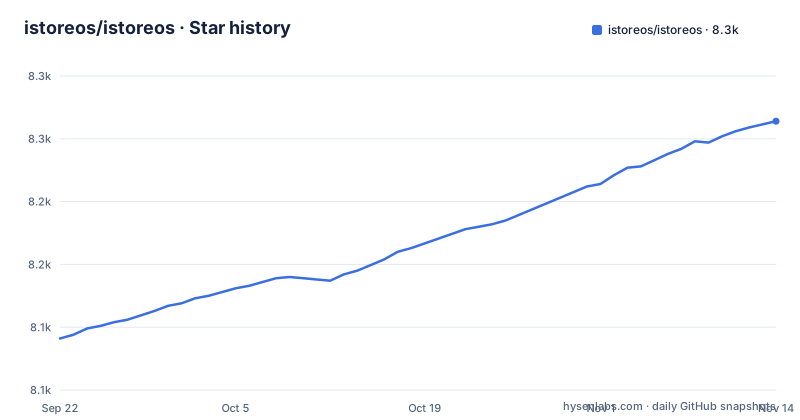
- istoreos/istoreos8,264 ★ · +173
| Repository | 2026-09-22 | 2026-11-14 |
|---|---|---|
| istoreos/istoreos | 8.1k | 8.3k |
173 Stars in the last 53 days, measured from the daily GitHub snapshot. Compare with other projects
Editorial analysis
What iStoreOS is, and the problem it targets
The README opens with a two-line definition: iStoreOS is an entry-level router system and also an entry-level NAS system, based on the original OpenWrt, iterated on ARS2 over a long period, and finally opened up for adaptation to several hardware platforms. That sentence is the whole product statement. Everything after it in the README is the upstream OpenWrt text, unchanged, including the firmware selector link, the build system requirements and the GPL-2.0 licence section.
The audience follows from the word entry-level. A stock OpenWrt install gives you a writable filesystem, opkg, and a LuCI web interface, and then leaves the package selection, the network layout and the storage configuration to you. iStoreOS is aimed at the person who wants a router that also serves files, without assembling that stack from packages one at a time.
One structural detail matters more than the marketing sentence. The default branch is istoreos-24.10, and the repository description states that main or master is not maintained and should not be used. If you clone this tree and check out the default branch, you get the maintained line. If you check out main, you are on a branch the project itself tells you to avoid.
The build tree: what the repository actually contains
This is an OpenWrt buildroot, not an application. The top level holds the usual OpenWrt skeleton: BSDmakefile, Config.in, Makefile, rules.mk, and the directories config/, feeds.conf.default, include/, package/, scripts/, target/, toolchain/ and tools/. There is also a .devcontainer/ directory, which suggests the project expects contributors to build inside a container rather than on a bare host.
The root Makefile is the standard two-phase OpenWrt entry point. The first phase includes include/debug.mk, include/depends.mk and include/toplevel.mk; once OPENWRT_BUILD is set to 1, the second phase pulls in rules.mk, target/Makefile, package/Makefile, tools/Makefile and toolchain/Makefile. The dependency chain is explicit in the same file: toolchain compilation depends on tools, target compilation depends on toolchain and tools, and package compilation depends on target. That ordering is why a first build downloads sources and builds a cross-compile toolchain before it compiles a single kernel module.
The Makefile also enforces one constraint before anything else runs: if the path to the OpenWrt directory contains a space, the build aborts with an error. The README states the same requirement for the build host, which must be GNU/Linux, BSD or macOS with a case-sensitive filesystem, and that Cygwin is unsupported because of the lack of a case-sensitive filesystem. The README also lists the tools needed to compile: binutils, bzip2, diff, find, flex, gawk, gcc-6+, getopt, grep, install, libc-dev, libz-dev, make4.1+, perl, python3.7+, rsync, subversion, unzip and which.
What the tree does not contain is any iStoreOS-specific documentation of its own. The README's link for more information goes to https://github.com/istoreos, and the homepage is https://site.istoreos.com. The repository itself is the build system, not the manual.
Building iStoreOS from this tree: install and first run
There is no package manager install for iStoreOS, because it is firmware. To get a runnable system you either build an image from this tree or download a prebuilt one. The README does not give iStoreOS-specific download instructions; it says only that more information is at https://github.com/istoreos, and the upstream OpenWrt text in the same file points at the OpenWrt Firmware Selector, which serves OpenWrt images rather than iStoreOS ones.
To build from source, start on a case-sensitive filesystem on GNU/Linux, BSD or macOS, in a directory path with no spaces. Fetch the package definitions first:
./scripts/feeds update -a
./scripts/feeds install -a
The first command reads feeds.conf and feeds.conf.default and pulls the latest package definitions. The second creates symlinks for those packages under package/feeds/. After both finish, the packages exist in the tree but nothing has been compiled.
Next, choose the target system and the package selection:
make menuconfigThis opens the configuration interface. You pick your target system there, along with the firmware packages you want included. The README gives no iStoreOS-specific target list, so the targets you can choose from are whatever this tree's target/ directory defines.
Then build:
makeThe README states that this downloads all sources, builds the cross-compile toolchain, and then cross-compiles the GNU/Linux kernel and all chosen applications for the target system. Expect the first run to be long and to depend on network access to the source mirrors.
If you would rather not build, the practical first step is to look for a prebuilt image through the istoreos GitHub organisation or the site.istoreos.com homepage, and confirm before flashing that the image matches your hardware and was built from the istoreos-24.10 branch rather than main.
Where iStoreOS is the wrong tool
The biggest limitation is visible in the README itself. The iStoreOS-specific content is three sentences. Everything below the divider is the upstream OpenWrt README, verbatim, down to the GPL-2.0 licence paragraph. If you are looking for a document that explains iStoreOS's own installer, its storage layout, or how its NAS features are configured, this repository does not contain it. You are expected to go to the organisation or the homepage.
Branch discipline is the second constraint, and it is stated as a warning rather than a suggestion: the repository description says the currently active branch is istoreos-24.10, and that main or master is not maintained and must not be used. A contributor who follows the common default of cloning and building main will be building a branch the project has disowned.
The third constraint comes from the build system. The root Makefile aborts if the path contains a space, and the README rules out Cygwin and any host without a case-sensitive filesystem. That eliminates a plain Windows development setup, and it makes the .devcontainer/ directory the more sensible entry point for anyone not already running Linux, BSD or macOS.
Finally, the repository has no published GitHub releases. That means there is no changelog to read before you flash, and no documented way to go back to a previous image. If your router is the only path to your network and you have no out-of-band access, that absence is the deciding factor, not the feature list.
iStoreOS against OpenWrt and the NAS-first alternatives
The obvious comparison is OpenWrt itself, and the difference is packaging rather than kernel. Both are the same buildroot: the same Makefile phases, the same feeds mechanism, the same opkg package manager, the same LuCI web interface. Upstream OpenWrt ships a minimal image and leaves the application set to you, which is why its README talks about the firmware selector and the package repositories. iStoreOS takes that base and, per its README, iterates it on ARS2 and adapts it to several hardware platforms with a router-plus-NAS package selection already made. If you enjoy choosing every package, upstream OpenWrt gives you a cleaner starting point. If you want the choices pre-made, iStoreOS is the shorter path.
Against NAS-first systems, the split is at the base layer. A system built around containers and a web application catalogue assumes a general-purpose host with a normal Linux userland and plenty of RAM and storage. iStoreOS is an embedded OpenWrt firmware first, so its NAS role runs on the same constrained device that does the routing. That is an advantage in footprint and a disadvantage in what you can run: you get the packages this buildroot cross-compiles for your target, not arbitrary container images, unless the target and package selection include container support.
For iStoreOS versus OpenWrt, the answer from this repository is that the comparison is about the default package set and the target adaptation work, not about a different networking stack. The branch name istoreos-24.10 tracks an OpenWrt release line, which is the clearest signal of how the two relate.
Maintenance, upgrade cost and licensing
The repository is not archived, and the last push was on 2026-10-29. That is recent enough that the istoreos-24.10 line is being touched, but a push date says nothing about release cadence, and the repository has no published releases, so there is no version history to measure against. Treat the push date as evidence of activity on the branch, not as a support commitment.
Upgrade cost is where an OpenWrt-derived firmware differs from a normal application. Because it is firmware, upgrading means flashing an image, and the README does not document rollback. The build side has its own recurring cost: a full build downloads sources and compiles a cross-compile toolchain before the kernel, so a clean build on a new machine is not a quick operation, and keeping a build environment current means re-running the feeds steps and rebuilding. The .devcontainer/ directory exists to reduce that setup burden, though the repository does not document what the container provides.
On licensing, this repository carries a NOASSERTION identifier, meaning GitHub could not classify it automatically. The root Makefile carries an SPDX-License-Identifier of GPL-2.0-only in its header, and the upstream OpenWrt README reproduced in the same file states that OpenWrt is licensed under GPL-2.0. A tree that combines GPL-2.0 build code with third-party package feeds will contain components under other terms, and the repository does not enumerate them. If you plan to redistribute a built image commercially, read the LICENSES/ directory and the individual package licences rather than relying on the repository-level identifier. That is a description of what the files say, not legal advice.
Editorial conclusion
Adopt iStoreOS if you want an OpenWrt-derived router and NAS image and you are willing to work from the istoreos GitHub organisation and the istoreos-24.10 branch, since the README states that main and master are not maintained. Do not adopt it if you need a documented upgrade and rollback path, or if you want a distribution whose release notes you can read before flashing: the repository has no published releases and the README does not document rollback. Before flashing anything, verify that the image matches your exact device, and confirm which branch the image you downloaded was built from.
Frequently asked questions
Is iStoreOS the same thing as OpenWrt?
No. The README describes iStoreOS as based on the original OpenWrt, iterated on ARS2 and then adapted to several hardware platforms. The repository is an OpenWrt buildroot, and much of its README is the upstream OpenWrt text reproduced unchanged.
Is iStoreOS the same as ImmortalWrt?
The README does not mention ImmortalWrt. It describes iStoreOS as based on the original OpenWrt and adapted to several hardware platforms, and the repository itself is an OpenWrt buildroot, so the README offers no basis for that comparison.
Is iStoreOS the same as CasaOS?
The README does not mention CasaOS. It presents iStoreOS as an entry-level router system and also an entry-level NAS system based on OpenWrt, so the two are described differently here and no direct comparison is available in this repository.
Is iStoreOS the same as iKuai?
The README does not mention iKuai. It describes iStoreOS as an OpenWrt-based router and NAS system iterated on ARS2, and this repository contains only the OpenWrt buildroot, so the README offers no basis for that comparison.
Official sources
Add this badge to your README
If you maintain this project, the badge below links readers to this analysis and shows its maintenance status from the daily GitHub snapshot. Paste the markdown into your README; add ?metric=license or ?metric=stars to the image URL for a different field.

[](https://hysenlabs.com/projects/istoreos-istoreos)Star history chart for your README
[](https://hysenlabs.com/projects/istoreos-istoreos)Was this useful?