itzg Docker Bedrock Server setup and versioning
Containerized Minecraft Bedrock Dedicated Server with selectable version
At a glance
- What is it?
- itzg/docker-minecraft-bedrock-server runs the Minecraft Bedrock Dedicated Server in Docker with selectable versions, persistent data, and explicit NetherNet ports. It suits container operators, while startup-time downloads and network setup require careful attention.
- Who is it for?
- Adopt this image for a Docker or Kubernetes operator who accepts Minecraft's terms and can expose both the TCP discovery port and required UDP gameplay range. Do not choose it for Java Edition or for a host that cannot run the required container architecture.
- Can I use it commercially?
- Yes. MIT is a permissive licence: you can use, modify and sell software built on it, as long as you keep its copyright and licence notices.
- Is it still maintained?
- Yes. The repository last received commits 2 days ago.
- What is it written in?
- Mainly Shell, according to GitHub's language statistics.
Answers come from the project's GitHub data, last synced on October 23, 2026, and from our analysis. They are not legal advice.
Star history
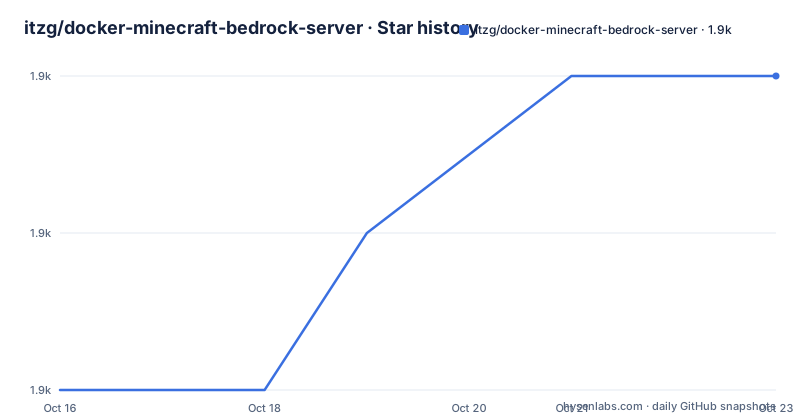
- itzg/docker-minecraft-bedrock-server1,875 ★ · +2
| Repository | 2026-10-16 | 2026-10-23 |
|---|---|---|
| itzg/docker-minecraft-bedrock-server | 1.9k | 1.9k |
2 Stars in the last 7 days, measured from the daily GitHub snapshot. Compare with other projects
Editorial analysis
What the Bedrock server container handles
itzg/docker-minecraft-bedrock-server solves the deployment problem of obtaining, starting, and retaining a Minecraft Bedrock Dedicated Server inside a container. It is intended for operators of Bedrock Edition servers, including people who want the server to run on a home network or a managed container platform. It does not provide Minecraft Java Edition. The README directs Java Edition users to the separate `itzg/minecraft-server` image.
The image does not include the Bedrock server executable. According to the README, the startup process downloads or upgrades the server from Mojang. This separation matters when planning updates. An image release and a Minecraft Bedrock server release are independent. The container image can change without changing the selected game server version, while the game server can update when a container using `VERSION=LATEST` starts.
Persistent files belong under `/data`, which the Dockerfile declares as a volume and working directory. The documented example mounts that location as the named volume `mc-bedrock-data`. This is the central deployment decision because the image can be replaced or recreated while server state remains outside the container layer.
NetherNet requires TCP and UDP mappings
The network model changed with Bedrock Dedicated Server 1.26.50, which the README says uses NetherNet by default. A client first connects to TCP port `19132`, then uses a UDP port for gameplay. A single-port mapping is therefore insufficient for the documented default configuration.
The quickstart maps TCP `19132` and a range of UDP ports from `19140` through `19155`. It also sets `SERVER_UDP_PORTS` to a host IP, the same range, and the container port range. The address `192.168.1.10` is an example that the README asks administrators to replace with the Docker host address. It also permits `<public_ip>` so the container can resolve the public address when it starts.
This arrangement is not merely a firewall convenience. The README says `ENABLE_BDS_V6BIND_FIX` allows `SERVER_PORT` and `SERVER_PORT_V6` to use the same port with the older RakNet protocol. It is intended to mitigate connectivity problems in dual-stack setups. The Dockerfile exposes `19132/tcp`, `19132/udp`, and `19133/udp`, but those declarations do not publish host ports. Operators must configure Docker or the hosting platform so the TCP discovery connection and every advertised UDP gameplay port are reachable from clients.
First Bedrock server deployment with Docker
The shortest documented first use is a detached Docker container with `EULA=TRUE`, a named data volume, and explicit NetherNet port mappings. Replace the example LAN address before running it, or use `<public_ip>` if that resolution feature fits the host.
docker run -d -it -e EULA=TRUE \
  -e SERVER_UDP_PORTS="192.168.1.10:19140-19155:19140-19155" \
  -p 19132:19132/tcp -p 19140-19155:19140-19155/udp \
  -v mc-bedrock-data:/data itzg/minecraft-bedrock-server
Docker should return a container identifier when it accepts the request. Since the server executable is absent from the image and fetched during startup, the first start also performs a download. The default `DOWNLOAD_PROGRESS=false` leaves that operation without a progress bar. Setting `DOWNLOAD_PROGRESS=true` displays one, which helps distinguish a slow first startup from a silent download.
The named volume must remain associated with the deployment. Recreating the container does not remove `mc-bedrock-data`, but deleting that volume removes its server files. For a long-running installation, the README points to Docker Compose or Kubernetes because a management layer supports incremental reconfiguration and image upgrades. The repository also includes `examples/docker-compose.yml`, Kubernetes manifests, backup examples, and directories for NetherNet and two-server deployments.
How VERSION controls server installation
`VERSION` defaults to `LATEST`, which makes version checking part of normal startup. With that value, each startup checks for the latest non-preview Bedrock server and upgrades when necessary. Restarting the container is the documented way to check for the newest server version. `PREVIEW` follows the same startup-time process but selects the latest preview version.
For controlled deployments, `VERSION` can name a specific Bedrock server version. If that version is a preview, `PREVIEW` must also be set to `true`. `EXISTING` uses an executable already stored in `/data`, but the README requires its filename to be either `bedrock_server-{version}` or `bedrock_server`.
When Mojang's normal site lookup fails, `DIRECT_DOWNLOAD_URL` accepts a URL pointing directly to the appropriate `bedrock-server-VERSION.zip`. The README identifies this option for CI/CD and temporary Minecraft website changes. It does not document checksum validation for a configured URL, so its integrity and immutability remain deployment concerns.
Image tags have separate meanings. `latest` includes the newest features merged into the primary branch, `stable` points to the newest image release, and a tag such as `2026.4.1` identifies one image release. These are not Bedrock server selectors. Project releases include `2026.10.0` on 2026-10-12, `2026.9.2` on 2026-09-30, and `2026.9.1` on 2026-09-25. The repository is not archived, and its last push was on 2026-10-16.
Persistent worlds and add-on installation
The `/data` volume stores the server installation and persistent server state, while `MC_PACK` can supply a world or pack layout. It accepts a container path to an archive such as `.mcpack`, `.mcworld`, `.mctemplate`, `.mcaddon`, or a zip, or to a directory with the same structure. At startup, behavior packs are merged into `behavior_packs/`, resource packs into `resource_packs/`, and other content goes into `worlds/{LEVEL_NAME}` when `level.dat` is present. The README says `.mcaddon` archives with root-level `data/` and `resources/` folders are detected through their manifest UUIDs.
Copying is conservative by default. A world is copied only when the destination does not already exist. Setting `FORCE_WORLD_COPY=true` removes and replaces `worlds/{LEVEL_NAME}` at every startup. Existing pack folders with matching names are also preserved unless `FORCE_PACK_COPY=true` is set. These options replace data by design. Enabling them without a tested backup creates a poor deployment choice for an active world.
Operational settings include `UID` and `GID`, which override IDs otherwise derived from the `/data` owner. `TZ` affects container time and logs. Setting `ENABLE_SSH=true` exposes a remote console on port `2222`, unless `REMOTE_CONSOLE_BIND_ADDRESS` supplies another bind address. The README does not document SSH authentication, so its exposure cannot be judged from authentication guidance alone.
License boundaries and deployment limitations
The repository uses the MIT license. Separately, setting `EULA=TRUE` tells container startup to accept the Minecraft End User License Agreement linked by the README. The repository license and Mojang's server terms cover different subjects. Operators should preserve that distinction when deploying or redistributing the image, without treating the MIT license as a statement about Minecraft software rights.
Upgrade effort depends on the selected control model. `VERSION=LATEST` reduces version tracking work but makes every restart a possible Bedrock server update. A pinned `VERSION` selects the game release explicitly, while a pinned image tag limits changes in the container code. The README does not document an automated rollback procedure, so recovery planning must account separately for `/data` and the server executable selected during startup.
The image is the wrong choice when Java Edition is required, when the host cannot run Docker or reach the required ports, or when runtime downloads from Mojang conflict with policy. `DIRECT_DOWNLOAD_URL` addresses some controlled-network cases, but the operator must provide a suitable direct archive. SSH is optional, but hosts that should not expose an additional listening service can leave `ENABLE_SSH` disabled.
Upgrade and data-management choices
A deployment that uses `VERSION=LATEST` and the `latest` image tag changes on two independent schedules. The repository README explains that image releases and Mojang releases do not move together. Combining both moving targets also combines changes to the container implementation and Bedrock server software. Pinning `VERSION` while retaining the image's default tag separates game server changes from image upgrades at startup, although the image itself can still change when recreated.
The backup examples under `examples/kubernetes-backup-to-s3.yaml` and `examples/kubernetes-restore-to-s3.yaml` indicate that Kubernetes users have documented workflows for object-storage backup and restore. The README does not specify their retention settings. For Docker Compose, the important boundary remains the named volume. Image replacement and server data lifecycle are different operations.
The repository's `CONTRIBUTING.md`, `SECURITY.md`, `Dockerfile`, `bedrock-entry.sh`, and helper binaries show that this is more than a thin launcher. The Dockerfile installs architecture-specific helpers, including Box64 setup for ARM64, and its entrypoint delegates to `demoter-entry.sh`. The README does not document a complete rollback command, so operators should not infer that deleting an image tag reverses a Bedrock upgrade or restores world data.
Editorial conclusion
Adopt this image for a Docker or Kubernetes operator who accepts Minecraft's terms and can expose both the TCP discovery port and required UDP gameplay range. Do not choose it for Java Edition or for a host that cannot run the required container architecture. Verify first whether `VERSION=LATEST` matches your update policy, then confirm NetherNet or RakNet connectivity and the contents of `/data` before replacing a working server.
Frequently asked questions
How do I start itzg/docker-minecraft-bedrock-server on a LAN?
Use the documented Docker command with `EULA=TRUE`, TCP port `19132`, UDP ports `19140-19155`, and a persistent `/data` volume. Replace `192.168.1.10` with the Docker host's address.
Does itzg/docker-minecraft-bedrock-server include the Minecraft Bedrock server executable?
No. The README states that the server software is downloaded or upgraded from Mojang during container startup.
How does itzg/docker-minecraft-bedrock-server select a Minecraft version?
Set `VERSION` to a specific version, `LATEST`, `PREVIEW`, or `EXISTING`. A preview version also requires `PREVIEW` to be set to `true`.
Which ports does itzg/docker-minecraft-bedrock-server need for NetherNet?
The README documents TCP port `19132` for the initial connection and UDP ports `19140-19155` for gameplay in its quickstart.
Can itzg/docker-minecraft-bedrock-server replace an existing Minecraft world?
Yes, but replacement is opt-in. `FORCE_WORLD_COPY=true` removes and replaces `worlds/{LEVEL_NAME}` whenever the container starts with a matching packed world.
Official sources
Add this badge to your README
If you maintain this project, the badge below links readers to this analysis and shows its maintenance status from the daily GitHub snapshot. Paste the markdown into your README; add ?metric=license or ?metric=stars to the image URL for a different field.

[](https://hysenlabs.com/projects/itzg-docker-minecraft-bedrock-server)Star history chart for your README
[](https://hysenlabs.com/projects/itzg-docker-minecraft-bedrock-server)Was this useful?