LinuxMirrors: shell scripts that repoint a distro's package mirror and install Docker, documented mostly in Chinese
Scripts to switch GNU/Linux system package mirrors, plus scripts for Docker installation and mirror switching.
At a glance
- What is it?
- SuperManito/LinuxMirrors is a set of shell scripts that switch the package mirror of a GNU/Linux system and install Docker with a mirror switch. It lists 27 distributions in its support table, ships no GitHub releases, and keeps its main README in Simplified Chinese.
- Who is it for?
- Use LinuxMirrors if you run Debian, Ubuntu, a RHEL family system, Arch or one of the Chinese distributions and want to swap the package mirror without editing repository files by hand. Skip it if you need a pinned, versioned release, since the repository has none.
- Can I use it commercially?
- Yes. MIT is a permissive licence: you can use, modify and sell software built on it, as long as you keep its copyright and licence notices.
- Is it still maintained?
- Yes. The repository last received commits 7 days ago.
- What is it written in?
- Mainly Shell, according to GitHub's language statistics.
Answers come from the project's GitHub data, last synced on November 26, 2026, and from our analysis. They are not legal advice.
Star history
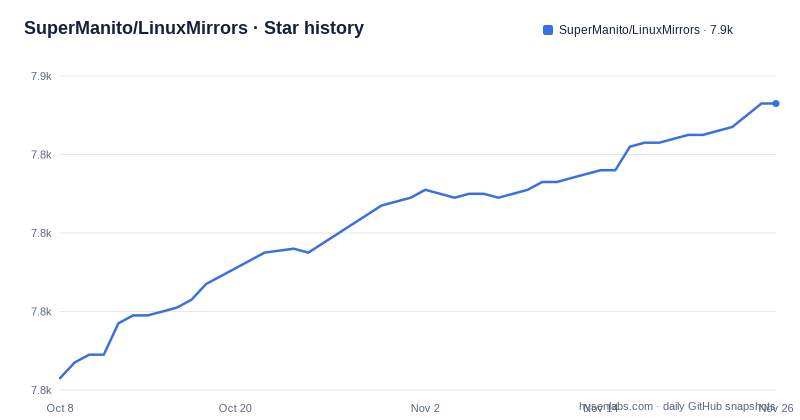
- SuperManito/LinuxMirrors7,853 ★ · +70
| Repository | 2026-10-08 | 2026-11-26 |
|---|---|---|
| SuperManito/LinuxMirrors | 7.8k | 7.9k |
70 Stars in the last 49 days, measured from the daily GitHub snapshot. Compare with other projects
Editorial analysis
Four scripts, with a Lite variant for each job
The top level of the repository holds four shell scripts. ChangeMirrors.sh switches the system package mirror. ChangeMirrorsLite.sh is a lighter version of it. DockerInstallation.sh installs Docker, and DockerInstallationLite.sh is its lighter counterpart. The repository description puts it as scripts to switch GNU/Linux system package mirrors, plus scripts for Docker installation and mirror switching.
To see what separates the Lite scripts from the full ones, open both files and compare them before choosing. The project documents its use on the website linuxmirrors.cn, which has a usage page, a mirror list page, a page for the extra Docker installation script, a community page and a sponsor page.
Because these scripts run as part of system setup, the sensible habit is to read the script first. Changing a package mirror edits the files that decide where your system fetches every update, so a wrong URL or an unreachable mirror breaks apt, dnf or pacman until you revert it.
The support table runs from Debian 8 to NixOS 26 and marks many entries as all
The README opens with a table of 27 operating systems and the versions each script covers. Debian is listed as 8 to 13 and Ubuntu as 14 to 26. Linux Mint covers 17 to 22 and LMDE 2 to 7. Red Hat Enterprise Linux is 7 to 10, Fedora 30 to 44, CentOS 7 to 8 plus Stream 8 to 10, and Rocky Linux, AlmaLinux and Oracle Linux are each 8 to 10.
Kali Linux, Deepin, Zorin OS, Armbian, Proxmox VE, Raspberry Pi OS, openKylin, Arch Linux, Manjaro, EndeavourOS, Gentoo and Void Linux are all marked all. Alpine Linux is v3 and edge, openSUSE is Leap 15 to 16 plus Tumbleweed, and NixOS is 19 to 26. The table also includes openEuler 20 to 26, OpenCloudOS 8.6 to 9 plus Stream 23, and Anolis OS 8 and 23.
A distribution outside the table is unsupported by definition. A release inside a range is not guaranteed to be tested equally. If you run an old Ubuntu such as 14, expect the old release's repositories to be the weak point, since the distribution itself may have retired them.
Documentation is written for Chinese-speaking users first
The main README is in Simplified Chinese, with the title reading as scripts for switching GNU/Linux system software sources plus Docker installation and mirror switching. Translations exist as README.en-US.md and README.zh-Hant.md, and the changelog is similarly split into CHANGELOG.md, CHANGELOG.en-US.md and CHANGELOG.zh-Hant.md. A locales/ folder holds the translations for the documentation site.
The focus on Chinese-language users is also visible in the choice of distributions. Deepin, openEuler, OpenCloudOS, openKylin and Anolis OS are all Chinese-developed systems, and the homepage is linuxmirrors.cn. That fits a project whose purpose is switching to nearby mirror hosts. If you are outside that region, the value of a switch depends on whether the mirrors on its list are closer to you than your distro's default.
Readers who only read English should start with README.en-US.md, then confirm against the Chinese original if wording is unclear, since translation lag is possible between the three files.
Linux Mint ranges cover Mint 17 to 22 and LMDE 2 to 7
Linux Mint appears in the table with two ranges: Mint 17 to 22, and LMDE 2 to 7. LMDE is Linux Mint Debian Edition, so the project treats the Ubuntu-based and Debian-based lines separately. For a Mint user the question is which line you installed, because the mirror layout differs between them.
Details of which mirrors are offered are on the usage and mirror list pages of linuxmirrors.cn. Before running a script, find the mirror you intend to use on that list and check that it carries the repositories your Mint release needs.
The same caution applies to every distribution in the table. Switching a mirror changes where packages come from, so confirm that the new mirror is complete for your release, and take a copy of the existing repository configuration before changing it so you can go back.
No GitHub releases, so the main branch is the version
The repository has no GitHub releases. The default branch is main, and the last push was 2026-10-31. The repository is not archived. With nothing tagged, the version you run is whatever is on main when you fetch the script, and it can change between two runs.
For reproducible provisioning, copy the script into your own repository at a commit you have reviewed, and call that copy from your automation instead of fetching main each time. The changelog files list changes in three languages, and reading CHANGELOG.md before an update shows whether the supported-version ranges moved.
The license is MIT. The root also holds CODE_OF_CONDUCT.md and SECURITY.md, which gives you a place to report a problem in a script that rewrites system configuration. A .gitee folder alongside .github suggests the project is also mirrored on Gitee.
The documentation site is built with MkDocs Material and a pinned plugin list
A large part of the repository is the documentation site. The requirements.txt lists mkdocs-material 9.7.7, mkdocs-glightbox 0.5.2, mkdocs-exclude-search 0.6.7, mkdocs-static-i18n 1.3.1 and termynal 0.14.0, with mkdocs-minify-plugin 0.8.0 commented out. A mkdocs.yml file and a netlify.toml file complete the build setup, and giscus.json configures the comment widget.
These pins matter only if you want to build the site locally or contribute documentation. The scripts themselves are shell and need none of those packages. The termynal package renders animated terminal sessions, which suggests the usage pages show command transcripts.
Anyone contributing a new distribution should expect to touch three places: the support table in the README, the script, and the documentation pages. Open an issue first to ask how a new distribution is tested.
Sponsors fund the project, and the scripts touch the whole system
The README carries a sponsor banner and a link for becoming a sponsor, and a DeepWiki badge links to generated documentation of the repository. The sponsor graphics have light and dark variants. None of this changes what the scripts do, but a reader weighing trust in a script that edits system files can see who is listed as backing the project on the sponsor page.
The practical risk is scope. A mirror script writes repository configuration as root, and the Docker scripts install software that runs with high privilege. Run them first on a disposable virtual machine for your distribution and release, check that package installs still work, and only then use them on a machine you care about.
If a script fails halfway, you may be left with a partly edited configuration. The usage pages are where recovery steps would live, so read them before the first run.
Editorial conclusion
Use LinuxMirrors if you run Debian, Ubuntu, a RHEL family system, Arch or one of the Chinese distributions and want to swap the package mirror without editing repository files by hand. Skip it if you need a pinned, versioned release, since the repository has none. Before running any of its scripts on a server, read the script and the usage page at linuxmirrors.cn, which documents the exact commands.
Frequently asked questions
What is LinuxMirrors?
LinuxMirrors is a set of shell scripts to switch the system package mirrors of GNU/Linux distributions, plus scripts for Docker installation and Docker mirror switching. It is released under the MIT license.
How do I change the mirror in Linux Mint with LinuxMirrors?
Linux Mint 17 to 22 and LMDE 2 to 7 are in the support table. The usage page at linuxmirrors.cn documents how to run the scripts, so follow it for the exact command.
What is a Linux mirror in the context of LinuxMirrors?
The project treats a mirror as the source your system uses for packages. Its scripts switch that source, and the website keeps a list of available mirrors.
Official sources
Add this badge to your README
If you maintain this project, the badge below links readers to this analysis and shows its maintenance status from the daily GitHub snapshot. Paste the markdown into your README; add ?metric=license or ?metric=stars to the image URL for a different field.

[](https://hysenlabs.com/projects/supermanito-linuxmirrors)Star history chart for your README
[](https://hysenlabs.com/projects/supermanito-linuxmirrors)Was this useful?