Zr.Admin.NET: .NET 8 RBAC Administration with Tenant Isolation
🎉 ZR.Admin.NET —— 基于 .NET 8 + SqlSugar + Vue3 的前后端分离通用权限管理框架(RBAC),跨平台、开箱即用。内置 SaaS 多租户(一租户一库)、可视化工作流引擎、一键代码生成、Quartz.NET 任务调度、Redis 缓存、SignalR 实时通知、接口限流、全局异常处理、数据权限过滤与动态国际化,并集成 AI 助手与 AI 治理能力。代码简洁易懂、易扩展。
At a glance
- What is it?
- Zr.Admin.NET is a .NET 8 and Vue-based administration framework for teams that need RBAC, SaaS tenant isolation, workflow, scheduling, caching, and administrative modules in one application. Its DB-per-tenant design and broad feature set make it more than a login and user-management starter, but the separate frontend repositories and missing GitHub releases add adoption work.
- Who is it for?
- Zr.Admin.NET fits .NET teams that want a broad administrative foundation, especially when separate tenant databases and built-in approval workflows matter. It is less suitable for a small CRUD service, a Vue-only team, or an organization that needs a documented release and upgrade process before committing.
- Can I use it commercially?
- Yes. MIT is a permissive licence: you can use, modify and sell software built on it, as long as you keep its copyright and licence notices.
- Is it still maintained?
- Yes. The repository last received commits 8 days ago.
- What is it written in?
- Mainly C#, according to GitHub's language statistics.
Answers come from the project's GitHub data, last synced on November 6, 2026, and from our analysis. They are not legal advice.
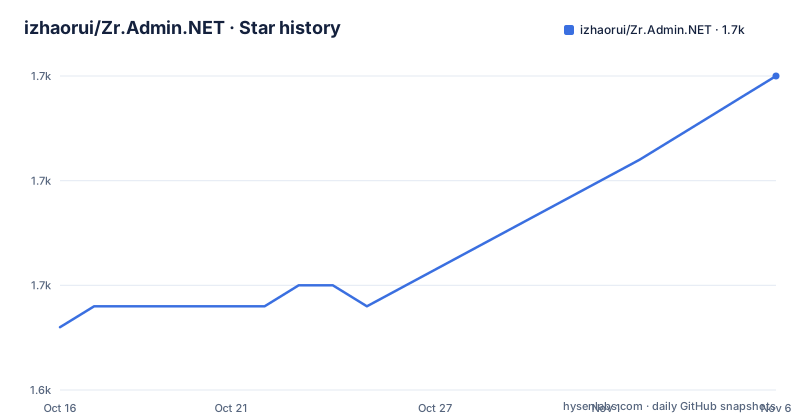
Star history
- izhaorui/Zr.Admin.NET1,660 ★ · +12
| Repository | 2026-10-16 | 2026-11-06 |
|---|---|---|
| izhaorui/Zr.Admin.NET | 1.6k | 1.7k |
12 Stars in the last 21 days, measured from the daily GitHub snapshot. Compare with other projects
Editorial analysis
Zr.Admin.NET Targets Administrative Software, Not Just Login Screens
Zr.Admin.NET addresses the repeated work that appears in internal business systems: user accounts, departments, positions, menus, roles, dictionaries, logs, scheduled jobs, file management, notifications, imports, and code generation. The intended audience is developers who already have some .NET and Vue experience. That qualification matters because the project is a framework rather than a narrow starter application. It expects the team to adapt its modules and connect them to domain-specific business logic.
The repository presents RBAC as its central permission model. Roles receive menu and operation permissions, while menus define application navigation and button-level permission identifiers. The built-in functions also cover account registration, login and operation logs, service monitoring, online users, email, parameters, announcements, database audit logs, third-party login, and system API documentation through Swagger. This is a broad administrative base, but it is not a substitute for product-specific authorization rules. The README mentions data-permission filtering, yet it does not describe the exact policy model or how those filters are attached to application queries.
Several features are explicitly aimed at operational products. Quartz.NET schedules assemblies or HTTP requests, Redis and in-memory caching are listed, SignalR handles online status and real-time notifications, and IpRateLimit is used for interface rate limiting. NLog records login, operation, and scheduled-task events. The framework also includes MiniExcel and mail-related utilities. These integrations reduce the number of separate services a team must assemble for a conventional internal system, although the README does not document their production configuration or deployment requirements in detail.
The Architecture Separates API, Services, Data Access, and Frontend Code
The repository layout shows a multi-project .NET solution rather than one application file. `ZR.Admin.WebApi` is the web API entry point, while `ZR.Model`, `ZR.Repository`, `ZR.Service`, and `ZR.ServiceCore` separate models, data access, service logic, and shared service infrastructure. `ZR.Tasks` contains scheduled-task work, `ZR.Workflow` contains workflow-related code, `ZR.CodeGenerator` contains code-generation logic, and `ZR.Common` holds shared utilities. `ZR.Tests` is also present as a dedicated test project.
The backend documentation lists ASP.NET Core Web API, SqlSugar, Swagger, SignalR, Quartz.NET, Redis, MiniExcel, NLog, and IpRateLimit. This gives the application a conventional layered structure, but the README does not publish a complete request path from controller to repository, nor does it identify whether each layer is intended as a strict dependency boundary. The visible layout nevertheless makes the intended separation clear: the API project is the runnable entry point, while reusable application concerns live in named projects.
The frontend is not embedded in this repository as the only supported client. The README points to `ZR.Admin.Vue3` as the recommended Vue 3 frontend and also mentions Vue 2, Vue 3, and uniapp technology choices. `ZR.Vue` exists in this repository, while the documentation separately identifies external frontend repositories. That distinction is important during adoption because a backend framework can be easy to start with while the usable interface still depends on obtaining and configuring the correct client project.
SaaS Mode Uses Physical Database Isolation per Tenant
The clearest architectural commitment in Zr.Admin.NET is its DB-per-tenant SaaS mode. According to the README, each tenant uses a separate database, while tenant records, package definitions, menus, and related shared data remain in a main database. SqlSugar's `SugarScope` multi-configuration support provides dynamic database routing. Separate databases are not necessarily separate database server instances, and they do not alone establish complete tenant security isolation.
This approach can reduce reliance on row-level tenant filters for tenant business data, but correct routing, credentials and authorization remain essential to prevent cross-tenant access. The cost is operational. The main database still contains shared platform data, and every tenant database requires initialization, schema management, backup, monitoring, and eventual migration. A tenant lifecycle can include provisioning, table creation, seed data, default package assignment, suspension, renewal, and cancellation. Those are database and platform responsibilities, not just UI operations.
The README documents a feature gate named `TenantSettings:UseTenant`, plus package-based menu authorization and user quotas. It says a tenant's capabilities are the intersection of role menus and package menus. Platform-specific menus are restricted to the main tenant. This model is clear enough to assess conceptually, but the README does not provide the complete configuration file, migration procedure, or failure behavior for an unreachable tenant database. For an application with strict data-isolation requirements, those operational details should be verified before production adoption.
Workflow, Scheduling, and Notifications Add Runtime Dependencies
Zr.Admin.NET includes more than CRUD administration. The workflow module is described as a visual approval system covering process definition, application submission, node approval, record tracking, dynamic forms, condition branches, parallel splitting and merging, copying, approval, rejection, withdrawal, transfer, countersigning, dashboards, and soft deletion. This is a substantial feature set for an internal framework, and it targets organizations whose software needs approvals rather than simple record editing.
Quartz.NET provides a separate execution path for scheduled work. The README says tasks can execute assemblies or HTTP requests, and that administrators can add, modify, delete, and manually run jobs while reviewing execution logs. Redis is listed as a caching option, and SignalR is listed for online-user management and notifications. These features are useful for asynchronous administration, but each introduces a runtime dependency or operational question. The documentation does not say whether Redis is mandatory, how SignalR behaves behind multiple API instances, or what retry policy applies to HTTP-based jobs.
The framework's one-line feature list can make it appear self-contained. In practice, the API, database, cache, scheduler, frontend, and possibly tenant databases have separate deployment concerns. The repository includes `DockerBuild.bat`, but the README excerpt does not give a complete Docker Compose topology or environment-variable list. That is a limitation of the documented setup, not evidence that those deployment options are unavailable.
Initial Database Setup Is Explicit, While Full Installation Is Documented Elsewhere
The README provides a concrete first operation for creating or initializing the database. It says to run the command from the repository root, where the `.sln` file is located. The command explicitly triggers automatic migration and seed data. Before running it, verify the database connection, review the migration and seed behavior, back up existing data and test on a non-production database.
Run the documented initialization command from the directory containing `ZRAdmin.sln`:
dotnet run --project ZR.Admin.WebApi -- --initdbThe README also gives a shorter form. Both forms are intended to trigger the same initialization path:
dotnet run --project ZR.Admin.WebApi -- -iA Windows batch file is also listed:
init-run.batThe README says these steps handle automatic migration and seed data. It does not document the prerequisite database connection settings, required Redis configuration, frontend startup command, or exact files to edit before the API can serve a useful client. The quick-start documentation is linked separately, so the repository README is sufficient for the database initialization trigger but not for a complete end-to-end installation tutorial. The separate `ZR.Admin.Vue3` repository is identified as the recommended frontend, which means obtaining the client is part of the practical setup.
Frontend Choice Is a Real Trade-off Between Web, Mobile, and UI Conventions
Zr.Admin.NET is not tied to one visual stack according to the README. It mentions Vue 2, Vue 3, and uniapp, with Vue 3 identified as the recommended web frontend. It also points to an Ant Design Vue technology-stack edition. The mobile demonstrations are described as uniapp versions for Vue 2 and Vue 3, while a workflow demonstration uses a Vue 3 TypeScript version.
The practical alternative is therefore a client choice within the same overall framework family. A team that needs web administration can use the recommended Vue 3 repository, while a team targeting mobile delivery can use a uniapp variant. A team already standardized on Ant Design Vue can examine the provided edition instead of adopting the default client presentation. These are not identical choices: they change framework version, component library, repository, and possibly application structure.
The tradeoff is integration work. The backend may expose the same API, but the frontend repository, build setup, component conventions, and supported features still need to be checked. The README specifically notes that some capabilities are version-dependent, such as static and dynamic internationalization being limited to Chinese, English, and Traditional Chinese, with Vue 3 support called out separately. It also says the online form builder supports only Vue 2 and that the mall frontend is still under development. Those boundaries matter more than the broad technology list.
License and Maintenance Signals Are Simple, but Upgrade Planning Is Underspecified
The repository declares the MIT license. That gives the project a permissive license identifier for reuse and modification, subject to the actual license text and any third-party obligations. The README links to the project's `LICENSE` file, so an adopting organization should review that file and the licenses of dependencies separately.
Check the repository's current activity, tags and changelog when choosing a version. The absence of GitHub releases alone does not establish that no commit or tag can be pinned. The README links to a changelog and contains promotional feature language.
This combination makes adoption possible without presenting a release process that the repository has not documented. The code-generation feature also creates a maintenance choice: generated files may need to be reconciled with later schema or framework changes. The project has a test directory, but the README does not list test commands or coverage. The first upgrade-related check should therefore be the changelog, the database initialization behavior, and the compatibility of the selected frontend repository.
Editorial conclusion
Zr.Admin.NET fits .NET teams that want a broad administrative foundation, especially when separate tenant databases and built-in approval workflows matter. It is less suitable for a small CRUD service, a Vue-only team, or an organization that needs a documented release and upgrade process before committing. The first verification should be the documented database initialization path, the chosen frontend repository, and the exact tenant and workflow configuration used by the intended deployment.
Frequently asked questions
How do I initialize the Zr.Admin.NET database?
The README documents `dotnet run --project ZR.Admin.WebApi -- --initdb` from the repository root, or `-i`, to trigger migration and seed data. Review the configured database connection and migration behavior first, back up existing data, and test the procedure in a non-production environment before running it against an existing database.
Does Zr.Admin.NET support SaaS applications?
The README describes an optional database-per-tenant SaaS mode, with shared tenant and menu information in a main database and SqlSugar SugarScope for routing. Separate databases do not by themselves guarantee separate database servers or complete security isolation; verify connection routing, credentials, backups and access controls for your deployment.
Which frontend should I use with Zr.Admin.NET?
The README identifies the Vue 3 frontend in `ZR.Admin.Vue3` as the recommended web client. It also documents Vue 2 and Vue 3 uniapp variants, plus an Ant Design Vue edition, so the choice depends on the target client and UI convention.
What does Zr.Admin.NET use for scheduled jobs and real-time notifications?
Quartz.NET is listed for scheduled tasks that can execute assemblies or HTTP requests. SignalR is listed for online-user status and real-time notifications.
Official sources
Add this badge to your README
If you maintain this project, the badge below links readers to this analysis and shows its maintenance status from the daily GitHub snapshot. Paste the markdown into your README; add ?metric=license or ?metric=stars to the image URL for a different field.

[](https://hysenlabs.com/projects/izhaorui-zr-admin-net)Star history chart for your README
[](https://hysenlabs.com/projects/izhaorui-zr-admin-net)Was this useful?