Arclight: Bukkit plugins running inside a NeoForge or Fabric server
A Bukkit(1.20/1.21) server implementation in modding environment using Mixin. ⚡
At a glance
- What is it?
- Arclight implements the Bukkit server API on top of NeoForge and Fabric using Mixin, letting one server process load both content mods and Bukkit plugins. Documentation for everything beyond the launch command lives in an external wiki rather than in the repository.
- Who is it for?
- Arclight serves administrators who need both Bukkit plugins and NeoForge or Fabric mods on one server and have no way to collapse one ecosystem into the other. Skip it when only one ecosystem matters, because Mixin-based bridging adds a compatibility surface with no documented test results to consult.
- Can I use it commercially?
- Yes, with conditions. GPL-3.0 is a copyleft licence: if you distribute software that includes it, you must release that software's source code under the same licence. Running it internally without distributing it does not trigger that obligation.
- Is it still maintained?
- Yes. The repository last received commits 2 days ago.
- What is it written in?
- Mainly Java, according to GitHub's language statistics.
Answers come from the project's GitHub data, last synced on October 21, 2026, and from our analysis. They are not legal advice.
Star history
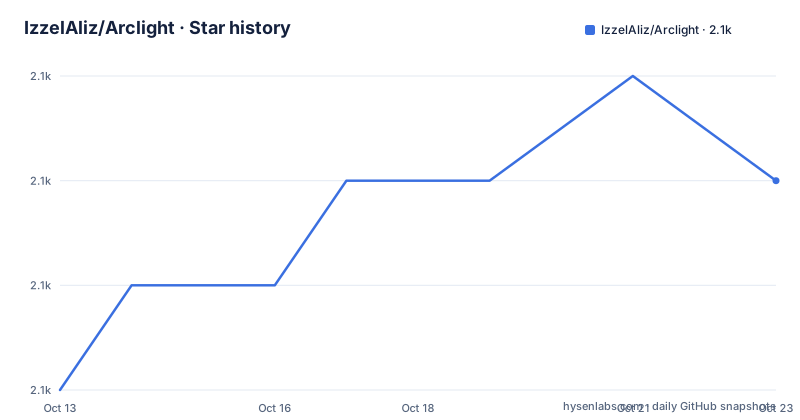
- IzzelAliz/Arclight2,088 ★ · +3
| Repository | 2026-10-13 | 2026-10-21 |
|---|---|---|
| IzzelAliz/Arclight | 2.1k | 2.1k |
3 Stars in the last 8 days, measured from the daily GitHub snapshot. Compare with other projects
Editorial analysis
Bukkit plugins alongside NeoForge or Fabric mods on one server process
Running a Bukkit plugin server and a mod loader server in parallel has always meant separate processes, separate player management and two sets of operational overhead. Rather than forcing a choice between ecosystems, Arclight removes that separation by implementing the Bukkit server API inside a NeoForge or Fabric environment, so one server process loads content mods and Bukkit plugins together.
Repository topics compress the coverage: bukkit, craftbukkit, neoforge, fabric, spigot and spigot-fork all appear alongside mixins, naming both sides of what the project bridges. The mechanism is Mixin, as the project description states.
Administrators who have assembled both a mod list and a plugin list and cannot replace one with equivalents from the other ecosystem are the audience Arclight addresses. A server that needs only one of those ecosystems should skip it entirely.
Three source modules, an absent arclight-forge directory and an unexplained topics discrepancy
The repository top level contains arclight-common/, arclight-fabric/, arclight-neoforge/, bootstrap/ and installer/ as its main source directories. Fabric and NeoForge each have a named module, and arclight-common/ sits alongside them as a shared base.
Comparing the directory listing against the repository topics reveals a specific gap: the topics include both forge and neoforge, yet the directory structure has arclight-neoforge/ and arclight-fabric/ with no arclight-forge/ present anywhere at the top level. Classic Forge and NeoForge are distinct projects, and the directory listing accounts for NeoForge with a named module while classic Forge has none. The README does not explain the gap and redirects all loader detail to wiki.izzel.io/s/arclight-docs. Arclight is distributed under GPL-3.0.
Bootstrap/ and installer/ directories appear at the top level with no description in the README or in any file the repository listing shows.
Download, launch with one command, and consult the wiki for every setup question
Installing Arclight means downloading the jar from arclight.izzel.io and running:
java -jar arclight.jar noguiPassing nogui disables the server control panel. Beyond that command, the README's install section ends. No Java version floor appears there, no prerequisite mod loader installation is mentioned, and no configuration file for a first run is described. Every question that arises after the server starts is redirected to the documentation at wiki.izzel.io/s/arclight-docs rather than answered inline.
Building from source is not covered in the README. The top-level repository holds build.gradle, settings.gradle, gradlew and a gradle/ directory, indicating a Gradle project, but no build task, no target Java version and no signing procedure is given. A developer who wants a custom build has to determine all those steps from the build files independently.
Branch generation labels as version prefixes and why the discussions thread is the version map
Arclight tags each build with the active branch generation name as a prefix, producing identifiers like FeudalKings/1.0.0 and GroupOfSoldiers/1.0.0-SNAPSHOT. GroupOfSoldiers/1.0.0-SNAPSHOT is the current build, described as experimental in the project's own notes.
A tag in this scheme carries no Minecraft version information on its own, because the branch name is a generation label rather than a Minecraft identifier. The README links to a GitHub Discussions thread at discussions/1575 for Minecraft version compatibility details, rather than documenting that mapping inline. Without that thread, a tag gives only a generation name and a sequence number with no Minecraft context.
The project description covers Bukkit 1.20 and 1.21. The GroupOfSoldiers generation addresses 1.21.11 specifically, a detail the discussions thread documents rather than the top-level description.
Mixin conflicts between Arclight and a mod's own class-loading patches
Both Arclight and many individual NeoForge and Fabric mods use Mixin. When Arclight and a mod both apply Mixin modifications to the same class, they can conflict in ways that neither project's documentation anticipates or describes. That risk is present regardless of how well a mod or plugin works in its own environment.
Neither a compatibility list nor any record of tested plugin-mod combinations appears in the README. A server operator has no published reference to check whether a specific plugin and a specific mod have been verified to work together through Arclight. Conflict discovery requires trial and error.
A server with a large mix of plugins and mods carries more incompatibility surface area than a server running only one ecosystem, and no curated list exists to narrow that surface down. Arclight removes the constraint of choosing between ecosystems but leaves the compatibility investigation to the operator.
Support channels: external wiki, GitHub Discussions, Discord and a QQ group
The README's support section names four channels: documentation at wiki.izzel.io/s/arclight-docs, a GitHub Issues page for bug reports, a GitHub Discussions section for questions, a Discord server at discord.gg/ZvTY5SC, and QQ Group Chat 3556966.
Having documentation outside the README has a direct consequence for a new install. The launch command is all the install section gives, and actual setup documentation for configuring the server, adjusting directories or troubleshooting a failed start lives in the external wiki. A server operator who works only from the README has one command and nothing more.
For bugs, the README explicitly asks for reports through the GitHub Issues page and does not describe any other reporting route.
When a single-ecosystem server avoids the overhead Arclight adds
A server running only Bukkit plugins has purpose-built options that carry none of the mod loader layer, and those options are the better fit when mods are not needed. A server running only NeoForge or Fabric mods has no reason to carry the Bukkit API. The project description states it targets a combined use case, so a single-ecosystem server is outside its stated scope.
For operators who do need both ecosystems, checking the discussions thread at discussions/1575 before committing to a server build is the step the README prescribes. That thread maps the GroupOfSoldiers and FeudalKings generation names to their Minecraft targets, and the naming convention itself carries no Minecraft version information.
Because the README documents no rollback path, no world backup instructions and no recovery procedure for a failed first start, planning those steps before deploying is a prerequisite Arclight itself does not cover.
Editorial conclusion
Arclight serves administrators who need both Bukkit plugins and NeoForge or Fabric mods on one server and have no way to collapse one ecosystem into the other. Skip it when only one ecosystem matters, because Mixin-based bridging adds a compatibility surface with no documented test results to consult. Before deploying, check the discussions thread at github.com/IzzelAliz/Arclight/discussions/1575 to confirm which build covers your target Minecraft version, then read the external wiki at wiki.izzel.io/s/arclight-docs, since the README itself covers almost nothing beyond the launch command.
Frequently asked questions
What is Arclight for Minecraft?
Arclight is a Bukkit server implementation built on top of NeoForge and Fabric using Mixin. It allows a single Minecraft server process to load both Bukkit plugins and NeoForge or Fabric mods at the same time.
Which Minecraft versions does Arclight support?
The project description covers Bukkit 1.20 and 1.21. The specific Minecraft version each branch generation targets is documented in a GitHub Discussions thread at discussions/1575, which the README links to directly.
Does Arclight support classic Forge?
The repository topics include both forge and neoforge, but the top-level source directories contain arclight-neoforge/ and arclight-fabric/ with no arclight-forge/ module. The README does not address classic Forge support and redirects all loader details to the external wiki at wiki.izzel.io/s/arclight-docs.
How do I install Arclight?
Download the jar from arclight.izzel.io and run java -jar arclight.jar nogui. The nogui argument disables the server control panel. The README gives no further install steps and points to the documentation at wiki.izzel.io/s/arclight-docs for setup details.
Where can I find Arclight documentation?
The README points to the documentation at wiki.izzel.io/s/arclight-docs. Support and questions go to GitHub Discussions, the Discord server at discord.gg/ZvTY5SC, or the QQ Group Chat 3556966.
Official sources
Add this badge to your README
If you maintain this project, the badge below links readers to this analysis and shows its maintenance status from the daily GitHub snapshot. Paste the markdown into your README; add ?metric=license or ?metric=stars to the image URL for a different field.

[](https://hysenlabs.com/projects/izzelaliz-arclight)Star history chart for your README
[](https://hysenlabs.com/projects/izzelaliz-arclight)Was this useful?