FreeBox: TVBox and CatVod rules on the desktop, from Windows to Linux
A desktop companion app for TVBox, dedicated to extending TVBox's features and ecosystem across platforms.
At a glance
- What is it?
- FreeBox is a JavaFX desktop application that brings the TVBox and CatVod configuration ecosystem to Windows, macOS and Linux. It requires an external player for video rendering and JDK 17, which adds installation steps that the download page does not fully spell out.
- Who is it for?
- FreeBox is worth adopting if you already use TVBox or CatVod configurations on mobile and want the same experience on a desktop without reformatting your scripts. The JDK 17 requirement and the external player dependency mean installation has at least two components, and the auto-updating installer removes manual control over which version runs.
- Can I use it commercially?
- Yes, with conditions. GPL-3.0 is a copyleft licence: if you distribute software that includes it, you must release that software's source code under the same licence. Running it internally without distributing it does not trigger that obligation.
- Is it still maintained?
- Yes. The repository last received commits 91 days ago.
- What is it written in?
- Mainly Java, according to GitHub's language statistics.
Answers come from the project's GitHub data, last synced on October 23, 2026, and from our analysis. They are not legal advice.
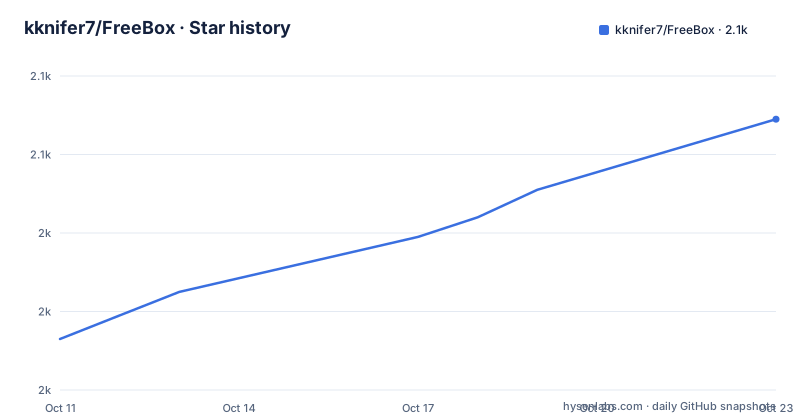
Star history
- kknifer7/FreeBox2,069 ★ · +56
| Repository | 2026-10-11 | 2026-10-23 |
|---|---|---|
| kknifer7/FreeBox | 2k | 2.1k |
56 Stars in the last 12 days, measured from the daily GitHub snapshot. Compare with other projects
Editorial analysis
A JavaFX desktop client that carries TVBox and CatVod rules to three operating systems
FreeBox is described as a sister software to TVBox, built to expand the TVBox and CatVod content playback ecosystem across desktop operating systems. TVBox and CatVod are frameworks oriented toward mobile devices and television set-top boxes. FreeBox brings their Spider-based configuration model to Windows, macOS and Linux without requiring a mobile device.
Two functions are combined in a single window: video playback and resource auditing. Resource auditing means checking whether content sources and configuration URLs are reachable and functional, which is useful when managing Spider configurations across updates. Having both functions in one interface removes the need to switch between separate applications.
Platform packages by architecture, and the arm64 gap on Windows
Download packages are available for three operating systems. Windows requires version 10 or newer and packages come in MSI installer and ZIP formats, but only for the amd64 architecture. macOS requires version 11 or newer and offers DMG packages for both amd64 and arm64. Linux packages cover amd64 with DEB, RPM, AppImage and tar.gz formats.
The AppImage format is called out specifically in the feature list as a way to cover most Linux distributions. A DEB or RPM package ties to a particular packaging system; an AppImage is a portable single file designed to run on most modern Linux systems without going through a package manager. That distinction matters on distributions that use neither apt nor rpm.
Windows packages cover only the amd64 architecture, leaving out ARM-based Windows machines. macOS is the only platform with documented arm64 support in the download table.
Installer packages receive auto-updates; archives require manual replacement
The documentation explicitly recommends downloading the installer version rather than a ZIP or tar.gz archive, because the installer version supports self-updates while compressed archives do not. An upgrade-config.json file at the repository root is listed among the top-level files; the README does not document its format or describe how to modify the update behavior.
A self-updating installation trades convenience for control. With a compressed archive, you decide when to update and which version to run; with the installer, updates can arrive on the application's own schedule. No path for disabling or pinning the auto-update mechanism is documented.
A dedicated installation and upgrade guide exists in the project wiki, and the README links to it before the download table. Reading that wiki page before choosing between the installer and an archive is the recommended first step.
The out-of-the-box claim has a strikethrough in the README for a reason
The README uses a strikethrough to flag its own out-of-the-box claim: the struck-through text acknowledges that out-of-the-box use requires installing a supported player first. FreeBox handles content discovery, Spider management and resource auditing, but video rendering is delegated to a separately installed external application. No player is bundled.
A supported players wiki page documents which external players are compatible. The README does not list player names or count how many options exist; it links only to that wiki page. Checking the wiki and installing a compatible player is therefore the first step after installing FreeBox.
For most users, this is a two-component installation: FreeBox itself plus a supported player. The README flags this dependency upfront in the feature list rather than relegating it to a footnote, which makes the limitation visible before download.
Spider script hot-reload for content source development without a separate environment
FreeBox includes a hot-reload debugging feature for Spider scripts. In the TVBox and CatVod ecosystem, Spider scripts are programs that define how to fetch and parse content from a source. Hot-reload means changes to a script take effect without restarting the application, reducing the feedback loop when iterating on a configuration.
This feature covers both resource auditing and Spider development, and the README states it does not require setting up a separate development environment. For someone writing or maintaining Spider scripts, that removes the overhead of running a standalone test runner. FreeBox uses the same Spider format as the companion CatVodSpider-PC project, and the README links to a Spider writing guide in that project's wiki rather than documenting the format inline.
Hot-reload is positioned as a developer feature. An end-user who loads existing Spider configurations without modifying them does not interact with this part of the application.
Author's principle of not introducing unnecessary dependencies, alongside the external player requirement
The README describes the author's development principle as not introducing dependencies unless necessary, with strict control over application size. That explains why FreeBox does not bundle a media renderer: adding a full video decoding stack would increase the package size and introduce a dependency the author considered avoidable.
FreeBox's own footprint is kept minimal, but the total installation includes whichever external player the user installs. Whether this is a net saving depends on whether you already have a compatible player or need to install one specifically for FreeBox.
FreeBox follows CatVod rules and shares the configuration format with TVBox. An existing TVBox user who already has configurations and Spider scripts can carry them over without reformatting. Someone new to the TVBox/CatVod ecosystem would need to build or find a configuration before the playback function is useful.
Gradle build with JDK 17, and what the repository structure documents
The build system is Gradle: gradlew, gradlew.bat, build.gradle and settings.gradle are all at the repository root. The Gradle wrapper is included, so no separate Gradle installation is needed to compile the source. No build command or task name is documented in the README, meaning anyone building from source needs to consult build.gradle directly.
The repository structure also includes a doc/ directory and a resources/ directory alongside src/. An upgrade-config.json file is also at the root; its schema is not described in the README.
v1.8.0 was released on 2026-07-16, with the last push on 2026-07-24; source is under GPL-3.0 and the runtime requires JDK 17 or newer with JavaFX 21.0.9 as the UI framework.
Editorial conclusion
FreeBox is worth adopting if you already use TVBox or CatVod configurations on mobile and want the same experience on a desktop without reformatting your scripts. The JDK 17 requirement and the external player dependency mean installation has at least two components, and the auto-updating installer removes manual control over which version runs. Skip it if you need a self-contained player with no runtime dependencies, or if you are not familiar with the Spider and CatVod configuration format. Before installing, check the supported players wiki page to confirm the player you have is on the list.
Frequently asked questions
What is FreeBox?
FreeBox is a JavaFX-based desktop application that extends the TVBox and CatVod content ecosystem to Windows, macOS and Linux. It combines video playback with resource auditing and supports Spider script development with hot-reload debugging.
Does FreeBox work on Linux?
Yes. Download packages for the amd64 architecture include DEB, RPM, AppImage and tar.gz formats. The AppImage format is mentioned as a way to cover most Linux distributions.
Why does FreeBox require an external player?
FreeBox handles content discovery and Spider configuration but delegates video rendering to a separately installed external player. The README acknowledges this with a strikethrough on the out-of-the-box claim, and a supported players wiki page lists compatible options.
What Java version does FreeBox require?
FreeBox requires JDK 17 or newer. The README badge specifies JavaFX 21.0.9 as the UI framework version.
Does FreeBox support automatic updates?
The installer version supports automatic updates. The README recommends downloading the installer rather than a ZIP or tar.gz archive for this reason.
Official sources
Add this badge to your README
If you maintain this project, the badge below links readers to this analysis and shows its maintenance status from the daily GitHub snapshot. Paste the markdown into your README; add ?metric=license or ?metric=stars to the image URL for a different field.

[](https://hysenlabs.com/projects/kknifer7-freebox)Star history chart for your README
[](https://hysenlabs.com/projects/kknifer7-freebox)Was this useful?