transitions.dev hands agents a fixed vocabulary of CSS motion
Collection of the most essential transitions for web apps, skill for agents and Refine tool for agents
At a glance
- What is it?
- An HTML demo site, an npm CLI and an installable agent skill that hand coding agents a fixed set of copy-ready CSS transitions instead of letting them improvise motion. The catch is that the README's twelve-row transitions table and its eighteen per-transition reference files are not the same set.
- Who is it for?
- Adopt the skill if your agent keeps rewriting hover and menu transitions from scratch and you want one motion vocabulary across projects. Skip it if your design system already owns motion tokens, since each snippet writes custom properties onto :root and will fight them.
- Can I use it commercially?
- Check first. The repository uses a licence we do not classify automatically, so read its LICENSE file before any commercial use.
- Is it still maintained?
- Yes. The repository last received commits 7 days ago.
- What is it written in?
- Mainly HTML, according to GitHub's language statistics.
Answers come from the project's GitHub data, last synced on November 15, 2026, and from our analysis. They are not legal advice.
Star history
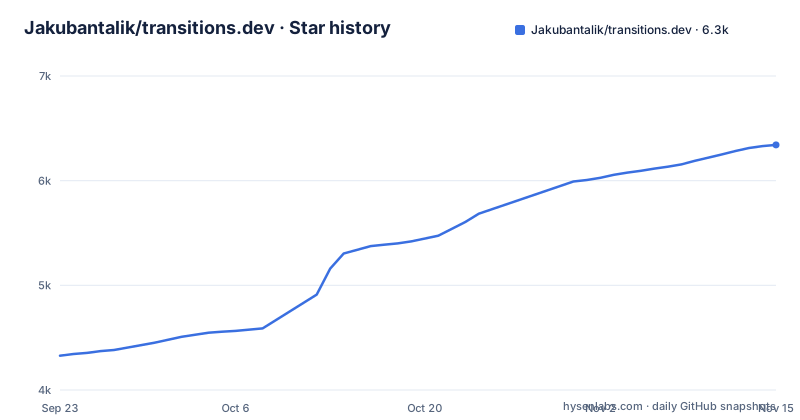
- Jakubantalik/transitions.dev6,342 ★ · +2,014
| Repository | 2026-09-23 | 2026-11-15 |
|---|---|---|
| Jakubantalik/transitions.dev | 4.3k | 6.3k |
2,014 Stars in the last 53 days, measured from the daily GitHub snapshot. Compare with other projects
Editorial analysis
The problem is agents inventing motion on every component
Ask a coding agent to animate a dropdown and you get something different each time: a different duration, a different easing, a different transform origin. The code works, then it looks wrong next to the button next to it. transitions.dev answers that by fixing the motion vocabulary before any component is written. Twelve named patterns are listed in the README table, each demonstrated on a card, each with a copy button that emits a self-contained CSS block. The block is deliberately narrow: custom properties on :root, transition rules under t-* class names, and a prefers-reduced-motion guard. Nothing in it depends on the markup of the demo page.
That last property is the reason the project is worth a look. A snippet you can paste anywhere beats a component library you have to adopt wholesale, and for agents it removes the negotiation step where the model asks what your spacing scale looks like.
Each snippet is namespaced so it cannot collide
The mechanics are plain CSS with an opinion about naming. Rules live under t-* classes, which keeps a transition out of the global cascade in a way a bare .dropdown rule would not. Tokens are semantic custom properties declared on :root, so the values can be re-pointed without rewriting keyframes, and every block ships its own @media (prefers-reduced-motion: reduce) guard rather than leaving the accessibility decision to the integrator.
The README describes one snippet as self-contained and portable, and the patterns themselves are specific enough to be worth reading. Card resize is a smooth size transition. Number pop-in flips digits with blur and stagger. Notification badge slides on a diagonal with a spring pop. Menu dropdown is origin-aware, so it opens from the button rather than from the centre of the viewport. Avatar group hover springs the hovered avatar up while neighbours follow with a falloff. Error state shake shakes the input and reverts to neutral on its own. These are decisions, not generic easing curves.
Three ways to take the code, one of which needs a browser
The fastest path is the CLI, published as the transitions-dev package. It pulls a named transition into your project without a manual copy:
npx transitions-dev listThat command prints everything available, which is worth running before you plan around a specific effect. To grab a single one:
npx transitions-dev add card-resizeFree transitions need no account. Pro transitions, such as confetti-burst, open only after a passwordless browser sign-in that confirms a code on a web page, and no API key is ever written to your terminal. Once signed in:
npx transitions-dev add confetti-burstThe second route is the agent skill, which wraps the same transitions for tools such as Cursor, Claude Code and Codex:
npx skills add Jakubantalik/transitions.devThe third is reading and copying from the live site at transitions.dev.
The twelve row table and the eighteen file list do not agree
Here is the contradiction worth catching before you plan a migration. The transitions table in the README lists twelve entries, ending at avatar group hover and error state shake. The same README then describes skills/transitions-dev as holding eighteen per-transition reference files, from 01-card-resize.md through 18-texts-reveal.md, and describes index.html as carrying all eighteen transitions.
So the README table is smaller than the artefact count: 12 rows against 18 files, a gap of six. The Pro transition confetti-burst appears in the login example and nowhere in the table. If you budget a transition set for a product, take the list from npx transitions-dev list, not from the README table. The site is the source of truth here, because build/extract.mjs parses PROTO_TEMPLATES and the :root { --pX-* } block out of index.html and re-renders every file under skills/transitions-dev/ from templates in build/templates/. The skill cannot drift from the site; the prose table can.
Refine injects a live panel instead of editing your source
Refine is the aggressive half of the project. One command injects a script tag into your running app, starts a local relay, and slides in a panel from the right. Every Refine click asks your coding agent to align the selected CSS or Motion transition to the transitions.dev tokens, or swap in one from the library, and the result applies as a live, reversible override.
npx transitions-refine live
npx transitions-refine live --llm
npx transitions-refine stop
Without --llm the panel runs deterministic suggestions. With it, the command also installs and wires the Cursor CLI so the relay answers with an LLM and keeps doing so. Without --llm, you can instead run /refine live inside your editor to back the panel with the in-IDE agent. stop removes the injected script tag. This is the sharpest edge in the project: it writes a tag into your running HTML by design, and the env knobs behind the full flow live in refine/README.md rather than the top-level README.
Regenerating the skill is one npm script, not an editing pass
The skill is generated, which is the correct architectural choice and the reason the snippets stay honest. Editing a reference file by hand would be pointless because the next build overwrites it. After changing the source site:
npm run buildThat runs node build/extract.mjs, the only script in package.json, which is a private module with no dependencies declared. For local work on the pages themselves the README gives a plain static server:
python3 -m http.server 8765Then open http://127.0.0.1:8765/. Note what this setup is not: no bundler, no framework, no npm install for the site itself. index.html, prototypes.html with its live tuning controls for durations, distances and easings, and skill.html are plain files.
A fixed catalogue of patterns, not a motion token system
The trade is fixed variety. You get a fixed set of patterns with reduced-motion handling already written into every snippet, and you get zero ability to invent a thirteenth without dropping down to hand-written CSS. A token-driven approach costs more setup and lets every value move, which is the real difference in approach, not a difference in quality.
Adoption is not pinned, since the repository has no GitHub releases to depend on, and the last push was on 2026-10-29. The library licence allows unlimited personal and commercial use by you and any coding agent working for you, with one restriction: no redistributing the library itself as a competing transitions library or kit, while the CLI, the agent and Refine are MIT. If your legal review treats that redistribution clause as a blocker, the answer is not to paraphrase it away but to check the terms page at https://transitions.dev/terms.html before you build a kit on top.
Editorial conclusion
Adopt the skill if your agent keeps rewriting hover and menu transitions from scratch and you want one motion vocabulary across projects. Skip it if your design system already owns motion tokens, since each snippet writes custom properties onto :root and will fight them. Verify first which transitions are actually free, because the twelve row table and the eighteen reference files do not match, and because Pro transitions such as confetti-burst need a browser sign-in (npx transitions-dev login) you may not want inside CI. Then run npx transitions-dev list and count before you commit a deadline.
Frequently asked questions
What is the transitions-dev skill?
It is an installable agent skill that packages the same CSS transitions used on the transitions.dev site so tools like Cursor, Claude Code and Codex can apply them inside a project. It is installed with npx skills add Jakubantalik/transitions.dev and contains SKILL.md, eighteen per-transition reference files and a _root.css install block.
How do I install the transitions.dev CLI?
There is nothing to install permanently: run it through npx as the public transitions-dev package. npx transitions-dev add card-resize pulls a single free transition, npx transitions-dev add --free pulls every free one, and npx transitions-dev list shows what is available.
Do transitions.dev Pro transitions need an API key?
No. Pro transitions open through a passwordless browser sign-in using a device flow, where you confirm a code in the browser, and no API key is placed in your terminal. Pro recipes are fetched from the authenticated API rather than shipped in the package, which is also why the old transitions-pro name holds no premium source.
What does transitions.dev Refine do to my app?
npx transitions-refine live injects a script tag that adds a timeline and a Refine panel to your running app and starts a local relay, applying suggestions as reversible live overrides. npx transitions-refine stop removes the injected tag again, and the --llm flag additionally wires the Cursor CLI so the relay answers with an LLM.
Official sources
Add this badge to your README
If you maintain this project, the badge below links readers to this analysis and shows its maintenance status from the daily GitHub snapshot. Paste the markdown into your README; add ?metric=license or ?metric=stars to the image URL for a different field.

[](https://hysenlabs.com/projects/jakubantalik-transitions-dev)Star history chart for your README
[](https://hysenlabs.com/projects/jakubantalik-transitions-dev)Was this useful?