Kobweb: Kotlin pages that carry their own routing, export and server routes
A modern framework for full stack web apps in Kotlin, built upon Compose HTML
At a glance
- What is it?
- Kobweb wraps Compose HTML in a Kotlin framework for sites and web apps, adding routing, static export, Markdown and server API routes. The command that creates a project is not in its README, and the CLI it needs is distributed through five outside package repositories.
- Who is it for?
- Adopt Kobweb if you already write Kotlin and want the site shell that Compose HTML leaves out: routing, static export, Markdown and server routes. Pass on it if your site is small enough to assemble by hand, or if a pre-1.0 framework with its CLI in a different repository and a different version line is more than you want to track.
- Can I use it commercially?
- Yes. Apache-2.0 is a permissive licence: you can use, modify and sell software built on it, as long as you keep its copyright and licence notices.
- Is it still maintained?
- Yes. The repository last received commits 1 day ago.
- What is it written in?
- Mainly Kotlin, according to GitHub's language statistics.
Answers come from the project's GitHub data, last synced on October 23, 2026, and from our analysis. They are not legal advice.
Star history
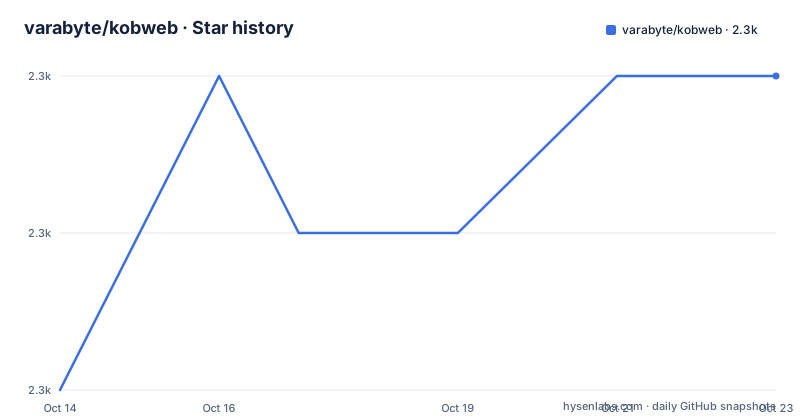
- varabyte/kobweb2,254 ★ · +2
| Repository | 2026-10-14 | 2026-10-23 |
|---|---|---|
| varabyte/kobweb | 2.3k | 2.3k |
2 Stars in the last 9 days, measured from the daily GitHub snapshot. Compare with other projects
Editorial analysis
Kotlin web pages are Compose functions, not templates
A Kobweb page is a Kotlin function that carries the @Page annotation and is marked @Composable, so the markup comes out of the Compose runtime rather than a template engine. Routing between those functions is handled for you, and the sample page at the front of the README shows the shape: a centered Column, a color mode held in state, and a button that swaps an icon. The declaration is this short:
@Page
@Composable
The middle of that sample is where the interesting mechanics sit:
    var colorMode by ColorMode.currentState
    Button(
      onClick = { colorMode = colorMode.opposite },
      Modifier.borderRadius(50.percent).padding(0.px).align(Alignment.End)
    ) {
      // Includes support for Font Awesome icons
      if (colorMode.isLight) FaMoon() else FaSun()
    }
    H1 {
      Text("Welcome to Kobweb!")
    }
Reading ColorMode.currentState twice is worth the effort. Assigning colorMode.opposite flips the page between light and dark inside the same function that rendered the button, and the icon changes with it because both lines read one value. No second copy of the page exists to keep in sync.
Five package managers keep the CLI outside the repository
The framework lives in varabyte/kobweb, but the binary that drives a site lives in a separate project, kobweb-cli, with its own version line. On Mac and Linux the shortest documented path is a Homebrew tap:
$ brew install varabyte/tap/kobwebThe Nix route needs flakes switched on first, because the package is a GitHub flake. Create ~/.config/nix/nix.conf with this one line:
experimental-features = nix-command flakesthen add the profile:
$ nix profile add github:varabyte/kobweb-cli-nixSDKMAN covers Windows, Mac and Nix with `sdk install kobweb`, and Arch users with an AUR helper run `yay -S kobweb`, `paru -S kobweb` or `trizen -S kobweb`. Those five routes live in five repositories that kobweb itself does not contain, and the README credits outside contributors for making them work. If your package manager is missing, the project keeps one open request for it at https://github.com/varabyte/kobweb-cli/issues/11 and asks you to comment there.
Windows via Scoop pulls a JDK before the CLI
The Scoop path is the odd one out. It is the only route in the walkthrough that installs a second program before the CLI, and it takes that program from a separate Java bucket:
# Note: Adding buckets only has to be done once.

# Feel free to skip java if you already have it
> scoop bucket add java
> scoop install java/openjdk

# Install kobweb
> scoop bucket add varabyte https://github.com/varabyte/scoop-varabyte.git
> scoop install varabyte/kobweb
The comments say adding buckets happens once and that java can be skipped if you already have it. What the block does not explain is why Windows needs a JDK when Homebrew, Nix, SDKMAN and the AUR helper do not install one. Nobody needs to guess: treat that JDK as a second toolchain with no stated version constraint, and check what your machine already has before running the bucket add.
The CLI at 0.9.23 and the framework at 0.25.1 move apart
Badges at the top of the README pin a whole stack: kobweb 0.25.1, kobweb-cli 0.9.23, Kotlin 2.4.10, compose-html 1.11.1, compose-runtime 1.12.0 and Ktor 3.5.0. The Kotlin, compose-html and compose-runtime badges all point at COMPATIBILITY.md, which is where the project records which pairing works. That is the central upgrade decision for an adopter, because the framework and its command line tool sit on two separate version lines and a mismatch between them is ordinary rather than alarming.
If you would rather skip a package manager, the archive is on GitHub in both formats:
$ wget https://github.com/varabyte/kobweb-cli/releases/download/v0.9.23/kobweb-0.9.23.zip
$ unzip kobweb-0.9.23.zip
Read the file name in that URL next to the framework badge. The archive is kobweb-0.9.23.zip under the v0.9.23 path while the library reads 0.25.1, and nothing in the README connects those two numbers to each other. The repository is not archived and the last push landed on 2026-09-15, which is later than the version named in the badges, so commits arrive between published builds rather than only alongside them.
Static export, live reload, Markdown, and server routes
Around page composition, Kobweb's own layer covers the parts a site needs: automatic routing between pages, static site exports for SEO, out-of-the-box Markdown, an environment built around live reloading, server API routes with persistent streams, and support for web workers. The distinction that matters is where each piece runs. Static export and Markdown are build time work that ends in files a crawler can index, while server API routes and persistent streams need a Kotlin process alive when requests arrive.
The repository root reflects that split, with backend/, frontend/ and common/ sitting beside playground/, templates/ and tools/, and a Ktor 3.5.0 badge in the README header covering the server side. Live reloading is described as an environment built from the ground up around it rather than as a plugin, which puts a dev process in the normal workflow instead of an optional add on. None of this layout is spelled out in the README text; a separate ARCHITECTURE.md at the root is where the design write up belongs.
The README stops before it shows project creation
This is the gap to know about before starting. The walkthrough is titled Getting started and its first step is to get the Kobweb binary, yet the file ends in the middle of the download section, right after the tar archive is unpacked. No command that creates a project appears anywhere in it. The closest the README comes is a demo clip captioned with a Compose HTML project created from scratch with Markdown support and live reloading in under 10 seconds, which names the capability without showing how it is typed.
Where the details go is stated once, near the top: a detailed guide at https://kobweb.varabyte.com/docs, beside an API reference at https://varabyte.github.io/kobweb/. The README also does not document how to check which CLI a machine already has when several package managers have installed it, and it does not describe a way back from a version you dislike.
Escape hatches exist because Kobweb is still pre-1.0
The project's own account of its maturity is blunt: Kobweb is still pre-1.0, it has been usable for a while now, and it provides escape hatches to lower level APIs so anything it does not support yet can still be done. For a framework this opinionated that is a fair trade, and it is also why the page calls itself opinionated while naming Next.js and Chakra UI as inspirations. Those are conventions you inherit instead of choose.
Two costs come with it. The top level listing contains no directory named for tests, so where a Kobweb project's tests are meant to live cannot be answered from the repository layout alone. And no compatibility promise across the 0.x line is documented: every dependency in the header badges is a fixed version, COMPATIBILITY.md is the only place that pairing is written down, and the two Kobweb lines move on their own clocks. Kobweb ships under Apache-2.0, a permissive licence that does not require a site built with it to be published as source.
Comparing Kobweb with hand written Compose HTML
The real alternative is to write Compose HTML directly and assemble the surrounding pieces yourself. Compose HTML, the JetBrains project Kobweb builds on, hands you the composable DSL and stops there: no routing layer, no static export, no Markdown pipeline, no live reload environment. Choosing Kobweb means accepting those as decided rather than optional, and receiving a project layout, a set of widgets and a CLI that already agree with one another.
The opposite route keeps your dependency list short and your choices open. Nothing in the framework forces the CLI, the Ktor side or the template directory onto you, and a plain Compose HTML build can take one widget at a time. For a small brochure site or an internal tool that skips search engines, that is the cheaper path. For a team that already ships JVM services in Kotlin, the server API routes and the shared code under common/ are the parts Kobweb adds that a Compose HTML only build would leave for you to write.
Editorial conclusion
Adopt Kobweb if you already write Kotlin and want the site shell that Compose HTML leaves out: routing, static export, Markdown and server routes. Pass on it if your site is small enough to assemble by hand, or if a pre-1.0 framework with its CLI in a different repository and a different version line is more than you want to track. Verify one thing first: read COMPATIBILITY.md at the repository root and match its pinned Kotlin 2.4.10, compose-html 1.11.1, compose-runtime 1.12.0 and Ktor 3.5.0 set against your own build.
Frequently asked questions
What does Kobweb add on top of Compose HTML?
Kobweb sits on Compose HTML and adds automatic routing between pages, static site exports for SEO, Markdown support, server API routes with persistent streams, and a live reload environment. A page is a @Composable function carrying the @Page annotation, so there is no separate template layer.
Do I need the Kobweb CLI before I can create a site?
Yes, the walkthrough starts with installing the Kobweb binary, and it comes from a Homebrew tap, a Nix flake, a Scoop bucket or an AUR package rather than a single library coordinate. The command that creates a project is not shown in the README, which points readers to the user guide at https://kobweb.varabyte.com/docs instead.
Which Kotlin and Compose versions does Kobweb pin?
The header badges name Kotlin 2.4.10, compose-html 1.11.1, compose-runtime 1.12.0 and Ktor 3.5.0, and those badges link to COMPATIBILITY.md at the repository root for the pairing rules. The CLI badge reads 0.9.23 while the framework badge reads 0.25.1, so the two are versioned separately.
How is the Kobweb source tree laid out?
The repository root is split into backend/, frontend/, common/, playground/, templates/ and tools/, and carries a separate ARCHITECTURE.md alongside COMPATIBILITY.md and CONTRIBUTING.md. No top level directory is named for tests, and the README does not say where a generated project's tests belong.
Is Kobweb still pre-1.0, and is the repository still active?
The README states that Kobweb is still pre-1.0 and points to escape hatches to lower level APIs for anything unsupported. The repository is not archived and the last push landed on 2026-09-15.
Official sources
Add this badge to your README
If you maintain this project, the badge below links readers to this analysis and shows its maintenance status from the daily GitHub snapshot. Paste the markdown into your README; add ?metric=license or ?metric=stars to the image URL for a different field.

[](https://hysenlabs.com/projects/varabyte-kobweb)Star history chart for your README
[](https://hysenlabs.com/projects/varabyte-kobweb)Was this useful?