Hugo Bearblog theme setup, content, and customization
🧸 A Hugo theme based on »Bear Blog«. Free, no-nonsense, super-fast blogging. This theme now includes a dark color scheme to support dark mode 🦉 ⬛️!
At a glance
- What is it?
- Hugo Bearblog is a compact Hugo theme based on Bear Blog, aimed at writers who want a plain blogging site with automatic browser dark mode. Its small customization surface is easy to understand, but teams needing built-in complex navigation or publishing workflows will need to supply that themselves.
- Who is it for?
- Adopt Hugo Bearblog if your priority is a small, readable Hugo blog with a restrained appearance and a straightforward partial-based customization path. Do not choose it unchanged if you require built-in section menus, comment systems, social integrations, or advanced publishing controls.
- Can I use it commercially?
- Yes. MIT is a permissive licence: you can use, modify and sell software built on it, as long as you keep its copyright and licence notices.
- Is it still maintained?
- Yes. The repository last received commits 31 days ago.
- What is it written in?
- Mainly HTML, according to GitHub's language statistics.
Answers come from the project's GitHub data, last synced on November 4, 2026, and from our analysis. They are not legal advice.
Star history
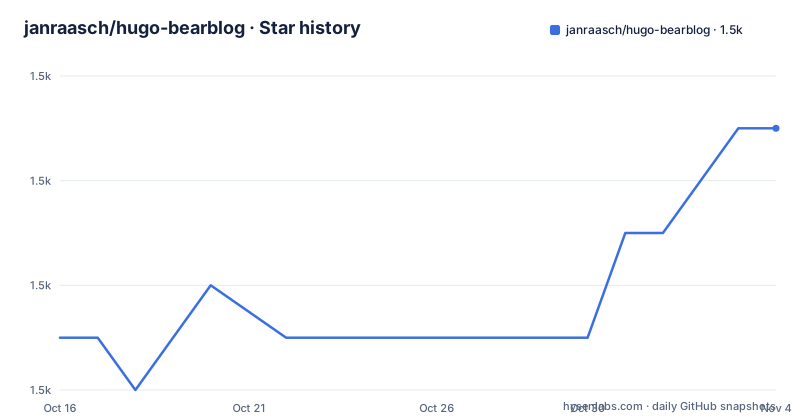
- janraasch/hugo-bearblog1,521 ★ · +4
| Repository | 2026-10-16 | 2026-11-04 |
|---|---|---|
| janraasch/hugo-bearblog | 1.5k | 1.5k |
4 Stars in the last 19 days, measured from the daily GitHub snapshot. Compare with other projects
Editorial analysis
The blogging scope of Hugo Bearblog
Hugo Bearblog addresses a narrow but common problem: turning a Hugo site into a personal blog without assembling many separate theme features. It is based on Bear Blog and presents content in a deliberately plain format. The intended audience is a Hugo user who wants to write pages and posts, adjust a small set of styles, and publish without beginning with a large theme framework. The repository identifies blog, Hugo theme, and dark mode as its subject areas, which matches the limited feature set documented by the project.
This is a theme rather than a content management application. Hugo remains responsible for reading the site's content and rendering it, while the theme supplies layouts, styling, archetypes, and an example site. The README does not advertise dashboards, comments, built-in social sharing, newsletter forms, multi-author workflows, or an administration interface. Their absence from the documentation matters: a writer can adopt the theme without expecting to configure a large feature set, but a publication with more involved publishing needs may have to add functionality through Hugo templates and site configuration.
The name refers to the original Bear Blog design, with credit given to Herman. Hugo Bearblog adds a practical theme implementation and automatic selection between light and dark color schemes. That is a narrow advantage rather than a complete visual system. The project suits blogs that put readable content ahead of elaborate presentation.
How Hugo content reaches the Bearblog layouts
The documented content path follows Hugo's normal model. Site copy belongs in `content`, while reusable presentation logic is stored under `layouts`. The repository includes an `exampleSite`, `layouts`, `archetypes`, and configuration files, so the theme is designed to be used as a Hugo theme rather than as a standalone application. The README directs new users to copy the contents of `exampleSite` into their source directory when starting fresh. That example acts as the reference configuration and content structure.
The site index is not controlled through an unspecified admin screen. Its text comes from `content/_index.md`, which users edit directly. Ordinary pages and blog posts are created through Hugo commands that apply the theme's content archetypes. After generation, Hugo uses the theme templates to produce the site's pages. The repository's layout directory is also where project-specific overrides belong.
Dark mode is tied to the user's browser preference, according to the README. Light mode is the default, but when the browser is running in dark mode, the theme selects its dark color scheme automatically. The implementation is assigned to `layouts/partials/style.html`. The README points editors to that file both to inspect the applied CSS and to understand how the scheme is selected. It does not provide a Hugo configuration switch for forcing dark mode, so a site that needs an explicit user-controlled color selector would require extra work.
Installing the theme and creating the first post
For an existing Hugo site, the documented installation method adds the repository as a Git submodule under the theme directory. Run this from the root of the Hugo site:
git submodule add https://github.com/janraasch/hugo-bearblog.git themes/hugo-bearblogAfter the command completes, `themes/hugo-bearblog` should contain the theme repository. Next, adjust the site's `hugo.toml` by referring to the configuration in the theme's `exampleSite/hugo.toml`. The README does not print a complete replacement configuration, so copying undocumented keys into the file would risk producing an unsupported setup. It also directs new projects to copy the `exampleSite` contents into the source directory, although it does not provide a shell command for that copy operation.
With Hugo installed and the example configuration in place, create the first blog post using the documented command:
hugo new blog/my-new-post.mdHugo should create the post under the site's `blog` content path, with the structure supplied by the selected archetype. To create a standalone page instead, use:
hugo new my-new-page.mdThe index copy can then be changed through `content/_index.md`. These commands work at the site level once the theme is installed. Commands run from the theme repository root need different source and theme-directory arguments, as described below.
Running exampleSite during theme development
The repository includes a working `exampleSite` and documents a dedicated local server command. From the repository root, start Hugo with the example as its source and the parent directory as the theme directory:
hugo server --source ./exampleSite --themesDir ../..This arrangement is important because the example site is not the root Hugo project. The `--source ./exampleSite` option selects the example content and configuration, while `--themesDir ../..` lets Hugo discover the theme from the parent-level directory structure. The README does not state the URL printed by the command, so no port should be assumed.
The same path arguments are required when creating content while developing from the repository root. For a post, the documented command is:
hugo new blog/post.md --source ./exampleSite --themesDir ../..For a page, it is:
hugo new page.md --source ./exampleSite --themesDir ../..This local workflow is for theme contributors or evaluators who want to work against the repository's own example. A site owner who has already installed the theme can use the shorter site-level `hugo new` commands shown earlier.
Branding through custom_head.html and style.html
The project offers a deliberately small customization path. Branding, colors, or additional CSS can be introduced by creating `layouts/partials/custom_head.html`. That file may contain a `<style>` block or a `<link>` element that references a separate CSS file. Since Hugo resolves site layouts and theme layouts in its template system, placing the partial in the site's `layouts/partials` directory provides a project-specific extension point without requiring the theme repository to be edited directly.
Before changing styles, the README recommends inspecting `layouts/partials/style.html`. That file contains the default styles and the implementation associated with light and dark presentation. Editors need to compare their additions against the selectors already applied, because duplicate rules can make a customization appear ineffective or alter both color schemes unintentionally. The documentation names this file as the source of truth for existing styles, but it does not publish a list of CSS variables or a formal theming API.
The package metadata provides a limited HTML formatting check. Its `test` script runs `npm run beautify`, and the `beautify` script recursively formats `layouts/**/*.html` in place using `js-beautify`. Based on the script definition, this is a formatting operation rather than a Hugo build, template rendering test, or browser test. Contributors should also note that running it may rewrite template files in the working tree. The repository's CI badge indicates that a workflow exists, but the README does not document what that workflow validates.
Theme boundaries and maintenance considerations
Hugo Bearblog is a poor fit when a team expects a theme to supply a complete publication platform. The documentation gives no built-in recipe for complex navigation, comments, memberships, scheduled editorial review, media management, or analytics. It also does not describe compatibility across specific Hugo releases. Because the project builds directly on Hugo templates, adopting a missing capability means writing templates or configuration rather than enabling a documented feature switch.
Customization also has a boundary. The supported instructions concentrate on `custom_head.html`, `style.html`, `hugo.toml`, and ordinary Hugo content. The repository does not document theme upgrades, a migration procedure, or a policy for preserving local template changes. The Git submodule installation method makes the upstream repository identifiable, but the README does not explain whether editors should pull submodule updates before or after copying local overrides. A site that heavily changes layouts should first verify how its local partials interact with the theme's templates.
The repository is not archived. Its last push was on 2026-10-07, and it has no GitHub releases. That means there is no release-based upgrade sequence documented by the repository history presented here, and maintenance must be assessed through the repository and commit activity rather than versioned artifacts.
The theme is licensed under the MIT License and lists Jan Raasch as the author. The `package.json` also declares `"license": "MIT"`. This identifies the published permission set for reuse, modification, distribution, and conditions on the software, but it is not a substitute for reviewing the complete `LICENSE` file for a particular deployment.
Comparing Hugo Bearblog with feature-heavy blog themes
The practical alternative is to choose a feature-heavy Hugo blog theme that already supplies richer templates, navigation patterns, and presentation components. The difference is architectural. Hugo Bearblog keeps the starting point close to the original Bear Blog and documents only a small set of extension points. A feature-heavy theme may require more configuration and may impose a more elaborate visual system, but it can reduce the amount of custom template work for a site that needs predefined components.
This comparison should be based on the actual site rather than the number of visible options. A single-author site with an index, pages, and blog posts can work directly with the documented structure. A multilingual publication, documentation portal, or news-oriented blog will need capabilities that the README does not confirm. In that case, reviewing the candidate theme's content organization and template overrides is more useful than assuming that a minimal appearance means fewer technical responsibilities.
Hugo Bearblog does not compete on a documented feature matrix. Its case rests on a restrained presentation, Hugo-native content, and a short path from installation to the first post. That simplicity is useful when every unnecessary component has a cost, but it is a limitation when common publishing functions must be built separately.
Editorial conclusion
Adopt Hugo Bearblog if your priority is a small, readable Hugo blog with a restrained appearance and a straightforward partial-based customization path. Do not choose it unchanged if you require built-in section menus, comment systems, social integrations, or advanced publishing controls. Before adoption, copy the exampleSite configuration into your own project, inspect layouts/partials/style.html, and confirm that the available templates and styling meet the site structure you need.
Frequently asked questions
How do I install the Hugo Bearblog theme?
Add it as a Git submodule under `themes/hugo-bearblog`, then adjust `hugo.toml` using the configuration in `exampleSite/hugo.toml`. For a new project, the README also says to copy the contents of `exampleSite` into the source directory.
How do I create a new post with Hugo Bearblog?
From an installed site, run `hugo new blog/my-new-post.md`. When developing against the repository's `exampleSite`, add `--source ./exampleSite --themesDir ../..` to the command.
How does Hugo Bearblog support dark mode?
Light mode is the default, and the theme automatically uses its dark color scheme when the user's browser is running in dark mode. The README identifies `layouts/partials/style.html` as the implementation file.
Can I add my own CSS to Hugo Bearblog?
Create `layouts/partials/custom_head.html` and add either a `<style>` tag or a `<link>` to a separate CSS file. The README suggests checking `layouts/partials/style.html` to see which styles are already applied.
Official sources
Add this badge to your README
If you maintain this project, the badge below links readers to this analysis and shows its maintenance status from the daily GitHub snapshot. Paste the markdown into your README; add ?metric=license or ?metric=stars to the image URL for a different field.

[](https://hysenlabs.com/projects/janraasch-hugo-bearblog)Star history chart for your README
[](https://hysenlabs.com/projects/janraasch-hugo-bearblog)Was this useful?