godot-demo-projects: a working reference for Godot 4.x, not a starter kit
Demonstration and Template Projects
At a glance
- What is it?
- The official Godot demo repository ships dozens of runnable projects organised by feature area, from 2d/ and 3d/ to compute/ and xr/. It is a reference to read and modify, not a template to fork into a shipping game.
- Who is it for?
- Adopt godot-demo-projects if you are learning a specific Godot subsystem and want a runnable example to read and modify, or if you need a reference for how a feature is wired in GDScript. Do not adopt it as the base of a commercial game: it is a collection of demonstrations, not a framework.
- Can I use it commercially?
- Yes. MIT is a permissive licence: you can use, modify and sell software built on it, as long as you keep its copyright and licence notices.
- Is it still maintained?
- Yes. The repository last received commits 38 days ago.
- What is it written in?
- Mainly GDScript, according to GitHub's language statistics.
Answers come from the project's GitHub data, last synced on November 14, 2026, and from our analysis. They are not legal advice.
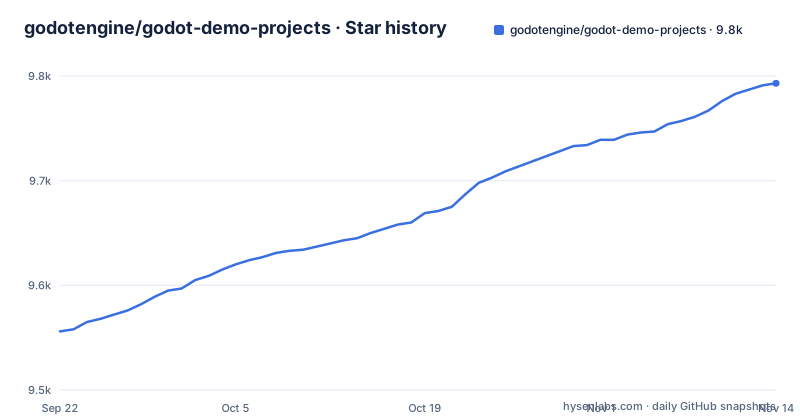
Star history
- godotengine/godot-demo-projects9,793 ★ · +237
| Repository | 2026-09-22 | 2026-11-14 |
|---|---|---|
| godotengine/godot-demo-projects | 9.6k | 9.8k |
237 Stars in the last 53 days, measured from the daily GitHub snapshot. Compare with other projects
Editorial analysis
What godot-demo-projects actually is
This is the Godot Foundation's own collection of demonstration and template projects, distributed under the MIT license. Every folder that contains a project.godot file is a separate project you can open in the editor. The top-level layout is organised by feature area rather than by difficulty: 2d/, 3d/, audio/, compute/, gui/, loading/, misc/, mobile/, mono/, networking/, plugins/, viewport/ and xr/. If you want XR or compute shader examples, there are xr/ and compute/ folders.
The audience is narrow but real. It suits someone who already has Godot installed and wants a runnable answer to a specific question, and it suits people evaluating the engine who want to see what the API looks like in practice. It is not aimed at beginners looking for a game template. The repository description says "Demonstration and Template Projects", but the repository is a catalogue of examples, and nothing in it behaves like a scaffold you would build a product on top of.
How the repository is organised and versioned
The branch structure matters. According to the README, the master branch is compatible with Godot's master development branch, meaning the next 4.x release, not the current stable one. Other branches match stable versions, and the README gives 2.1 as an example of a branch for demos compatible with Godot 2.1.x. The 3.x branch tracks Godot's 3.x development branch. That means cloning master and opening it in a stable editor is a genuine mismatch risk, and the README does not document a rollback procedure if a demo fails to open.
The most recent release listed is 4.7-6ad6167, dated 2026-07-07, followed by 4.2-31d1c0c from 2024-03-28 and 3.5-9e68af3 from 2023-01-23. The release tags carry a commit hash, so a tag identifies an exact snapshot of the demos rather than a semantic version with a compatibility promise. The last push to the repository was on 2026-10-08, so the master branch moves between releases. If you need something reproducible, a tagged release is the safer reference than a branch tip.
Importing the demos and running your first one
The README describes two routes. You can clone the repository or download a ZIP archive, extract it, then open the Godot project manager and click the Scan button on the right. Choose the path to the folder containing all demos, and every project with a project.godot file should appear in the project manager. The archive URL given in the README points at the master branch, so the ZIP route inherits the same version caveat as cloning master.
git clone https://github.com/godotengine/godot-demo-projects.gitAfter cloning, open the Godot project manager, click Scan, and select the cloned folder. The demos should then be listed individually and can be opened like any other project. The README notes that most demos are also exported to GitHub Pages and can be tried in a browser, but it adds a caveat worth repeating: browser performance is lower than native, and the README recommends downloading the demos and running them with a native version of the editor for the best performance.
If you would rather not clone the whole repository, the README says individual demos can be downloaded from the Asset Store, either on the website or from inside Godot's project manager. That is the lighter option when you only care about one feature area.
The mono/ folder and the C# question
The repository is primarily GDScript, but there is a top-level mono/ directory, which by its name points to C#/Mono demos. The repository's primary language is GDScript, so treat it as a GDScript resource first. If you are working in C#, expect the examples outside mono/ to be written in GDScript and to need translation rather than reuse.
The README itself does not explain the mono/ folder, does not state which demos have C# equivalents, and does not describe how the C# projects are built or run. That is a documentation gap, and it is the kind of gap that costs time: you cannot tell from the README alone whether the C# coverage is partial or complete. You have to open the folder and look.
Where the demos stop being useful
The demos are deliberately small. Each one isolates a feature so the code stays readable, which means none of them show how features interact under production constraints. A demo that renders a shader correctly tells you nothing about how that shader behaves when it is one of two hundred materials in a scene.
The browser export is the other limit. The README warns that Godot's performance in a browser is lower than natively, which means the hosted demos are fine for reading behaviour and misleading as a performance reference. If you are evaluating whether Godot can hit a frame budget, running the browser build will understate what the engine does on desktop or mobile.
There is also a maintenance cost on your side. Because master tracks Godot's development branch, demos can change under you between the time you read them and the time you open them. Pinning to a release tag such as 4.7-6ad6167 avoids that, at the cost of reading code that may already differ from the branch tip.
How it compares with the TPS demo
The README links a separate project, the TPS demo, at godotengine/tps-demo. The difference in approach is scope. godot-demo-projects is a broad catalogue of small, single-purpose examples, each isolating one subsystem. The TPS demo is a separate repository the README lists under useful links.
Check the TPS demo's own repository for what it covers. Neither is a game framework, and the README does not present either as one.
License and what the MIT terms mean in practice
The README states the demos are distributed under the terms of the MIT license, described in LICENSE.md. MIT is permissive, so copying demo code into your own project is the kind of use the license is designed to allow. Two practical points follow, and neither is legal advice. First, the demos are the Godot Foundation's code, so keep the license file and attribution intact if you redistribute substantial portions. Second, the demos are not the engine: the MIT license here covers the example projects, while Godot Engine itself is a separate repository with its own license file. If you are auditing dependencies, treat them as two distinct entries.
Editorial conclusion
Adopt godot-demo-projects if you are learning a specific Godot subsystem and want a runnable example to read and modify, or if you need a reference for how a feature is wired in GDScript. Do not adopt it as the base of a commercial game: it is a collection of demonstrations, not a framework. Before you spend time on it, check that the branch name matches your Godot version, since the README states master tracks Godot's master branch rather than the latest stable release.
Frequently asked questions
How do I install godot-demo-projects?
There is no installer. Clone the repository or download the ZIP archive, then open the Godot project manager, click Scan, and choose the folder containing the demos. Individual demos can also be downloaded from the Asset Store.
Which branch of godot-demo-projects should I use?
The README states that master is compatible with Godot's master development branch, meaning the next 4.x release, while other branches match stable versions. Pick the branch that matches the Godot version you have installed.
Are the godot-demo-projects free to use?
Yes. The README states the demos are distributed under the terms of the MIT license, as described in LICENSE.md.
Does godot-demo-projects include C# examples?
The repository has a top-level mono/ directory, and the primary language is GDScript. The README does not document which demos have C# equivalents, so you have to inspect that folder directly.
Can I try the godot-demo-projects without installing Godot?
Most demos are exported to GitHub Pages and can be viewed in a browser. The README notes that browser performance is lower than native, and recommends downloading the demos and running them with a native version of the editor for the best performance.
Official sources
Add this badge to your README
If you maintain this project, the badge below links readers to this analysis and shows its maintenance status from the daily GitHub snapshot. Paste the markdown into your README; add ?metric=license or ?metric=stars to the image URL for a different field.

[](https://hysenlabs.com/projects/godotengine-godot-demo-projects)Star history chart for your README
[](https://hysenlabs.com/projects/godotengine-godot-demo-projects)Was this useful?