OAuth2orize: A Middleware Toolkit for Building OAuth 2.0 Authorization Servers in Node.js
GitHub describes it as OAuth 2.0 authorization server toolkit for Node.js.. The repository metadata lists JavaScript as its primary language. The metadata lists the MIT license. This article stays within the project description and details documented in the GitHub repository README.
At a glance
- What is it?
- OAuth2orize provides Node.js middleware for assembling an OAuth 2.0 authorization server, working alongside Passport strategies and your own route handlers. It focuses on grant and exchange flows, leaving client and token storage to you.
- Who is it for?
- Adopt OAuth2orize if you are building a custom OAuth 2.0 authorization server in Node.js and you want fine control over grant types and token issuance, with Passport already in your stack. Do not use it if you need a full-featured identity provider with built-in user management, token storage, or OpenID Connect support out of the box; those require additional modules or a different product.
- Can I use it commercially?
- Yes. MIT is a permissive licence: you can use, modify and sell software built on it, as long as you keep its copyright and licence notices.
- Is it still maintained?
- Probably not. The repository last received commits 30 months ago, on April 12, 2024.
- What is it written in?
- Mainly JavaScript, according to GitHub's language statistics.
Answers come from the project's GitHub data, last synced on October 22, 2026, and from our analysis. They are not legal advice.
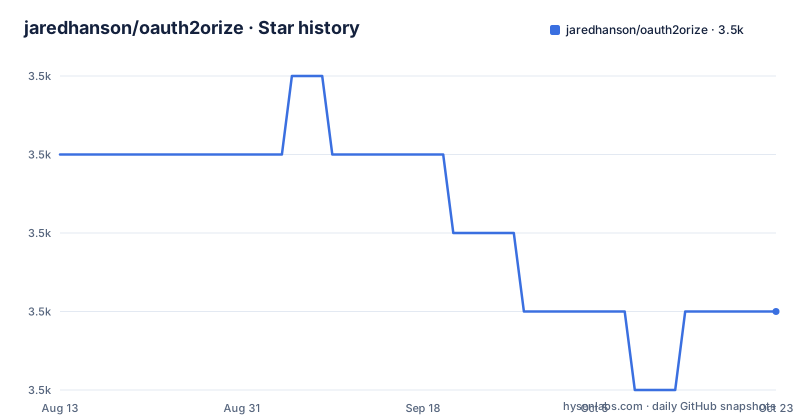
Star history
- jaredhanson/oauth2orize3,531 ★ · -2
| Repository | 2026-08-13 | 2026-10-22 |
|---|---|---|
| jaredhanson/oauth2orize | 3.5k | 3.5k |
-2 Stars in the last 70 days, measured from the daily GitHub snapshot. Compare with other projects
Editorial analysis
The Problem OAuth2orize Solves
OAuth 2.0 is a framework, not a single implementation. The RFC 6749 specification allows servers to pick which authorization grants to support, how to issue tokens, and how to authenticate clients. If you are building an API that needs to let third-party applications access user data, you have to implement the authorization endpoint, the token endpoint, and the logic that ties them together. OAuth2orize is a toolkit for that exact job. It is aimed at Node.js developers who already use Passport for authentication and who want to assemble an OAuth 2.0 server from middleware rather than write the protocol handling from scratch. It does not provide a ready-made server. Instead, it gives you the protocol plumbing: middleware for the authorization and token endpoints, plus a way to register the grant and exchange logic that your application defines.
How the Grant and Exchange Model Works
The core abstraction in OAuth2orize is the separation between grants and exchanges. A grant represents permission from a user to a client, obtained at the authorization endpoint. An exchange is the process of trading that grant for an access token at the token endpoint. The README shows how to register a grant handler for authorization codes using server.grant(oauth2orize.grant.code(...)). That handler receives the client, redirect URI, user, and authorization request, and is responsible for generating and storing an authorization code. Similarly, server.exchange(oauth2orize.exchange.code(...)) registers the logic that takes a code and returns an access token. This separation is deliberate: it lets you support only the grant types you need. The toolkit bundles code, implicit, password, client credentials, and refresh token support, according to the README. But the actual storage of codes, tokens, and clients is entirely your responsibility. The example handlers call utils.uid() and save records to a database, but OAuth2orize itself does not touch persistence.
Middleware Composition for Authorization and Token Endpoints
OAuth2orize exposes middleware that you mount in Express routes. The README demonstrates an authorization endpoint at /dialog/authorize that uses login.ensureLoggedIn() from connect-ensure-login, then server.authorize(...). The authorize middleware takes a function that looks up the client by ID and checks the redirect URI. After that, your own route handler renders a dialog asking the user to approve. The form submission goes to a POST route that uses server.decision(). That decision middleware invokes the appropriate grant module based on the client's requested grant type. The token endpoint is simpler: app.post('/token', passport.authenticate(...), server.token(), server.errorHandler()). The Passport strategies authenticate the client, server.token() runs the exchange logic, and server.errorHandler() formats errors. This composition means OAuth2orize fits into an existing Express application rather than forcing you into a separate framework.
Session Serialization and Transaction State
Authorization is a multi-step process. The user must be authenticated, see a consent dialog, and submit a decision. During that time, OAuth2orize serializes the transaction to the session. The README shows how to register serializeClient and deserializeClient functions. These are analogous to Passport's user serialization. You provide a function that turns a client object into an ID, and another that loads the client from that ID. The transaction ID is exposed as req.oauth2.transactionID, which you can use when rendering the dialog. This design gives you control over what gets stored in the session, but it also means you must have a session store configured. If your application does not use sessions, or if you want a stateless authorization flow, OAuth2orize will not work as documented. This is a real constraint: the toolkit assumes session-based state.
Getting Started: Commands and Configuration
Installation is a single npm command: npm install oauth2orize. There is no configuration file or CLI. You create a server instance with var server = oauth2orize.createServer(). From there, you register grants and exchanges, then mount the middleware. The README gives a complete pattern: define a grant for authorization codes, an exchange for codes, then wire up the /dialog/authorize and /token routes. You also need Passport strategies for client authentication, such as passport-http for Basic auth and passport-oauth2-client-password for body credentials. For API endpoints, you use passport-http-bearer to authenticate bearer tokens. The example project linked in the README, oauth2orize-examples, shows a full service provider implementation. There is no built-in database, so you must provide your own models for clients, authorization codes, and access tokens. The code snippets in the README are the closest thing to a configuration guide.
Limitations and Cases Where It Is the Wrong Tool
OAuth2orize is not an out-of-the-box authorization server. It leaves storage, client registration, and token revocation to you. That is a strength for flexibility but a weakness if you want speed. The README does not mention token expiration, refresh token rotation, or revocation endpoints; you would have to implement those yourself in the exchange handlers. Also, the toolkit only covers the OAuth 2.0 core. OpenID Connect is not included; you need the separate oauth2orize-openid module. If your goal is to support social login or to act as an identity provider with user info endpoints, OAuth2orize alone is insufficient. Another limitation is that the project appears to be in maintenance mode. The README shows Travis CI and Coveralls badges, but the last push and recent releases are listed as unknown. That does not mean the code is broken, but it suggests you should verify compatibility with your Node.js version and Express version before relying on it for a new project.
Alternatives and How They Differ
A common alternative is to use a full authorization server framework like oauth2-server (the npm package node-oauth2-server). That project provides a more complete implementation, including token storage and endpoint handling, with a configuration object for models. The difference in approach is that oauth2-server expects you to define model functions for saving clients, tokens, and codes, but it handles the protocol flow internally. OAuth2orize, by contrast, gives you middleware and lets you write the grant and exchange logic as plain functions. Another alternative is to use a hosted service or a standalone product like Keycloak, which manages users, tokens, and consent pages out of the box. That is a fundamentally different approach: you deploy a separate server rather than embedding middleware in your Node.js app. For developers who want minimal dependencies and full control, OAuth2orize is appropriate. For those who want less protocol code, a more complete library or a standalone identity server is easier.
Maintenance and License Considerations
The repository is licensed under MIT, which permits commercial use, modification, and redistribution with attribution. There are no known patent or copyleft implications from the license itself, but you should review the full license text if you have legal concerns. The maintenance status is unclear from the material. The README includes status badges from Travis CI, Coveralls, and David DM, but the last push date and recent releases are not provided. The project has not been archived, which is a positive sign, but the absence of recent release information means you should check the npm registry for the latest version and its publish date. When you install oauth2orize, you also pull in dependencies like debug and oauth2orize's own middleware stack. You should check those dependencies for known vulnerabilities, especially if you are using an older Node.js version. The upgrade cost is moderate: because the API has been stable for years, migrating between versions is likely straightforward, but you must test your custom grant and exchange handlers against any changes in the middleware behavior.
Editorial conclusion
Adopt OAuth2orize if you are building a custom OAuth 2.0 authorization server in Node.js and you want fine control over grant types and token issuance, with Passport already in your stack. Do not use it if you need a full-featured identity provider with built-in user management, token storage, or OpenID Connect support out of the box; those require additional modules or a different product. Before adopting, verify that the grant types you need are covered by the bundled middleware or that you can write a plugin, and confirm that your team is comfortable writing the route handlers and storage logic that OAuth2orize deliberately leaves to you. Also check the maintenance status of the repository and its dependencies, since the last push and release information is not provided in the material.
Frequently asked questions
What is OAuth2orize?
An OAuth 2.0 authorization server toolkit for Node.js. It provides a suite of middleware that, combined with Passport authentication strategies and your own route handlers, is used to assemble a server implementing the protocol, rather than providing a server itself.
How do I install oauth2orize?
With npm install oauth2orize. The manifest records version 1.12.0, declares Node 0.4.0 or newer as its floor, and lists three runtime dependencies on wide version ranges: a unique identifier generator, a merge helper and the debug module.
What does OAuth2orize support out of the box?
Bundled support for the authorization code, implicit, password and client credential grants, plus refresh tokens for renewing expired access tokens. Grants and exchanges are registered separately on the server instance, and the appropriate module is invoked based on the grant type the client requested.
Does OAuth2orize store authorization codes and access tokens for me?
No. The examples construct and save your own authorization code and access token records and generate the values themselves, and you register client serialization functions so an OAuth transaction can be kept in your session. The middleware dispatches; storage, expiry and cleanup are yours.
Official sources
Add this badge to your README
If you maintain this project, the badge below links readers to this analysis and shows its maintenance status from the daily GitHub snapshot. Paste the markdown into your README; add ?metric=license or ?metric=stars to the image URL for a different field.

[](https://hysenlabs.com/projects/jaredhanson-oauth2orize)Star history chart for your README
[](https://hysenlabs.com/projects/jaredhanson-oauth2orize)